설치
npm i github:131CDA1/dsh-better-api이 명령은 GitHub 저장소 주소에서 생성됩니다. 실행 전에 업스트림 README와 소스를 검토하고 재현성이 필요하면 release 또는 commit을 고정하세요.
README
유지 관리자가 작성한 문서 스냅샷입니다.
최근 디렉터리 동기화에서 이 README 스냅샷을 새로 고치지 못했습니다.
English | 中文
dsh-better-api
An enhanced Models settings plugin for the DSH Web GUI: per-model reasoning strength (reasoningEfforts) editing for your custom models.
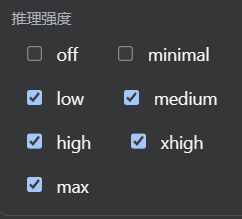
The official models settings page ships no reasoning-effort control. This plugin adds it to the official model-catalog editor:
- Each model row gains a Reasoning strength checkbox group:
off / minimal / low / medium / high / xhigh / max - Checked levels are written into the model's
reasoningEfforts(levels are sent under their own name;offis special-cased to "send no parameter") - Unchecking everything removes the declaration, so the model falls back to "no reasoning" and no misleading control is shown
- Hand-declared custom models (OpenAI-compatible gateways, etc.) now get an Effort menu in the conversation model picker (provider default + the declared levels); picking one persists it as the session default
Forked from the official @deepseek-ai/dsh-client-ui-settings-models (MIT) with only this editing capability added; everything else behaves like the official plugin.
Features
- Settings → Models → any provider → model catalog → expand a model row → check reasoning levels
- Also available while creating a new custom provider
- Full en/zh UI copy
- Writes land in the settings document (e.g.
~/.dsh/settings.yaml) on save — no restart required
Install
cd ~/.dsh/profiles/web
npm i github:131CDA1/dsh-better-api
# merge the repo-root cordis.patch.yml into this profile's cordis.patch.yml
or directly:
dsh plugin --profile web add github:131CDA1/dsh-better-api
Why must the official models settings page be disabled?
This plugin and the official one share the same settings.section#models slot; enabling both throws a duplicate-registration error.
This plugin is an enhanced replacement for the official models settings page — the bundled patch disables the official row
(ui-settings-models / @deepseek-ai/dsh-client-ui-settings-models) automatically; if you install manually, disable that row in the plugin inventory first.
Does it conflict with other plugins?
No conflict with API proxy / relay / usage plugins.
Usage
- Open Settings → Models, expand your provider card (e.g. custom
gpt). - In Models, expand a model row (advanced area) and check the reasoning levels you want.
- Click Apply.
- Back in a conversation, select that model — the Effort menu now shows the declared levels.
Config reference (settings.yaml)
reasoningEfforts declares a model's selectable thinking levels: each key is a level selectors offer, its value the spelling dispatch sends on the wire (low: low passes the canonical name through; max: ultra renames it for a gateway with its own vocabulary). Keys come from the level set off / minimal / low / medium / high / xhigh / max; a level not declared is not offered.
llm-pi-ai:
  providers:
    gpt:
      apiKeyEnv: GPT_API_KEY
      api: openai-completions
      baseURL: https://api.example.com
      models:
        - id: gpt-5.6-sol
          name: GPT-5.6 Sol
          reasoningEfforts:
            low: low
            medium: medium
            high: high
offis the one three-state key: declared with no value (off:) offers Off and sends no parameter when selected; declared with a value (off: none) sends that value.- Once declared, the declaration is the whole offer — restate every level you want to keep.
- For gateways with their own vocabulary, change the value (e.g.
max: ultra) — no UI change needed.
License
MIT. Fork of @deepseek-ai/dsh-client-ui-settings-models; upstream copyright retained.
저장소 정보
- 언어
- JavaScript
- 라이선스
- NOASSERTION
- 최신 릴리스
- v0.1.0
- 마지막 업데이트
- 2026. 8. 18. AM 4:03
신중하게 설치하기
소스 코드, 권한, 수명 주기 스크립트, 의존성 및 네트워크 접근을 검토하고 신뢰하지 않는 플러그인은 격리 환경에서 테스트하세요.