설치
npx -y @deepseek-ai/dsh plugin --profile web add github:3yi2u34yu32/dsh-balance-peak이 설치 명령은 GitHub 저장소 주소에서 생성된 확인되지 않은 시작점입니다.
README
유지 관리자가 작성한 문서 스냅샷입니다.
최근 디렉터리 동기화에서 이 README 스냅샷을 새로 고치지 못했습니다.
dsh-balance-peak
DeepSeek Harness 简洁余额 + 高峰时段指示插件。
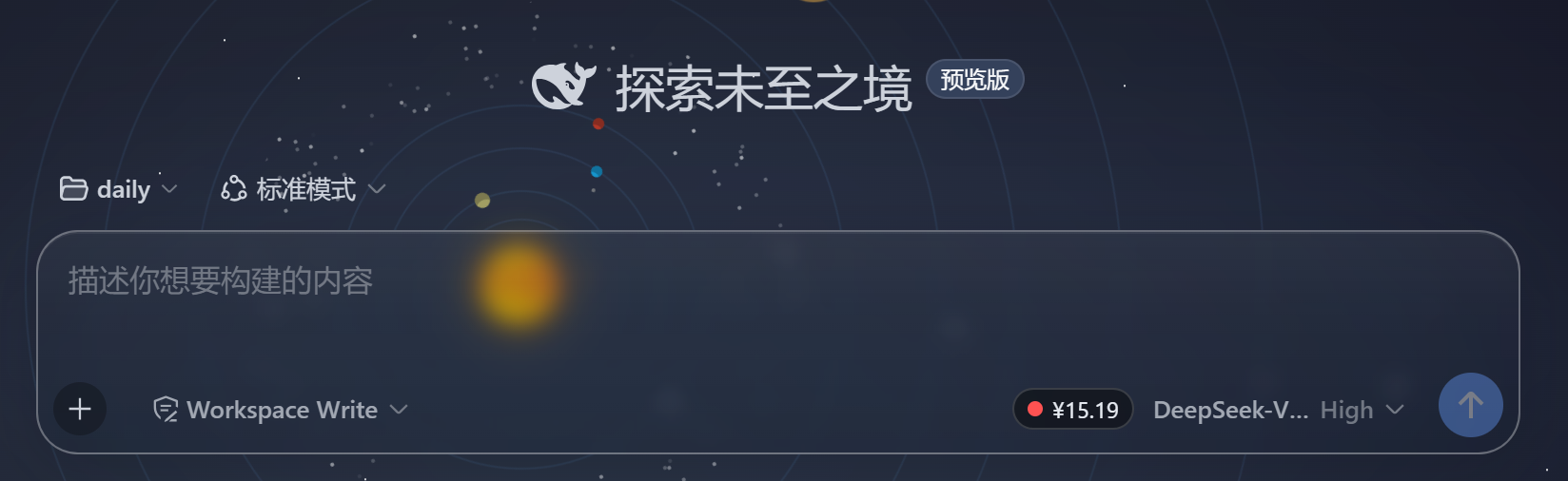
在输入框模型名(如 DeepSeek-V4-Flash)左侧显示一个简洁小板块:
[●] ¥123.45 DeepSeek-V4-Flash
- 圆点颜色:红色 = 高峰时段(北京时间 09:00-12:00、14:00-18:00,全价 ×1.0);绿色 = 空闲时段(半价 ×0.5)。按
Asia/Shanghai时区计算,并在时段边界(09:00/12:00/14:00/18:00)整点精确变色。 - 余额数字:来自 DeepSeek 官方接口
GET /user/balance(免费、不消耗额度),每 60 秒自动刷新。 - 悬停提示:鼠标悬停小板块,向上弹出高峰时段规则说明(当前时段 + 高峰/空闲时间表)。
用处
- 一眼看到当前账户余额,不用开网页查;
- 一眼看到现在是计费高峰还是空闲(空闲半价),决定要不要现在调模型。
效果展示


特性
- 无 UI 配置,装好即用(余额走 DSH 的
credentials服务取DEEPSEEK_API_KEY); - 零 token 消耗(不调用模型);
- 轻量:页面脚本仅在需要时扫描定位模型名元素;
- 不依赖任何外部前端库。
安装
# 桌面版(DSH Desktop)
node "D:\Program Files\DSH Desktop\resources\app.asar.unpacked\node_modules\@deepseek-ai\dsh\lib\bin.js" plugin --profile desktop add link:<本目录绝对路径>

# 或 dsh web
dsh plugin --profile web add link:<本目录绝对路径>
重启后生效。
环境要求
DEEPSEEK_API_KEY(Settings → Models,或~/.dsh/.credentials.yaml)curl(Windows 10+ 自带)
技术实现
- Host(
lib/index.js):注册/balance-peak/balance(curl 调官方余额接口)与/balance-peak/script.js,并通过webServer.tapIndex注入页面脚本。 - 页面脚本(
lib/script.js):定位输入框模型名元素 → 插入小板块 → 轮询余额、边界定时切换圆点、hover 提示。 - 余额获取逻辑参照 MIT 协议的 dsh-whale-balance。
License
MIT
프로젝트 파일 및 신호
표시된 항목은 디렉터리 스냅샷에서 감지된 공개 저장소 신호입니다.
문서감지됨
저장소 정보
- 언어
- JavaScript
- 라이선스
- MIT
- 마지막 업데이트
- 2026. 8. 18. AM 6:39
신중하게 설치하기
소스 코드, 권한, 수명 주기 스크립트, 의존성 및 네트워크 접근을 검토하고 신뢰하지 않는 플러그인은 격리 환경에서 테스트하세요.