설치
npx -y @deepseek-ai/dsh plugin --profile web add github:baiyun200/dsh-dashboard이 설치 명령은 GitHub 저장소 주소에서 생성된 확인되지 않은 시작점입니다.
README
유지 관리자가 작성한 문서 스냅샷입니다.
DSH Plugin Dashboard
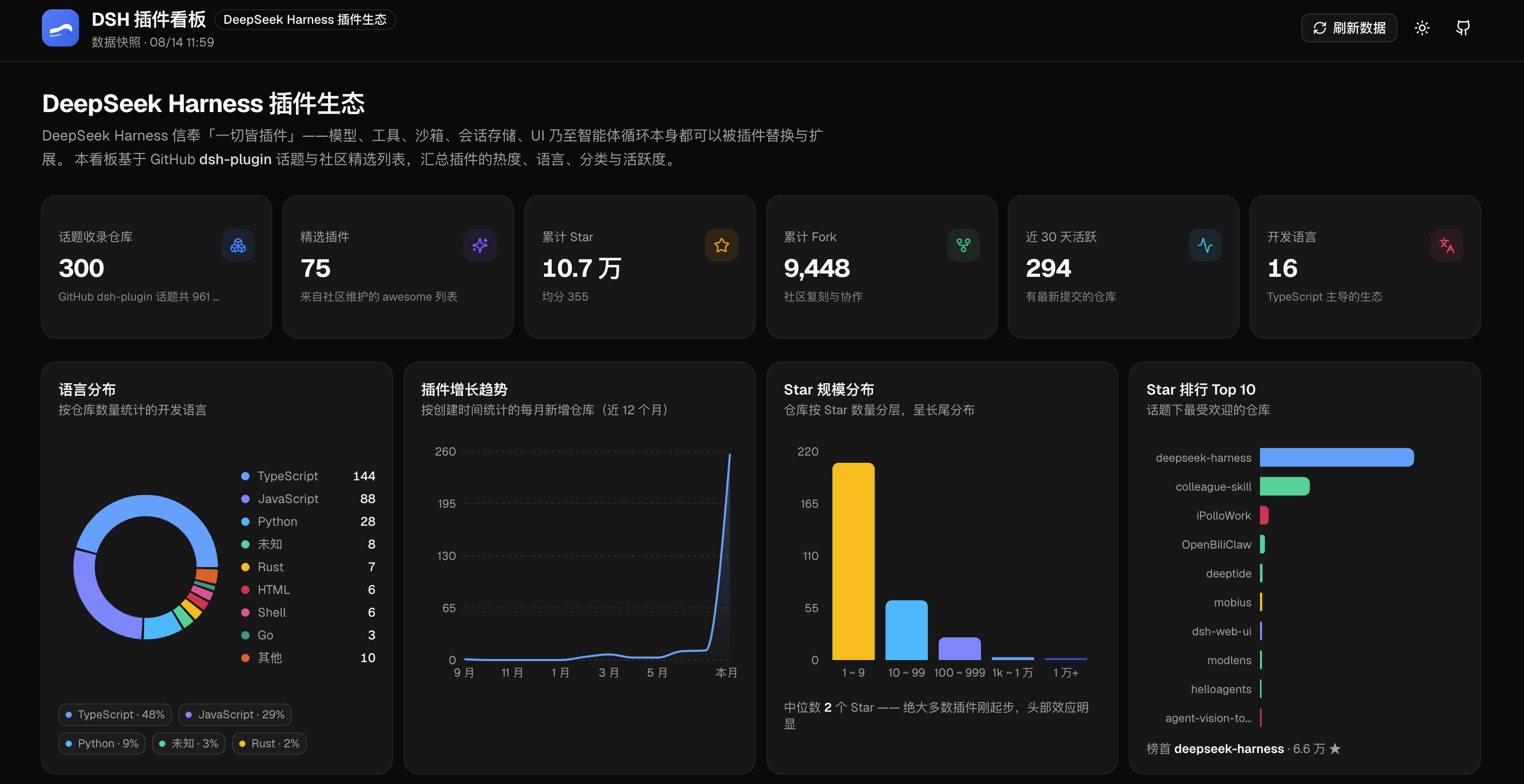
A visualization dashboard for the DeepSeek Harness plugin ecosystem, built on the GitHub dsh-plugin topic.
Built with shadcn/ui + Recharts — bilingual (中文 / English) interface: stat cards, charts, category overview, and a searchable / filterable / sortable plugin table with a detail drawer. On first visit the language follows your browser; you can switch it anytime from the header.
DeepSeek Harness: Everything is a Plugin. Models, tools, sandboxes, session stores, UI, even the agent loop itself can be replaced and extended with plugins.
Preview
Live Site
- GitHub Pages: https://baiyun200.github.io/dsh-dashboard/
- Built and deployed daily by GitHub Actions: re-fetches the
dsh-plugintopic at 01:30 UTC (09:30 Beijing time) and publishes; pushing tomainor a manual trigger (Actions → 每日构建 & 部署 GitHub Pages → Run workflow) also redeploys.
Features
-
👁️ Visitor counter: cumulative GitHub Pages visits shown in the top-right corner (third-party counter)
-
🌐 Bilingual UI (中文/English): auto-detects your browser language on first visit; switch anytime from the header
-
📊 Stat cards: repos in topic, curated plugins, total stars/forks, active in 30 days, languages
-
📈 Charts:
- Language distribution donut
- Plugin growth trend (new repos per month, last 12 months)
- Star size distribution (long-tail histogram)
- Top 10 by stars
-
🗂️ Category overview: 11 categories following awesome-dsh-plugin / awesome-deepseek-harness; click to filter
-
🔍 Plugin table: search (name / author / description / topic tags), category & language filters, sorting, curated-only toggle, pagination
-
📋 Detail drawer: description, stats, topic tags, timeline, one-click copy of the install command
-
🔄 Live refresh: re-fetch topic data from the GitHub API (Top 300) in the browser, with graceful fallback on failure
-
🌓 Light/dark theme: dark by default, switchable and remembered
Quick Start
npm install        # install dependencies
npm run dev        # dev server (Vite, http://localhost:5173)
npm run build      # type check + production build (dist/)
npm run preview    # preview the production build (http://localhost:4173)
Data Pipeline
The built-in snapshot comes from scripts/build-data.mjs, fed by the GitHub API snapshots and curated lists under data/raw/:
bash scripts/fetch-data.sh   # re-fetch topic_page1-9.json + awesome README (rate-limit aware)
npm run data                 # normalize + categorize → src/data/plugins.json
The Refresh button in the top-right corner calls the GitHub API directly from the browser (cached in localStorage).
Quality Checks
npm run preview    # start the preview first
node scripts/smoke-test.mjs   # end-to-end smoke tests with puppeteer-core + local Chrome
Project Structure
src/
  components/
    charts/        # donut / growth trend / distribution histogram / ranking
    ui/            # shadcn/ui components (base-nova style)
    *.tsx          # header / stat cards / category overview / plugin table / detail drawer / footer
  data/plugins.json   # build output: 592+ repos + stats
  lib/             # types / data utils / GitHub live refresh / theme / i18n
scripts/
  build-data.mjs   # data build
  fetch-data.sh    # data fetching
  smoke-test.mjs   # end-to-end smoke tests
Disclaimer
This dashboard is a community project, not affiliated with DeepSeek; inclusion does not imply official endorsement. Installing third-party plugins executes their code — review the source yourself.
Star Growth Trend
프로젝트 파일 및 신호
표시된 항목은 디렉터리 스냅샷에서 감지된 공개 저장소 신호입니다.
저장소 정보
- 언어
- TypeScript
- 라이선스
- 보고되지 않음
- 마지막 업데이트
- 2026. 8. 14. 오전 7:42
신중하게 설치하기
소스 코드, 권한, 수명 주기 스크립트, 의존성 및 네트워크 접근을 검토하고 신뢰하지 않는 플러그인은 격리 환경에서 테스트하세요.