설치
npx -y @deepseek-ai/dsh plugin --profile web add github:cogine-ai/marketplace이 설치 명령은 GitHub 저장소 주소에서 생성된 확인되지 않은 시작점입니다.
README
유지 관리자가 작성한 문서 스냅샷입니다.
Cogine AI Marketplace
A curated internal marketplace of role-based skills for Codex and Claude Code.
Install the Marketplace
Codex (recommended)
codex plugin marketplace add cogine-ai/marketplace
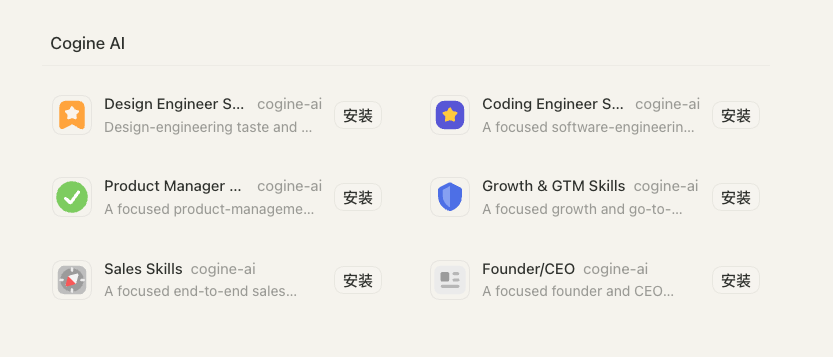
Then open the Codex App's Plugins page, choose Cogine AI, and install only the role plugins you want. If the Marketplace does not appear immediately, restart Codex once.
Claude Code
claude plugin marketplace add cogine-ai/marketplace
Adding the Marketplace registers its catalog; it does not install every plugin.
This is a private repository, so Git must already have access to
cogine-ai/marketplace.
Available plugins
| Plugin | Skills | Focus |
|---|---|---|
design-engineer-skills | 8 | UI prototyping, frontend library selection, polish, animation review, and motion design. |
coding-engineer-skills | 25 | Specs, implementation, isolated worktrees, frontend and React work, architecture, debugging, testing, security, Git/CI, and multi-repository orchestration. |
product-manager-skills | 16 | Strategy, product judgment, discovery, research, PRDs, prototypes, roadmaps, metrics, design, specs, and tickets. |
growth-and-gtm-skills | 18 | Product marketing, growth models, channels, acquisition, conversion, retention, measurement, PLG sales assist, and recurring execution. |
sales-skills | 12 | Founder-led selling, first customers, prospecting, outreach, calls, enablement, enterprise accounts, pipeline review, and PLG sales integration. |
founder-ceo-skills | 16 | Founder judgment, product-market fit, strategy, decisions, planning, organization, finance, fundraising, and board communication. |
Install any plugin from the table with its ID:
# Codex
codex plugin add coding-engineer-skills@cogine-ai

# Claude Code
claude plugin install coding-engineer-skills@cogine-ai
In an existing Claude Code session, run /reload-plugins after installation.
Compatibility
Codex is the primary target. The repository also ships native Claude Code manifests while sharing the same skill folders:
- Codex catalog:
.agents/plugins/marketplace.json - Codex manifests:
plugins/*/.codex-plugin/plugin.json - Claude Code catalog:
.claude-plugin/marketplace.json - Claude Code manifests:
plugins/*/.claude-plugin/plugin.json
Update
codex plugin marketplace upgrade cogine-ai
claude plugin marketplace update cogine-ai
Repository layout
.agents/plugins/marketplace.json       # Codex catalog
.claude-plugin/marketplace.json        # Claude Code catalog
docs/images/                           # Marketplace screenshots
plugins/design-engineer-skills/
  .codex-plugin/plugin.json            # Codex manifest
  .claude-plugin/plugin.json           # Claude Code manifest
  skills/                              # 8 shared skills
plugins/coding-engineer-skills/
  .codex-plugin/plugin.json            # Codex manifest
  .claude-plugin/plugin.json           # Claude Code manifest
  skills/                              # 25 shared skills
plugins/product-manager-skills/
  .codex-plugin/plugin.json            # Codex manifest
  .claude-plugin/plugin.json           # Claude Code manifest
  skills/                              # 16 shared skills
plugins/growth-and-gtm-skills/
  .codex-plugin/plugin.json            # Codex manifest
  .claude-plugin/plugin.json           # Claude Code manifest
  skills/                              # 18 shared skills
plugins/sales-skills/
  .codex-plugin/plugin.json            # Codex manifest
  .claude-plugin/plugin.json           # Claude Code manifest
  skills/                              # 12 shared skills
plugins/founder-ceo-skills/
  .codex-plugin/plugin.json            # Codex manifest
  .claude-plugin/plugin.json           # Claude Code manifest
  skills/                              # 16 shared skills
프로젝트 파일 및 신호
표시된 항목은 디렉터리 스냅샷에서 감지된 공개 저장소 신호입니다.
저장소 정보
- 언어
- Python
- 라이선스
- 보고되지 않음
- 마지막 업데이트
- 2026. 7. 28. 오후 6:49
신중하게 설치하기
소스 코드, 권한, 수명 주기 스크립트, 의존성 및 네트워크 접근을 검토하고 신뢰하지 않는 플러그인은 격리 환경에서 테스트하세요.