설치
npx -p @deepseek-ai/dsh dsh plugin --profile web add github:hashdiana/dsh-token-usage이 명령은 GitHub 저장소 주소에서 생성됩니다. 실행 전에 업스트림 README와 소스를 검토하고 재현성이 필요하면 release 또는 commit을 고정하세요.
README
유지 관리자가 작성한 문서 스냅샷입니다.



The shipped DeepSeek Harness web UI squeezes token usage into one cramped line of text under the composer. dsh-token-usage replaces it with a glanceable chip bar plus a details panel with the full breakdown — and it follows your theme, light or dark.
🎯 Token usage shouldn't have to be decoded — it should be readable at a glance.
Screenshots

The token-usage bar under the composer.
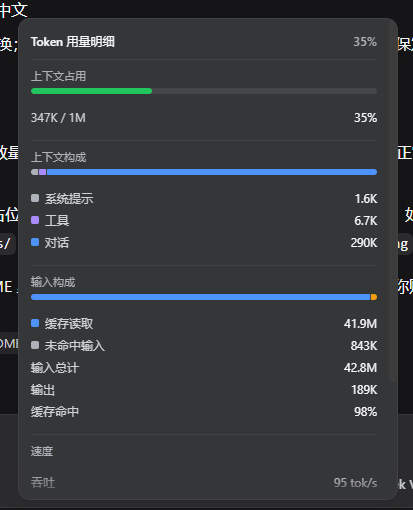
The details panel — click the bar to open it.
Contents
Highlights
- Context at a glance — a thin occupancy bar that turns green → amber → red as you fill the context window.
- Input, output, and cache, separated — billed input splits into cache-read / cache-write / uncached, with the cache-hit rate shown up front.
- Speed where you need it — decode throughput (
tok/s) and average first-token latency (TTFT) right on the bar. - A details panel on click — context composition (system / tools / messages), a stacked input split, and session turn / step / model / tool time.
- Natural edge fades — the panel's top and bottom edges fade and blur while there's more to scroll, and vanish at the ends.
- Theme-adaptive and bilingual — styled only with
--dsw-*tokens (light/dark), shipped in Chinese and English.
What it shows
The bar under the composer shows these chips, left to right:
| Chip | Meaning |
|---|---|
| Context | Used / window tokens, with a color-coded occupancy bar |
| Input | Total billed input (cache read + cache write + uncached) |
| Output | Provider-reported output tokens |
| Hit rate | Cache-read share of billed input |
| tok/s | Decode throughput over usage-reporting steps |
| TTFT | Average first-token latency |
Clicking the bar opens a panel with context occupancy + composition, the input-split stack, throughput / TTFT, and session counts. The whole line hides itself when there is no data yet.
Install
From GitHub (recommended):
npx -p @deepseek-ai/dsh dsh plugin --profile web add github:hashdiana/dsh-token-usage
From a local checkout:
npx -p @deepseek-ai/dsh dsh plugin --profile web add <path-to-this-repo>
Then restart the profile:
dsh web
The Git path ships the built
lib/(see Build & develop), so no build script runs at install time.
Uninstall / Disable
Temporarily disable without uninstalling — add to $DSH_HOME/profiles/web/cordis.patch.yml:
- id: dsh-token-usage
  disabled: true
Restart dsh web; the default stats line returns. Remove those lines to re-enable.
Build & develop
pnpm install
pnpm typecheck   # tsc -b
pnpm build       # tsc -b + tsdown → lib/index.js (host) + lib/client.js (browser)
pnpm test        # vitest: folds, locale parity, jsdom render, slot registration/dispose
The client bundle is emitted as window.__ModuleLoader__.load({ id, factory }); CSS Modules are hashed by lightningcss and injected as a <style data-plugin="dsh-token-usage"> tag. Commit lib/ — Git installs consume the built output, not src/.
How it works
- Pure client plugin — the host half is an empty
apply(); the browser half ships viaexports["./client"]. - Slot — registers into
conversation.composer.dock(cellid: "stats",priority: -1), shadowing the shipped text line; the registration is withdrawn with the plugin fiber. - Data — reads the durable projections
tokenUsage,contextPressure,contextBreakdown, andsessionStats; a window fold serves only as the no-projection fallback. - Locale — owns the
tokenUsagenamespace, Chinese and English.
License
프로젝트 파일 및 신호
표시된 항목은 디렉터리 스냅샷에서 감지된 공개 저장소 신호입니다.
저장소 정보
- 언어
- TypeScript
- 라이선스
- MIT
- 마지막 업데이트
- 2026. 8. 17. 오후 7:38
신중하게 설치하기
소스 코드, 권한, 수명 주기 스크립트, 의존성 및 네트워크 접근을 검토하고 신뢰하지 않는 플러그인은 격리 환경에서 테스트하세요.