설치
npx -y @deepseek-ai/dsh plugin --profile web add github:kakadeka/Baton이 설치 명령은 GitHub 저장소 주소에서 생성된 확인되지 않은 시작점입니다.
README
유지 관리자가 작성한 문서 스냅샷입니다.
🥁 Baton — Pass your project, not your context.
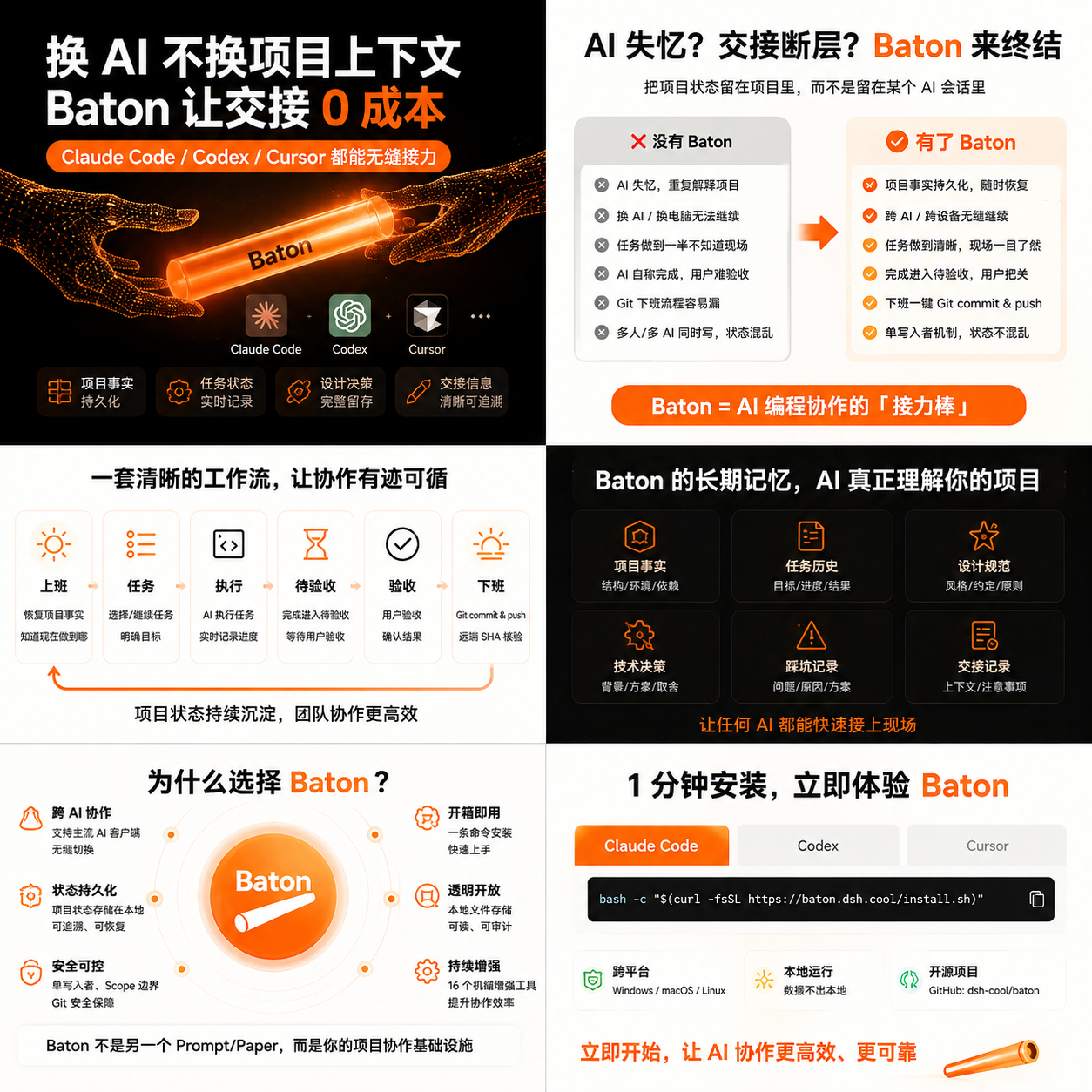
Switch computers, switch AI, switch sessions — and keep working with one sentence.








English · 简体中文 · 繁體中文 · 日本語 · 한국어 · Français · Deutsch · Español · Português · Русский · Türkçe · العربية · ไทย
Baton is a project-relay collaboration system. It lets Claude Code, Codex, Cursor, and DeepSeek Harness take turns maintaining the same project across machines — progress, memory, design specs, tasks, and Git stay consistent. You talk normally; it does the rest.
Three core promises:
- 🔄 Anyone can take over — switch AI tools or machines, say one command, and pick up exactly where you left off. No re-explaining the project.
- 🎯 Do what was asked — task boundaries and protected paths are mechanically checked at closeout, and design facts are locked into specs; the rest is guarded by rules plus review — drift gets caught, not discovered hours later.
- ✅ "Done" really means done — closeout auto-commits, pushes, and verifies the remote SHA — no more "committed locally but never on GitHub, yet told it's done."
🚀 Quick start (DeepSeek Harness — one line)
Using DeepSeek Harness? This is everything you need.
dsh plugin --profile web add @kakadeka/dsh-baton
- Install the DSH CLI once:
npm i -g @deepseek-ai/dsh - Paste the line above, press Enter.
- Restart
dsh— done. All 19baton_*tools are now active in your profile.
Also installable from GitHub:
dsh plugin --profile web add github:kakadeka/BatonUsing Codex / Claude Code / Cursor instead? Jump to install for other AI tools.
📖 Scenarios (one per requirement, pain → Baton's answer)
| # | Pain | Baton's answer |
|---|---|---|
| 1 | Every morning or new machine: which branch? what was done yesterday? is the remote updated? | Say clock in — auto git checks + safe sync + read handoff/todos → task table → reply a number |
| 2 | "Committed locally but not pushed"; manual PowerShell git at night | Say clock out — verify → docs/memory/metrics → commit → push → remote SHA == local HEAD before "done" |
| 3 | Finishing a task and "end of day" got conflated | Say complete task — close the task, record results, suggest next. Task-done ≠ end-of-day |
| 4 | Confirmed designs get forgotten; AI free-styles | Say save design spec — lock design facts into long-term specs (conflicts keep history); UI tasks auto-reference them |
| 5 | Lost session, new conversation, re-explain everything | Say continue work — restore task/branch/blocker/handoff/next-step. One sentence, done |
| 6 | Multiple todos; AI shouldn't decide priority; typing full tasks is tedious | Task table with numbers — reply 1/2/3 |
| 7 | Long project, history unreachable; re-reading everything burns tokens | Decisions/pitfalls/specs auto-indexed; query the index, read only the hit fragment |
| 8 | Codex/Claude/Cursor relay without knowing what the last one did | Unified handoff file — branch/HEAD/changes/constraints/next-step. Read the last entry, continue |
| 9 | Expensive model used for everything; weak model makes mistakes; manual switching is painful | Auto model routing by task difficulty — micro: main session, normal: flash, complex/review: pro, with fallback chains |
| 10 | "Which model actually ran?" bills don't match | recommended vs actual recorded separately, source labeled honestly (dispatch record / host descriptor / unknown) |
| 11 | AI drifts from prototype after hours of work | Frozen requirements + allowed/protected paths + mechanical scope checks + independent review + no dangerous git |
| 12 | Changing a button color took an hour | Micro fast path — no delegation, no reviewer, no irrelevant tests. Simple tasks take minutes |
| 13 | Complex tasks must not be written sloppily | Escalating gates: contract, strong model, independent reviewer, fidelity vs frozen spec, rollback plan |
| 14 | Office and home machines out of sync; fear of losing local work | Safe fetch + ff-only sync (never overwrites), auto commit/push, remote SHA verify; force/reset/clean forbidden |
| 15 | Picking models by feel, no real data | Every task records actual model and completion → monthly dashboard; success/failure/duration not yet collected are shown as "not recorded", never fabricated |
| 16 | Reuse/share the system with a new project | Framework and project instance fully separated; Baton init one-shot bootstrap; share via sanitizing pipeline (no keys/paths/private notes) |
| 17 | Other skills installed that bypass project rules | External skills may help, but project boundaries (paths, design specs, git discipline) are enforced by Baton, coordinated with AGENTS.md |
✨ Features
- Command automation — clock in / clock out / continue work / save design spec / complete task / update project docs / remember / Baton init / number confirm / git natural language
- Cross-AI & cross-machine — plain-text project truth + one-command thin adapters (Codex/Claude/Cursor) + handoff relay
- Long-term memory — decisions/pitfalls/specs auto-archived + lightweight index; progressive reads, no full re-reads
- Anti-drift — FROZEN constraints + allowed/protected path checks + forbidden-change list + independent review + no dangerous git
- Git truth loop — ff-only sync, auto commit/push, remote SHA == local HEAD, publish record (
last_published_sha) - Auto model routing — task tier × rule table (flash/pro + high/max + fallback); recommended vs actual recorded transparently
- Monthly dashboard — model rankings / hourly activity / daily detail / agent detail, from real execution data
- One-click acceptance —
baton_accept: skeleton/state/security/volume checks → PASS/FAIL + blocking list - Lean implementation gate — per-task
implementation_policy(off/lite/full/strict): in strict mode new dependencies/files/abstractions are budgeted mechanically and over-budget closeout is blocked until the user confirms an exception - Specialist skills —
lean-review(over-engineering audit),debt(tech-debt scan),doctor(health check: version/drift/lock/publish surface) — all read-only, installed alongside the main skill - Credential hygiene — every persisted input is scanned; secrets never reach Git, memory, metrics or logs
- Trusted publishing — npm releases ship with SLSA provenance (OIDC, tag-triggered)
🗣️ Commands (when to use each)
Say any of these English phrases — the meaning is identical in every AI. Chinese speakers can use the same commands in Chinese (see the Chinese version via the link at the top).
| Command | When | What happens |
|---|---|---|
| clock in / start work | daily start / new machine / new AI | git checks → safe sync → handoff & todos → task table (plus an update-check nudge when >7 days unchecked) |
| clock out / end work | end of workday | verify → docs/memory/metrics → commit → push → remote SHA verify |
| continue work / resume | lost session / switched tool | restore task, branch, blocker, handoff tail, next step |
| save design spec | after you confirm a design | lock into long-term spec + index; UI tasks obey it |
| complete task | a task is done, more to do | close task, record result, suggest next (no full closeout) |
| update project docs | mid-work checkpoint | write progress + handoff checkpoint (workspace stays held) |
| remember this pitfall / record this decision | hit a pitfall / made a decision | write to long-term memory + auto-index |
| Baton init | first time in a new project | generate memory skeleton + config (never overwrites) |
reply 1 / 2 / 3 | task table shown | the number is persisted as the current task, then work starts |
| release workspace / I confirm the previous agent stopped | ownership conflict at clock in | unlock the single-writer lock + write a release note |
| pull github / sync github / check git status | manual git intent | lightweight git path, no contract/review ceremony |
| check update | wondering if a new Baton version exists | read local version anchor + query GitHub/npm for the latest, report up-to-date or new version |
| update baton / upgrade baton | a new version is out | AI runs the full update (git pull + re-run install script / npm update) and verifies local == remote |
| lean review / scan debt / run doctor | want a code audit / tech-debt list / health check | runs the read-only specialist skill (over-engineering review / BATON-DEBT scan / version-drift-lock diagnosis) |
🛠️ Install for other AI tools (Codex / Claude / Cursor)
Installing = copy one command, press Enter, wait for it to finish, then verify one command. No manual folder creation, no manual file copying. DeepSeek Harness users can skip this — use the one-line Quick start above instead.
Step 0: Decide which install you need (10 seconds)
| Your situation | Install this | After install |
|---|---|---|
| Multiple projects — you want Baton available in every project on this machine | User-level (once per machine) | Global on this machine; any project recognizes the commands |
| One specific project you want other machines/AIs to take over | Project-level (once per project) | The project carries its own memory skeleton + 3-tool adapters; git clone and continue |
| Both | User-level first, then project-level | Most complete |
💡 Recommended: run user-level (30s), then project-level on your real project (30s).
Step 1: Download Baton (once)
Open PowerShell (press Win, type powershell, Enter), paste this line:
git clone https://github.com/kakadeka/Baton.git $HOME\Baton
No git? Install from https://git-scm.com/download/win, reopen PowerShell, paste again.
Step 2: Pick one install type and paste its command
Option A — User-level (once per machine, all projects)
pwsh -File $HOME\Baton\scripts\baton-install.ps1 -Scope User
You'll see ok: [Codex] ..., ok: [Claude Code] ..., ok: [Cursor] ... — the global skill for all three AI tools is installed.
Option B — Project-level (once per project, makes the project portable)
cd C:\your\project\path
pwsh -File $HOME\Baton\scripts\baton-install.ps1 -Scope Project
You'll see a success line (project-level install complete) plus the created list (memory skeleton docs/ai_memory, config .baton, three skill mirrors, and entries in AGENTS.md / CLAUDE.md / .cursorrules). If it says no .git, run the git init commands it prints.
Project-level install is fully automatic and works without the DeepSeek Harness plugin (plugin-free mode).
Step 3: Verify (the important one — one command)
In the project, tell your AI:
clock in
✅ Success: the AI acts per Baton and outputs a status report with the branch, HEAD, working-tree state, current task, and handoff summary, followed by a task table like —
Task table: 1) ...
❌ Nothing happens? Check in order:
- Which AI are you using? Claude Code →
~\.claude\skills\baton\SKILL.md; Codex →~\.agents\skills\baton\SKILL.md; Cursor →~\.cursor\skills\baton\SKILL.md(user-level install creates all three) - Does the project have
.git? (elsegit init+ first commit) - Is the command exactly clock in with nothing else?
- Does the project have
docs/ai_memory/? (project-level install creates it)
Step 4: Joining an existing Baton project (new machine / new AI)
On the new machine: install git → git clone your project → tell your AI:
clock in or continue work
Memory, handoff, and tasks come with the code. Continue directly — nothing else to install.
Step 5: How to check / update the Baton version
The installer leaves a version anchor for you: user-level installs write version.json next to each global SKILL.md, project-level writes .baton/version.json. You never need to remember version numbers — just tell your AI:
| Command | What happens |
|---|---|
| check update | AI reads your local version anchor, queries GitHub/npm for the latest, and reports "up to date" or "new version X.Y.Z available" |
| update baton | with a newer version available, AI runs the full update (git pull + re-run install script / npm update) and verifies the local version matches the remote before reporting done |
Tip: every clock in, if you haven't checked for updates in 7 days, Baton adds a one-line "you may check update" nudge. SKILL changes take effect in a new session; DSH bundle updates require a restart.
Step 6: Uninstall (safe, never touches your content)
pwsh -File $HOME\Baton\scripts\baton-uninstall.ps1 -ProjectRoot C:\your\project\path
- Removes only what the installer created: the three skill mirrors, the entry segments (only the marker-bounded span), and the version anchor.
- Your memory (
docs/ai_memory/) and config are kept by default — they are your project's truth. Add-RemoveMemoryonly when you really want them gone. - Files you have edited since install are detected by content hash and kept, with a notice — never deleted silently.
-DryRunshows exactly what would happen without writing anything.
What the one-click script does (transparent)
| Mode | Automatically does |
|---|---|
| User-level | Copies SKILL.md into the global skill folders of all three AI tools (Codex / Claude Code / Cursor) |
| Project-level | ① docs/ai_memory/ skeleton (with revision log + archive index) ② .baton/config.json ③ .gitignore append ④ three skill mirrors ⑤ three entry segments (AGENTS.md / CLAUDE.md / .cursorrules, never overwrites your rules) |
Idempotent: re-running never overwrites your existing docs and rules; it only fills in what's missing.
📁 Where the truth lives
project/
├── docs/ai_memory/            ← long-term memory (Git-synced, AI-agnostic)
│   ├── index.md               ← read me first
│   ├── current.md             ← what's happening now
│   ├── handoff_current.md     ← handoff log (last entry = truth)
│   ├── state/                 ← tasks.json, archive_index.json, project_state.json
│   ├── knowledge/             ← tech_decision.md, pit_experience.md
│   ├── ui_spec/               ← design specs
│   ├── daily_log/             ← daily logs
│   └── agent_metrics/YYYY/MM/index.html  ← monthly dashboard
└── .baton/                    ← machine-local (gitignored): config, metrics, evidence
🛡️ Safety & design
- Dangerous git (force push / reset --hard / risky clean / unauthorized rebase) does not exist
- Syncs are ff-only; divergence stops and reports; never auto-resolves conflicts
- Credentials never enter Git / Memory / Metrics / logs
- History is append-only or marked "superseded" — never overwritten
- "Done" = mechanical evidence (remote SHA + publish record), not a claim
- Saving tokens is a first-class goal: index-first, risk-based models, bounded outputs, no redundant calls
📦 Repository & license
- Open-source: https://github.com/kakadeka/Baton (public package only, synced via a sanitizing pipeline — no private plans, session notes, or credentials)
- npm: @kakadeka/dsh-baton
- License: Apache-2.0
저장소 정보
- 언어
- JavaScript
- 라이선스
- Apache-2.0
- 마지막 업데이트
- 2026. 8. 16. 오후 5:26
신중하게 설치하기
소스 코드, 권한, 수명 주기 스크립트, 의존성 및 네트워크 접근을 검토하고 신뢰하지 않는 플러그인은 격리 환경에서 테스트하세요.