설치
npx -y @deepseek-ai/dsh plugin --profile web add github:Mappedinfo/dsh-tool-vision-read이 설치 명령은 GitHub 저장소 주소에서 생성된 확인되지 않은 시작점입니다.
README
유지 관리자가 작성한 문서 스냅샷입니다.
dsh-tool-vision-read
Unofficial community plugin. Independently developed and maintained; not part of the official DeepSeek Harness distribution.
A lightweight DeepSeek Harness plugin that registers a vision_read tool: it reads an image file through a dedicated vision model route and returns a text description — so a text-only agent (a model whose route does not declare image input, e.g. a chat model without vision) can still "see" images.
It is the same idea as routing different roles to different models (e.g. oh-my-pi's modelRoles), applied to one narrow capability: image description. No third-party CLI (modlens etc.), no manual delegation — the plugin does it in one call.
How it works
| Mode | Behavior | Cost |
|---|---|---|
direct (default) | The plugin reads the file, commits it through the attachment service, and makes one llm.stream call to the configured vision provider/model with a text+image message. | One round trip, no agent loop. |
subagent | The plugin starts an in-process subagent pinned to the vision route (agentOptions), which calls read_image itself and can iterate (zoom, OCR, follow-ups). | Full agent loop, more flexible. |
The tool always routes to the configured vision route, regardless of the calling model. Mounting fails loud when the route is missing; a call fails with guidance when the resolved route does not declare image input (declare it in the provider settings, e.g. defaultInput: [text, image] for pi-ai routes).
Requirements
- A DeepSeek Harness deployment (source checkout or out-of-tree profile install).
- A vision-capable model route. The plugin was verified against Kimi Coding API (
k3-256k, which accepts image input) — any provider that supports image content blocks works.
Install
Option A: inside the deepseek-harness monorepo (recommended for development)
Copy this package under packages/vision/tool-vision-read (or install from git), then:
pnpm install
Register the package in tsconfig.base.json (add ./packages/vision/*/src to the @deepseek-ai/dsh-* wildcard and the @deepseek-ai/dsh-*/invariant wildcard) and in tsconfig.host.json references, then mount it — see the official adding-a-package cookbook.
Option B: out-of-tree install into your dsh profile
Add the git dependency to your profile manifest and insert the plugin row into your profile patch ($DSH_HOME/profiles/<profile>/package.json and cordis.patch.yml):
// $DSH_HOME/profiles/web/package.json
{
  "dependencies": {
    "@deepseek-ai/dsh-tool-vision-read": "github:Mappedinfo/dsh-tool-vision-read"
  }
}
# $DSH_HOME/profiles/web/cordis.patch.yml
- insert:
    - id: tool-vision-read
      name: '@deepseek-ai/dsh-tool-vision-read'
      config:
        provider: kimi-coding   # your vision provider route
        model: k3-256k          # your vision model
        # mode: direct          # 'direct' (default) | 'subagent'
cd $DSH_HOME/profiles/web && pnpm install
Restart dsh web. The @deepseek-ai/* peer packages are satisfied by the dsh installation's module closure ($DSH_HOME/profiles/node_modules flat fallback) — autoInstallPeers: false keeps pnpm from pulling older registry copies.
Configuration
| Key | Type | Default | Meaning |
|---|---|---|---|
provider | string | — (required) | Registered provider route owning the vision model. |
model | string | — (required) | Vision model id on that route. |
toolName | string | vision_read | Model-facing tool name. |
mode | 'direct' | 'subagent' | 'direct' | Execution mode. |
maxImageBytes | number | attachment limits | Cap on image bytes sent to the vision route. |
maxOutputTokens | number | 1024 | Cap on the vision route's output tokens. |
prompt | string | see source | Instruction sent beside the image; {{path}} and {{focus}} placeholders. |
Tool contract
vision_read(file_path: string, focus?: string)
Returns { path, provider, model, description } — the vision model's text description of the image. Accepts PNG/JPEG/WebP/GIF paths only; paths resolve against the calling session's workspace cwd.
Example
A text-only agent (deepseek-v4-flash) calling vision_read on a campus-gate photo, with the description produced by Kimi K3-256K through the kimi-coding route:
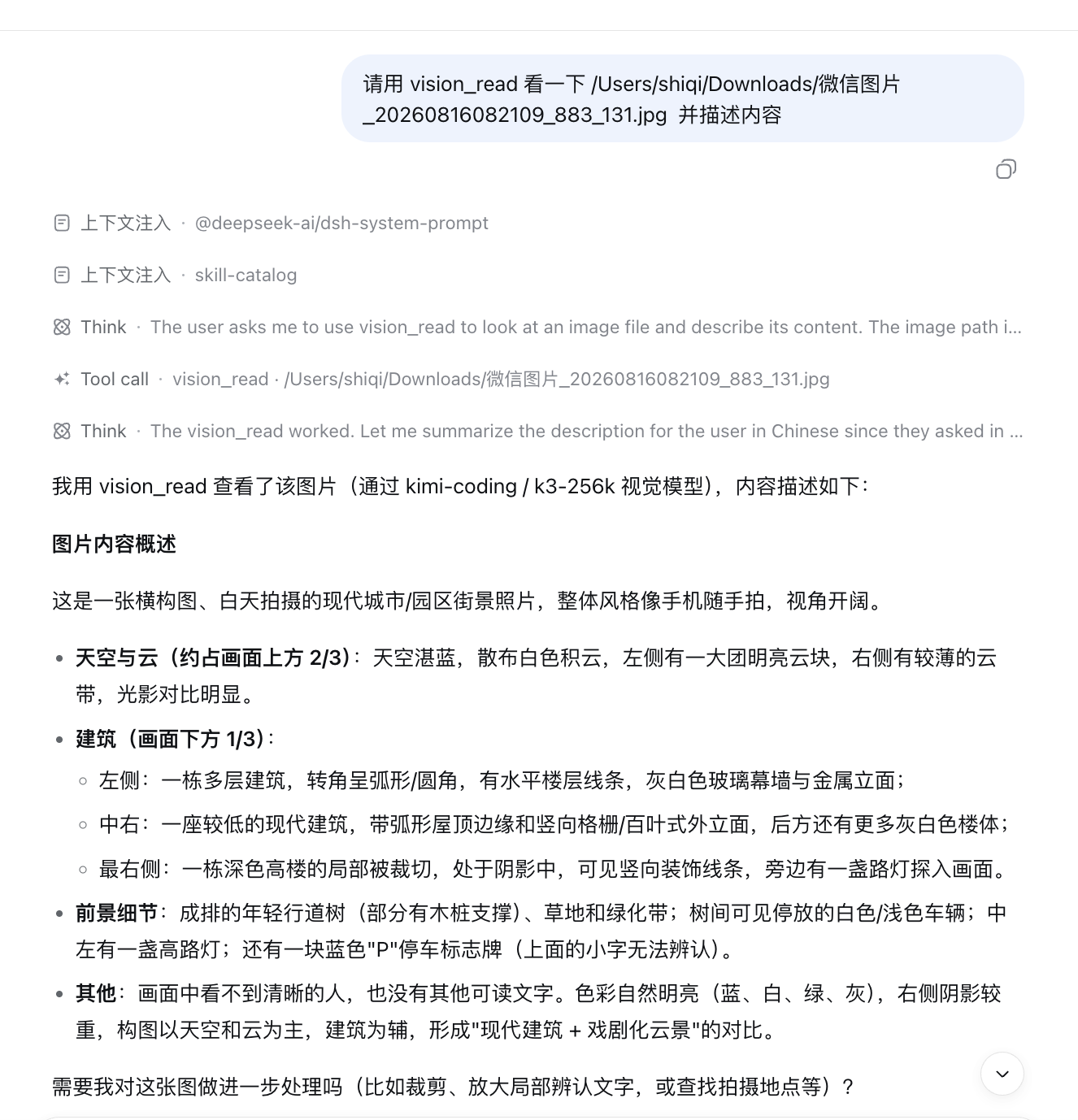
user: 请用 vision_read 看一下 /Users/shiqi/Downloads/微信图片_20260816082109_883_131.jpg 并描述内容
agent: (vision_read) → "这是一张横构图、白天拍摄的现代城市/园区街景照片……天空与云约占画面上方 2/3……
        左侧一栋多层建筑转角呈弧形……中右一座较低的建筑带弧形屋顶边缘和竖向格栅外立面……"
Layout
src/index.ts          # plugin (name/inject/apply/Config) + vision_read tool
src/invariant.ts      # package invariant companion (no runtime invariant)
lib/                  # reference build emitted from the deepseek-harness monorepo
tests/                # vitest spec (runs in the monorepo context)
docs/dsh-discussion-draft.md   # DeepSeek Harness "Show Your Plugins!" draft
Notes
lib/is the reference build generated from the package inside the deepseek-harness monorepo (packages/vision/tool-vision-read); the tests run against the monorepo toolchain. The git dependency installs the committedlib/directly.- Developed and verified end-to-end: a text-only agent (deepseek-v4-flash) calling
vision_readon a JPEG received a correct description from Kimi K3-256K.
License
MIT
프로젝트 파일 및 신호
표시된 항목은 디렉터리 스냅샷에서 감지된 공개 저장소 신호입니다.
저장소 정보
- 언어
- TypeScript
- 라이선스
- MIT
- 마지막 업데이트
- 2026. 8. 16. 오전 12:25
신중하게 설치하기
소스 코드, 권한, 수명 주기 스크립트, 의존성 및 네트워크 접근을 검토하고 신뢰하지 않는 플러그인은 격리 환경에서 테스트하세요.