설치
npx -y @deepseek-ai/dsh plugin --profile web add github:mattismegevand/dsh-terminal이 설치 명령은 GitHub 저장소 주소에서 생성된 확인되지 않은 시작점입니다.
README
유지 관리자가 작성한 문서 스냅샷입니다.
dsh-terminal
English | 中文
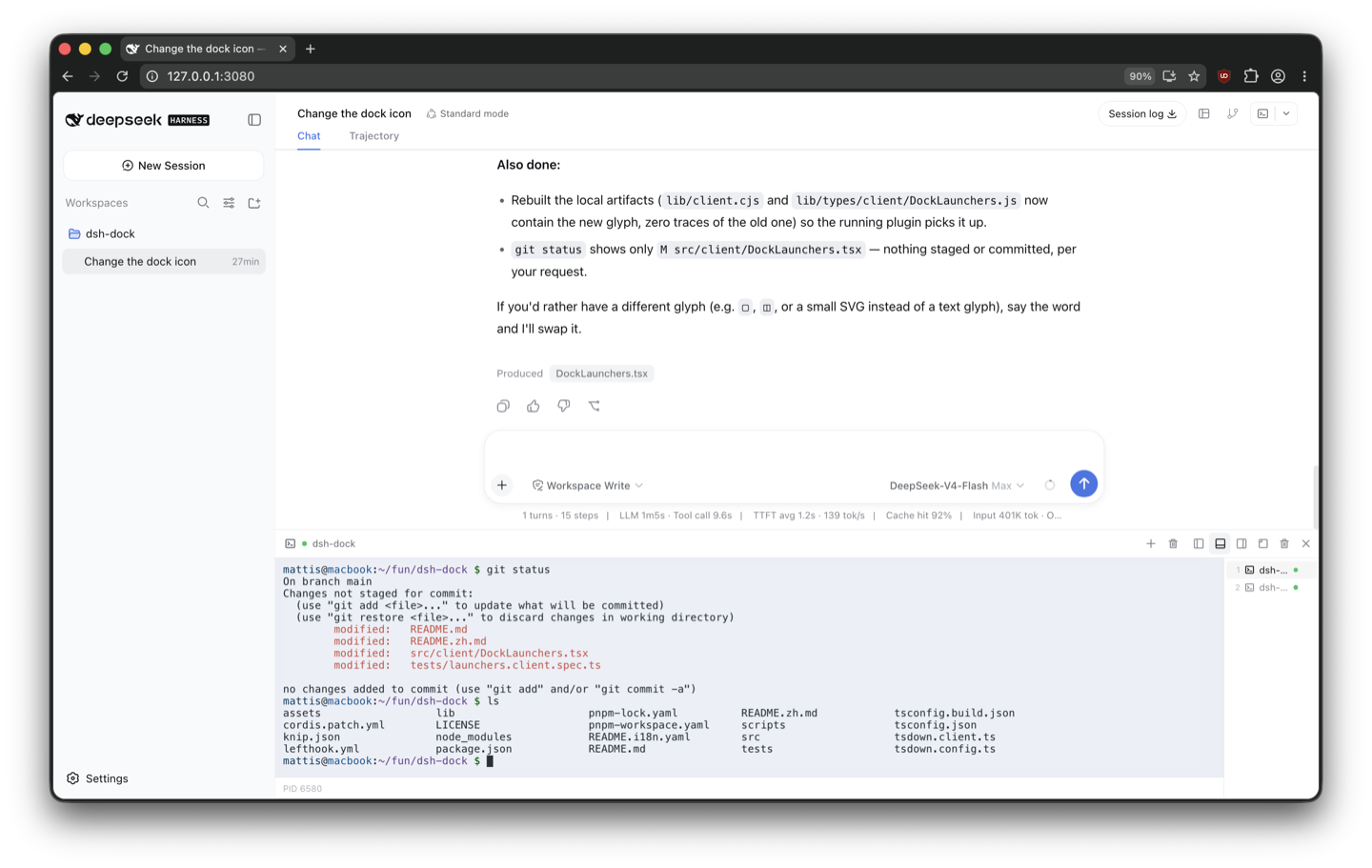
A VS Code-style terminal panel for DeepSeek Harness Web. It renders with ghostty-web, serves Ghostty's versioned WASM as an immutable asset, and connects to a local PTY through
node-pty. Placement and resizing come fromdsh-dock.


What it does
- Multiple terminals per Harness session with a responsive tab tray.
- Left, right, bottom, and floating placement through
dsh-dock. - Live detachment and rejoining of terminal panes without restarting PTYs.
- Resize propagation, truecolor, Unicode, selection, paste, scrollback, and full-screen programs.
- Live light/dark palette synchronization with the active Harness theme.
- Shell titles that follow the workspace, foreground process, and app-provided terminal title.
- PTYs remain alive when a panel hides or moves, and stop when their tab, plugin, browser page, or Harness process closes.
- Optional confinement by the session's current Harness sandbox policy.
- Same-origin WebSocket fencing, bounded input, per-session caps, scrubbed environments, and output backpressure.
Install
Requires dsh-dock, the dsh CLI (Node.js 22.19+ or 24), and pnpm 10+.
From npm
dsh plugin --profile web add @mattismegevand/dsh-terminal
From GitHub
dsh plugin --profile web add github:mattismegevand/dsh-terminal
Git installs fetch sources, so pnpm runs the package's prepare build on first add. pnpm ≥10 refuses that until you allow it: copy the exact package key pnpm printed into the profile's pnpm-workspace.yaml allowBuilds entry, then re-run the same add.
Develop locally
git clone https://github.com/mattismegevand/dsh-terminal.git
cd dsh-terminal
corepack pnpm install
corepack pnpm check:all
dsh plugin --profile web add .
node-pty is native. If pnpm adds an allowBuilds.node-pty placeholder to the Web profile workspace, set it to true and rerun the same plugin-add command.
Usage
Open a session and select Terminal. Use + or `Ctrl+Shift+`` for another shell. Drag a tray row to detach it; docking terminal panes on the same edge rejoins their live terminals. The panel × hides a pane, while the tray trash action ends its shell.
Configuration
- id: terminal
  name: '@mattismegevand/dsh-terminal'
  config:
    shellPath: /bin/zsh
    shellArgs: ['-l']
    maxTerminalsPerSession: 12
    maxCols: 400
    maxRows: 200
    disposeGraceMs: 2000
    respectSandbox: false
    outputHighWaterBytes: 2097152
    outputLowWaterBytes: 524288
    processTitlePollMs: 500
    initialCols: 100
    initialRows: 30
    fontSize: 13
    scrollback: 10000
With respectSandbox: true, the terminal uses the session's sandbox mode. In workspace-write, shells may warn that they cannot update history or other files outside the workspace; that is expected.
Related plugins
- dsh-dock — the docking system that hosts this panel.
- dsh-open — Codex-style workspace Open menu in the session header.
- dsh-git — session-scoped working-tree Review panel.
Model experience
Human-operated terminal UI
What the model sees
Nothing. Terminal input and output travel between the human-operated browser terminal and its PTY; the plugin registers no model prompt, tool, or conversation message.
Token effect
Zero tokens are added to model requests or responses. Terminal output is not copied into model context.
KV Cache effect
None. PTY activity does not alter the main model request prefix.
Known limitations
- The terminal is local-host only. Remote providers require a resize-capable Harness PTY contract.
- PTYs intentionally do not survive a browser refresh, plugin reload, Harness shutdown, or explicit tab close.
respectSandboxfollows the current local sandbox provider; changing mode requires closing active terminals first.- The Ghostty WASM asset path is versioned with the pinned
ghostty-webdependency and must change when that asset is upgraded.
License
MIT
프로젝트 파일 및 신호
표시된 항목은 디렉터리 스냅샷에서 감지된 공개 저장소 신호입니다.
저장소 정보
- 언어
- TypeScript
- 라이선스
- MIT
- 마지막 업데이트
- 2026. 8. 16. 오후 2:31
신중하게 설치하기
소스 코드, 권한, 수명 주기 스크립트, 의존성 및 네트워크 접근을 검토하고 신뢰하지 않는 플러그인은 격리 환경에서 테스트하세요.