설치
npx -y @deepseek-ai/dsh plugin --profile web add github:qingfeng200410/dsh-plugin-dosage이 설치 명령은 GitHub 저장소 주소에서 생성된 확인되지 않은 시작점입니다.
README
유지 관리자가 작성한 문서 스냅샷입니다.
dsh-plugin-dosage
English · 简体中文
GitHub · MIT
A DeepSeek Harness plugin: one sidebar entry for multi-provider balances and peak/off-peak cost.


This plugin combines dsh-usage-stats account monitoring with dsh-usage-plugin per-call billing, then puts both behind a single sidebar popover. There is no extra tab next to Conversation / Trace.
Screenshots
Overview
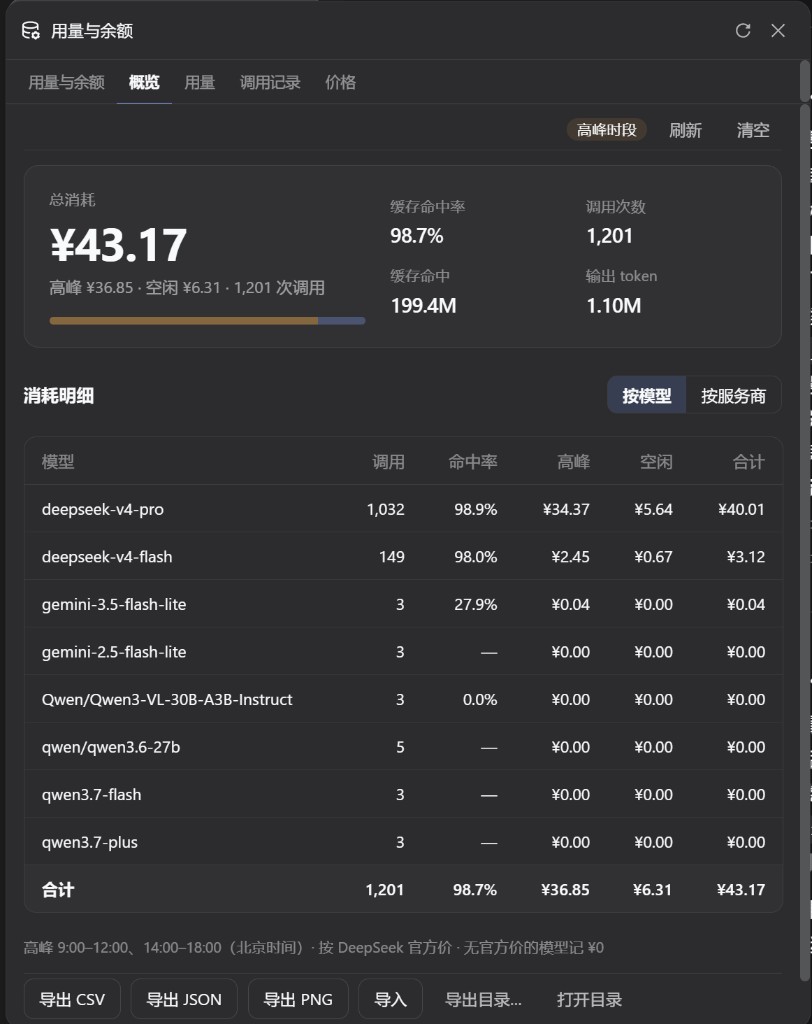
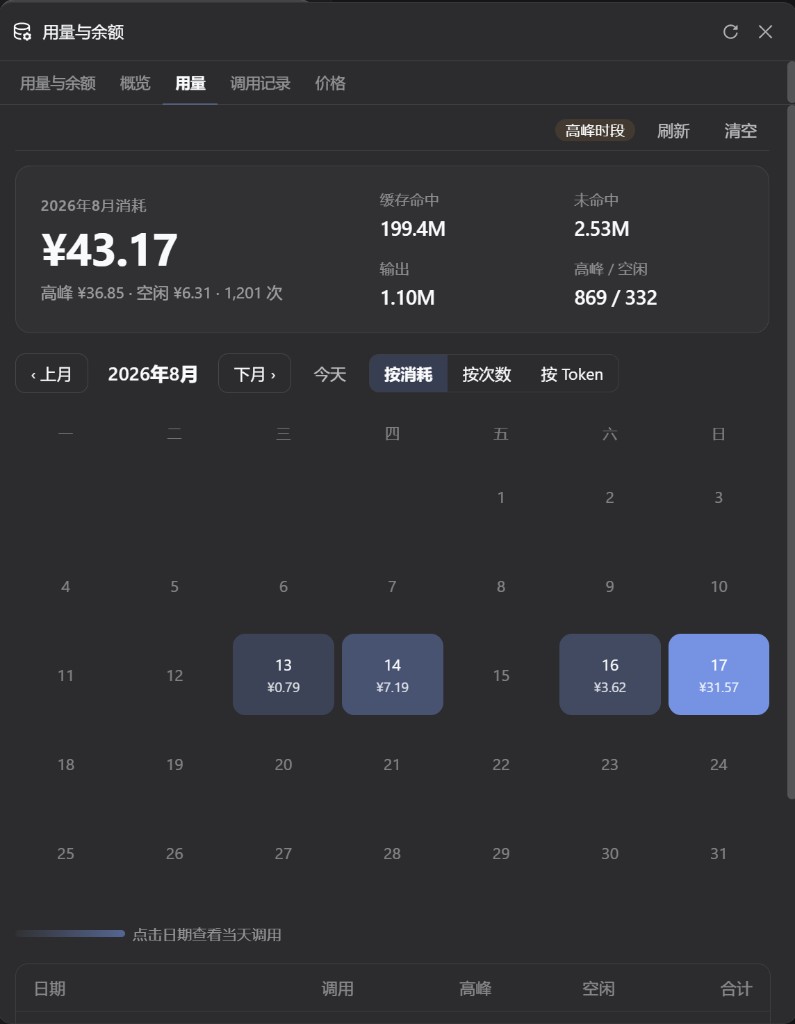
Usage
What you get
Click Usage/Balance at the bottom of the sidebar. The popover has five tabs:
| Tab | What it shows |
|---|---|
| Usage & Balance | Current provider balance or Token Plan, today / month / all-time tokens, cache hits, today's cost, last 14 days |
| Overview | Total spend, peak vs off-peak split, per-model totals |
| Usage | Monthly heatmap (cost, call count, or tokens); click a day for detail |
| Call log | Each call's model, hit rate, finish reason, and peak/off-peak cost; Today / 7 days / 30 days / All |
| Prices | Official DeepSeek unit prices for deepseek-v4-flash and deepseek-v4-pro, stacked vertically; the table is not editable |
The call log and the 14-day list read the same session logs. While the popover is open, tokens, today's cost, and the current provider balance refresh every 10 seconds. The only usage entry is the sidebar footer.
Peak hours are 09:00–12:00 and 14:00–18:00 Beijing time. Models without an official price are counted as ¥0.
Install
Needs the DeepSeek Harness web profile, plus dsh and pnpm.
dsh plugin --profile web add -w github:qingfeng200410/dsh-plugin-dosage#v1.13.0
Restart a running dsh web and hard-refresh the browser. Usage/Balance appears in the sidebar footer.
For another profile, replace web. Local tarball:
dsh plugin --profile web add ./dsh-plugin-dosage-1.13.0.tgz
Upgrade
dsh plugin --profile web add -w github:qingfeng200410/dsh-plugin-dosage#v1.13.0
add the latest tag. Do not use dsh plugin update on a Git ref.
Uninstall
dsh plugin --profile web remove dsh-plugin-dosage
Restart after uninstall. Files under ~/.dsh/dsh-usage/ are kept.
Do not install both
This package already includes those two plugins. Installing them together gives you two sidebar buttons or colliding routes:
dsh plugin --profile web remove dsh-usage-stats
dsh plugin --profile web remove @feiyang666/dsh-usage-plugin
Also delete leftover name: dsh-usage-stats or @feiyang666/... rows in ~/.dsh/profiles/web/cordis.patch.yml.
Accounts and credentials
The plugin uses providers already configured in Harness. Credentials are resolved on the host and never sent to the browser. DeepSeek uses the same DEEPSEEK_API_KEY as Settings → Models.
| Provider | Mode | Default credential |
|---|---|---|
| DeepSeek | Balance | provider apiKeyEnv |
| OpenRouter | Balance | OPENROUTER_MANAGEMENT_KEY (not the inference key) |
| Moonshot / Kimi API | Balance | provider apiKeyEnv |
| OpenCode Go | Subscription | OPENCODE_GO_API_KEY or local auth.json |
| Z.ai | Subscription | ZAI_API_KEY |
| Kimi For Coding | Subscription | KIMI_API_KEY |
| MiniMax Coding Plan | Subscription | MINIMAX_API_KEY |
| New API / Sub2API / custom | See monitors below | credential ref |
Providers without a public account API still get token stats. The account card says “unsupported” instead of inventing a balance.
Put New API, Sub2API, or declarative monitors on this plugin's Cordis config. Do not also mount dsh-usage-stats:
# ~/.dsh/profiles/web/cordis.patch.yml
- insert:
    - id: plugin-dosage
      name: 'dsh-plugin-dosage'
      config:
        monitors:
          relay-a:          # must be a real Harness provider id
            adapter: new-api
Full adapter and security notes: dsh-usage-stats.
Data
All user-level; nothing is written into the current project:
| File | Path |
|---|---|
| Call records | ~/.dsh/dsh-usage/usage-records.json (cap 100,000) |
| Price config | ~/.dsh/dsh-usage/pricing.json |
| Default export | ~/.dsh/dsh-usage/{csv,json,images}/ |
| Token fold cache | ~/.dsh/storages/usage-stats-cache.json |
| Boot log | ~/.dsh/dsh-usage/dsh-usage-boot.log |
If DSH_HOME is set, paths are relative to that directory. The panel can export CSV / JSON / PNG and merge-import by timestamp.
FAQ
| Symptom | Fix |
|---|---|
| Two Usage/Balance buttons | Remove standalone dsh-usage-stats and its patch row |
| No sidebar entry after install | Restart dsh web and hard-refresh; confirm the package is listed for the web profile |
Unexpected end of JSON input | Missing Cordis inject. Reinstall with dsh plugin add above; do not hand-edit a truncated row |
| OpenRouter shows not configured | Set OPENROUTER_MANAGEMENT_KEY in ~/.dsh/.credentials.yaml |
dsh plugin cannot find pnpm | npm install -g pnpm or corepack enable |
Do not paste .credentials.yaml, API keys, or cookies into issues.
Acknowledgements
This plugin combines and builds on two MIT projects:
| Project | Author | License | Used for |
|---|---|---|---|
| dsh-usage-stats | Ychris12138 and contributors | MIT | Multi-provider accounts, token aggregation, loopback APIs, sidebar Usage/Balance entry |
| dsh-usage-plugin | feiyang-dev | MIT | Peak/off-peak billing, overview / usage / call log / prices, CSV/JSON/PNG export, POST /usage/api |
| DeepSeek Harness | DeepSeek | MIT | Host and Cordis plugin runtime |
On top of those, this repo mainly did the following integration, UI work, and extras:
- Both feature sets live in one sidebar Usage/Balance popover (five tabs); the extra tab next to Conversation / Trace is gone, and so is the Settings usage section
- Overview / Usage / Call log / Prices were redesigned: a single total with a peak/off-peak bar, empty calendar days stay unfilled, a shorter call-log table, and stacked price cards
- The account tab adds cache hits, hit rate, and today's cost; its monthly heatmap was removed (the calendar stays on Usage) and the heatmap gained a by token mode
- The call log uses the same session logs as the last-14-days list, instead of only stream snippets the plugin captured itself
- While the popover is open, tokens / today's cost / the current provider balance refresh every 10 seconds; click outside to close; height is locked to the Usage tab
- Records live at user-level
~/.dsh/dsh-usage/so switching projects does not split the data; the official price table is fixed (not editable); models without an official price are ¥0; model names are shown as requested
Full terms: LICENSE and NOTICE. DeepSeek is a trademark of DeepSeek. This is a community plugin and is not affiliated with DeepSeek.
Contributing
Issues and pull requests are welcome — UI tweaks, bug fixes, and new features all help.
This is my first public open-source project. The docs, code, and UX will have rough edges; please bear with them. If something is broken, or you believe any part infringes your rights and should be taken down, open an issue. I will look into it and remove or fix the material as soon as I can.
License
프로젝트 파일 및 신호
표시된 항목은 디렉터리 스냅샷에서 감지된 공개 저장소 신호입니다.
저장소 정보
- 언어
- JavaScript
- 라이선스
- MIT
- 마지막 업데이트
- 2026. 8. 17. AM 9:22
신중하게 설치하기
소스 코드, 권한, 수명 주기 스크립트, 의존성 및 네트워크 접근을 검토하고 신뢰하지 않는 플러그인은 격리 환경에서 테스트하세요.