설치
npx -y @deepseek-ai/dsh plugin --profile web add github:sopaco/terrain이 설치 명령은 GitHub 저장소 주소에서 생성된 확인되지 않은 시작점입니다.
README
유지 관리자가 작성한 문서 스냅샷입니다.
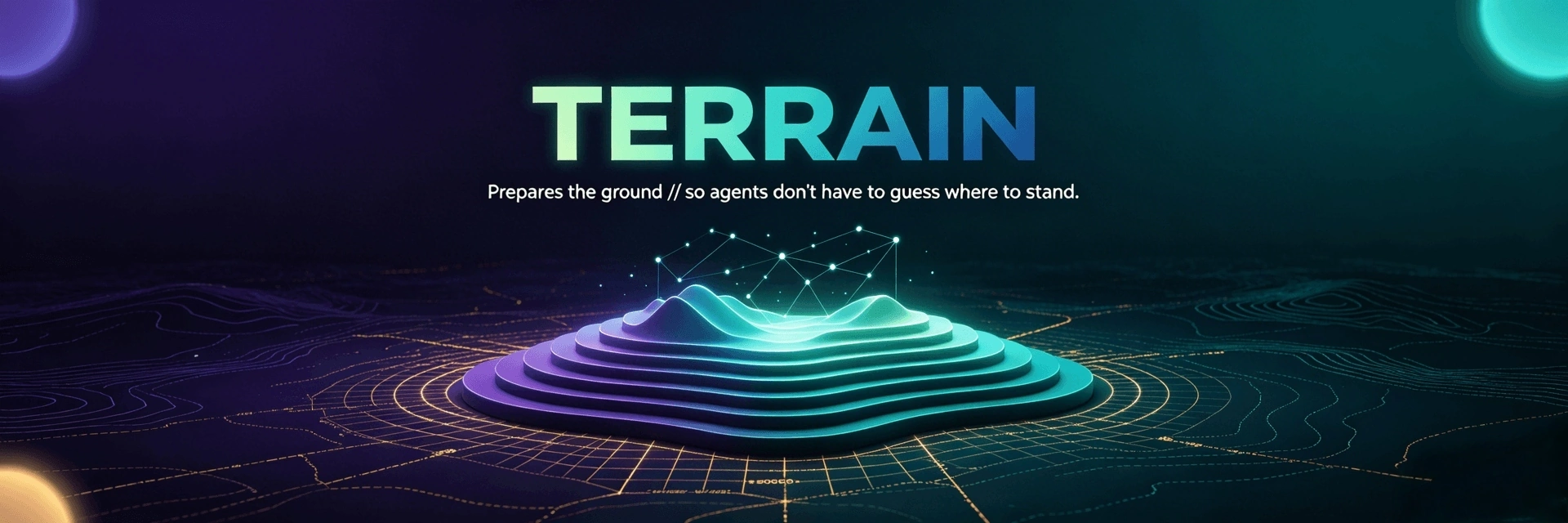
Terrain
Terrain prepares the ground so agents don't have to guess where to stand.
Engineering environment management for human developers and AI coding assistants — knowledge as the map, tools as the roads, conventions as the trail markers.


What is Terrain?
Terrain is a standardized, AI-friendly engineering environment built for the age of AI-assisted development. Point it at a Git repository and it delivers three things:
- 🗺️ Engineering knowledge — auto-generated, always-in-sync C4 docs and agent context, produced from your code and consumed by both humans and AI agents.
- 🤝 A standardized environment for AI agents — one shared "knowledge contract" (Skills,
AGENTS.md, CLIs) so every coding agent reads the project the same way instead of blind-grepping the live repo. - ⚙️ Auto-deployed agent enhancement tools — one command installs the toolchain your agents need (CodeGraph, RTK, preset Skills); no per-repo yak-shaving.
Terrain provides both GUI and CLI modes. Through the CLI, you can conveniently integrate engineering knowledge generation and Deepwiki's Q&A functionality into PR and CI/CD pipelines. Human developers use the Tauri desktop app or CLI. For specific usage of the CLI, see Terrain CLI Guides.
App preview
| Project overview | Engineering knowledge | DeepWiki Q&A | Agent environment |
|---|---|---|---|
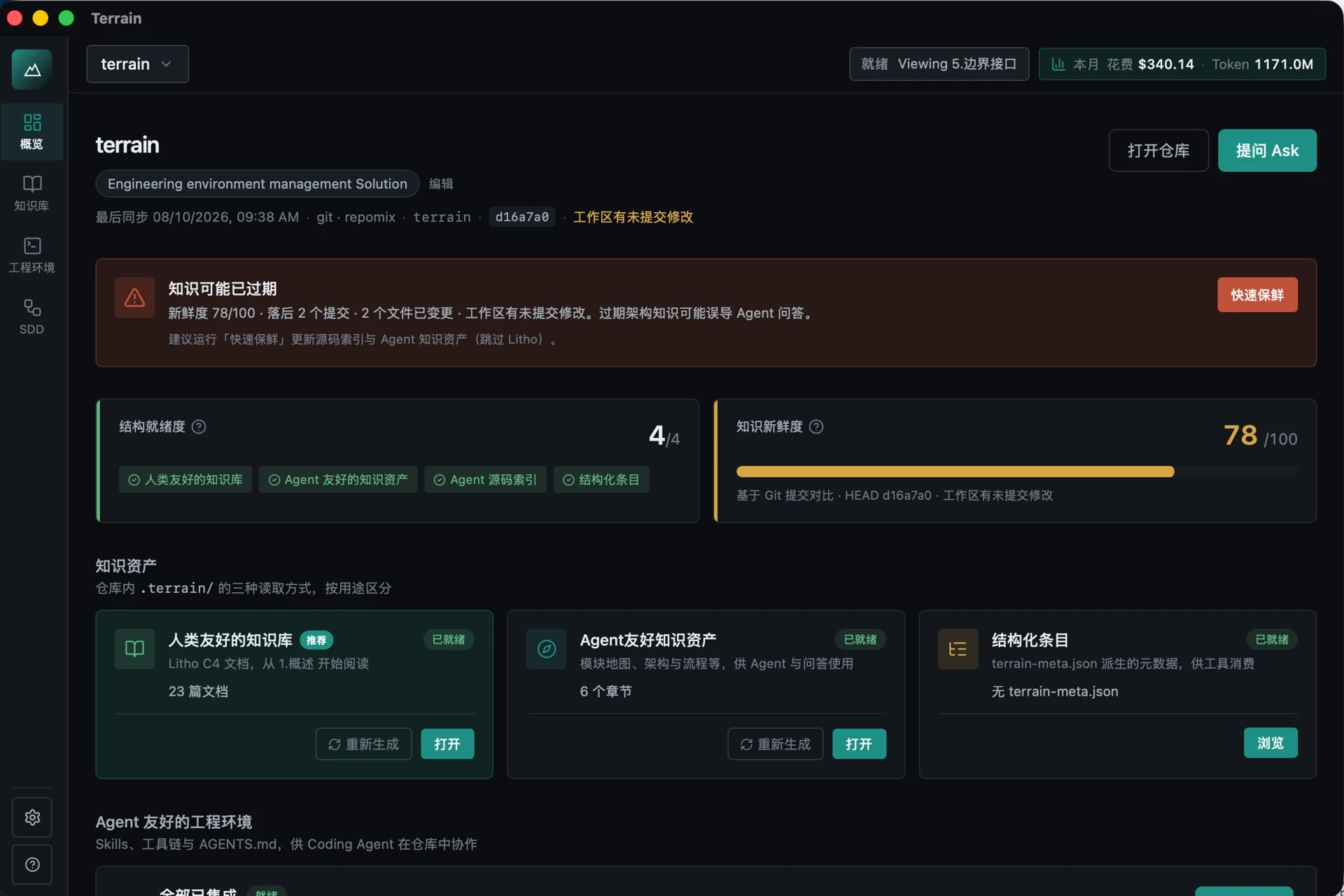 | 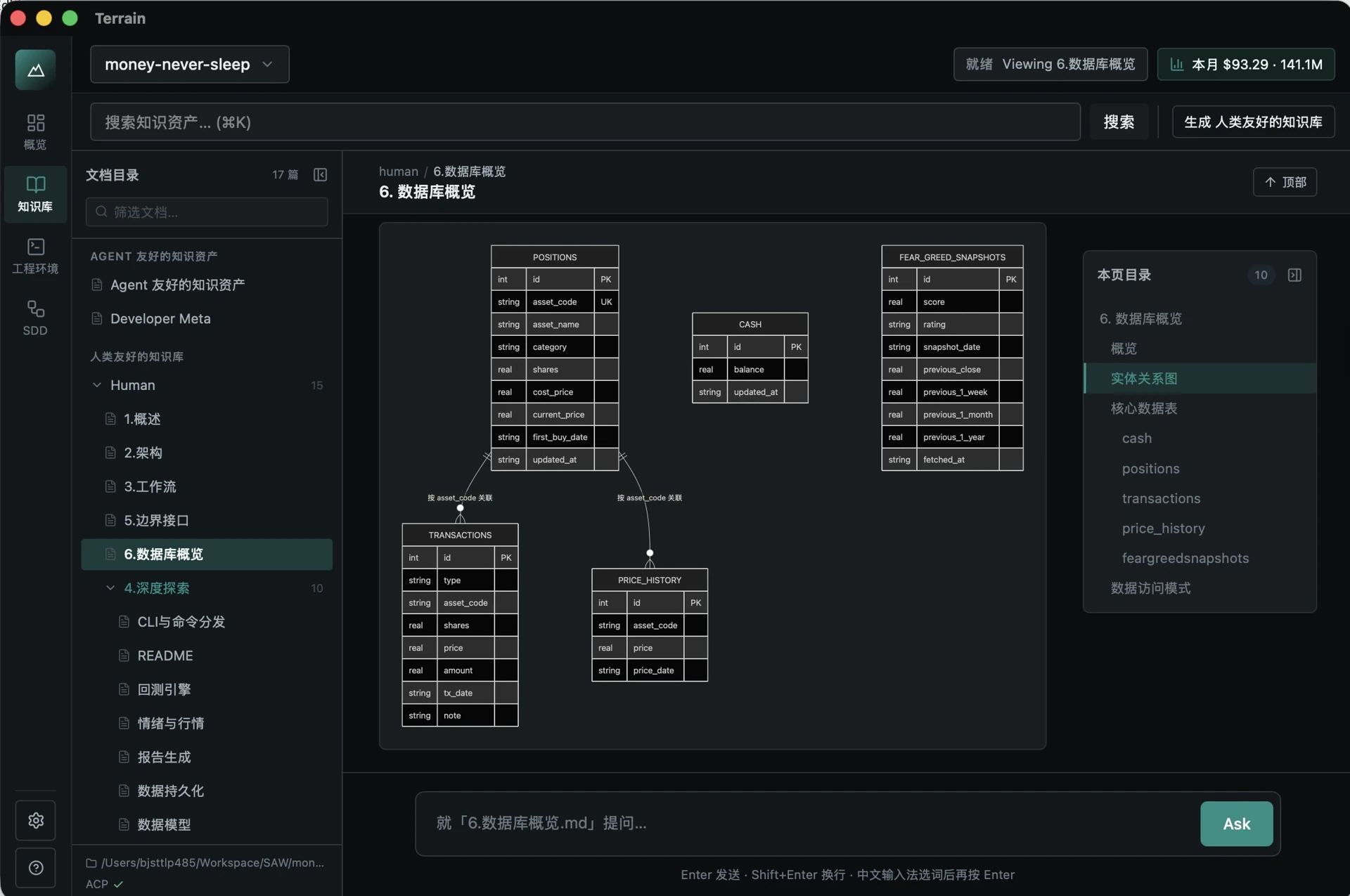 | 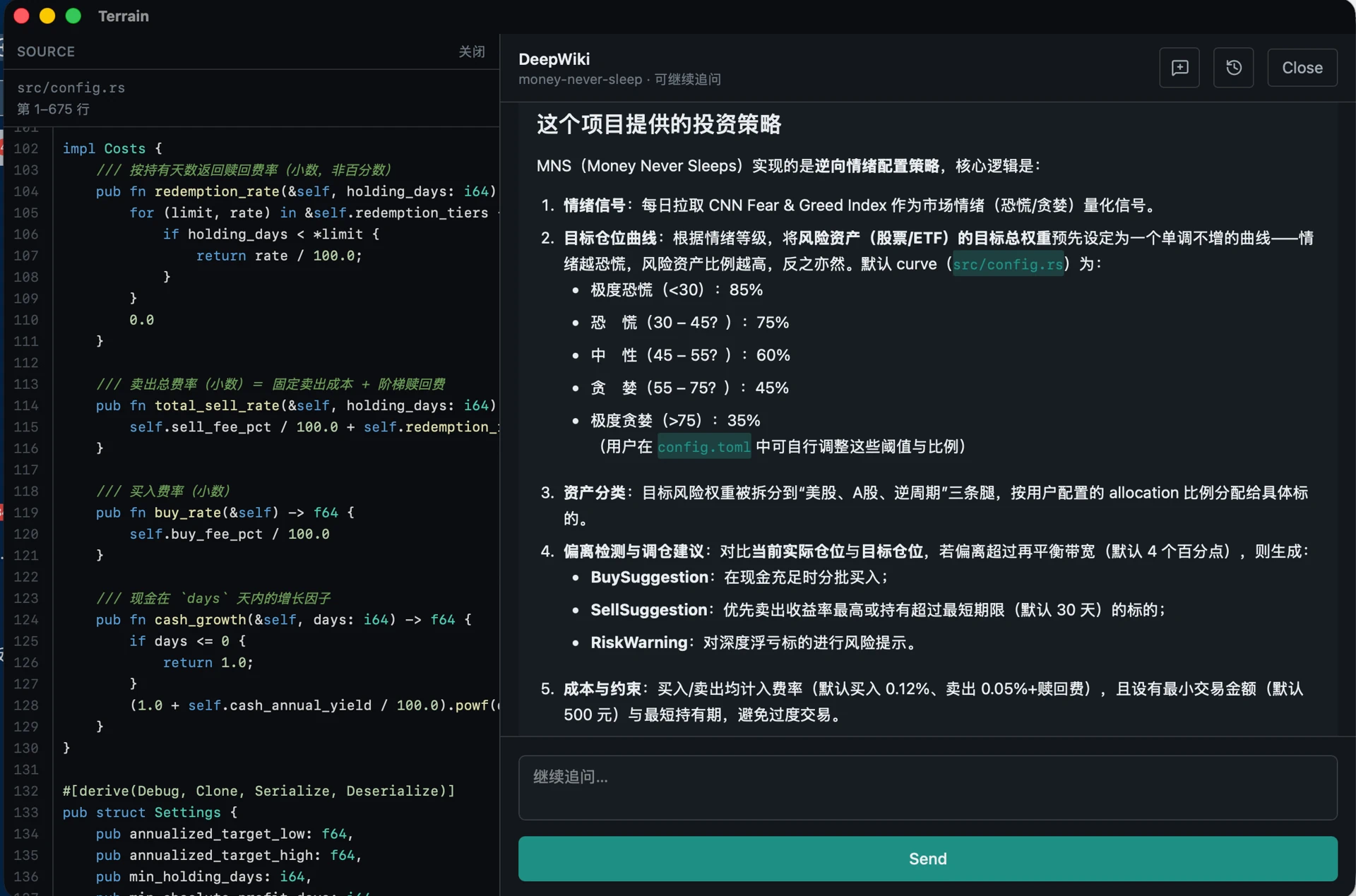 | 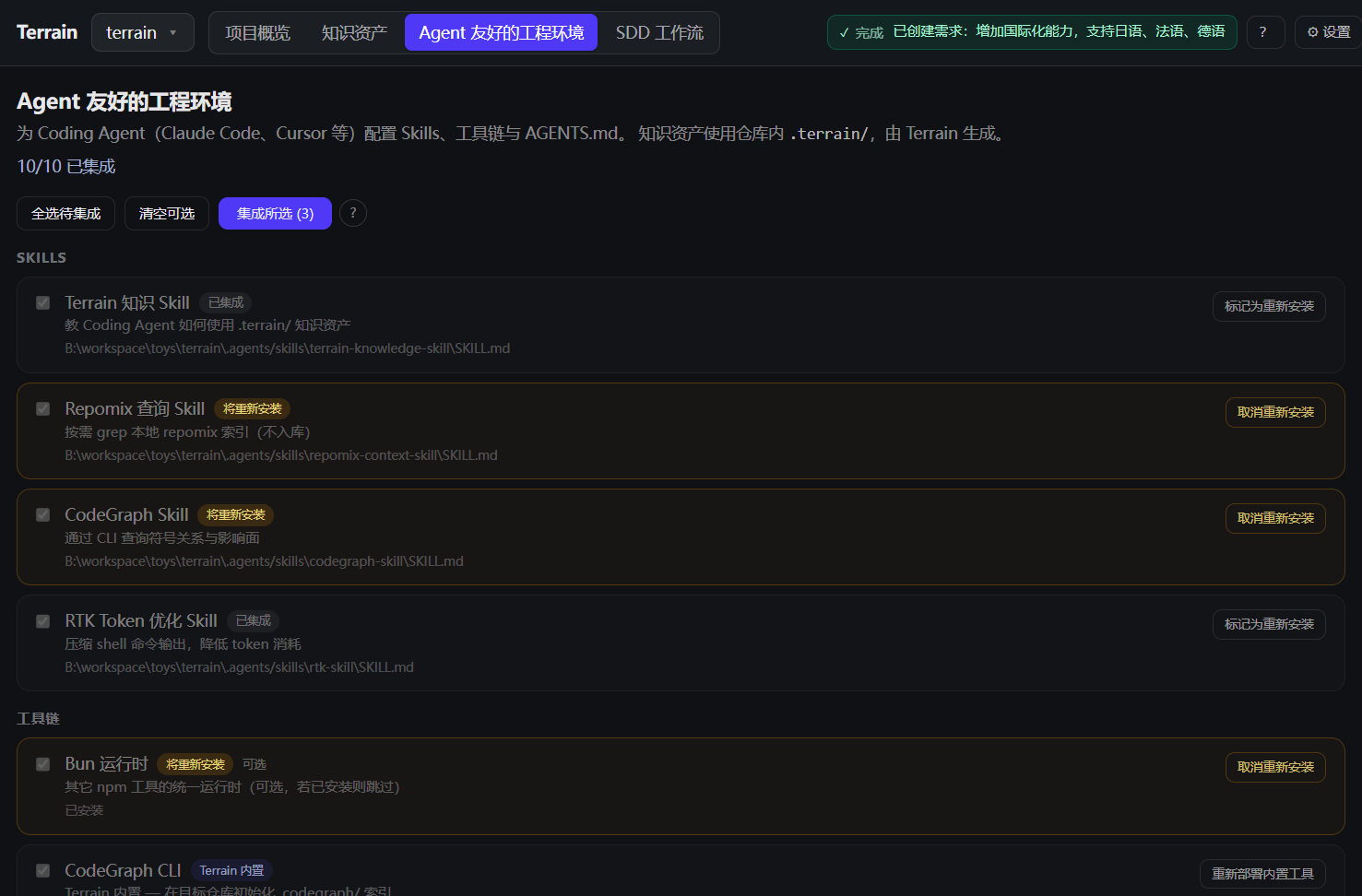 |
From left to right: project list with freshness scores, auto-generated C4 docs, knowledge-grounded Q&A, and one-command agent tooling setup.
Three pillars at a glance
| Pillar | Metaphor | What you get |
|---|---|---|
| Engineering knowledge assets | Map | Dual-track docs in .terrain/ — produced from code, consumed by humans and agents |
| Standardized AI environment | Roads | Skills, CLIs, and AGENTS.md that route agents to the right knowledge and tools |
| Agent enhancement tools | Gear | One-command deployment of CodeGraph, RTK, and preset Skills |
Dual-track knowledge
| Audience | Path | Format |
|---|---|---|
| Humans | .terrain/human/ | Narrative C4 docs with Mermaid diagrams |
| AI agents | .terrain/agent/context.md | Structured architecture overview (≤ 14 KiB) |
| Source index | .terrain/agent/repomix.md | Repomix pack — grep/read on demand, not preloaded |
| Domain terms | .terrain/knowledge/ | Business glossary and internal conventions |
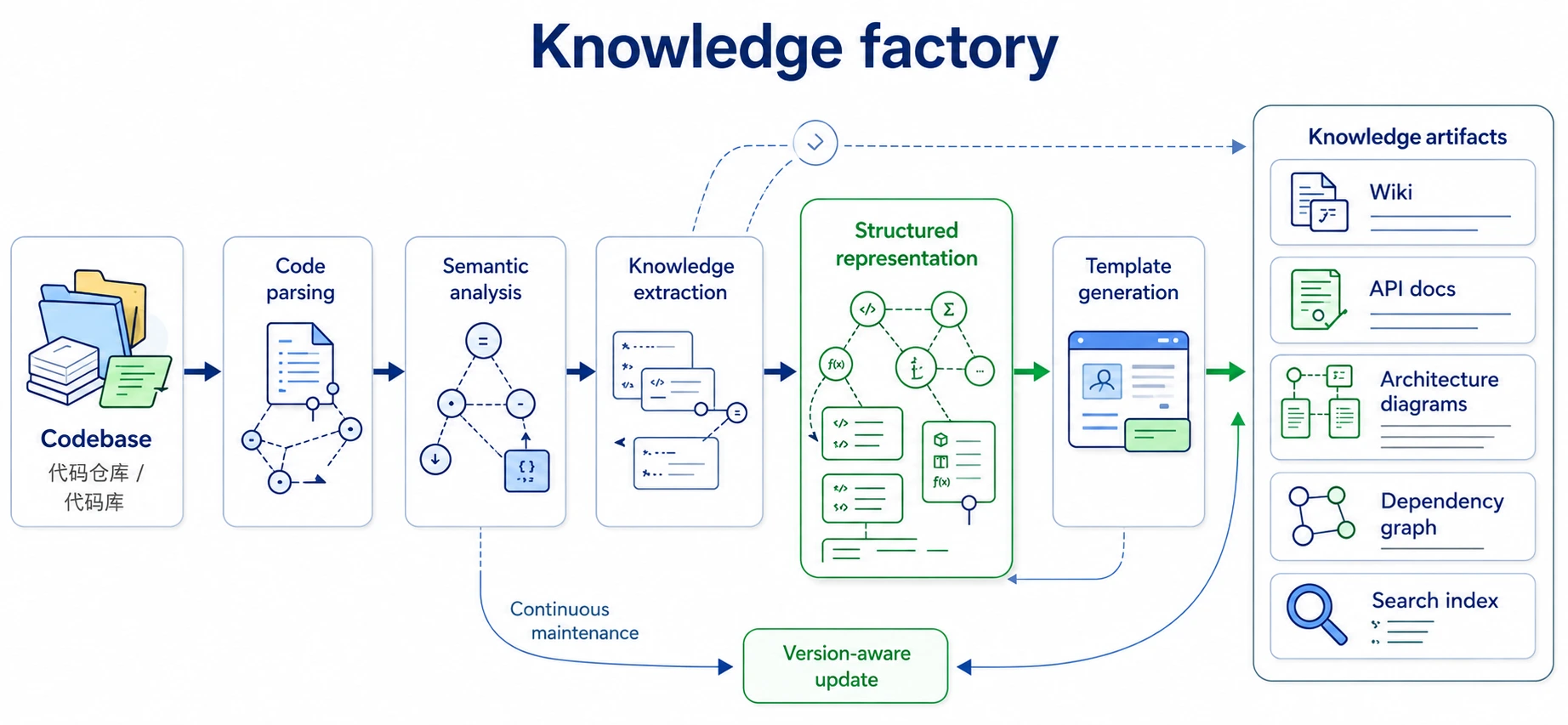
Knowledge factory
Why Terrain?
Onboarding to a new codebase usually means days of reading source and stale wiki pages. Terrain compresses that to minutes: register a repo, run initialization, and get a full C4 doc set plus an agent-ready context pack.
| Without Terrain | With Terrain |
|---|---|
| Architecture knowledge scattered across wikis, Slack, and senior engineers | Engineering knowledge assets generated from the actual codebase |
| AI assistants grep the live repo blindly | Agents read context.md first, then targeted repomix slices |
| Docs drift from code on every refactor | Incremental updates + freshness tracking; knowledge travels with Git branches |
| Every team reinvents "how to onboard an AI to our repo" | Env integration installs Skills, CodeGraph, RTK, and AGENTS.md snippets |
Built for:
- Developers exploring or documenting a codebase
- Tech leads who want architecture docs that stay close to the code
- Teams adopting AI coding assistants and need a shared knowledge contract
- CI/CD pipelines that regenerate knowledge assets on merge
- ACP integrators wiring
terrain toolsinto Claude Code, Codex, OpenCode, or compatible agents
From Litho (deepwiki-rs) to Terrain
Terrain's knowledge engine is the direct successor of Litho, the AI documentation generator published as deepwiki-rs (1.7k★). Litho proved the core thesis at scale — generate architecture docs from code, keep them in sync, make them agent-ready. Terrain takes that successful practice and hardens it into a platform:
- Incremental knowledge-base updates. Instead of regenerating from scratch, Terrain tracks Git HEAD and working-tree state and updates only what changed, so the knowledge base stays fresh on every commit without the full cost (freshness scoring + resumable pipelines).
- Broad language & framework adaptation. The generation core is language-agnostic and tuned for Rust, TypeScript/JavaScript, Python, Go, Java, C#, and more, with framework-aware structure extraction.
- ACP mode for your agents. Terrain speaks the Agent Client Protocol, so Claude Code, Codex, OpenCode, and Cursor can pull project knowledge through
terrain toolsinstead of guessing. - Litho Book, built in. The original Litho Book Markdown reader and its knowledge-grounded Q&A are now integrated into the Terrain desktop app — browse and ask in one place.
In short: if you liked Litho for docs, Terrain is Litho's knowledge core plus the environment, workflow, and agent bridge around it.
Features & Capabilities
1. Engineering knowledge assets — generate & consume
Terrain turns a codebase into a dual-track knowledge base that both people and agents use. Born from Litho (deepwiki-rs, 1.7k★), it keeps the proven doc-generation core and adds incremental, multi-language, agent-connected delivery.
- Generate — a four-phase pipeline produces six standard human docs (overview, architecture, workflows, deep module exploration, boundary interfaces, database overview) plus a structured
agent/context.mdand a grep-friendlyrepomix.mdsource pack. - Consume — DeepWiki answers natural-language questions over the knowledge base with citations and tool-call traces; external agents consume the same three layers through
terrain tools. - Stay fresh — incremental regeneration on code change and a freshness score that flags stale assets.
- Read & ask in one place — the integrated Litho Book reader and Q&A (formerly a separate tool) now live inside the desktop app.
The same Litho success story, now incremental, multi-language, and wired to your agents.
2. Standardized, AI-friendly engineering environment
A shared "knowledge contract" so every coding agent reads your repo the same way:
AGENTS.md— managed snippets that point agents to the knowledge layers first.- Preset Skills — standard playbooks (terrain-knowledge → repomix → codegraph → rtk) your agents can load.
- Conventions as trail markers — consistent workflow and access patterns across repositories.
3. Auto-deployed agent enhancement tools
One command wires up the toolchain your agents need — no per-repo setup:
- CodeGraph — symbol callers/callees/impact queries via
bunx codegraph. - RTK — shell-output token optimizer that saves agents tokens.
- Terrain CLI /
terrain tools— scan, assets, and ACP access. terrain env applyinstalls Skills, CLIs, andAGENTS.mdin the right dependency order (terrain-knowledge→repomix→codegraph→rtk).
4. SDD — standardized development workflow
Four sequential phases, each producing a reviewable Markdown artifact:
| Phase | Output | Execution |
|---|---|---|
| 1. Requirements | 1.requirements.md | Native LLM |
| 2. Technical design | 2.tech-design.md | Native LLM |
| 3. Code generation | 3.implementation.md + repo changes | ACP agent |
| 4. Code review | 4.code-review.md | Native LLM |
Session outputs live under ~/.terrain/sdd/{project}/sessions/{id}/outputs/ (local, not versioned).
5. Freshness tracking
Git HEAD and dirty-state monitoring score knowledge assets. Agents should down-weight context when freshness_score < 50.
Architecture
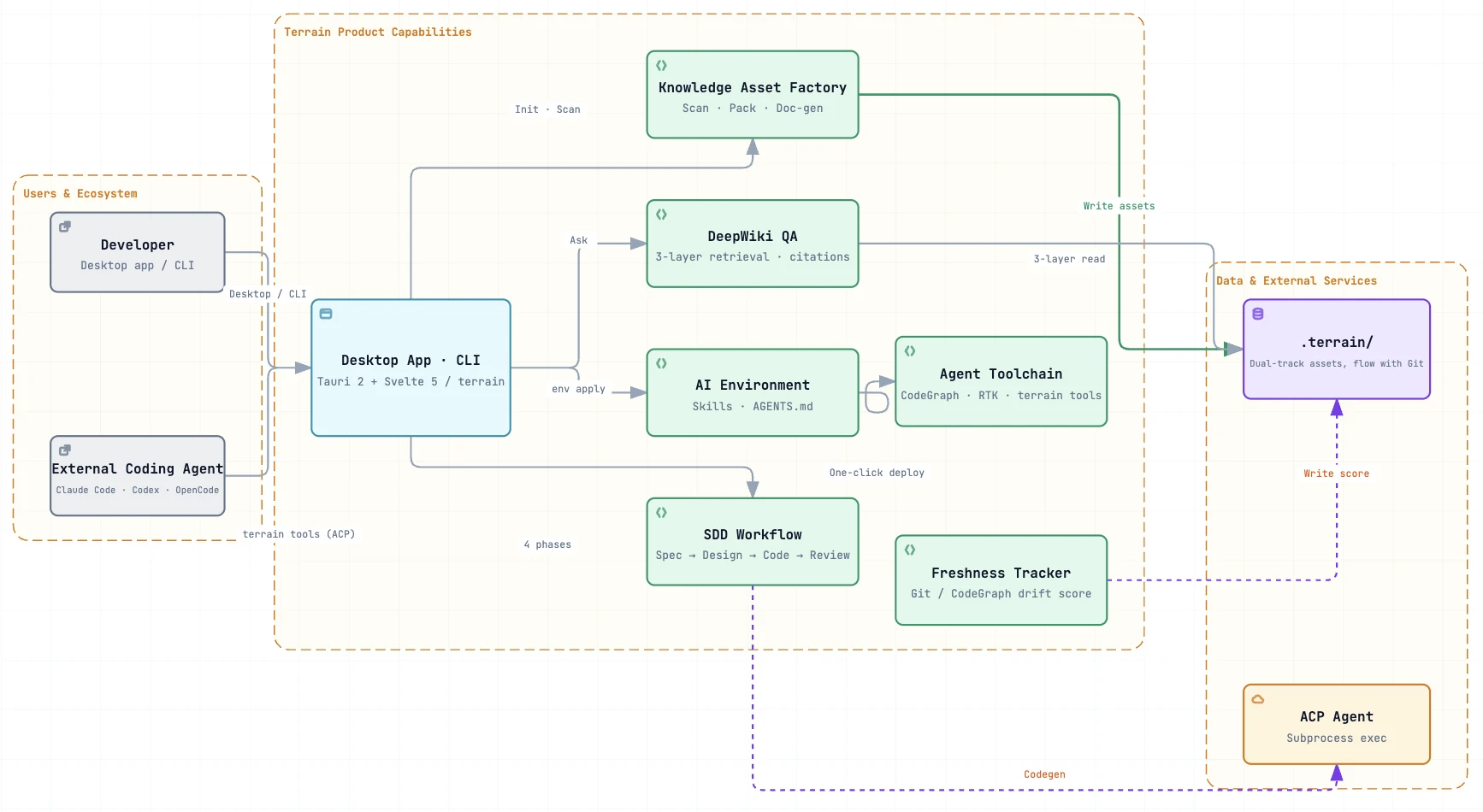
Terrain is an agent-first engineering environment platform. For each Git repository it delivers three coordinated solutions:
| Pillar | Metaphor | What agents get |
|---|---|---|
| Engineering knowledge assets | Map | Structured assets in .terrain/ — produced from code, consumed through layered access |
| Standardized AI environment | Roads | Skills, CLIs, and AGENTS.md that route agents to the right knowledge and tools |
| Development workflow (SDD) | Trail markers | A four-phase convention from requirements through code review |
Knowledge as the map, tools as the roads, conventions as the trail markers.
Humans use the desktop app or CLI; external coding agents (Claude Code, Codex, OpenCode, …) use the same contract via terrain tools (JSON stdout). Assets live in-repo (.terrain/ travels with branches); ~/.terrain/registry.json holds project pointers only.
System overview
① Engineering knowledge assets — the map
Dual-track assets from one factory — narrative human/ for people, structured agent/ for machines:
.terrain/
├── agent/context.md    macro overview
├── agent/repomix.md    grep-friendly source pack
├── human/              engineering knowledge docs (from Litho)
├── knowledge/          domain glossary
└── .meta/freshness.json
Produce (scan/pack are offline; LLM/ACP where noted):
Git ──scan──► index.md
    ──pack──► repomix.md
    ──context (LLM)──► context.md
    ──docs (ACP)──► human/ + .litho-agent/ checkpoints
    ──track──► freshness.json
Consume — DeepWiki and terrain tools share the same three layers:
| Layer | Source | API |
|---|---|---|
| Macro | agent/context.md | read-context |
| Meso | human/, knowledge/ | search, read-doc |
| Micro | agent/repomix.md | grep-pack → read-pack-file |
When sources conflict: repomix > CodeGraph > context.md > human/. Down-weight macro context when freshness_score < 50.
② Standardized AI environment — the roads
terrain env apply installs the navigation layer so agents don't improvise:
| Component | Purpose |
|---|---|
| Skills | Standard playbooks — terrain-knowledge → repomix → codegraph → rtk |
| Tools | ~/.terrain/bin/ — CodeGraph, RTK, terrain CLI (terrain tools for ACP) |
| AGENTS.md | Managed snippets — knowledge-first workflow, repomix for code, RTK for shell |
③ Development workflow — the trail markers
SDD defines a repeatable path; each phase produces a reviewable Markdown artifact:
| Phase | Output | Engine |
|---|---|---|
| Requirements | 1.requirements.md | Native LLM |
| Tech design | 2.tech-design.md | Native LLM |
| Codegen | 3.implementation.md + repo changes | ACP agent |
| Code review | 4.code-review.md | Native LLM |
The knowledge pipeline uses the same resumable pattern — research checkpoints under .terrain/.litho-agent/.
Runtime
graph LR
    Chan[Desktop · CLI] --> Intel[terrain-agent]
    Chan --> Core[terrain-core]
    Intel --> Core
    Intel --> LLM[LLM]
    Intel --> ACP[ACP]
    Core --> FS[".terrain/ · Git · registry"]
Core handles scan, pack, search, freshness, and env without an LLM. Agent orchestrates DeepWiki, knowledge generation, SDD, and context generation — lightweight tasks via native LLM, heavy tool-using work via ACP subprocess.
.terrain/ directory (per project)
{your-repo}/.terrain/
├── index.md                 # Project index (from scan)
├── agent/
│   ├── context.md           # Macro architecture context for agents
│   ├── repomix.md           # Source pack (generated, often gitignored)
│   └── meta.json            # Pack metadata
├── human/                   # Engineering knowledge docs (1.概述.md, 2.架构.md, …)
├── knowledge/               # Domain glossary and conventions
├── .meta/
│   ├── sync.json            # Scan sync state
│   └── freshness.json       # Asset freshness scores
└── .litho-agent/            # Litho/knowledge research workspace (transient)
Project registration (slug ↔ repo path) is stored locally at ~/.terrain/registry.json — pointers only, not knowledge files.
Ecosystem
Terrain composes with the tools your AI workflow already uses:
| Component | Role |
|---|---|
| Claude Code / Codex / OpenCode / ACP agents | Execute knowledge composition, SDD codegen, and tool calls in an isolated process |
| Repomix | Packs source into a grep-friendly index for agents |
| CodeGraph | Symbol callers/callees/impact queries via bunx codegraph |
| RTK | Compresses shell output to save tokens (@terrain-ai/rtk on npm, or ~/.terrain/bin/rtk) |
| Terrain CLI | Scan, assets, terrain tools for ACP (@terrain-ai/cli on npm, or ~/.terrain/bin/terrain) |
| Preset Skills | LLM workflow instructions in preset_skills/ (knowledge, SDD, Ask, Context) |
| DeepWiki / Litho Book | Knowledge-grounded Q&A and Markdown reader, integrated in the desktop UI |
Trust model for coding agents: when sources conflict, repomix source > codegraph > context.md > human docs.
Getting Started
Use Prebuilt Installer (Recommend)
Recommend downloading the pre-compiled software package from the Github Release, ready to use out of the box.
Build from source (Optional & DIY)
Prerequisites
- Rust 1.94+ (rust-toolchain.toml pins the version)
- NodeJS /Bun — Node toolchain for frontend and optional tools
- LLM access (optional) — OpenAI-compatible API, Ollama, or LM Studio (configure in the desktop app Settings panel)
- Mainstream coding agent — e.g. Codex, DeepSeek Harness, or Claude Code, for knowledge composition and SDD codegen
Build
# Clone and install frontend dependencies
git clone https://github.com/sopaco/terrain.git
cd terrain
bun install

# Build Rust workspace (CLI + libraries)
cargo build --release

# CLI binary
./target/release/terrain --help

# Desktop app (development)
bun run dev:app
License
MIT — see LICENSE.
프로젝트 파일 및 신호
표시된 항목은 디렉터리 스냅샷에서 감지된 공개 저장소 신호입니다.
저장소 정보
- 언어
- Rust
- 라이선스
- MIT
- 최신 릴리스
- 0.9.1
- 마지막 업데이트
- 2026. 8. 18. 오후 2:30
신중하게 설치하기
소스 코드, 권한, 수명 주기 스크립트, 의존성 및 네트워크 접근을 검토하고 신뢰하지 않는 플러그인은 격리 환경에서 테스트하세요.