설치
npx -y @deepseek-ai/dsh plugin --profile web add github:ThreeBody6666/dsh-computer-use이 설치 명령은 GitHub 저장소 주소에서 생성된 확인되지 않은 시작점입니다.
README
유지 관리자가 작성한 문서 스냅샷입니다.
DSH Computer Use
Native Windows Computer Use bundle for DeepSeek Harness. It uses the DSH Cordis tool registry directly and does not use MCP. The current compatibility target is DSH 0.1.0-rc.6.
Capabilities
computer_screenshot: captures the virtual desktop and returns a DSH image attachment.computer_click,computer_drag,computer_scroll: pointer control using bounded virtual-desktop coordinates.computer_type,computer_keypress: Unicode text and supported keyboard shortcuts sent to the active control.computer_wait: allows an application to settle before the next observation.computer_observe: captures the desktop and sends it to a user-selected vision model when the active DSH model cannot inspect images.
Every Computer Use tool asks through DSH's native approval service by default. CTRL+ALT+DELETE, empty text, unsupported keys, invalid durations, and coordinates outside the virtual desktop are rejected before input is sent.
Vision model settings
After installing and restarting DSH, open Settings > Plugins > Plugin configuration, then expand Computer Use Vision. Enter an OpenAI-compatible HTTPS base URL, API key, vision-capable model name, and response-token limit, then enable the model. The API key is stored in DSH's settings secret field and is not included in Cordis configuration or tool responses.
| Field | Requirement |
|---|---|
| Enabled | Turn this on only after the endpoint, key, and model are configured. |
| Base URL | An HTTPS OpenAI-compatible API base URL, such as https://api.example.com/v1. |
| API Key | Stored as a write-only DSH secret. Leaving the field blank during an update preserves the existing key. |
| Model | The vision-capable model identifier accepted by the provider. |
| Max Tokens | An integer from 64 to 8192; the default is 1000. |
computer_observe sends the current screenshot only to this configured endpoint. Keep it disabled unless you understand where the visual data will be processed.
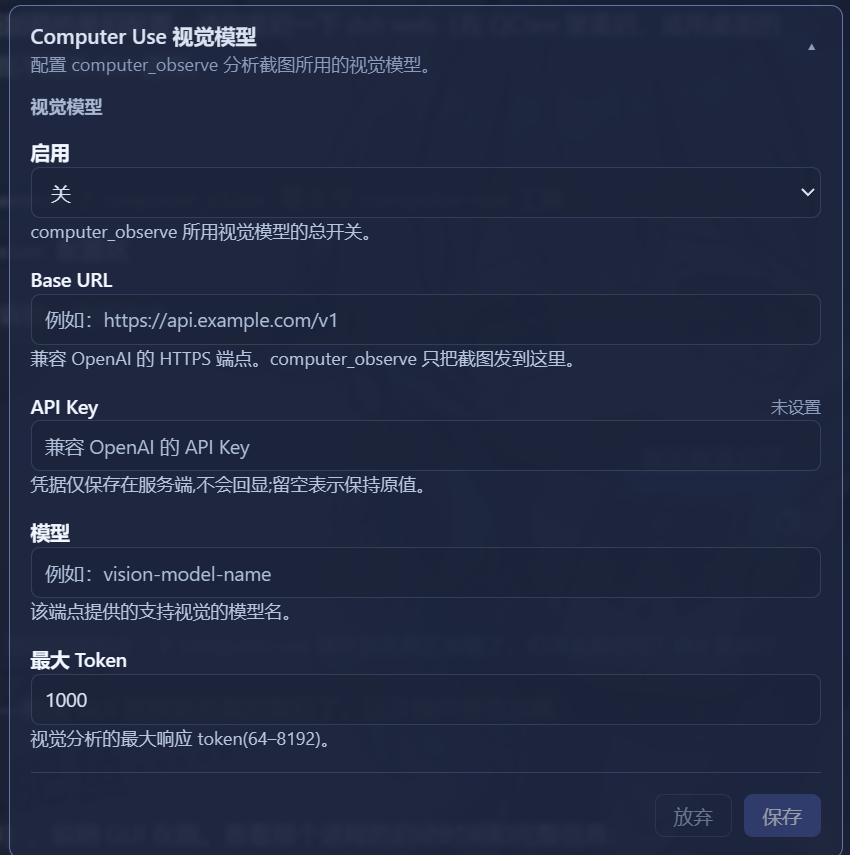
Why this appears in the settings UI
DSH only exposes selected settings namespaces to its browser configuration API. The plugin registers the vision configuration as a configurable model provider, so the native Web UI can safely read and save it. Computer-control tools are loaded separately, preventing their runtime dependencies from delaying the settings card.
Install
From npm (recommended). --profile is required — it selects which DSH profile gets the plugin:
dsh plugin --profile web add @crazy_th/dsh-computer-use
Replace web with the profile you actually use (tui, headless, ...).
From source (development):
pnpm install
pnpm run build
dsh plugin --profile web add link:<path-to-this-checkout>
Restart DSH after installation. To inspect the active layer:
dsh --profile web --dump-config
The bundled cordis.patch.yml enables approval and scales screenshots to at most 1600x1200. Override those values in the profile's cordis.patch.yml when needed.
Verify the installation
The composed configuration must contain both computer-use-settings and computer-use:
dsh --profile web --dump-config
For the Web profile, start DSH on the default local port and open the page locally:
dsh web --port 3082
# Open http://127.0.0.1:3082, then Settings > Plugins > Plugin configuration.
If the card is absent, restart DSH after rebuilding or reinstalling the plugin. Do not use a cached page from a different DSH instance or profile.
Development
pnpm test
pnpm run typecheck
pnpm run build
The automation driver is Windows-only. It uses user32.dll for input and System.Drawing for screen capture; it does not install a global hook or run a background process.
License
MIT
프로젝트 파일 및 신호
표시된 항목은 디렉터리 스냅샷에서 감지된 공개 저장소 신호입니다.
저장소 정보
- 언어
- JavaScript
- 라이선스
- MIT
- 마지막 업데이트
- 2026. 8. 15. 오후 2:19
신중하게 설치하기
소스 코드, 권한, 수명 주기 스크립트, 의존성 및 네트워크 접근을 검토하고 신뢰하지 않는 플러그인은 격리 환경에서 테스트하세요.