설치
npx -y @deepseek-ai/dsh plugin --profile web add github:WuWL-98/dsh-theme-paper이 설치 명령은 GitHub 저장소 주소에서 생성된 확인되지 않은 시작점입니다.
README
유지 관리자가 작성한 문서 스냅샷입니다.
dsh-theme-paper — 纸质主题
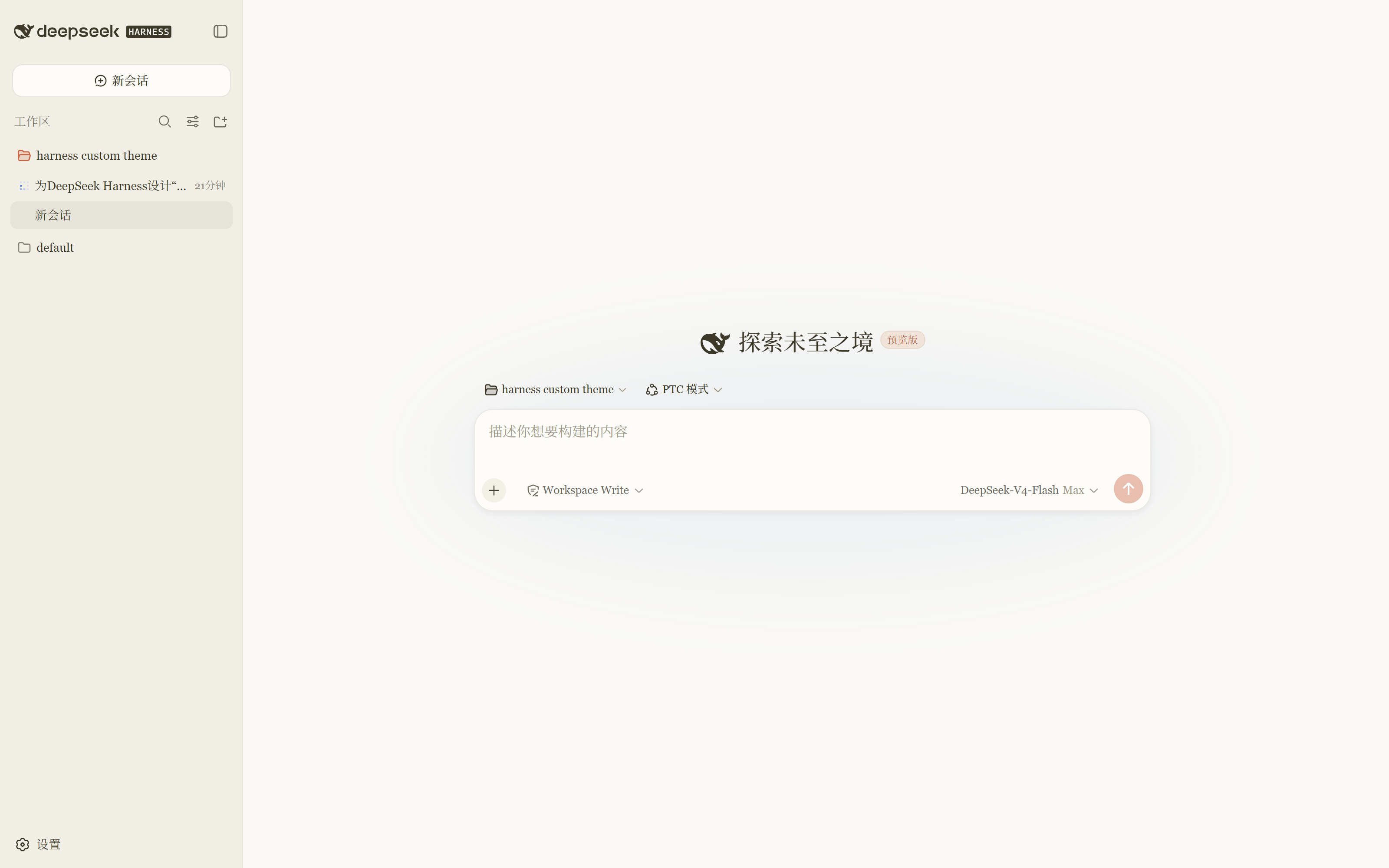
为 DeepSeek Harness(Web GUI)设计的暖色"纸质"外观主题,设计语言参考 Claude Code:奶油纸背景(#FAF9F5)、暖墨水文字(#3D3929)、陶土色强调(#C96442)、 衬线 CJK 友好字体与暖色代码块。
这是一个正式的 DSH 客户端插件(dsh.client 平台条目):主题通过平台主题服务注册,
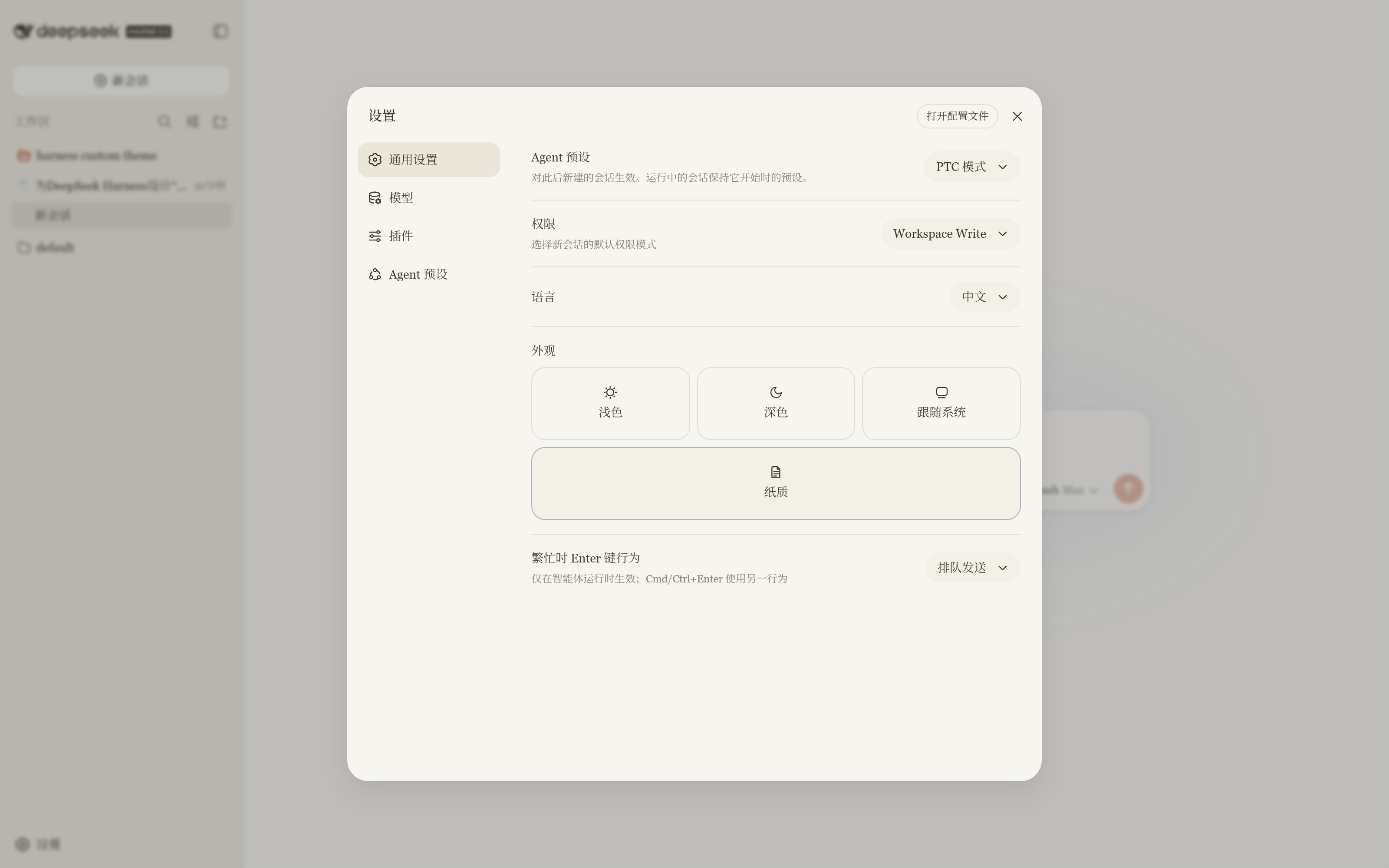
外观行被替换为四方块版本 —— 浅色 / 深色 / 跟随系统 / 纸质 —— 与内置行处于同一单元格。
卸载插件后内置外观行原样恢复。
界面预览
纸质主题下的会话列表(奶油纸背景 #FAF9F5、暖墨水文字、陶土色强调):
设置 → 常规 → 外观:一行四个方块,纸质 已选中(衬线字体、暖色界面元素):
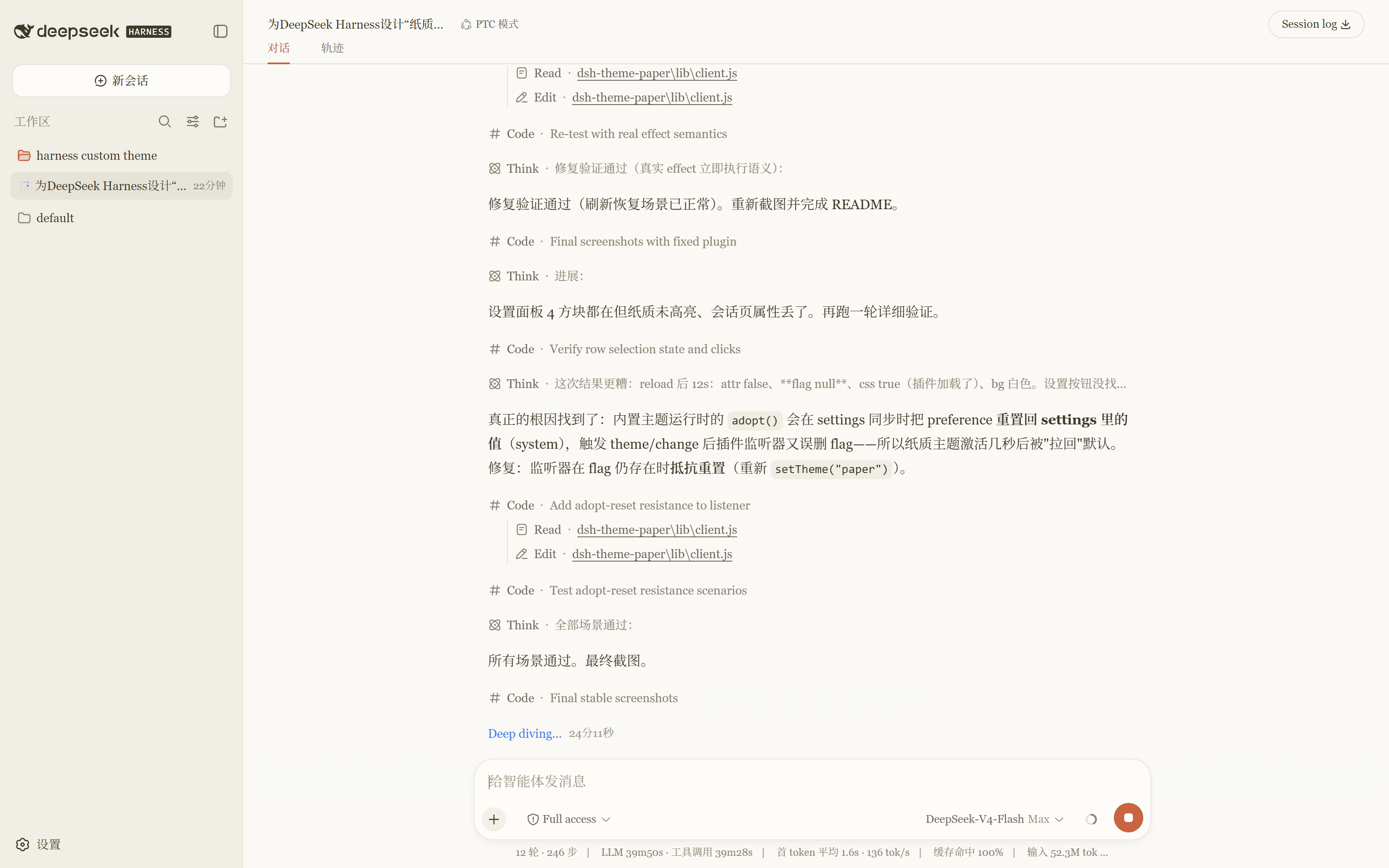
会话界面(暖色代码块与思考块、书卷质感排版):
工作原理
| 环节 | 位置 |
|---|---|
| 加载条目 | ~/.dsh/profiles/web/package.json 的 bundle 层 dsh-theme-paper(dsh.profile.bundles);条目由本包的 cordis.patch.yml 提供 |
| 包解析 | ~/.dsh/profiles/web/node_modules/dsh-theme-paper(junction 链接 → 本目录) |
| 主题注册 | lib/client.js 中 ctx.theme.register({ id: "paper", colorScheme: "light", tokens }) |
| 设置界面 | 以槽位优先级 -1 遮蔽 settings.general.item 内置的 appearance 单元格(最低优先级渲染;卸载后内置行恢复) |
| 持久化 | 纸质选择存于 localStorage(dsh.ui-theme.paper);内置选项仍走 settings.yaml |
| 启动层 | web shell 的 dist 中有一份同选择器/同 key 的调色板镜像与引导脚本,避免首帧闪烁;没有它插件也能完整工作 |
安装(一条命令,官方 bundle 形式)
本包是profile bundle(声明了 dsh.bundle.patch),这是 DSH 分发插件的标准方式:
安装进 profile 即自动激活。
# 任意目录下执行(需要 PATH 上有 pnpm):
dsh plugin --profile web add <本包路径或 GitHub 地址>
# 例如:dsh plugin --profile web add github:WuWL-98/dsh-theme-paper
# 或者:dsh plugin --profile web add D:\path\to\dsh-theme-paper

# 重启 Web 界面以加载新条目:
dsh web
dsh plugin 会在 profile 目录运行 pnpm 安装,并自动把本包追加到 profile 的
dsh.profile.bundles 层,无需手动改任何配置。
Clone 后安装(一键脚本,Windows)
git clone https://github.com/WuWL-98/dsh-theme-paper.git
cd dsh-theme-paper
powershell -ExecutionPolicy Bypass -File .\install.ps1
dsh web   # 重启生效
脚本做的事情:把仓库目录以 junction 链接进 ~/.dsh/profiles/web/node_modules,并把包名加入 profile 的 dsh.profile.bundles 层。
可重复运行(幂等);之后 git pull 即更新插件。
需要先至少运行过一次
dsh web(自动初始化 profile)再执行脚本。 macOS / Linux 可手动安装:ln -s <仓库目录> ~/.dsh/profiles/web/node_modules/dsh-theme-paper,再按下方"手动安装"第 2 步注册 bundle 层。
手动安装(无 pnpm)
# 1. 把包装进 profile
mkdir ~/.dsh/profiles/web/node_modules
New-Item -ItemType Junction -Path ~/.dsh/profiles/web/node_modules/dsh-theme-paper -Target <本包目录>

# 2. 在 ~/.dsh/profiles/web/package.json 中注册为 bundle 层:
#    "dsh": { "profile": { "bundles": ["@deepseek-ai/dsh-base", "@deepseek-ai/dsh-web-app", "dsh-theme-paper"] } }

# 3. 重启 dsh web
web profile 自己的
cordis.patch.yml保持[]—— 插件条目来自本包内的 bundle 补丁层(cordis.patch.yml)。
使用 / 关闭主题
打开 设置 → 常规 → 外观:一行四个方块。 点击 纸质 启用主题;点击 浅色 / 深色 / 跟随系统 退出(选择按浏览器记忆)。
卸载 / 停用插件
插件清单(设置 → 插件)显示运行状态,但启停由配置驱动(清单本身只读):
# A. 完全卸载(官方命令,需 pnpm):
dsh plugin --profile web remove dsh-theme-paper
dsh web

# B. 完全卸载(手动):
#    1. 从 ~/.dsh/profiles/web/package.json 的 dsh.profile.bundles 中移除 "dsh-theme-paper"
#    2. Remove-Item ~/.dsh/profiles/web/node_modules/dsh-theme-paper
#    3. 重启 dsh web

# C. 临时停用(保留安装,只是不加载):
#    编辑本包内 cordis.patch.yml,给条目加 disabled: true:
#    - id: theme-paper
#      name: dsh-theme-paper
#      disabled: true
#    然后重启 dsh web
卸载后内置外观行原样恢复;仅纸质相关的 localStorage 标记成为惰性数据(没有插件读取它们)。
文件说明
| 路径 | 作用 |
|---|---|
lib/client.js | 客户端 bundle:注册 paper 主题(102 个 token)、注入纸质 CSS、管理 data-ds-paper-theme 属性、持久化选择、渲染四方块外观行 |
lib/index.js | 服务端 loader 存根(纯浏览器插件) |
package.json | dsh.bundle.patch(bundle 层声明)+ dsh.client 平台声明与注入边 |
cordis.patch.yml | bundle 补丁:插入 theme-paper 加载条目 |
GitHub 分享
本目录可直接作为一个 Git 仓库推送(无绝对路径依赖、无构建步骤)。
使用者安装方式见上文"安装"章节。
注意:peerDependencies 中的 @deepseek-ai/* 是 DSH 自带包,使用者无需另行安装;
若对方 DSH 版本不同,可能需要按版本微调(当前针对 0.1.0-rc.6 验证)。
프로젝트 파일 및 신호
표시된 항목은 디렉터리 스냅샷에서 감지된 공개 저장소 신호입니다.
저장소 정보
- 언어
- PowerShell
- 라이선스
- MIT
- 마지막 업데이트
- 2026. 8. 15. 오전 9:47
신중하게 설치하기
소스 코드, 권한, 수명 주기 스크립트, 의존성 및 네트워크 접근을 검토하고 신뢰하지 않는 플러그인은 격리 환경에서 테스트하세요.