安装
pnpm dsh web --host 0.0.0.0此命令根据 GitHub 仓库地址生成。运行前请检查上游 README 与源代码;需要可复现安装时,请固定 release 或 commit。
README
维护者编写的文档快照。
DSH WhaleDeck · Modern DeepSeek Harness Full-Stack Agent Workbench

🔥 A modern desktop client and full-stack plugin suite for DeepSeek Harness — built for newcomers and geek developers alike.
English | 简体中文


📖 Introduction
DSH WhaleDeck is an out-of-the-box desktop client and full-stack plugin suite built on top of DeepSeek's official open-source agent framework, DeepSeek Harness (DSH).
While upstream DSH is exceptionally capable, its native CLI interface and runtime prerequisites (Node.js >= 22.19, pnpm, manual terminal orchestration) present a steep learning curve for many. DSH WhaleDeck bridges this gap:
- For Beginners & Everyday Users: Provides standalone, one-click desktop installers with bundled runtimes and curated plugins — just double-click and experience cutting-edge AI Agent workflows instantly.
- For DSH Plugin Developers: Offers a rich development, debugging, and showcase platform equipped with multi-source MCP aggregation, CoT vision inspection, an interactive mascot pet, and an industrial-grade sidebar.
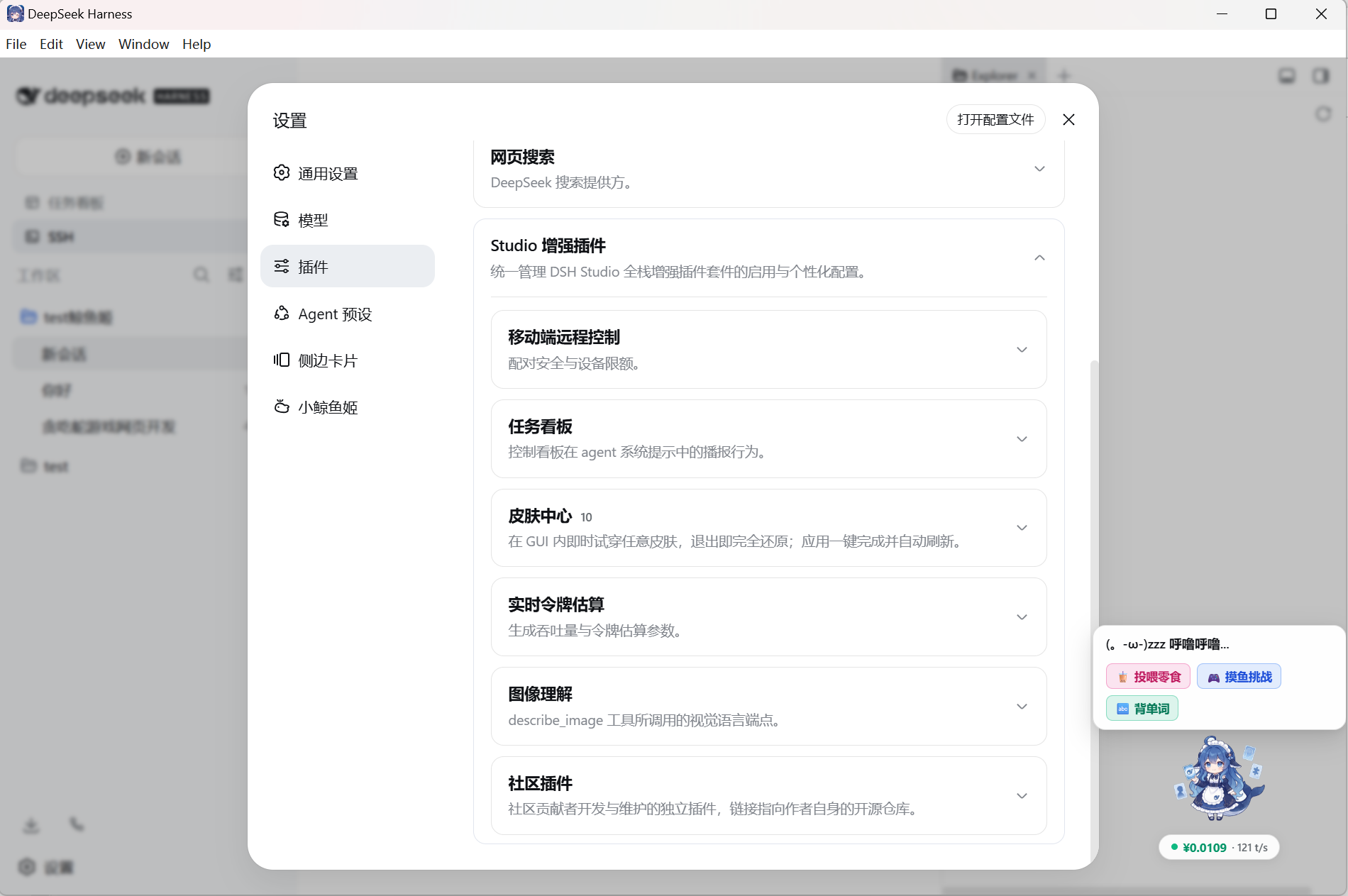
✨ Key Highlights
- 🚀 Zero-Configuration Desktop Client: Standalone installers for Windows x64 and macOS Apple Silicon — no manual Node.js or CLI setup needed.
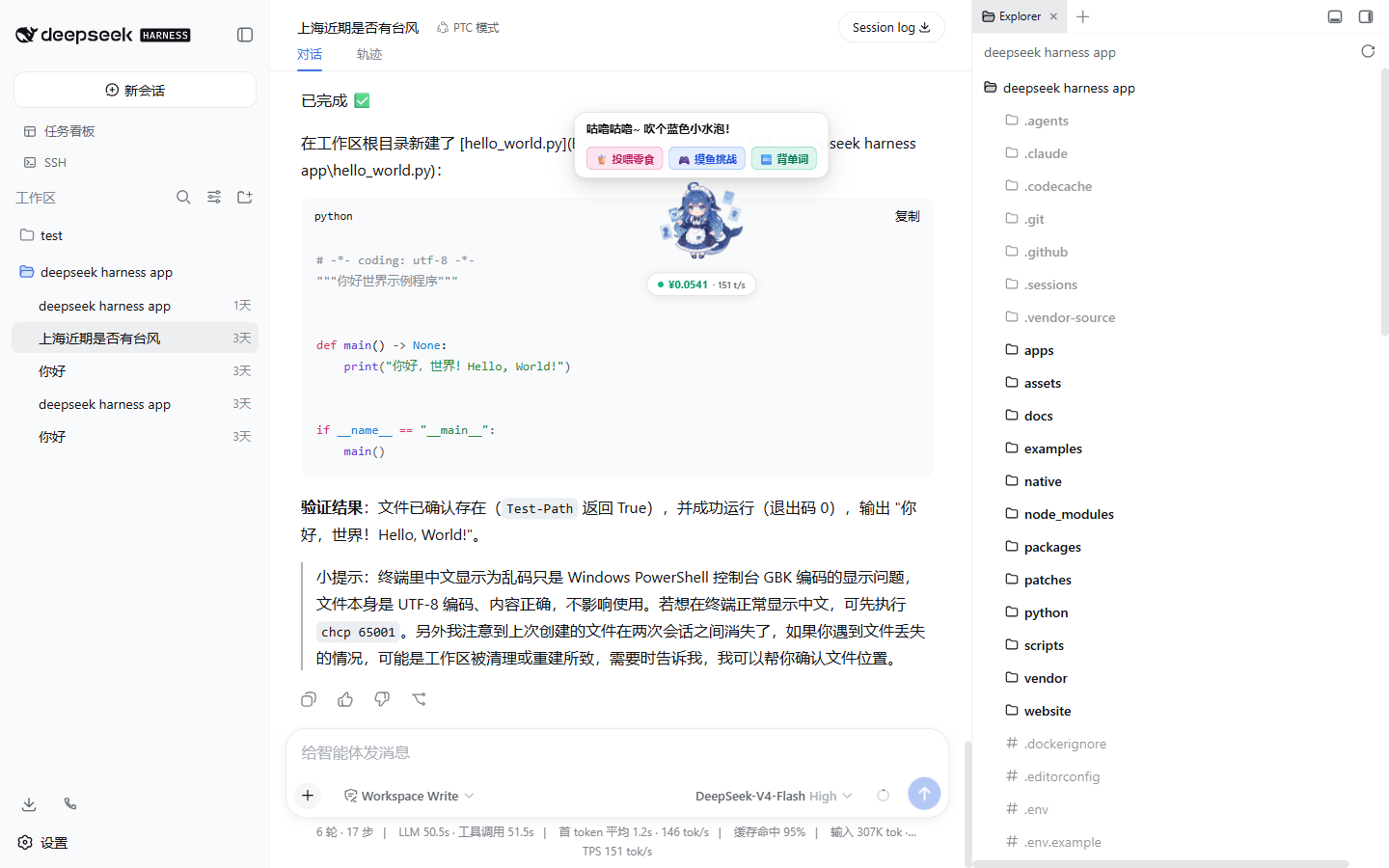
- 🐬 Whale-chan 2.0 Mascot Companion: An interactive desktop companion featuring 3 ultra-fine skins, real-time token/TPS billing, feed interactions, mini-games, and a food decision wheel.
- 🧰 Industrial Geek Sidebar: Fully equipped with an embedded workspace File Explorer, visual Git diff & history inspector, persistent ConPTY terminal, and Kanban Task Board.
- 🔌 Visual Multi-Source MCP Hub: Automatically discovers workspace & global MCP configurations (Cursor / Claude / Gemini / DSH) with an online single-tool RPC testing sandbox.
- 🧠 CoT Multimodal & Reasoning Engine: Seamlessly parses and reveals detailed
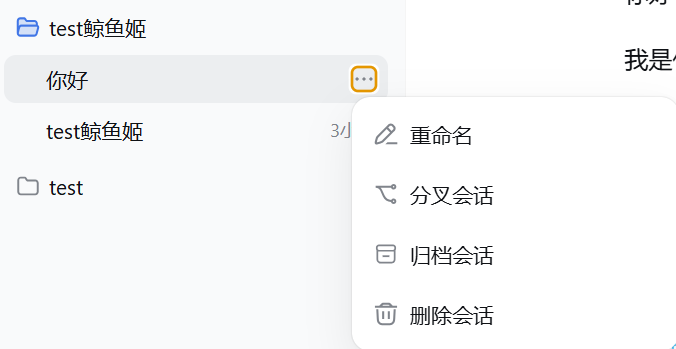
reasoning_contentchains from thinking-capable multimodal models. - 💬 Session Lifecycle Management: Visual session forking (branching), renaming, archiving, and deletion directly from the UI.
- 🛡️ Clean & Resilient Architecture: Guaranteed process tree lifecycle management without orphan processes, single-instance locking, and system tray residency for uninterrupted agent tasks.
🧩 Core Feature Tour
🐬 1. Whale-chan 2.0 Mascot Companion (dsh-mascot-pet)
Pain Point Solved: Long hours of agent debugging and programming can feel sterile; lacks empathetic feedback and quick mental breaks.
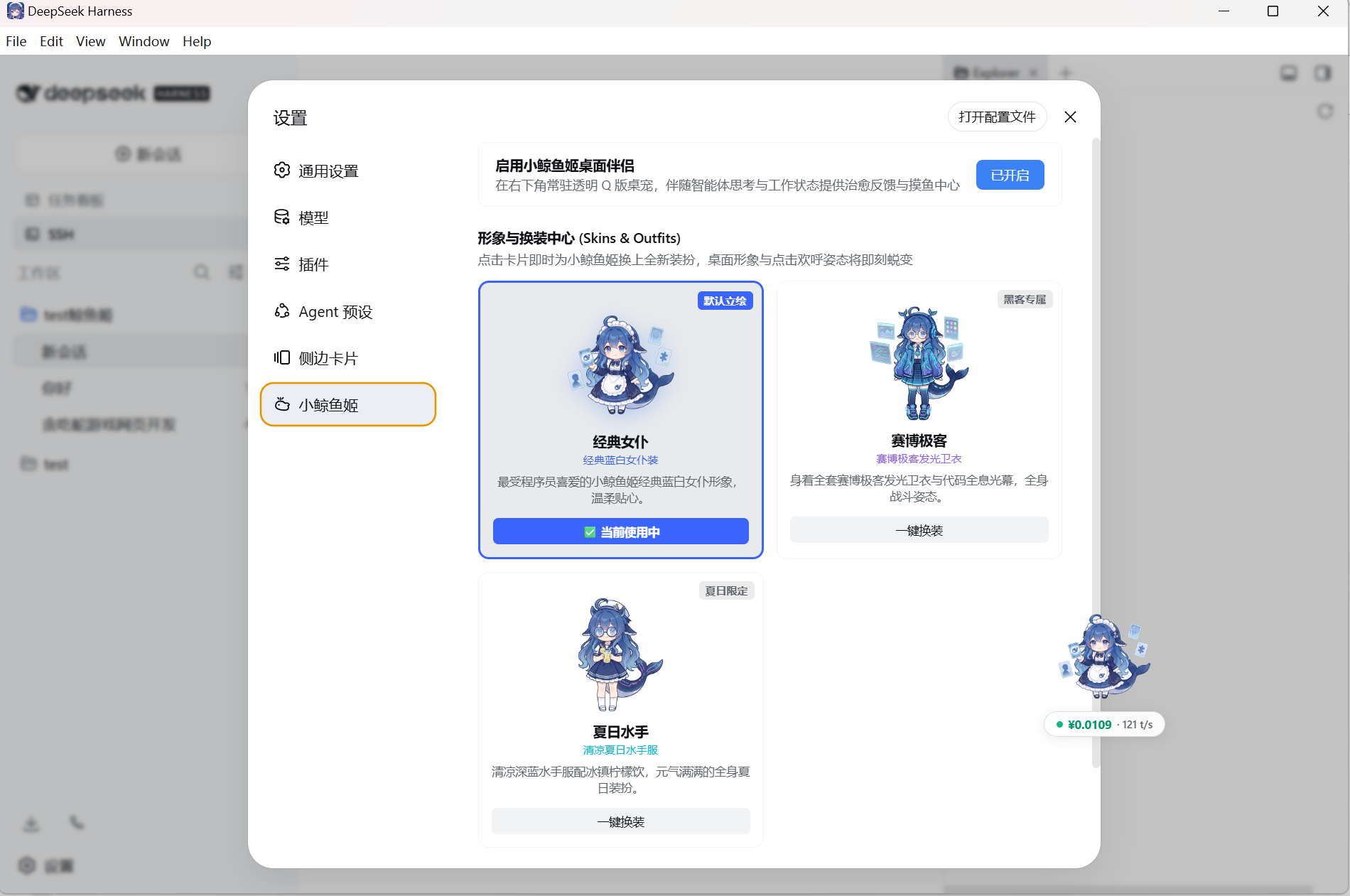
👗 3 High-Precision Transparent Skins (Skins & Outfits)
Instant, one-click skin switching among Classic Maid Outfit, Cyber Mecha Hacker, and Summer Sailor Uniform without page reloads.
🎮 Interactive Entertainment & Real-Time Monitoring Matrix
Whale-chan integrates real-time token monitoring, feeding gamification, mini-games, and geek humor to keep you energized:
| 📊 实时用量与 TPS 监控 (Token Billing) | 🍉 零食投喂与好感度 (Feed & Affinity) |
|---|---|
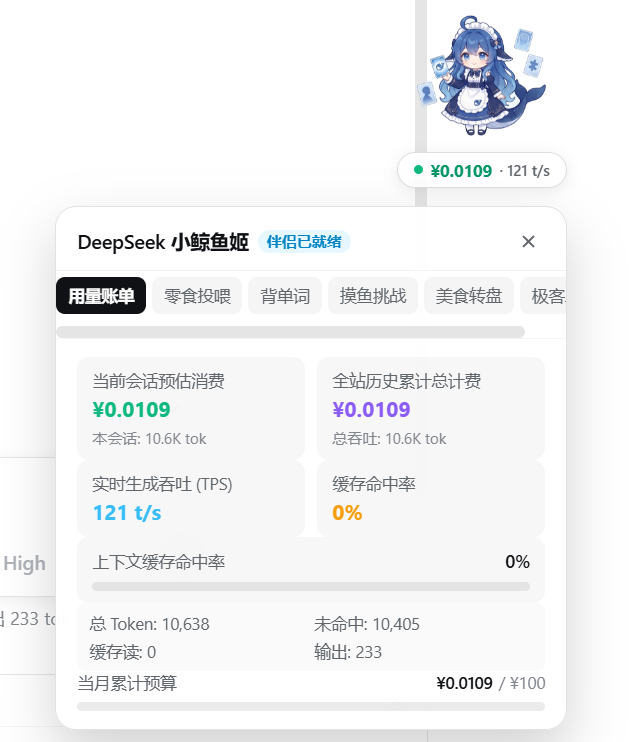 | 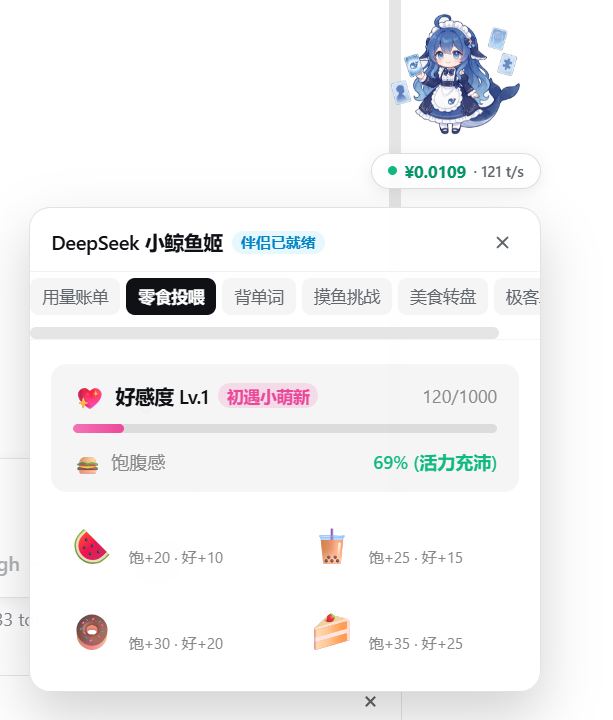 |
| 实时开销看板:当前会话消费、全站累计、实时 TPS 吞吐、缓存命中率与月度预算进度。 | 投喂养成系统:西瓜、奶茶、甜甜圈与草莓蛋糕投喂,好感度升级与饱腹感活力管理。 |
| 🕹️ 摸鱼小游戏大厅 (Mini-Games) | 🎲 美食决策转盘 (Food Wheel) |
|---|---|
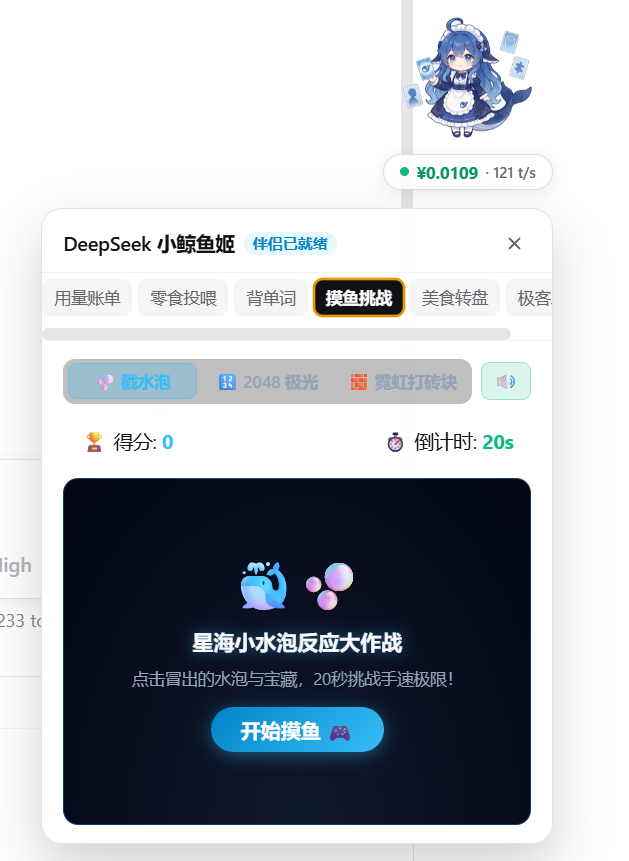 | 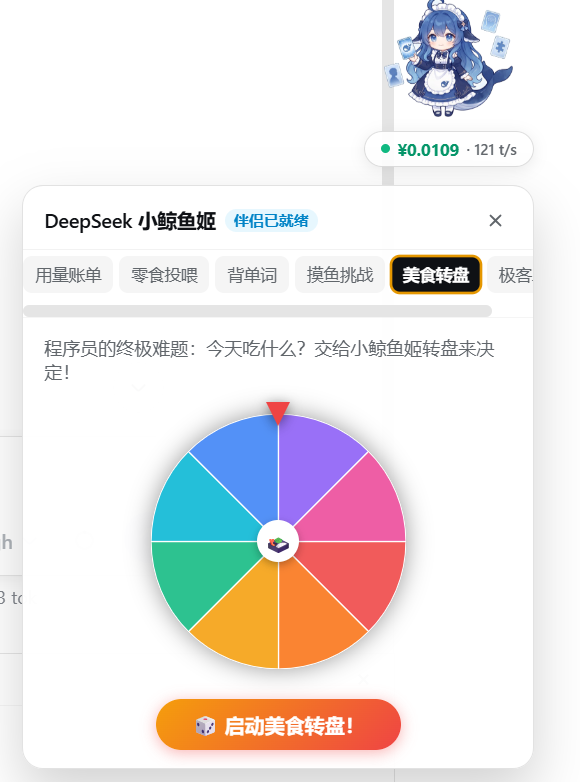 |
| 摸鱼解压小游戏:内置星海小水泡反应大作战、2048 极光、霓虹打砖块游戏大厅。 | 程序员终极难题解法:“今天吃什么?”交给小鲸鱼姬随机轮盘一键抽奖决定! |
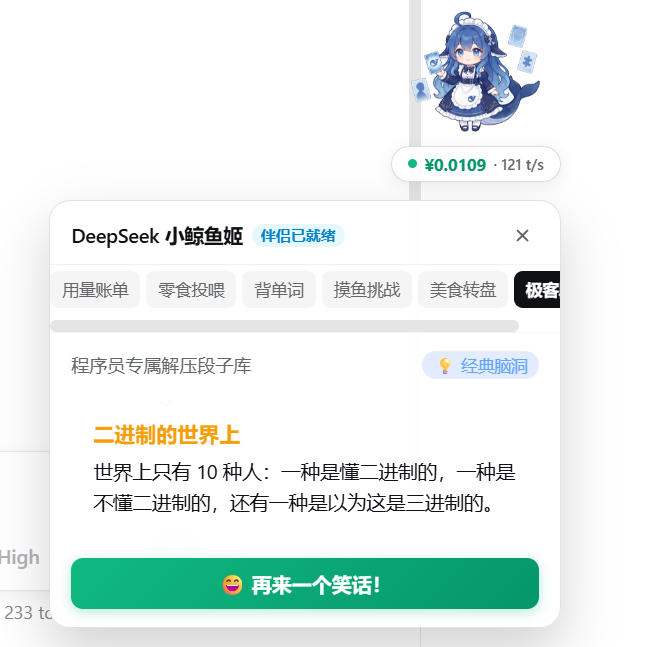
💡 程序员专属脑洞解压笑话库(二进制度、程序员幽默每日放送)
🧰 2. Industrial Geek Sidebar Suite (dsh-better-sidebar)
Pain Point Solved: Standard DSH lacks an embedded file explorer, terminal, and task board, forcing constant context switching between VSCode, terminal tabs, and browsers.
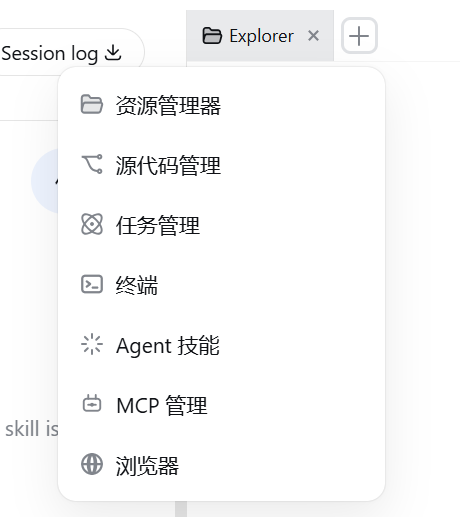
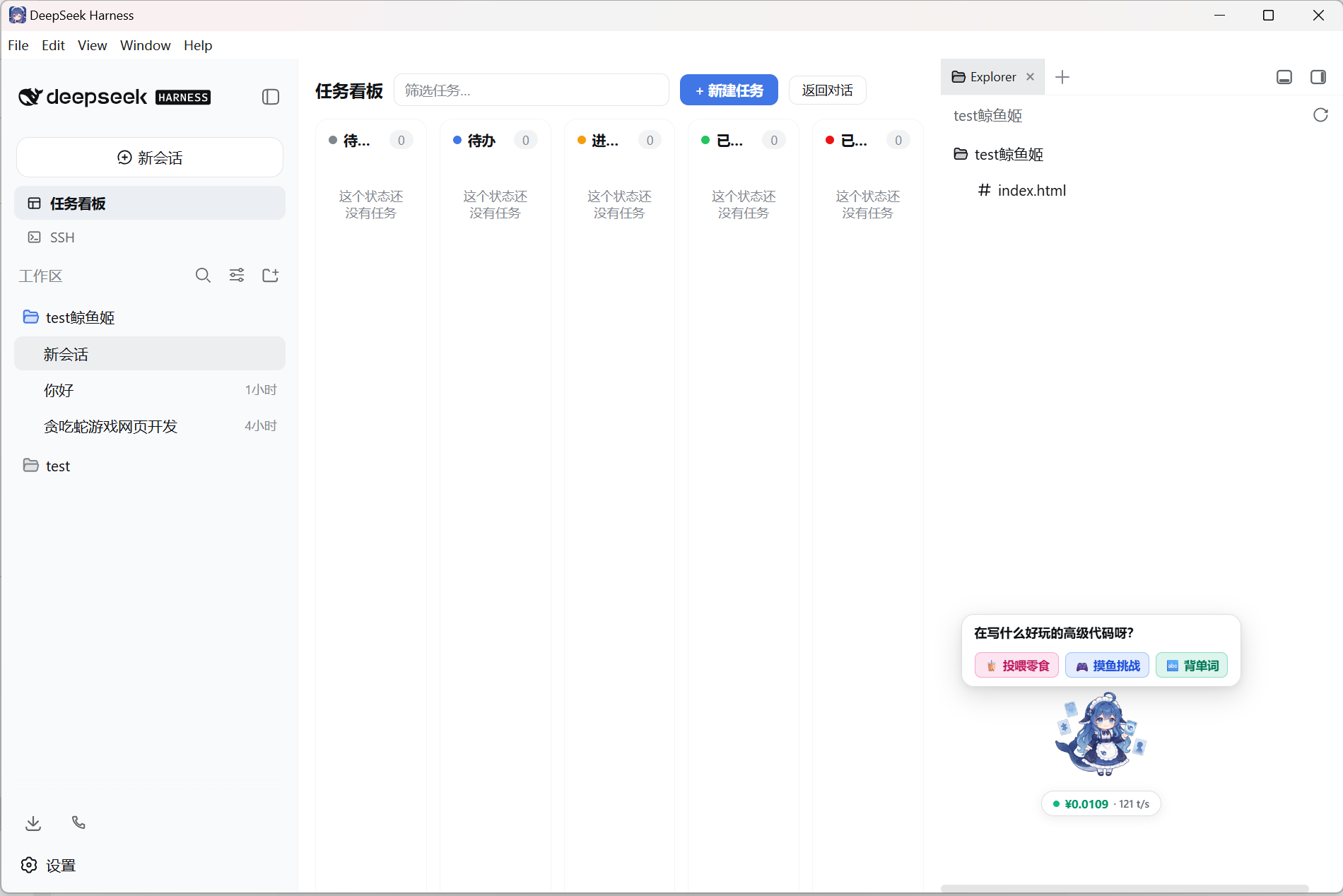
- 7-in-1 Workbench Navigation: Seamlessly switch across File Explorer, Source Control (Git), Task Board, Integrated Terminal, Agent Skills, MCP Management, and Embedded Browser.
- Visual Kanban Task Board: Real-time 5-column task progress tracking (Planned / Todo / In-Progress / Done / Failed) across durable agent workflows.
- Persistent PTY Terminal: Built-in Windows ConPTY / Unix PTY shell sessions supporting full CLI commands directly alongside the agent chat.
| 🗂️ 多标签工作台菜单 (Sidebar Menu) | 📋 5 列可视化任务看板 (Task Board Kanban) |
|---|---|
 |  |
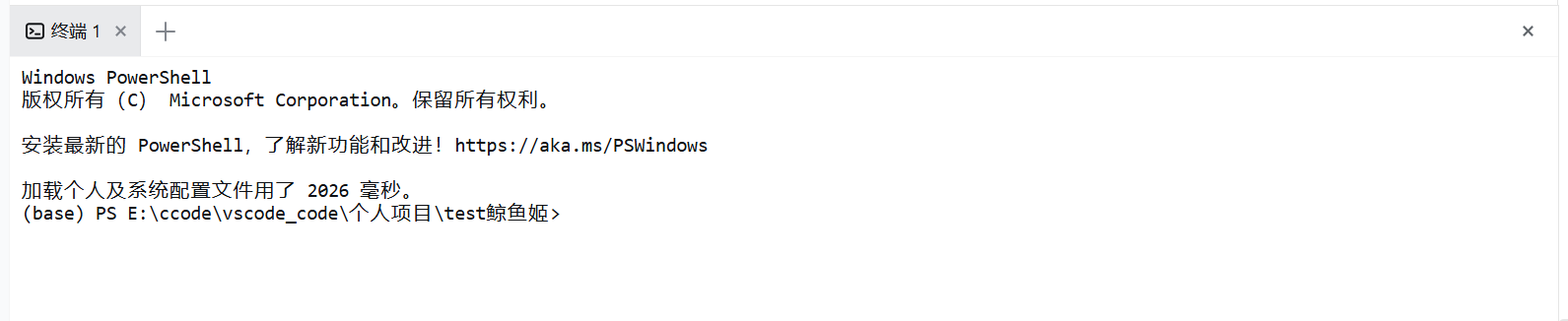
💻 内置持久化终端:免切窗口直接执行 Shell/PowerShell 命令
🔌 3. Visual Multi-Source MCP Hub (dsh-better-sidebar-mcp)
Pain Point Solved: Model Context Protocol (MCP) server configurations are traditionally scattered across different tools (
.cursor,.vscode,Claude Desktop), making them difficult to locate, test, and troubleshoot.
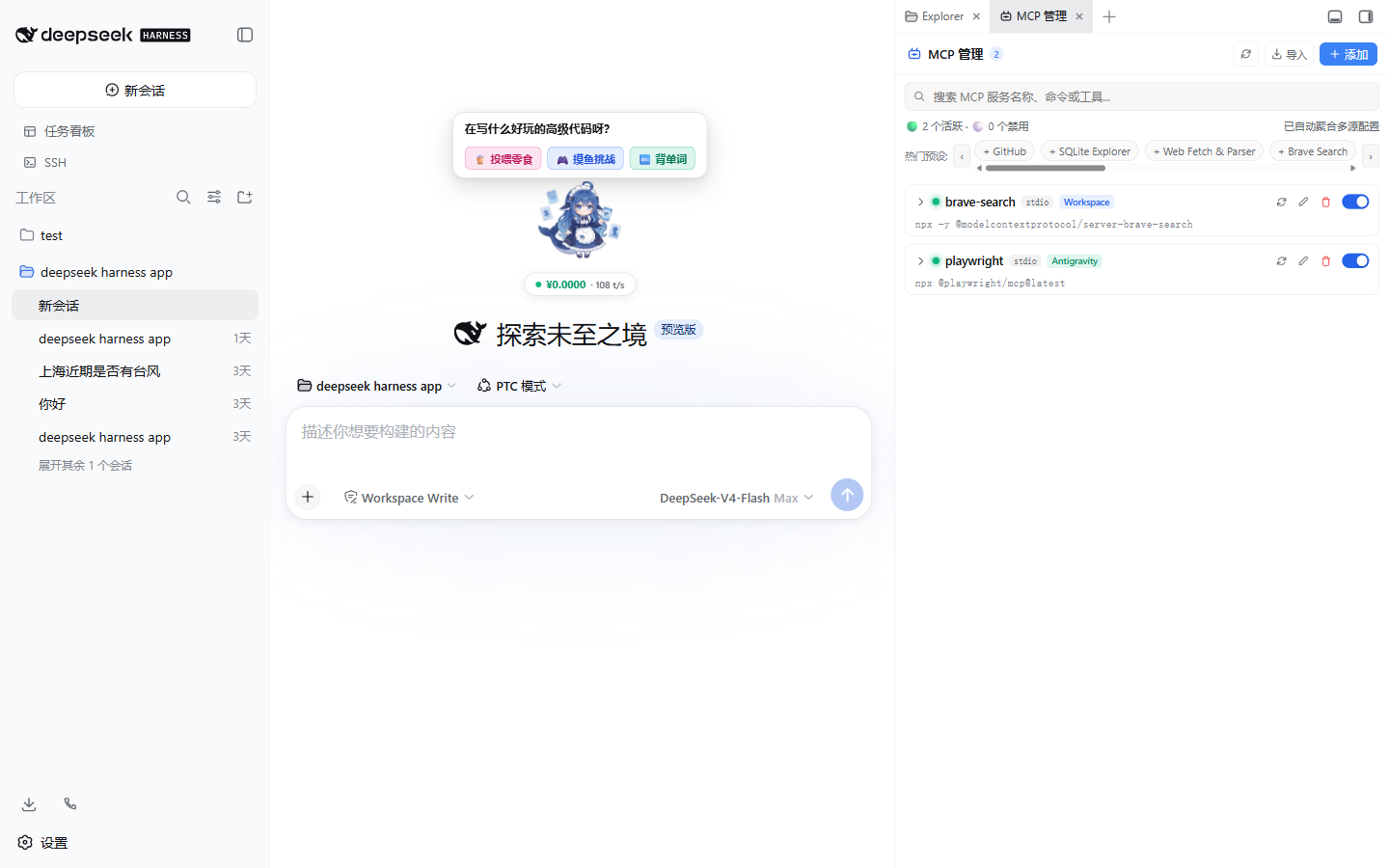
- Multi-Source Automatic Aggregation: Deep-scans both workspace configs (
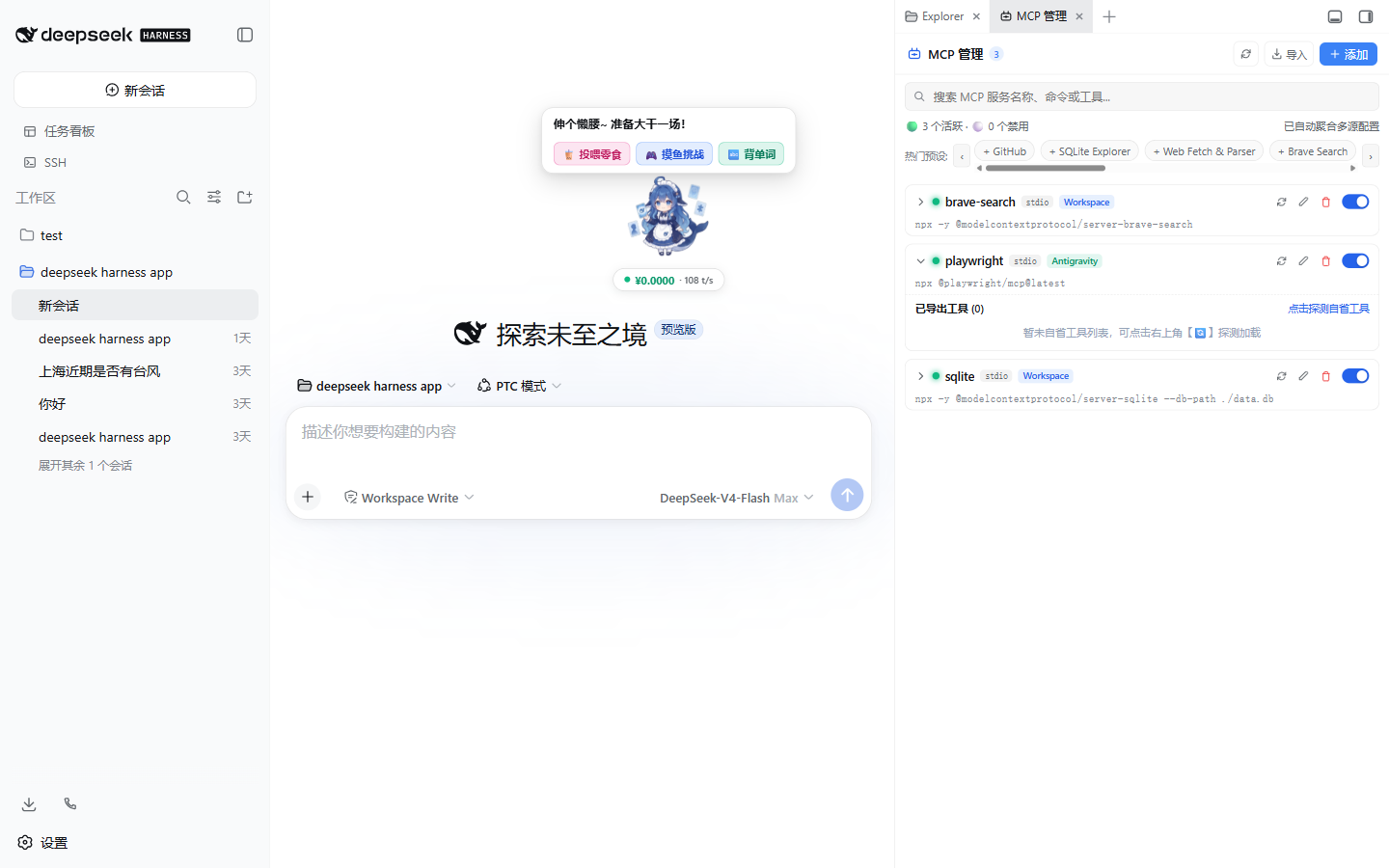
./mcp.json,.vscode/mcp.json,.cursor/mcp.json,.agents/mcp_config.json) and global environments (Claude Desktop, Cursor, Antigravity/Gemini,~/.dsh/mcp.json). - Tool Tester Sandbox Modal: Visualizes parameter JSON Schemas, auto-fills default test arguments, performs live RPC handshakes, and reports millisecond-level execution latencies.
- 10 Curated Official Presets: Pre-configured templates for GitHub, SQLite, Web Fetch, Brave Search, Puppeteer, PostgreSQL, Memory, Filesystem, Everything, and Git with smooth horizontal scrolling.
- Batch JSON Import & Hot Toggling: Paste any raw
mcpServersJSON block for instant parsing; toggle servers on/off dynamically without service restarts.
| 🔌 MCP 服务管理中心 (MCP Manager) | 🧪 单工具在线 RPC 调试沙箱 (Tool Tester) |
|---|---|
 |  |
🧠 4. CoT Multimodal & Reasoning Engine (dsh-tool-describe-image)
Pain Point Solved: Thinking-capable multimodal LLMs frequently emit empty streaming
contenttokens during their initial reasoning phases, resulting in blank screens or lost chain-of-thought visibility.
- Chain-of-Thought (CoT) Compatibility: Tailored for models with deep reasoning (e.g. Xiaomi MiMo, DeepSeek-R1 series), parsing and displaying
reasoning_contentblocks seamlessly in real time. - Graphical Connectivity & Model Discovery: One-click endpoint health checks, round-trip latency benchmarks, and automatic enumeration of upstream vendor model lists.
💬 5. Session Lifecycle Management & Forking
Pain Point Solved: Exploring multiple solution branches previously required manually creating sessions and copy-pasting conversation histories.
- Session Forking (Branching): Fork any session at its current state to test alternative prompts or code paths independently.
- Inline Organization: Rename, archive, and cleanly delete sessions with custom context actions.
🚀 Installation & Quick Start
Choose from three flexible installation methods based on your experience level:
                    ┌──────────────────────────────────────────────┐
                    │       How would you like to use DSH Studio?   │
                    └──────────────────────┬───────────────────────┘
                                           │
                 ┌─────────────────────────┴─────────────────────────┐
                 ▼                                                   ▼
     【Everyday Users / Beginners】                              【Developers & Power Users】
                 │                                                   │
   Download Standalone Installer (Method 0)              ┌─────────────┴─────────────┐
        • Windows: .exe (NSIS)                           ▼                           ▼
        • macOS: .dmg                               Build from Source (Method 1)  Install into Existing DSH (Method 2)
        • Zero dependencies, 1-click launch          • pnpm install                • dsh plugin add ...
                                                     • Hack & contribute           • Mix & match
Method 0: Standalone Desktop Installer (Recommended for Beginners)
Designed for users who want a hassle-free experience. The installer includes the full Node.js runtime and all DSH Studio core plugins out of the box.
| Operating System | Package Format | Architecture | Installation Notes |
|---|---|---|---|
| Windows | DSH-Studio-Setup-*.exe | x64 (64-bit) | Run the NSIS setup wizard; automatically creates desktop and start menu shortcuts |
| macOS | DSH-Studio-*.dmg | Apple Silicon (arm64, M1/M2/M3/M4) | Open the DMG image and drag DSH Studio.app into your Applications folder |
[!TIP] macOS Gatekeeper prompt on first launch?
- Go to System Settings > Privacy & Security > scroll down to find DSH Studio and click "Open Anyway";
- Or bypass directly in your terminal:
xattr -cr /Applications/DSH\ Studio.app
Method 1: Build & Run from Source (Developer Mode)
Ideal for developers who wish to customize plugins, modify the frontend, or contribute to DSH Studio (requires Node.js >= 22 and pnpm 11+):
# 1. Clone the repository
git clone https://github.com/jiuge2467/DSH-WhaleDeck.git
cd DSH-WhaleDeck

# 2. Install dependencies and build all packages
pnpm install
pnpm run build

# 3. Launch the DSH Web workbench (listens on 0.0.0.0:3080)
pnpm dsh web --host 0.0.0.0
Open http://127.0.0.1:3080 in your web browser to start exploring.
Method 2: Add Plugins to an Existing DSH Environment
If you already have upstream DSH installed and running, you can add individual DSH Studio plugins directly to your web profile:
# 1. Install MCP Visual Management Hub
cd ~/.dsh && dsh plugin --profile web add dsh-better-sidebar-mcp

# 2. Install Enhanced Sidebar (Explorer, Git, Terminal, Task Board)
cd ~/.dsh && dsh plugin --profile web add dsh-better-sidebar

# 3. Install Whale-chan Mascot Pet 2.0
cd ~/.dsh && dsh plugin --profile web add dsh-mascot-pet
Restart dsh web to activate the plugins.
🏗️ Architecture & Technology Stack
DSH Studio Desktop is built on a "Thin Electron Host + Process Tree Daemon + Local Loopback Web Application" decoupled architecture:
flowchart TD
  subgraph Electron_Main["Electron Main Process (Node.js Host)"]
    SingleInstance["Single Instance Lock"]
    AppLifecycle["Lifecycle Dispatcher (Ready / Activate / Quit)"]
    WindowManager["Window Manager (Splash -> Main Window)"]
    TrayManager["System Tray (Resident & Context Menu)"]
    ServerDaemon["DSH Server Daemon (Port Probing & Healthcheck)"]
    ProcessKiller["Process Tree Cascade Killer"]
  end

  subgraph DSH_Runtime["DSH Studio Runtime (Cordis Microkernel)"]
    WebServer["Loopback Web Server (http://127.0.0.1:3080)"]
    Plugin_MCP["🔌 MCP Management Hub"]
    Plugin_Pet["🐬 Whale-chan 2.0 Mascot"]
    Plugin_Vision["🧠 CoT Vision Engine"]
    Plugin_Sidebar["🧰 Enhanced Sidebar Suite"]
  end

  subgraph Renderer["Chromium Renderer (Web GUI)"]
    Web_UI["React 18 + CSS Modules + Vite"]
  end

  SingleInstance --> AppLifecycle
  AppLifecycle --> ServerDaemon
  AppLifecycle --> WindowManager
  AppLifecycle --> TrayManager
  ServerDaemon --> ProcessKiller
  ServerDaemon -->|Spawn & Monitor| WebServer
  WebServer --> Plugin_MCP
  WebServer --> Plugin_Pet
  WebServer --> Plugin_Vision
  WebServer --> Plugin_Sidebar
  ServerDaemon -->|HTTP 200 Ready Signal| WindowManager
  WindowManager -->|Load URL| Renderer
Technology Matrix
| Layer | Component / Tool | Purpose & Rationale |
|---|---|---|
| Desktop Shell | Electron ^35.0.0 | Cross-platform container providing system tray, native menus, and single-instance locks |
| Packaging | electron-builder ^25.1.8 | Generates Windows NSIS setup binaries and macOS DMG disk images |
| Frontend UI | React 18 + CSS Modules | Modern, responsive interface with frosted-glass design language |
| Plugin Kernel | Cordis + DSH Core | Highly modular microkernel supporting dynamic lifecycle effects and zero-coupling extensions |
| Language | TypeScript (Strict ESM) | Strict end-to-end type safety and explicit JSDoc contracts across packages |
| Build Tools | pnpm + tsdown + Vite | Monorepo dependency management and rapid bundle compilation |
| Testing | Vitest | Unit, integration, snapshot, and regression test suites |
| CI/CD | GitHub Actions | Cross-platform build matrix and automated GitHub Release asset dispatch |
🧩 Bundled Plugins, References & Optimizations
DSH Studio stands on the shoulders of the vibrant DeepSeek Harness and open-source Agent community. We bundle, adapt, and significantly optimize several foundational plugins to deliver a seamless, industrial-grade desktop experience:
| Plugin Package | Role & Features | Upstream / Reference | Key Optimizations & Enhancements in DSH Studio |
|---|---|---|---|
dsh-mascot-pet | 🐬 Whale-chan 2.0 Mascot Companion | Community Mascot & Pet concepts | • Zero-Residue Lifecycle: Fixed bug where popup bubbles and wander loops persisted when disabled (return null fail-fast DOM unmount + wanderEngine.interrupt()).• Skins Center: Built 3 high-precision outfits (Classic Maid / Cyber Hacker / Summer Sailor) with instant switching. • Fast-Paced Vocabulary: 650ms auto-advancing GRE/CET-4 flashcards with A/B/C/D keyboard blind-typing. • Mini-Game & Decision Hub: Built-in 2048 Aurora, Starry Bubbles, Neon Bricks, and Food Decision Wheel. • Live Token Billing: Real-time session expenditure, historical total, TPS throughput, and budget gauges. |
dsh-better-sidebar-mcp | 🔌 Visual Multi-Source MCP Hub | Community MCP Tools & Protocol | • Cross-Tool Auto Discovery: Deep-scans ./mcp.json, .cursor/, .vscode/, Claude Desktop, Gemini/Antigravity, and ~/.dsh/.• Interactive Tool Tester: In-GUI JSON Schema parameter visualization, live RPC payload execution, and latency benchmarks. • Batch JSON Parser: One-click import for raw mcpServers JSON snippets with hot enable/disable toggling. |
dsh-better-sidebar / dsh-task-board | 🧰 7-in-1 Geek Sidebar & Task Board | Community Sidebar & Kanban | • 7-in-1 Multi-Tab Hub: Seamless switching across Explorer, Git, Task Board, Terminal, Skills, MCP, and Browser. • Persistent PTY Terminal: Full ConPTY / PTY shell integration supporting direct CLI command execution. • 5-Column Task Kanban: Real-time visual progress tracking across durable agent workflow states. |
dsh-tool-describe-image | 🧠 CoT Multimodal Reasoning Engine | Multimodal Vision Tool | • Thinking Model Compatibility: Custom streaming parser for deep-reasoning multimodal models (e.g. Xiaomi MiMo, DeepSeek-R1), preventing blank screens and preserving complete reasoning_content chains.• Connectivity Benchmark: Visual endpoint health checks, round-trip latency metrics, and upstream model discovery. |
dsh-web-ui-settings | ⚙️ Studio Enhanced Plugin Config Hub | Web UI Settings | • Studio Brand Overhaul: Modernized full-stack plugin configuration UI, removing legacy strings in favor of unified DSH Studio branding. • Local Settings Bridge: Implemented loopback RPC bridge for seamless third-party namespace mutations. |
dsh-liangshen | ⚡ Custom Agent Preset (Nanliang Mode) | Community Agent Presets | • Specialized V4 Pro prompt guidance and custom preset template management. |
🌐 Open-Source Community Ecosystem References
We also express our sincere gratitude to the following community projects integrated into our community plugin directory:
- 📊 dsh-data-agent by
@omdsh-dev: Dedicated Data Agent preset for database querying, updates, and analysis. - 📟 dsh-TUI by
@ccch1mneyyy: Claude Code-style fullscreen interactive terminal plugin with pixel-whale header and TPS meters. - 📜 dsh-tianshu-tui by
@huiliyi37: TDD and evidence-gate terminal UI for DeepSeek Harness. - 📝 dsh-chat-summary by
@v833: Export conversations to Markdown / DOCX / PDF with optional LLM smart summarization. - 🔍 dsh-builtin-toggles by
@Starfie1d1272: Evidence-backed built-in capability inspector with fail-closed switches.
We believe in radical transparency in open source. Here is our balanced assessment of DSH Studio's strengths and current limitations:
🌟 Strengths (Pros)
- Zero-Friction Onboarding: Pre-built desktop packages completely eliminate Node.js, pnpm, and terminal dependencies for beginners.
- Curated Out-of-the-Box Suite: Five core plugins pre-installed — no manual config editing or fragile plugin installation steps.
- Unified MCP Central Hub: Seamlessly connects Cursor, Claude Desktop, VSCode, and DSH configurations with live tool debugging.
- Pure Modular Extensibility: Adheres to upstream DSH Cordis standards; every feature is an isolated bundle that can be removed or extended.
- Robust System Tray Residency: Closes to tray to keep long-running background Agent tasks alive and safe from accidental closure.
- Fully Open Source: Licensed under the permissive MIT License with clean, auditable code.
⚠️ Current Limitations & Mitigations (Cons)
- Desktop Package Targets: Pre-built packages currently target Windows x64 and macOS Apple Silicon (arm64). Linux users can run smoothly via source code (Method 1).
- macOS Gatekeeper Warning: Self-signed binaries may trigger an unsigned app prompt on macOS. Easily bypassed in System Settings or via
xattr -cr. - API Keys Required: DSH Studio is a local orchestration workbench; users must supply their own DeepSeek or OpenAI-compatible API credentials.
- Installer Binary Size: Bundling the full Node.js runtime and Chromium engine yields a larger download footprint than pure CLI tools. Ongoing optimization through ASAR compression and tree-shaking.
- Cloud Plugin Marketplace in Progress: An in-app one-click cloud store is currently on the roadmap for future releases.
🧪 Testing & Quality Assurance
DSH Studio is verified against comprehensive unit, integration, and snapshot test suites:
# Run full repository unit tests
pnpm test

# Run CI coverage audit (strict gate)
pnpm run test:coverage

# Run tests for a specific plugin package (e.g. Mascot Pet)
pnpm --filter dsh-mascot-pet test
🤝 Contributing
Contributions from the community are warmly welcomed! Whether reporting bugs, designing new skins, crafting plugins, or improving documentation:
- Fork this repository
- Create your feature branch:
git checkout -b feat/YourAwesomeFeature - Commit your changes:
git commit -m 'feat: add some amazing feature' - Push to the branch:
git push origin feat/YourAwesomeFeature - Open a Pull Request
Please check CONTRIBUTING.md for details.
📄 License
This project is licensed under the MIT License.
项目文件与信号
以下项目是目录快照中检测到的公开仓库信号。
仓库信息
- 开发语言
- TypeScript
- 许可证
- MIT
- 最后更新
- 2026年8月18日 09:56
谨慎安装
请检查源代码、权限、生命周期脚本、依赖与网络访问;不受信任的插件应先在隔离环境中测试。