安装
npx -y @deepseek-ai/dsh plugin --profile web add github:jsdvjx/dsh-strata此安装命令根据 GitHub 仓库地址生成,是未经验证的安装起点。
README
维护者编写的文档快照。
dsh-strata
Read the strata of a run.
English | 中文
A real minimap of the session trajectory for the DeepSeek Harness Web GUI — it takes the transcript's scrollbar seat and turns it into a scaled, colored picture of the whole loaded conversation, with your own messages emphasised and clickable anchors beside it.
Not a tick rail. Every other conversation navigator draws one evenly-spaced dot per prompt, which throws away the only thing a long agent session has too much of: volume. Here a band's height is the row's real rendered height, so the map is a proportional compression of the scroll extent — a 300-line answer looks like 300 lines, forty tool calls look like forty tool calls, and the viewport lens maps 1:1 onto the scrollbar. What you get is the shape of the run at a glance: where you spoke, how much work each prompt cost, and where it went wrong.
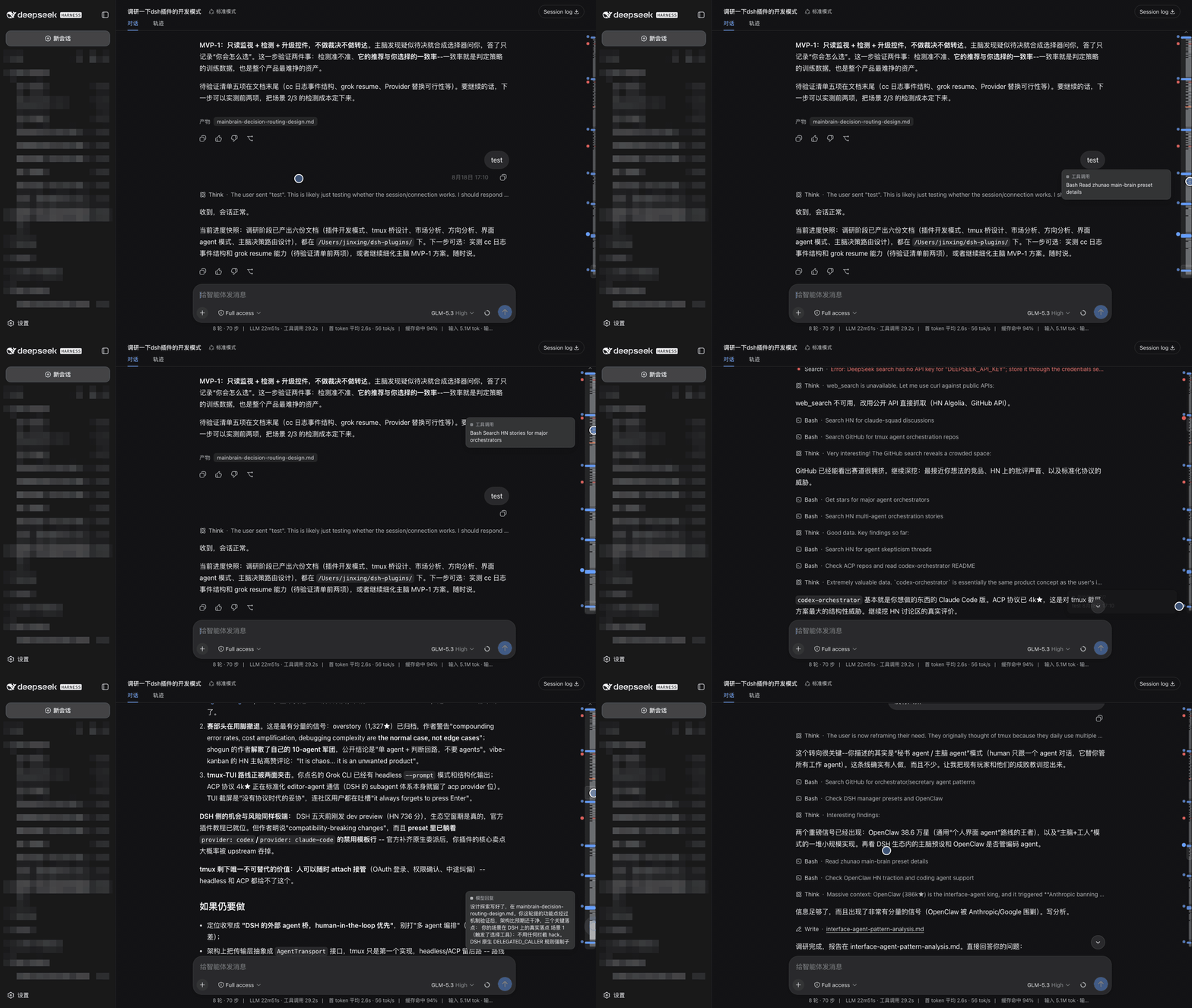
What the map shows
| Band | Meaning |
|---|---|
| Full-width blue | your message (and steering) — always the widest, brightest, never thinner than 5px |
| Grey block | a model reply; block height is how much it wrote |
| Thin grey tick | one tool call |
| Green | a slash command |
| Amber | a model retry, or a turn cut short by the output cap |
| Red | a failed turn — or any tool/command row that reported an error |
| Horizontal rule | a compaction checkpoint: where the model stopped seeing the history above |
| Rounded outline | the viewport lens (drag it) |
The ragged left edge is the index: every blue bar is a turn you started, and the block of agent work under it is what that turn cost.
It replaces the scrollbar
The rail sits in the transcript's own scrollbar gutter and the native thumb is suppressed while it is up, so there is one scroll control, not two — no layout shifts, because the gutter stays reserved either way. It is a takeover, not a theft: the moment the map stands down (Trajectory tab, no session, a transcript that does not scroll) the native scrollbar comes straight back, and uninstalling restores it permanently.
Anchors
Beside the rail is a column of clickable anchor dots — blue for every message you sent, red for every failed tool call or command. Click one to jump there. The dot for wherever you are reading stays enlarged, so the anchors double as a position indicator. Anchors that would collide collapse to keep the column readable; failures never collapse, since they are usually the reason you reached for the map.
Use
- Click an anchor dot to jump to that message or failure.
- Hover the rail — it widens and shows a preview card for the row under the cursor
(kind,
n/totalfor your own messages, and the row's text). - Click a band to scroll it into reading position; the row flashes when it lands.
- Click empty track or drag to scrub proportionally, like a scrollbar.
- Wheel over the rail or the dots to scroll the transcript.
- Keyboard: the rail is focusable — arrows nudge, PageUp/PageDown page,
Home/End jump to the ends (
role=scrollbarwith a livearia-valuenow). - Double-click to pin the rail open (persisted per browser).
- The
⌃cap appears above the rail while older history is still unloaded; clicking it triggers the transcript's own load older and the map extends.
The map hides itself when there is nothing to navigate: no session, a transcript that does not scroll, or a non-chat view such as Trajectory.
Install
dsh plugin --profile web add "github:jsdvjx/dsh-strata#main"
Then restart dsh web. To remove:
dsh plugin --profile web remove dsh-strata
How it works
Pure browser half; the Node half is empty and no session data crosses the wire for it.
Geometry and semantics both come from anchors the conversation view already publishes —
[data-conversation-scroll] for the scrollport, [data-chat-anchor-key] per flow row,
data-chat-flow-kind for that row's registered Chat Node kind, data-state="error" for a
failed tool or command, [data-composer-seat] to stay clear of the sticky composer. It
contributes one entry to the frame-wide shell.overlay list slot, so it adds a surface
instead of replacing one, and uninstalling leaves the native UI untouched. The scrollbar
takeover uses the theme's documented seam — rebinding --dsh-scrollbar-thumb to
transparent on the scrollport, the same mechanism ui-sidebar uses — so both the WebKit
and Firefox rendering paths are covered and no stylesheet is overridden.
Rendering is a canvas repainted on a rAF, re-measuring rows only when the transcript
mutates or its scroll height changes — a plain scroll moves the lens and nothing else, so a
streaming turn does not drag layout through the map. Colors are read from the theme's own
--dsw-alias-* tokens, so light and dark both come out right, and prefers-reduced-motion
disables the transitions.
Limits
- The map covers the loaded window. DSH pages older history in on demand; until it is
loaded it has no layout to map. The
⌃cap is the honest signal that more exists, and the fastest way to pull it in. - Chat view only. The Trajectory tab renders its own event ledger with different anchors; the map stands down there rather than guessing.
- The rail occupies a ~14px strip of the transcript's right padding, so clicks in that strip go to the map.
License
MIT
项目文件与信号
以下项目是目录快照中检测到的公开仓库信号。
仓库信息
- 开发语言
- JavaScript
- 许可证
- MIT
- 最后更新
- 2026年8月18日 16:09
谨慎安装
请检查源代码、权限、生命周期脚本、依赖与网络访问;不受信任的插件应先在隔离环境中测试。