安装
npx -y @deepseek-ai/dsh plugin --profile web add github:lencx/Minke此安装命令根据 GitHub 仓库地址生成,是未经验证的安装起点。
README
维护者编写的文档快照。

Minke
A native desktop workspace for DeepSeek Harness
English · 简体中文




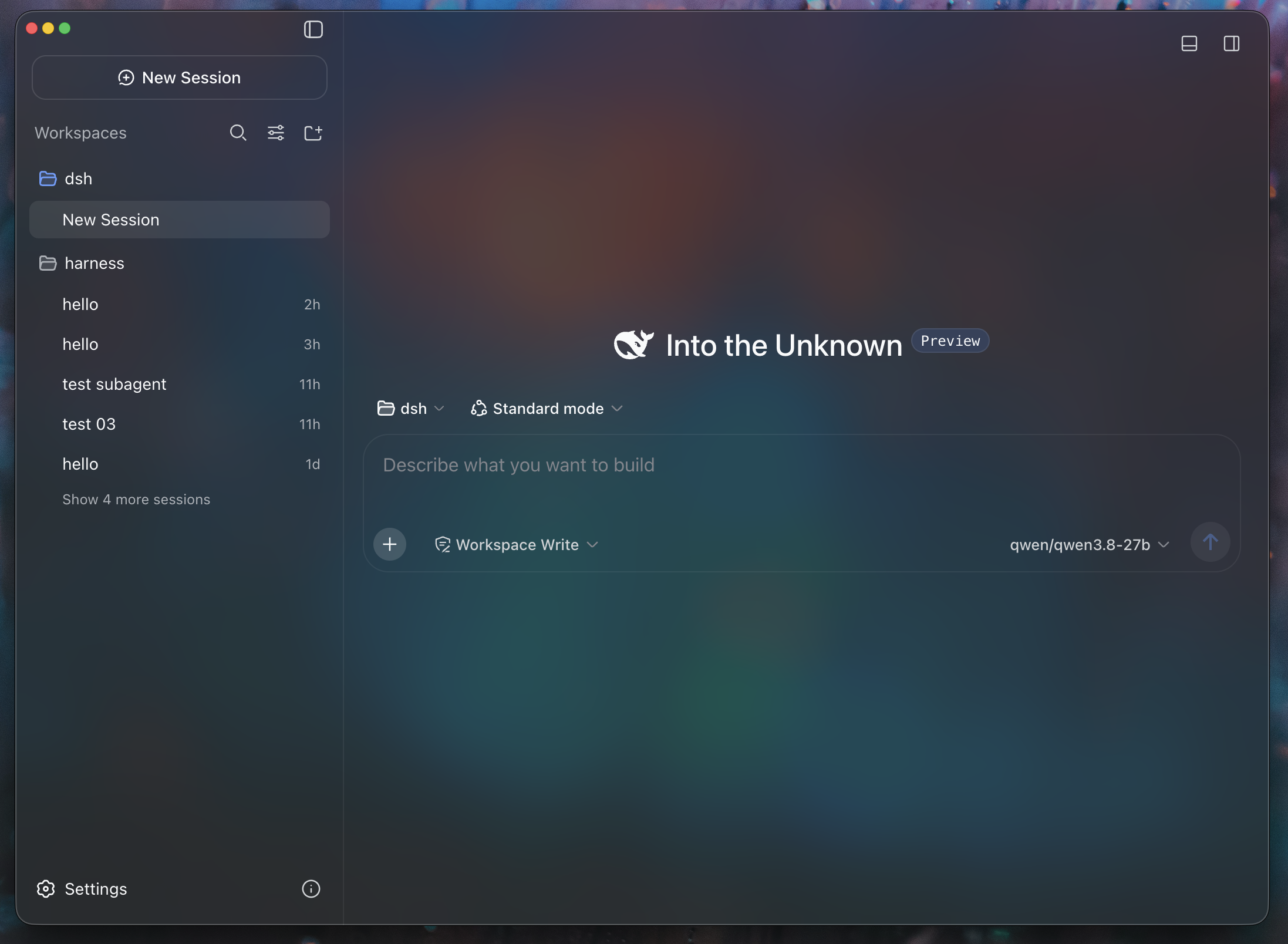
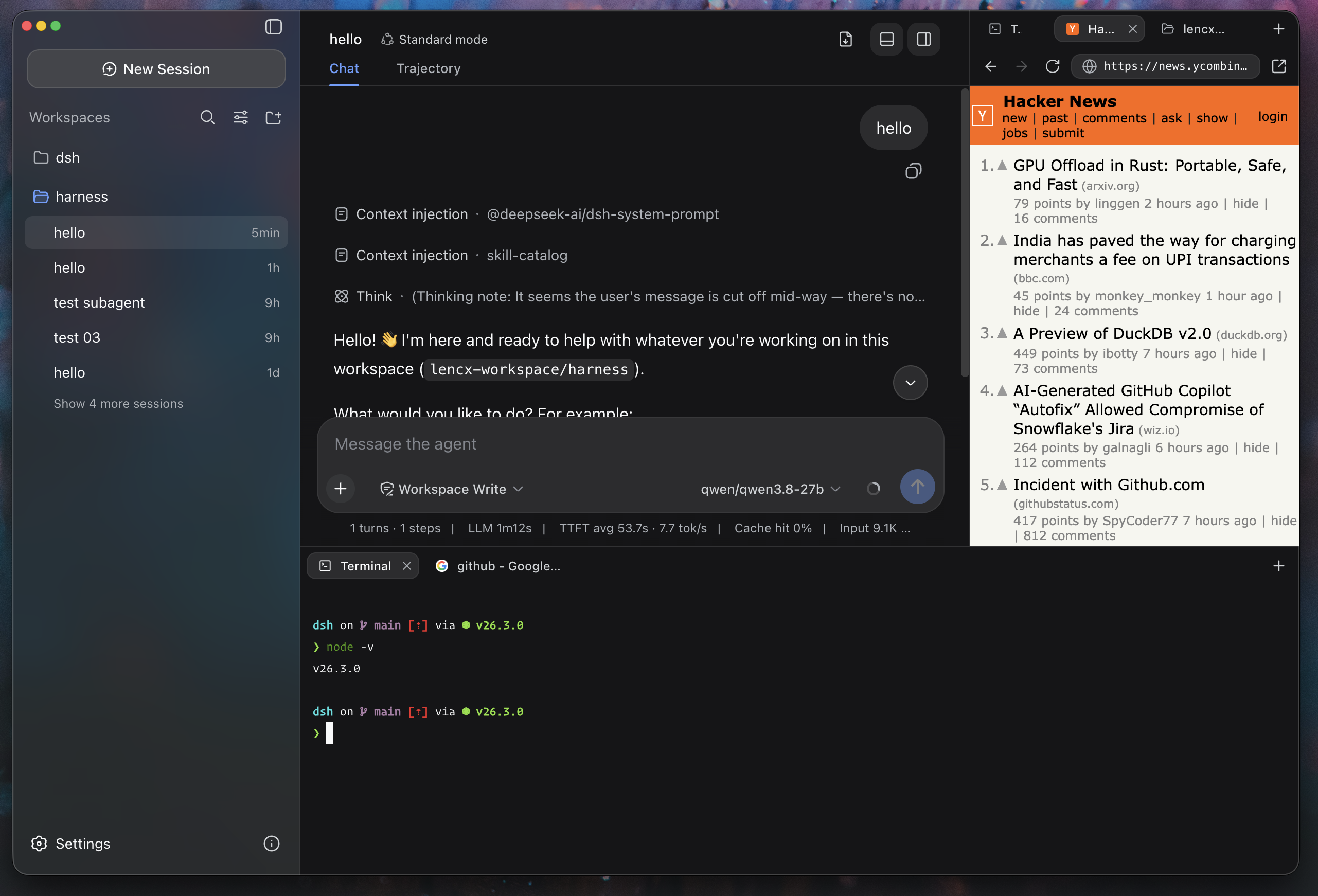
Minke brings DeepSeek Harness to the desktop as a focused, local-first workspace for agentic work. Conversations, project files, terminals, web tools, and native desktop actions stay within reach—without fragmenting your workflow across multiple apps.
[!IMPORTANT] Minke is under active development. Features, packaging, and the local data schema may change as the project evolves. Minke is an independent community project, not an official DeepSeek product.
Highlights
- A complete workspace for agentic work — Minke turns DeepSeek Harness into more than a conversation window. Files, terminals, web tools, and plugin discovery live in independent right and bottom workspaces, keeping the tools for understanding, changing, and validating a project beside the active conversation.
- Local-first by design — DeepSeek Harness runs locally, while Minke keeps its application state and browser session data on your machine. Desktop preferences live under
~/.minke, giving the app one clear and predictable data boundary. - A native desktop experience — Native menus, configurable shortcuts, Session log export, synchronized themes, and English and Chinese UI make Minke comfortable for daily use. macOS receives native window polish, Windows and Linux retain platform-appropriate defaults, and automated releases target all three desktop platforms.
Installation
Download Minke only from the official GitHub Releases page. The links below always point to the latest stable release.
| Platform | Architecture | Package |
|---|---|---|
| macOS | Apple Silicon (arm64) | Download .dmg |
| macOS | Intel (x64) | Download .dmg |
| Windows | x64 | Download .exe |
| Linux | Debian / Ubuntu (x64) | Download .deb |
| Linux | Fedora / RHEL (x64) | Download .rpm |
Release checksums are available in SHA256SUMS.
macOS
-
Download the
.dmgfile and open it. -
Drag
Minke.appinto the Applications folder. -
Current pre-release builds are not notarized. Open Terminal and remove the quarantine attribute from the installed app:
xattr -dr com.apple.quarantine "/Applications/Minke.app" -
Open Minke from the Applications folder.
[!CAUTION] Removing the quarantine attribute bypasses a macOS security check. Run this command only for
Minke.appdownloaded from the official Releases page, and never replace the path with a broad directory. You can also try Apple's Open Anyway flow under System Settings → Privacy & Security.
Windows
- Download the Windows x64
.exeinstaller. - Run the installer and follow the on-screen instructions.
- Windows may show a reputation-based warning for a new pre-release build. Continue only after confirming that the installer came from the official Minke Releases page.
Linux
Download the package for your distribution, then open it with your graphical package manager or install it from a terminal.
Debian / Ubuntu:
sudo apt install "/path/to/minke-package.deb"
Fedora / RHEL:
sudo dnf install "/path/to/minke-package.rpm"
Replace the example path with the downloaded package path.
Build from source
Build Minke on the same operating system and CPU architecture as the package you need. The build produces distributables for the current host under out/make; this project does not support cross-platform packaging from a single host.
Prerequisites:
- Git with submodule support. The
vendor/deepseek-harnesssubmodule must be checked out. - Node.js 24 or newer.
- pnpm 11.7.0, with the repository dependencies installed before running the scripts.
- macOS: an Apple Silicon or Intel Mac with Xcode Command Line Tools. The
.dmgtarget can only be built on macOS. - Windows: a Windows x64 host. Visual Studio 2022 Build Tools with the Desktop development with C++ workload may be needed if a native dependency must be compiled locally.
- Linux: a Linux x64 host with a native build toolchain,
fakeroot,dpkg, and eitherrpmorrpm-build.
On a fresh checkout, first install the repository dependencies, then prepare the Harness runtime:
pnpm run harness:stage
This command installs and builds the pinned DeepSeek Harness source, then stages the reusable desktop runtime under runtime/host. Run it after a fresh checkout, or whenever the pinned Harness source or runtime contract changes.
Start Minke in development mode with:
pnpm start
pnpm start refreshes the Minke integration in the prepared runtime and launches the development app.
Create the distributable package for the current platform with:
pnpm make
pnpm make performs a full runtime stage again before writing the platform package to out/make.
中国用户
如在使用中遇到问题,或希望进一步交流 Minke,可关注公众号「浮之静」,发送 dsh 获取进群码。也欢迎大家贡献 PR 或分享给更多朋友,您的每一次 Star 都是对开源项目的巨大支持,感恩。


项目文件与信号
以下项目是目录快照中检测到的公开仓库信号。
仓库信息
- 开发语言
- TypeScript
- 许可证
- Apache-2.0
- 最新发布
- v0.1.0
- 最后更新
- 2026年8月18日 00:33
谨慎安装
请检查源代码、权限、生命周期脚本、依赖与网络访问;不受信任的插件应先在隔离环境中测试。