安装
pnpm --filter @deepseek-ai/dsh-turn-rail run bundle此命令根据 GitHub 仓库地址生成。运行前请检查上游 README 与源代码;需要可复现安装时,请固定 release 或 commit。
README
维护者编写的文档快照。
dsh-turn-rail
English | 中文
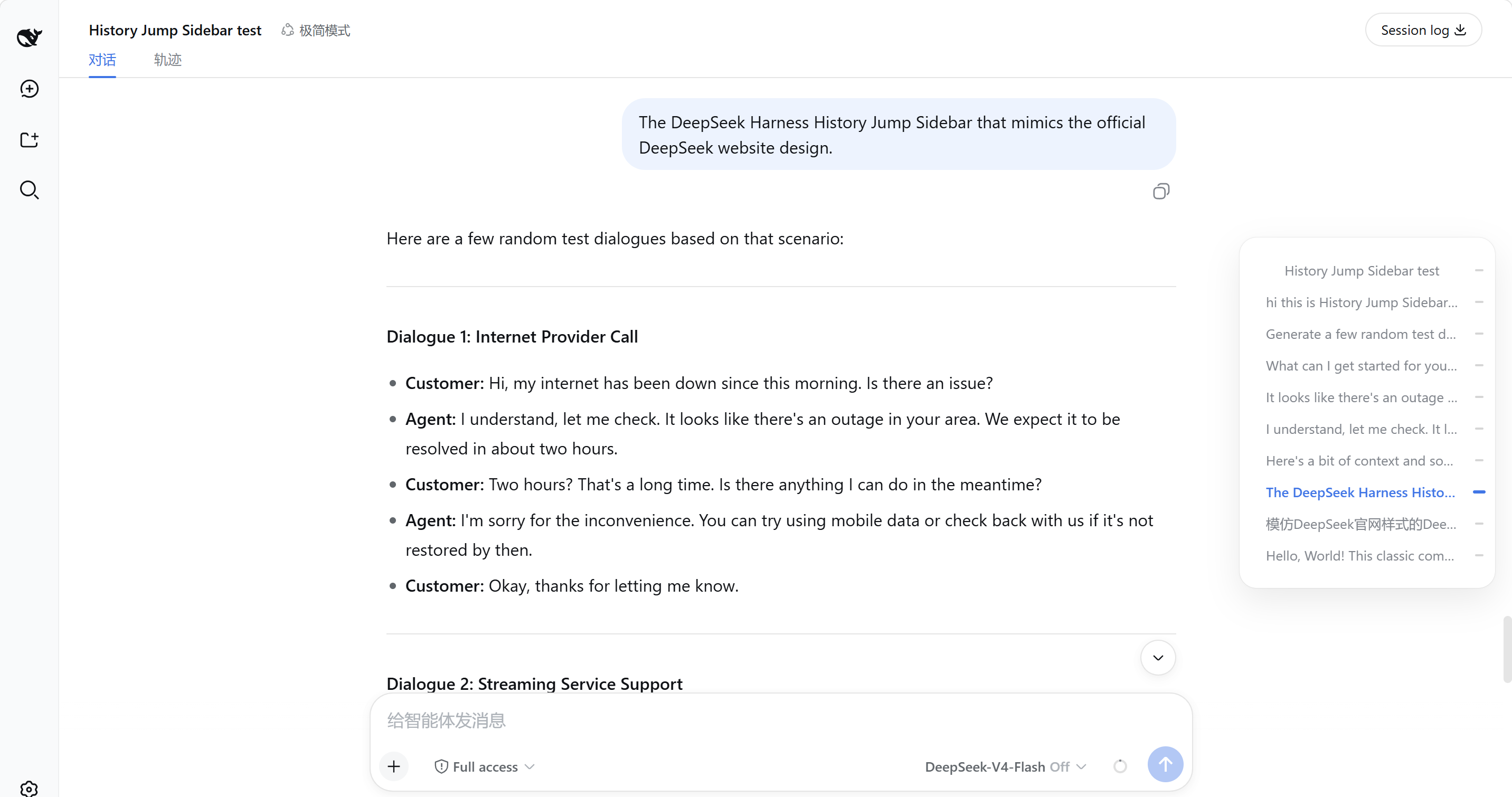
v0.3 — A right-side session turn navigation rail for DeepSeek Harness Web, replicating the DeepSeek official website chat page style:
- Collapsed: a 34px rail at the right edge; one small gray marker per user turn, the active turn is blue and stretched. The frosted rounded background is opt-in and off by default — see the toggle section below.
- Hover / keyboard focus: expands into a 240px floating panel with one row per user message.
- scrollspy keeps the active marker in sync while scrolling.
- Opening a session auto-pages older history, so every historical turn appears in the rail without manual scrolling.
Screenshot
One-line install
Prerequisite: DeepSeek Harness Web is installed and running (npx @deepseek-ai/dsh web or pnpm dsh web), and both dsh and pnpm are on PATH.
dsh plugin --profile web add github:Luoji-Yuli/dsh-turn-rail
A successful install prints + @deepseek-ai/dsh-turn-rail ....
If dsh web is running, restart it and refresh the page.
Local directory install (development):
dsh plugin --profile web add link:./dsh-turn-rail
Start
dsh web
Open http://127.0.0.1:3080 and hard-refresh with Ctrl + F5. Open any session with at least 2 user messages; the rail appears at the right edge of the page.
Frosted background toggle
The collapsed rounded frosted background is off by default.
- Open DeepSeek Harness Web and go to Settings → General.
- Find the row Turn rail frosted background.
- Toggle it on: the frosted rounded background shows in both light and dark themes.
- Toggle it off: no background in either theme (markers only).
Uninstall
dsh plugin --profile web remove @deepseek-ai/dsh-turn-rail
Repository layout
dsh-turn-rail/
  package.json          # declares both dsh.bundle and dsh.client
  cordis.patch.yml      # inserts one plugin row into the web profile
  docs/
    screenshot.png      # UI screenshot
  lib/
    index.js            # host-side no-op plugin (so the loader can import it)
    client.js           # prebuilt browser bundle (works out of the box)
    types/              # TypeScript declarations
  src/                  # plugin source (browser component + host no-op)
  tests/                # component tests
  tsconfig.json         # TS config used when building inside the deepseek-harness monorepo
  tsdown.config.ts      # bundle config used when building inside the deepseek-harness monorepo
Building from source
This repo ships a prebuilt lib/client.js, so normal installs do not need a build step.
After editing files under src/, mirror them into the deepseek-harness monorepo at:
packages/client/ui-turn-rail/
Then run:
pnpm install
pnpm --filter @deepseek-ai/dsh-turn-rail run bundle
Commit the regenerated lib/client.js back to this repo.
项目文件与信号
以下项目是目录快照中检测到的公开仓库信号。
仓库信息
- 开发语言
- TypeScript
- 许可证
- MIT
- 最后更新
- 2026年8月17日 18:09
谨慎安装
请检查源代码、权限、生命周期脚本、依赖与网络访问;不受信任的插件应先在隔离环境中测试。