安装
npx -y @deepseek-ai/dsh plugin --profile web add github:mervyn-teo/dsh-plugin-terminal此安装命令根据 GitHub 仓库地址生成,是未经验证的安装起点。
README
维护者编写的文档快照。
dsh-plugin-terminal
English | 中文
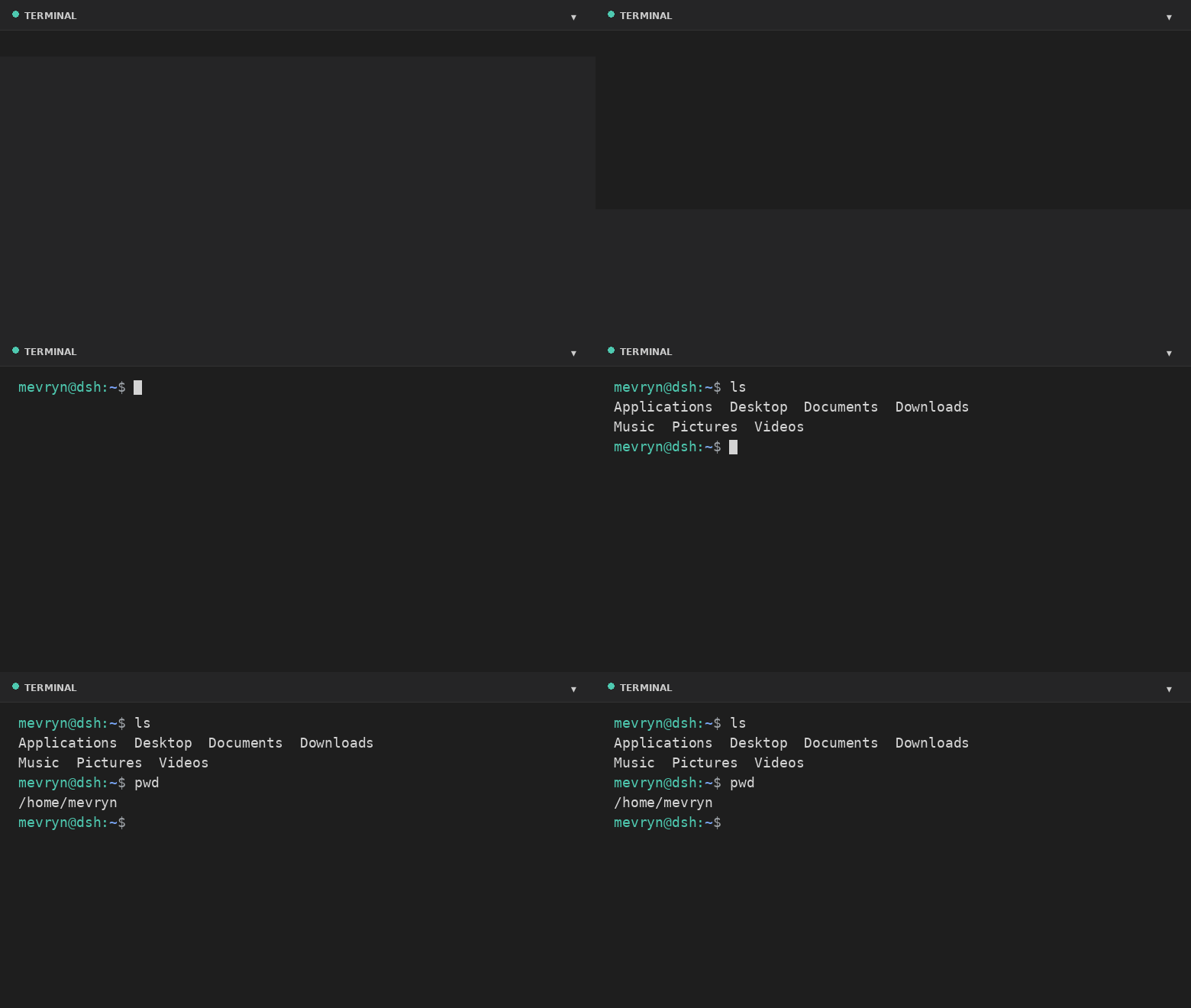
A DeepSeek Harness (DSH) Web plugin that adds a real interactive terminal — a VS Code-style collapsible panel docked to the footer. This plugin runs an actual shell in a PTY and streams the raw terminal bytes to the browser. It is a persistent bundle plugin (a host half plus a browser half) that loads on every boot.
Demo
What it does
- Actual terminal — a real interactive shell (PowerShell on Windows,
$SHELL//bin/bashelsewhere, by default) running in a PTY via the harness'ssubprocess.spawnTerminalprimitive (node-pty). - Full terminal rendering — xterm.js renders ANSI colors, cursor movement,
full-screen apps (
vim,htop,top, …), and 256-color output. - VS Code-style footer panel — a collapsible bottom panel with a header, drag-to-resize top edge, restart button, and collapse toggle.
- Keyboard shortcut — `Ctrl+
- Live resize — the PTY reflows when you resize the panel.
- A Terminal settings card under Settings → Plugins configures theme, font size, panel height, opacity, start-collapsed, shell, and working directory at runtime.
- Graceful fallback — if xterm.js cannot load (offline), a plain streaming view still exposes the real shell.
Files
| File | Purpose |
|---|---|
lib/index.js | Host half — spawns the PTY and bridges it over the /api/terminal WebSocket. |
lib/client.js | Browser half — the footer panel and the settings card. |
cordis.patch.yml | Composition patch that inserts the plugin row. |
package.json | Package metadata (dsh.bundle + dsh.client manifest). |
Install
dsh plugin --profile web add github:mervyn-teo/dsh-plugin-terminal
Then restart dsh web — host bundles load at boot.
Defaults live in cordis.patch.yml. Change them there (or in the profile's own
cordis.patch.yml) and restart, or adjust them at runtime from the settings
card. The host half serves two same-origin routes the browser half uses:
GET|POST /api/terminal/config and the /api/terminal WebSocket upgrade.
Requirements
- DSH with the
subprocessandwebServerservices mounted. - Network access to jsDelivr the first time the terminal renders xterm.js (the plain fallback works without it).
Settings
Settings → Plugins → Terminal exposes:
| Setting | Description |
|---|---|
| Theme | dark or light terminal theme (applied live). |
| Font size | Terminal font size in pixels (applied live). |
| Max height | Maximum panel height in pixels. |
| Opacity | Terminal background opacity 0–100% (100 = fully opaque). |
| Start collapsed | Whether the panel starts collapsed. |
| Shell | Shell executable for new sessions. |
| Working directory | Default directory for new sessions (empty = home directory). |
Shell and working directory apply the next time you open the terminal; theme, opacity, font size, and max height apply immediately.
Notes and limitations
- The terminal renders xterm.js from the jsDelivr CDN; the first expansion requires network access. The plain fallback still works offline.
- A session is process-local and does not survive a harness restart.
- The WebSocket route is loopback-bound like the rest of the Web GUI.
- Windows — on Windows the default shell is
powershell.exe(setshelltocmd.exefor Command Prompt, withshellArgs: []). It needs a Windows-builtnode-pty(conpty/winpty) from the DSH host.
License
仓库信息
- 开发语言
- JavaScript
- 许可证
- MIT
- 最后更新
- 2026年8月15日 12:18
谨慎安装
请检查源代码、权限、生命周期脚本、依赖与网络访问;不受信任的插件应先在隔离环境中测试。