安装
npx -y @deepseek-ai/dsh plugin --profile web add github:SenryLee/dsh-frosted-window此安装命令根据 GitHub 仓库地址生成,是未经验证的安装起点。
README
维护者编写的文档快照。
dsh-frosted-window
English | 中文
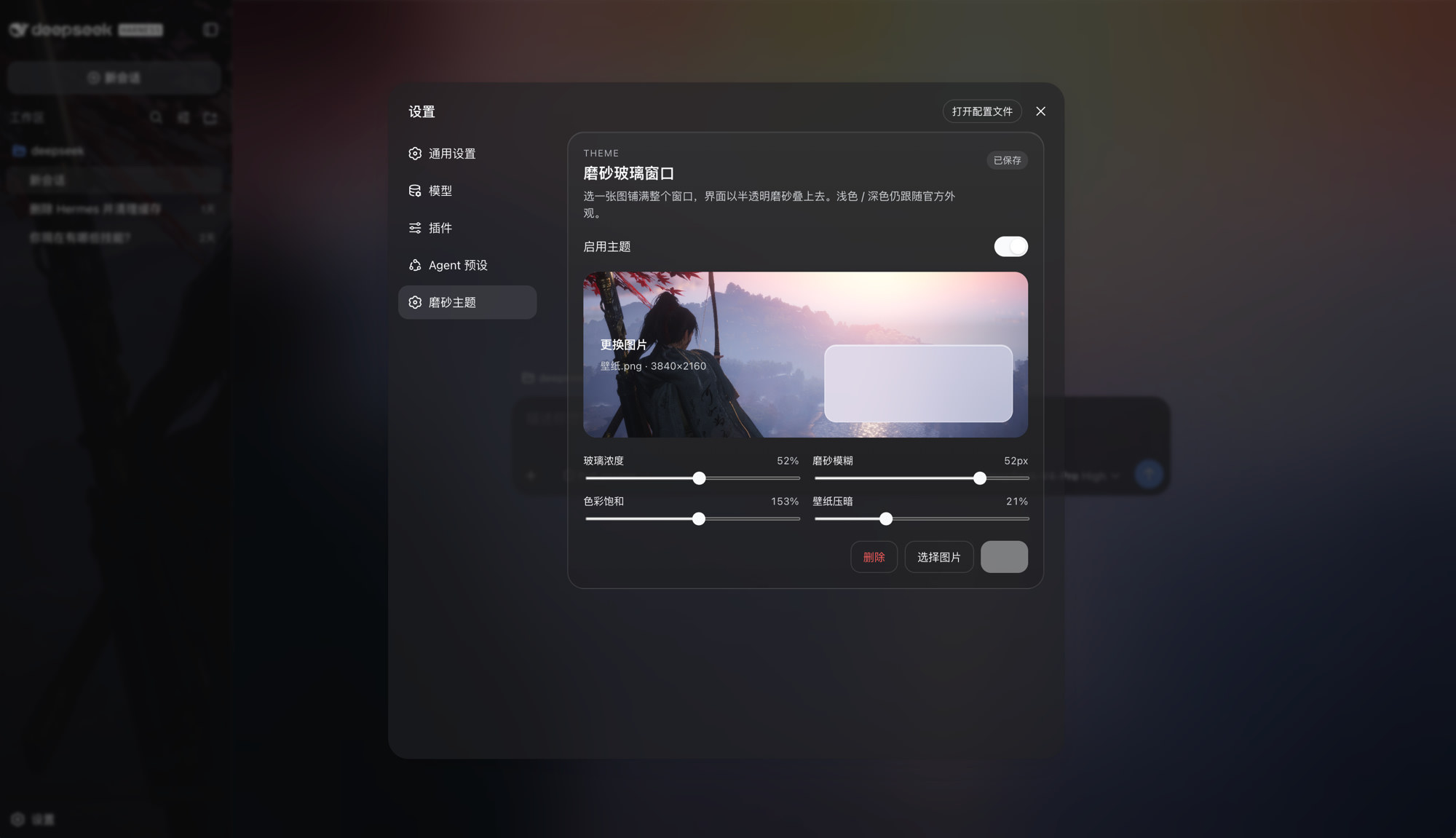
A DeepSeek Harness Web theme plugin. Upload an image, fill the window, and sit the sidebar, conversation, and details on one frosted-glass layer. Official Light / Dark / System stay in charge.
dsh plugin --profile web add github:SenryLee/dsh-frosted-window
Restart dsh web, then open Settings → Frosted.
Features
- Local JPEG / PNG / WebP / GIF upload, no file-size cap
- Full-window wallpaper with the same frost on sidebar, conversation, and details
- Sliders: glass density, blur, saturation, wallpaper dim
- Save / Delete so you can preview, then persist, then replace
- Toggle: green on, gray off; turn it off to restore the official look
- Does not steal official appearance:
overrideTokensonly, neversetTheme('custom')
The image lives in IndexedDB; knobs live in localStorage. Nothing is written to $DSH_HOME/settings.yaml, and nothing is fetched from a URL.
Install
dsh web must already run (the usual profile name is web).
A. From GitHub (recommended)
dsh plugin --profile web add github:SenryLee/dsh-frosted-window
pnpm ≥ 10 refuses git prepare scripts until you allow them. If the first add fails, put this in the profile's pnpm-workspace.yaml (usually ~/.dsh/profiles/web/pnpm-workspace.yaml) and add again:
allowBuilds:
  dsh-frosted-window: true
The repo already ships lib/. Allowing the build only recompiles on a source install.
B. From a Release tarball
No allowBuilds needed:
dsh plugin --profile web add https://github.com/SenryLee/dsh-frosted-window/releases/latest/download/dsh-frosted-window-0.1.0.tgz
If dsh is not on PATH
npx @deepseek-ai/dsh plugin --profile web add github:SenryLee/dsh-frosted-window
pnpm must be on PATH as well.
Use
- Quit and start
dsh webagain (a page refresh is not enough). - Open Settings at the bottom of the left rail.
- Open Frosted (or the same panel under General, below Appearance).
- Enable the theme, drop an image, tune the sliders.
- Click Save. The chip reads Saved when the next launch will restore it.
Replace: pick another image → Save. Clear: Delete.
Settings → Plugins lists the technical name frosted-window / dsh-frosted-window. Upload lives on the Frosted settings page, not in that catalog.
Uninstall
dsh plugin --profile web remove dsh-frosted-window
Then restart dsh web.
Develop
npm install
npm test
npm run build
Ships as dsh.bundle + dsh.client per the official package-and-install contract.
License
MIT
项目文件与信号
以下项目是目录快照中检测到的公开仓库信号。
仓库信息
- 开发语言
- TypeScript
- 许可证
- MIT
- 最新发布
- v0.1.0
- 最后更新
- 2026年8月15日 17:09
谨慎安装
请检查源代码、权限、生命周期脚本、依赖与网络访问;不受信任的插件应先在隔离环境中测试。