安装
npx -y @xxxyz/dsh-mcp-manager此命令根据 GitHub 仓库地址生成。运行前请检查上游 README 与源代码;需要可复现安装时,请固定 release 或 commit。
README
维护者编写的文档快照。
dsh-mcp-manager
Durable MCP server manager for DeepSeek Harness (DSH) — a composed loader plugin (not a dynamic session plugin), so it survives DSH restarts and upgrades.
Built to the DSH plugin development standard (see the official docs: 第一个插件, 开发一个工具):
- object-form Cordis plugin (
export default { name, inject, apply }) - required services declared in
inject— the framework guarantees they are ready beforeapplyruns, and reloads the plugin if one disappears (this is what keeps the plugin alive across DSH upgrades) - agent-facing capabilities exposed as registered model tools via
ctx.tools.register(defineTool(...)):mcp_manager_list,mcp_manager_set_enabled,mcp_manager_restart,mcp_manager_add - UI-facing capability via a
webServerexact route (POST /dsh-mcp-manager/api), consumed by the client half
Features:
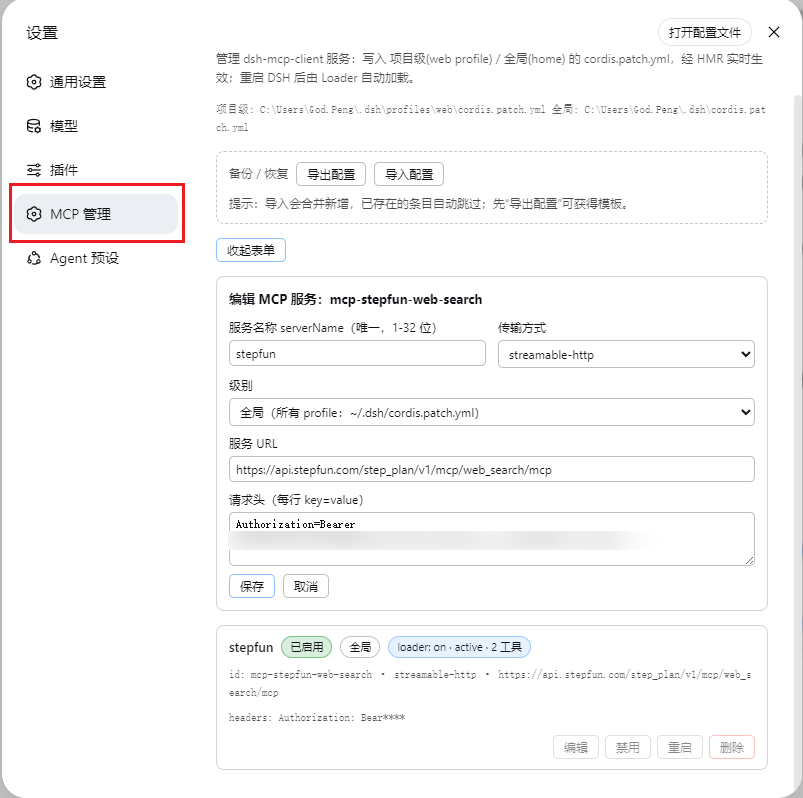
- Settings → MCP 管理 page (added by the client half)
- Host half manages
@deepseek-ai/dsh-mcp-clientrows in the real patch files:- 项目级 →
~/.dsh/profiles/<profile>/cordis.patch.yml - 全局 →
~/.dsh/cordis.patch.yml - add / edit / enable / disable / restart / delete, live tool-count health, JSON export/import, per-file write lock
- 项目级 →
How it works
| Piece | File | Role |
|---|---|---|
| Host plugin source | src/index.ts | TypeScript source (the documented plugin shape); build with npm run build (tsc) |
| Host plugin (compiled) | lib/index.js (main) | Cordis object-form plugin: patch-file CRUD + 4 model tools + webServer exact route /dsh-mcp-manager/api (JSON {op, args} → {ok, ...}) |
| Client bundle | lib/client.js (exports["./client"] + dsh.client) | Browser module: registers the settings page; calls the host via fetch('/dsh-mcp-manager/api') |
| Loader row | added to the profile's cordis.patch.yml | composes the host entry; the client-modules service scans enabled entries and serves the client bundle |
The loader entry is the single composition point for both halves — no changes to any shipped DSH package. The package itself is platform-neutral (pure JS; path separators detected at runtime), so it works on Windows, macOS and Linux. Building (npm run build) requires the devDependencies (typescript, @deepseek-ai/cordis, @deepseek-ai/dsh-tools, @types/node); the shipped/installed package needs none of them.
Install (any platform)
Quickest — one npx command (requires Node.js >= 18):
# from npm (recommended)
npx -y @xxxyz/dsh-mcp-manager

# or directly from GitHub (no npm account needed)
npx -y github:xxxyz/DeepSeekHarness-MCP-Manager
All flags pass through: npx -y @xxxyz/dsh-mcp-manager --dsh-home /path/.dsh --profile web --repair --port 3080.
npm package name:
@xxxyz/dsh-mcp-manager(the bare namedsh-mcp-manageris taken on npm by an unrelated package). The deployed plugin name is stilldsh-mcp-manager— npx is only the delivery channel; the installer copies the files to the same fixed locations below.
Alternative — run the installer scripts from a source checkout (all installers share one cross-platform logic file, install.mjs). Install steps:
- copy the package to
<dshHome>/local-packages/dsh-mcp-manager(a true source kept outsidenode_modules, so DSH upgrades never touch it) - copy it into
<dshHome>/profiles/node_modules/dsh-mcp-manager(a plain copy on purpose — a symlink would make Node ESM resolve the plugin's realpath where@deepseek-ai/dsh-toolscannot be found) - append the loader row to
profiles/<profile>/cordis.patch.yml(idempotent; keeps the patch a valid top-level array)
Windows (PowerShell):
.\dsh-mcp-manager\install.ps1                     # default: ~/.dsh, web profile
# or: .\install.ps1 -DshHome D:\path\.dsh -Profile web
macOS / Linux:
./dsh-mcp-manager/install.sh                      # default: ~/.dsh, web profile
# or: ./install.sh --dsh-home /path/.dsh --profile web
Any platform (direct):
node dsh-mcp-manager/install.mjs [--dsh-home <path>] [--profile <name>] [--port <n>] [--repair] [--skip-patch]
Then restart DSH and open Settings → MCP 管理. The four mcp_manager_* tools become callable by the model after that restart.
Uninstall (same three ways):
.\dsh-mcp-manager\uninstall.ps1 # or: ./uninstall.sh or: node uninstall.mjs [--dsh-home <path>] [--profile <name>]
then restart DSH. Uninstall removes the deployed copy, the local-packages true source, and the loader row.
After a DSH upgrade: --repair
A DSH upgrade (or a broken HMR state) can leave the plugin's host half unloaded while the files are still in place. One command fixes it — re-copies the package from the source of record, bumps the loader row's config.version to force an HMR re-apply, then polls the API until it answers:
node dsh-mcp-manager/install.mjs --repair            # default ~/.dsh, web, port 3080
node dsh-mcp-manager/install.mjs --repair --port 3080
# PowerShell: .\install.ps1 -Repair -Port 3080     bash: ./install.sh --repair --port 3080
--repair returns success only when POST /dsh-mcp-manager/api answers {ok:true} again. If the API still does not answer after 30s, restart DSH once (the loader always re-imports fresh at boot).
API reference
All ops are POST /dsh-mcp-manager/api with {"op": "<op>", "args": {...}}, same-origin.
| op | args | result |
|---|---|---|
mcpm-list | {} | {ok, rows[], paths, errors[]} |
mcpm-add | `{serverName, transport, url | command, args?, headers?, env?, level, enabled?}` |
mcpm-edit | {id, level, ...fields} | {ok} |
mcpm-set-enabled | {id, level, enabled} | {ok} |
mcpm-restart | {id, level} | {ok} |
mcpm-remove | {id, level} | {ok} |
mcpm-export | {} | {ok, json, savedTo} |
mcpm-import | {json} | {ok, added[], skipped[]} |
Model tools
Registered on the host with ctx.tools.register(defineTool(...)) (standard @deepseek-ai/dsh-tools):
| tool | description |
|---|---|
mcp_manager_list | list all configured MCP servers (level, enabled state, live loader status, tool count) |
mcp_manager_set_enabled | enable / disable one server (id, level, enabled) |
mcp_manager_restart | restart one server (id, level) |
mcp_manager_add | add a server (serverName, transport, url |
Notes / limitations
- The HTTP route is unauthenticated on the local web server — fine for a local single-user machine; do not expose the DSH web port publicly.
- Managed rows carry
# dsh-mcp-manager:server:<id>markers; the loader row is aninsertblock addingid: mcp-manager, name: dsh-mcp-manager— DSH's patch dialect treats a plain- id:row as an override of an existing entry (silently skipped when absent), so adding a plugin requires theinsertform. - If the running web page predates the install, a page refresh or DSH restart is needed for the client module (the boot graph is built at page load).
仓库信息
- 开发语言
- JavaScript
- 许可证
- MIT
- 最后更新
- 2026年8月18日 08:39
谨慎安装
请检查源代码、权限、生命周期脚本、依赖与网络访问;不受信任的插件应先在隔离环境中测试。