安装
npx -y @deepseek-ai/dsh plugin --profile web add github:yancf666/dsh-usage-panel此安装命令根据 GitHub 仓库地址生成,是未经验证的安装起点。
README
维护者编写的文档快照。
dsh-usage-panel
简体中文 · English
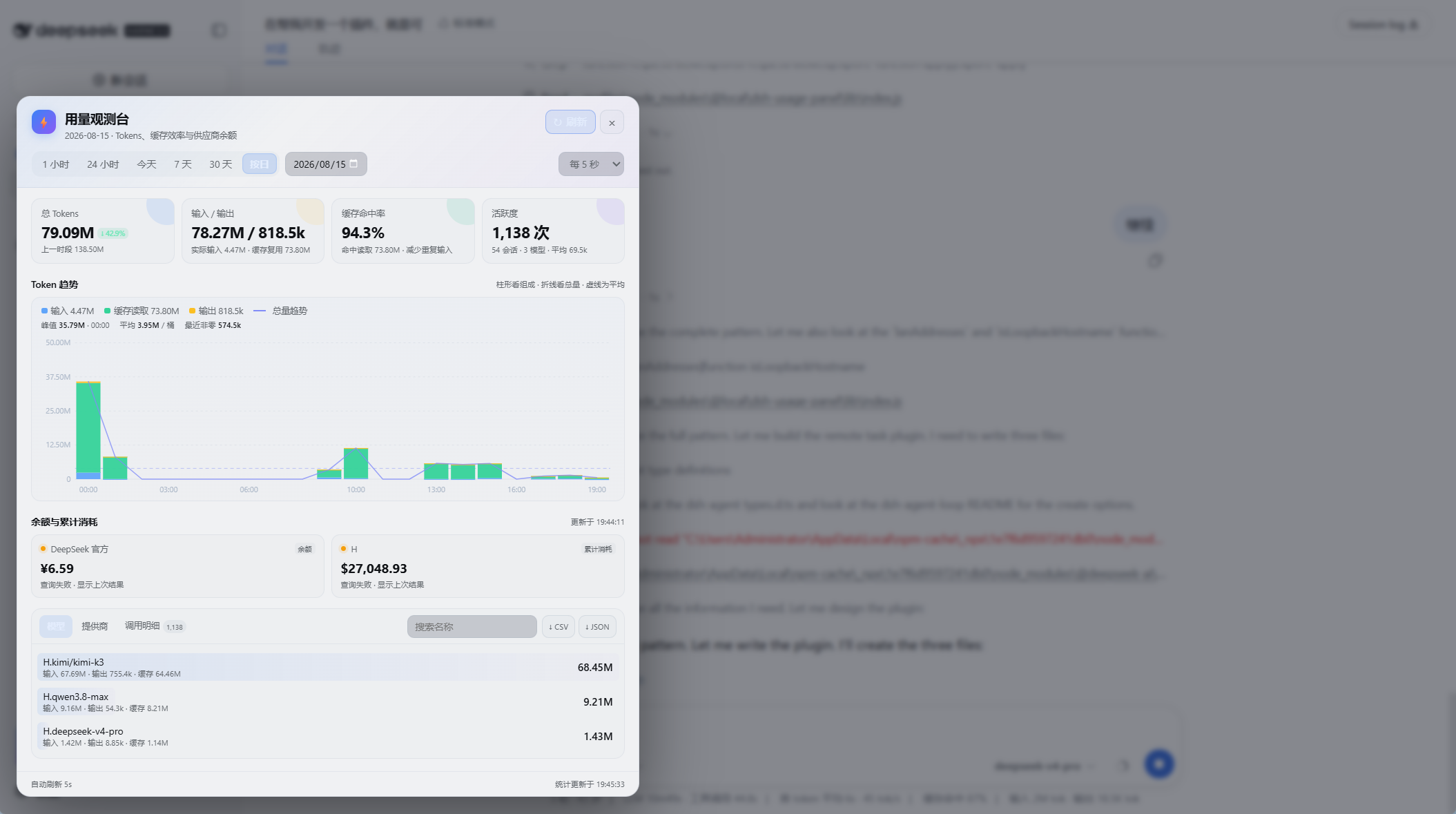
A polished, local-first usage observatory for DSH. It adds a compact token-and-balance widget to the web sidebar and opens a responsive dashboard for trends, cache efficiency, provider health, and detailed exports.


Highlights
- At-a-glance sidebar widget for today's tokens and the primary balance.
- Ranges for 1 hour, 24 hours, today, 7 days, 30 days, or a calendar date.
- Three-part token trend for input, cache reuse, and output, with a total line, average guide, peak, recent activity, and readable axis scaling. Cache writes remain included in input totals and exports without adding a noisy standalone metric.
- Previous-period comparison, cache hit rate, active sessions/models/providers, call count, and average tokens per call.
- Searchable model/provider breakdowns and server-side search across all expandable, paginated usage events.
- Full CSV and JSON export for the selected period.
- DeepSeek official balance, OpenAI-style gateway usage, and optional custom JSON balance sources.
- Concurrent balance checks with timeouts, transient retries, single-flight caching, background refresh, and last-good-value fallback.
- Durable 60-day ledger plus historical session-log backfill without double counting.
- Responsive light/dark UI with no client build step.
Requirements
- DSH with the web profile and webServer service.
- Node.js 22 or newer. Node.js 24+ is recommended because it can decode the historical .jsonl.zstd session logs; older supported runtimes still track live events and restore the plugin ledger.
Install from GitHub
From the DSH profile root that contains node_modules/ and web/:
cd ~/.dsh/profiles
npm install github:yancf666/dsh-usage-panel
Add the plugin to the profile patch, typically ~/.dsh/profiles/web/cordis.patch.yml:
- insert:
    - id: usage-panel
      name: 'dsh-usage-panel'
      inject: [webServer]
      config: {}
Restart dsh web. The widget appears at the bottom of the sidebar.
To upgrade:
cd ~/.dsh/profiles
npm install github:yancf666/dsh-usage-panel#main
Configuration
All options are optional:
- insert:
    - id: usage-panel
      name: 'dsh-usage-panel'
      inject: [webServer]
      config:
        # DeepSeek official balance
        balanceKeyEnv: DEEPSEEK_API_KEY
        balanceUrl: https://api.deepseek.com/user/balance

        # Reliability
        balanceCacheMs: 300000
        balanceTimeoutMs: 15000
        balanceRetries: 1

        # Generic JSON balance/usage endpoints
        balanceSources:
          - id: team-credit
            label: Team credit
            url: https://gateway.example.com/api/balance
            keyEnv: TEAM_GATEWAY_KEY
            valuePath: data.balance
            currency: USD
            scale: 1
            kind: balance
| Option | Default | Description |
|---|---|---|
| balanceKeyEnv | DEEPSEEK_API_KEY | Environment or .credentials.yaml key for DeepSeek. |
| balanceUrl | DeepSeek official endpoint | Override the official balance endpoint. |
| balanceCacheMs | 300000 | Successful balance cache lifetime, clamped to 5s–1h. |
| balanceTimeoutMs | 15000 | Timeout per request, clamped to 1s–30s. |
| balanceRetries | 1 | Retries for timeouts, HTTP 408/429, and 5xx; maximum 2. |
| balanceSources | [] | Extra Bearer-authenticated JSON endpoints. |
Each custom source supports id, label, url, keyEnv, valuePath (dot notation), currency, scale, and kind: balance or usage.
The plugin also discovers providers in ~/.dsh/settings.yaml. For OpenAI-style gateways it probes BASE_URL/dashboard/billing/usage; many gateways expose cumulative spend there but keep the remaining quota behind their web login.
Data and security
- API keys remain on the host and are never returned to the browser.
- Unknown provider responses are described by shape only; response values are not copied into errors.
- The summary and export routes accept loopback hosts. When DSH is explicitly bound to 0.0.0.0, the machine's own LAN addresses are also accepted.
- Usage stays local in ~/.dsh/storages/usage-panel.json.
- CSV/JSON exports include session identifiers; review them before sharing.
HTTP API
GET /usage-panel/summary?range=1h|24h|today|7d|30d
GET /usage-panel/summary?date=YYYY-MM-DD
GET /usage-panel/summary?...&eventPage=1&eventSize=30
GET /usage-panel/summary?...&q=model-or-session
GET /usage-panel/summary?...&refreshBalance=1

GET /usage-panel/export?range=today&format=csv
GET /usage-panel/export?date=YYYY-MM-DD&format=json
Development
npm install
npm test
npm run check
npm pack --dry-run
The host module is lib/index.js; the browser module is lib/client.js. The browser half is a hand-written React factory bundle, so no bundler is required.
License
项目文件与信号
以下项目是目录快照中检测到的公开仓库信号。
仓库信息
- 开发语言
- JavaScript
- 许可证
- MIT
- 最新发布
- v0.3.1
- 最后更新
- 2026年8月15日 12:17
谨慎安装
请检查源代码、权限、生命周期脚本、依赖与网络访问;不受信任的插件应先在隔离环境中测试。