安装
npx -y @deepseek-ai/dsh plugin --profile web add github:youzhoujiMrLiu/dsh-ui-wallpaper此安装命令根据 GitHub 仓库地址生成,是未经验证的安装起点。
README
维护者编写的文档快照。
dsh-ui-wallpaper
English | 中文
Wallpaper plugin for the DeepSeek Harness web GUI, modeled after Wallpaper Engine: set any local image, GIF, or video as your custom background, turn the application surfaces translucent so the wallpaper shows through, and manage it from a Wallpaper page in Settings.
Screenshots
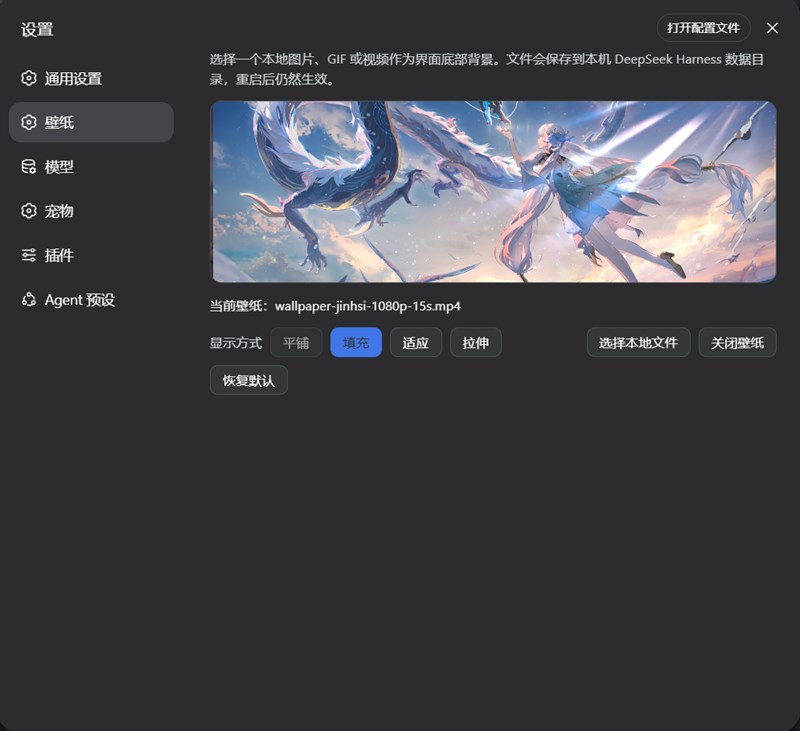
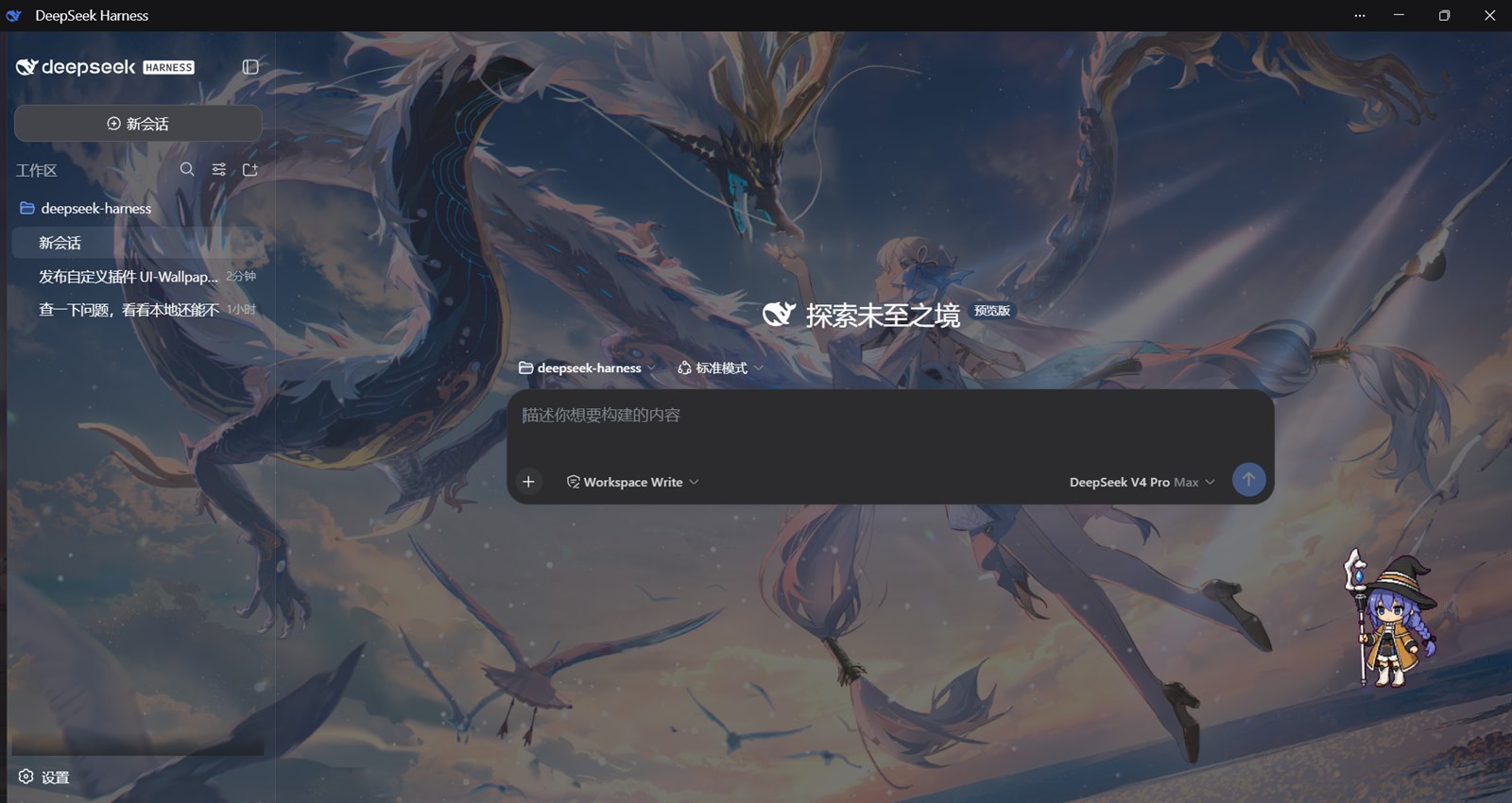
The skin composes three contributions, all owned by this package:
- Token layer —
ctx.theme.overrideTokens()stacks a 60% translucency mix over--dsw-alias-bg-baseand--dsw-specific-sidebar-fillfor both palettes. The fold is per-token and per-color-scheme, so the user's light/dark preference stays untouched and uninstalling the plugin restores the original opaque tokens. - Frame layer — a
shell.overlayentry portals a fixed, click-through media surface todocument.bodywith a negative z-index, so the app paints above it while the translucent column tokens let it show through. Images and GIFs support tile, fill, fit, and stretch; videos support fill, fit, and stretch (tile falls back to fill). One CSSbrightness()filter over the whole surface provides 20%–200% brightness control, identically for images, GIFs, videos, and tiled backgrounds. - Host routes —
POST /dsh-wallpaper/mediastores the picked file under$DSH_HOME/wallpaperwith an atomic replace, andGET /dsh-wallpaper/mediaserves it back with a nosniff content type. Routes sit behind the browser trust fence (loopback plustrustedHostsconfig); accepted formats are the shared MIME whitelist insrc/model/wallpaper.ts.
The Settings page has a live preview, the four layout modes, a brightness slider (20%–200%, live on both preview and backdrop), a local-file picker (image/* plus mp4/webm/ogg video), and disable/restore actions. The durable preference is a dsh.wallpaper store; only the URL, mode, and brightness multiplier are persisted, so the media bytes live on disk rather than in localStorage. The shipped default remains /eva.jpg (the shell static asset apps/web/public/eva.jpg) with the fill mode. Preferences persisted before the brightness feature have no brightness field; they read back as 100% (unchanged look), and the field joins the persisted preference on the first adjustment.
Two layout companions keep the tint single-layered: the AppFrame paints no background (body owns the base color) and the SidebarRoot content paints transparent (the layout column paints the fill). Without this skin both look exactly as before; with it, the wallpaper shows through each column once instead of through a compounding double tint.
Content cards, code blocks, inputs, and other raised surfaces keep their own fills, so text stays readable over the media.
Brightness
The Settings page offers a 20%–200% brightness slider that is live on the preview and the backdrop as you drag. Under the hood it is a single CSS brightness() filter over the whole media surface: images, GIFs, videos, and tiled backgrounds share one code path, playback of animated and video media is completely unaffected, and the GPU-composited filter adds no rendering cost. The multiplier persists in the dsh.wallpaper store alongside the selection and layout, and survives restarts; a reset button restores 100% in one click, and "Restore default" returns brightness, wallpaper, and layout together. Preferences persisted before the brightness feature have no brightness field; they read back as 100% (unchanged look), and the field joins the persisted preference on the first adjustment.
Playback speed
The Settings page offers 0.1×–5× playback-speed control for GIFs and videos: type a value directly or step with the ▲/▼ buttons — 0.1 per press below 1× and 0.5 per press from 1× up. Videos use the native <video> playbackRate, while GIFs — which have no browser speed control — are decoded frame by frame and replayed on a canvas at the chosen multiplier; at 1× the native <img> rendering stays in place with zero extra cost. The multiplier persists in the dsh.wallpaper store alongside the selection, layout, and brightness, and survives restarts; a reset button restores 1× in one click. Tiled GIFs render through a repeating background image with no frame-stepping path, so the slider disables with a hint in tiled mode. Speed-controlled replay decodes frames in memory, so very large GIFs use more memory.
Install
This package is a dsh bundle: its dsh.bundle manifest inserts the ui-wallpaper row into any profile that lists the package, and its dsh.client manifest plus lib/client.js carry the browser half for the Web GUI.
The easiest install is to let an agent do it — DeepSeek Harness itself, or any agent with terminal access to a machine that has the dsh CLI and can reach this repository. Paste this prompt:
Install the dsh-ui-wallpaper plugin from https://github.com/youzhoujiMrLiu/dsh-ui-wallpaper for me.

1. Run `dsh plugin add github:youzhoujiMrLiu/dsh-ui-wallpaper` (add `--profile <name>` to target a specific profile).
2. pnpm ≥10 refuses git-dependency build scripts on the first attempt: copy the package key it prints into the profile's `pnpm-workspace.yaml` `allowBuilds` block and re-run the add.
3. Verify the row `ui-wallpaper` shows up in the profile composition (`dsh --profile <name> --dump-config`) or on the Web GUI's Plugins page.
4. In the Web GUI, refresh the page — the Wallpaper page appears under Settings. After any server restart, refresh again.

Trust note: a git install runs this package's `prepare` build on the installing machine; pin a commit (`github:youzhoujiMrLiu/dsh-ui-wallpaper#<sha>`) if you want a fixed revision.
Under the hood the agent runs the ordinary git-install path: prepare builds lib/ from src/ after the install and is self-contained — it assumes no monorepo checkout.
Inside a deepseek-harness source checkout the same plugin lives at packages/client/ui-wallpaper; there, the client half additionally needs the web-app bundle dependency and a client-bundle rebuild, then a server restart and a page refresh.
Wallpaper Engine import
The Settings page also imports installed Wallpaper Engine wallpapers in one click (Windows only). The import panel detects the Wallpaper Engine install through Steam (registry, libraryfolders.vdf, or the default location) and reads the workshop index (workshopcache.json), so no Steam integration is needed. Detection reports the WE version and requires Wallpaper Engine 2.8.0 or newer — older installs get a clear "update Wallpaper Engine" message instead of a broken import. If detection fails (non-default layout, other drives), the panel lets you point at the Wallpaper Engine folder or its wallpaper32.exe / wallpaper64.exe directly; the path is validated server-side with a specific error when it is missing or wrong.
Imports are typed:
- Video wallpapers copy the source file into the media store — instant, lossless, and they work even without ffmpeg.
- Scene and web wallpapers open a dedicated "Wallpaper Pop-out" window through WE's own command line (
-control openWallpaper -playInWindow), optionally apply one of your saved WE presets and any property overrides (for example turn the clock off so the recording does not bake a frozen time into the video), pin the window on top, record it with ffmpeg (gdigrab, H.264), and close it again — your desktop wallpaper and its WE settings are never touched. Property values and named presets are read from WE'sconfig.json(wproperties/wpresets) and rendered as the same controls the wallpaper defines (booleans, sliders, combos, colors, text). - Application wallpapers are rejected with an explanation.
Recording needs ffmpeg, and the plugin makes that a zero-setup affair: when no usable ffmpeg exists, the import panel offers a one-click "Download recording component" that fetches an official ffmpeg build (the BtbN GitHub release first, gyan.dev as fallback, two attempts per source; both are GPLv3 and the license texts are installed alongside the executable) and unpacks it with Windows' built-in Expand-Archive into $DSH_HOME/wallpaper/ffmpeg — no admin rights, nothing added to $PATH, and the panel shows download progress. The resolver order is: the user-specified path in the import panel, the plugin-managed install, $PATH, then common install locations, and the panel states exactly which one is in use. The download URL is configurable (we.ffmpegDownloadUrl) for mirrors; video wallpapers import fine with no ffmpeg at all, so offline machines still get the copy path. The WE and ffmpeg path overrides persist per machine in $DSH_HOME/wallpaper/we-settings.json.
Known recording notes: recordings are silent (no audio track — music wallpapers import as muted video), the pop-out's physical size follows WE's DPI handling (the recording snaps to even dimensions automatically), and the pop-out window appears on screen for the duration of the recording.
Model Experience
None, as the plugin changes browser presentation only and registers no prompt, tool, schema, session event, or provider request.
KV Cache effect
None; this package neither assembles nor sends a provider request.
Known Limitations and Deferred Work
- Upload bound — the host route accepts at most
maxBytes(default 64 MiB). Larger videos need amaxBytesoverride in the mounting patch layer'sconfig. - Wallpaper Engine import is Windows-only and needs WE 2.8.0+ — older WE versions report "update Wallpaper Engine" in the import panel; non-Windows hosts show "not installed".
- Silent recordings — pop-out recordings carry no audio track; music wallpapers import as muted video.
- Application wallpapers — WE's application type cannot be imported; the panel rejects it with an explanation.
- Tiled GIF speed — tiled mode renders GIFs through a repeating background image without a frame-stepping path; the speed slider disables with a hint in that mode.
- Video tiling — videos render with
object-fit, so tile is not offered and an old tiled preference resolves to fill. - Boot flash — the shell boot page renders before plugin bundles load, so a plain background precedes the wallpaper on first paint.
- Uninstall is composition-level —
dsh plugin --profile <name> remove dsh-ui-wallpaperremoves both the dependency and the inserted layer; there is no runtime toggle. A row inserted by a user-installed bundle does not yet appear under the Custom plugins tab (that classification currently recognizes user patch layers only).
项目文件与信号
以下项目是目录快照中检测到的公开仓库信号。
仓库信息
- 开发语言
- TypeScript
- 许可证
- MIT
- 最后更新
- 2026年8月18日 15:34
谨慎安装
请检查源代码、权限、生命周期脚本、依赖与网络访问;不受信任的插件应先在隔离环境中测试。