설치
npx -y @deepseek-ai/dsh plugin --profile web add github:1321928757/dsh-prompt-polish이 설치 명령은 GitHub 저장소 주소에서 생성된 확인되지 않은 시작점입니다.
README
유지 관리자가 작성한 문서 스냅샷입니다.
dsh-prompt-polish
English | 中文
Input-bar prompt optimizer for DeepSeek Harness (DSH): an ✨ Optimize button that rewrites your draft into a clearer, more specific, more executable prompt — optionally grounded in the current session's context.
- 6 strategies × 3 languages plus custom instructions
- Optional context: goal, todo list, compaction summary, tool results, conversation history
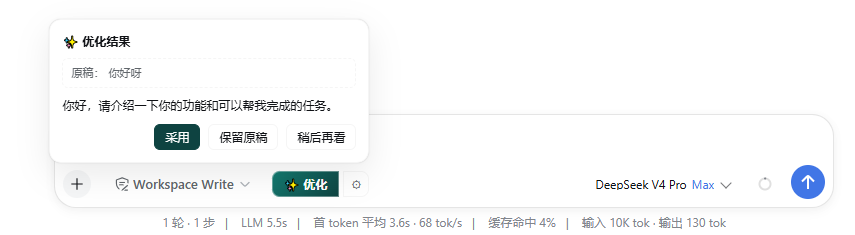
- Confirm dialog (Adopt / Keep draft / Later) — the draft is never silently overwritten
- Last-5 optimization history (review / refill / delete)
- Composer freeze while optimizing, with dual timeouts
- Three-tier settings persistence (browser L1 → settings row L2 → workspace file L3)
Install
dsh plugin --profile web add github:1321928757/dsh-prompt-polish#v0.2.0
Or from npm (once published):
dsh plugin --profile web add dsh-prompt-polish
PowerShell one-liner (bootstraps pnpm, pins versions, self-checks):
irm https://raw.githubusercontent.com/1321928757/dsh-prompt-polish/v0.2.0/scripts/install.ps1 | iex
Restart dsh web and the ✨ Optimize button appears on the left of the composer. Verify:
dsh --profile web --dump-config | findstr dsh-prompt-polish
Uninstall: dsh plugin --profile web remove dsh-prompt-polish
Requirements: DeepSeek Harness (Node ≥ 20). The package ships prebuilt JavaScript, so git installs need no build approval. Every model call goes through the model you already configured in DSH; nothing is sent to third parties.
Usage
| Entry | What it does |
|---|---|
| Composer ✨ Optimize | Rewrites the draft with the current strategy; includes session context when 📖 is on |
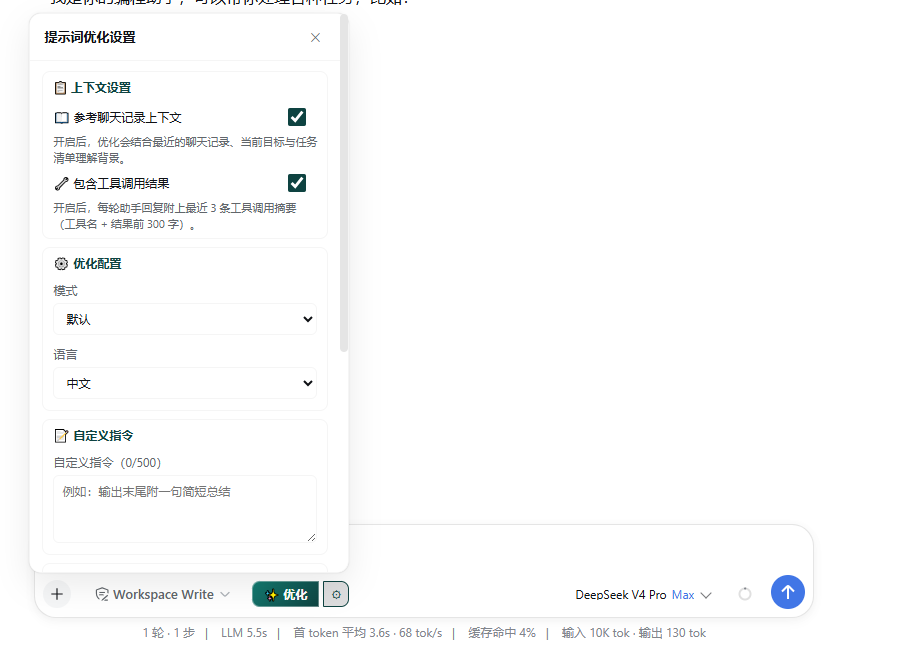
| Composer ⚙ | Settings panel: 📖 context toggle, 🔧 tool-results toggle, mode, language, custom instructions, optimization history, carry stats |
| Settings page row | L2 settings row, linked with the panel toggles |
Modes: Default (disambiguate and fix) / Concise / Structured (目标·背景·要求·期望输出) / Creative / Translate / Code request. Languages: follow draft / Chinese / English (target language in Translate mode).
Output guarantee: the result is always the user's first-person request to an AI — it never opens with "可以" / "好的" / "我来" and never answers the draft's questions. This is a fixed, byte-identical prompt red line.
Screenshots
Composer with the ✨ Optimize button and the ⚙ settings toggle:

Optimization result confirm dialog (Adopt / Keep draft / Later):
Settings panel (context toggles, mode, language, custom instructions, optimization history):
Settings persistence (three tiers)
- L1 browser:
localStoragekeyptopt.settings.v1, effective immediately; - L2 settings page: a row under DSH Settings → General, linked with the panel;
- L3 workspace file:
<workspace>/.dsh/prompt-optimizer/settings.json, synced across browsers/machines; writes are bound by the DSH sandbox policy and silently degrade to L1 when denied.
Compatibility
- Required host capabilities (all provided by the default web profile via
@deepseek-ai/dsh-base):llm,sessions,fs,sandboxPolicy,agentDefaultModel,timer,typert-loader; - The browser half talks to the host over Typert RPC (
remote.promptPolish.*) — no extra network endpoints; - All UI consumes
--dsw-*theme tokens and follows the global light/dark theme.
Development
node --test test/          # unit tests (strategy assembly, truncation, classification)
node --check lib/index.js  # syntax check
Local install loop:
dsh plugin --profile demo add ./path/to/dsh-prompt-polish
dsh --profile demo --dump-config
License
MIT. Not affiliated with DeepSeek. Installing runs third-party code on your machine — review the source first.
프로젝트 파일 및 신호
표시된 항목은 디렉터리 스냅샷에서 감지된 공개 저장소 신호입니다.
저장소 정보
- 언어
- JavaScript
- 라이선스
- MIT
- 마지막 업데이트
- 2026. 8. 17. AM 5:47
신중하게 설치하기
소스 코드, 권한, 수명 주기 스크립트, 의존성 및 네트워크 접근을 검토하고 신뢰하지 않는 플러그인은 격리 환경에서 테스트하세요.