설치
npx -y @deepseek-ai/dsh plugin --profile web add github:Alphazer01214/dsh-usage-dashboard이 설치 명령은 GitHub 저장소 주소에서 생성된 확인되지 않은 시작점입니다.
README
유지 관리자가 작성한 문서 스냅샷입니다.
dsh-usage-dashboard
English | 中文
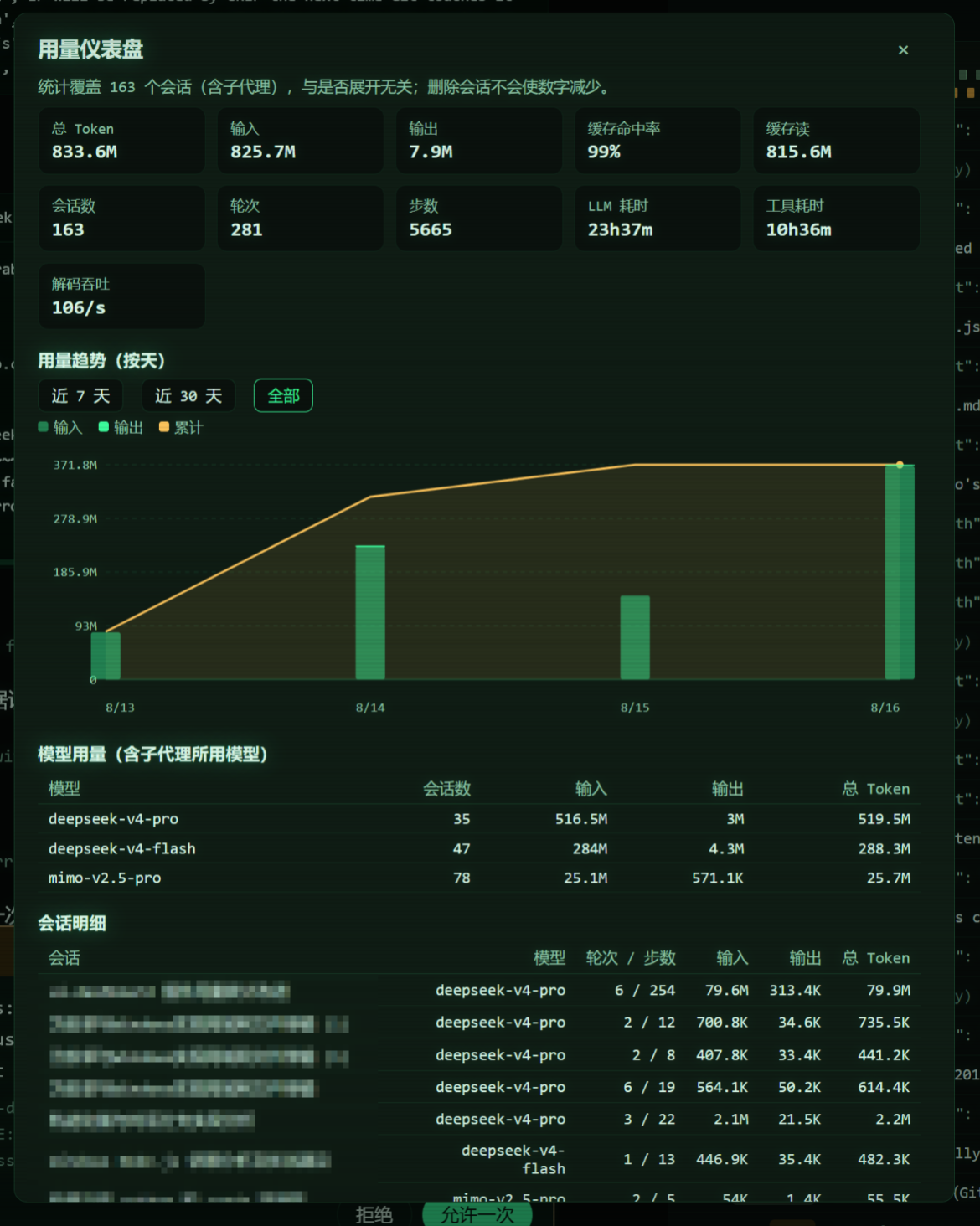
A usage dashboard for DeepSeek Harness web deployments, shipped as a dynamic Cordis plugin (one host half, one browser half). It replaces the sidebar's built-in usage dialog with a durable, deployment-wide usage ledger that fixes the built-in dashboard's four structural problems:
- No manual expansion. The built-in dashboard folds only the sessions the browser has loaded. This plugin backfills every persisted session straight from the session logs at activation, then folds every committed event live — nothing needs to be opened first.
- Deleting a conversation never reduces the totals. The ledger lives in its
own storage domain (
usage_dashboardin the harness storage root), completely separate from the session logs and their projection caches. - Backup and migration. The dialog exports the whole ledger as one JSON document and imports it again — importing into a fresh deployment restores the full history, and re-importing the same backup never double counts.
- Exact numbers — no more, no less. The fold mirrors the harness's own
tokenUsage/sessionStatsprojection semantics field-for-field (verified against the harness folds over randomized event sequences): same-step usage samples replace instead of adding, fork/subagent seed prefixes are skipped so an ancestor's history is counted exactly once, and every write is cross-checked against the livetokenUsageprojection with a loud mismatch log.
It also records the models used by subagents (each subagent is its own session, attributed to its parent), and draws the usage trend per day — stacked input/output bars plus a cumulative line, with 7-day / 30-day / all windows.
Requirements
A DeepSeek Harness web-profile deployment that mounts storage-domain and
session-persistence (the standard web bundle does). The plugin reads only
public services — it changes no harness code.
Loading the plugin
The plugin is a dynamic Cordis package. In the harness GUI (or via the cordis
API): define a package whose host half is src/host.js and whose client
half is src/client.js, then run it and approve the browser half. The sidebar
"用量" action now opens the ledger-backed dashboard (it replaces the built-in
entry in sidebar.footer.action; stopping the plugin restores the built-in
one).
Deployment auto-install (no harness code changes)
To install the dashboard into a deployment so it loads automatically for every
session, use the autoload/ loader package and the deployment's own profile
patch layer (under $DSH_HOME/profiles/<profile>/):
-
Copy
autoload/to<profile>/packages/dsh-usage-dashboard-autoload/(package.json + lib/index.js). -
Add
"dsh-usage-dashboard-autoload": "file:./packages/dsh-usage-dashboard-autoload"to<profile>/package.jsondependencies and runpnpm installin the profile directory (the profile's hoisted linker puts it intoprofiles/node_modules, where the loader resolves bare row names). -
Append to
<profile>/cordis.patch.yml:- insert: - id: usage-dashboard-autoload name: dsh-usage-dashboard-autoload -
Restart the harness. For every root session the loader now defines and runs the dashboard automatically (subagent children are skipped; the root instance folds every session globally). The browser half still requires one approval per session per process run — that is the harness's client-code activation policy, and it is the only per-session step left.
What the dialog shows
- Stat cards — total / input / output tokens, cache-hit share, cache read/write, session count, turns, steps, LLM and tool wall time, decode throughput.
- Usage trend (per day) — stacked input/output bars with a cumulative line, legend, dashed gridlines, sparse date ticks, and window selection.
- Model usage — per-model totals including the models subagents billed, with distinct-session counts.
- Session table — per-session tokens, newest billed model, turns/steps, with a 子代理 badge for subagent sessions.
- Backup & migration — export (copy the JSON document to a file) and import (paste a backup and merge it).
Data semantics
- Each ledger record is keyed by
sessionId@createdAtand carries the folded state (per-day and per-model token buckets, turns/steps/timings, newest billed model) plus a seq watermark. Records only ever advance: writes are serialized per key and a lower-watermark snapshot can never regress a stored record. - A session's own suffix starts at its header's
seedLength: fork and subagent children count exactly what they themselves billed, and the inherited prefix stays attributed to the ancestor — the totals are the true billed usage with no double counting anywhere in a fork tree. - Live sessions fold through
session/eventwith{ global: true }listeners (a dynamic package mounts in the requesting session's agent scope; without the flag other conversations' events would never reach it). Activation heals every stored tail, materializes live cells, andusage.reportadditionally backfills any session the ledger has never seen, so the report is complete even for sessions created while the plugin was stopped. - The backup document is
{ format: 'dsh-usage-dashboard-backup', version: 1, exportedAt, records }. Import validates every record and merges by key: a record is adopted only when its seq is higher than the stored one, so repeated imports are idempotent.
Known limitations
- Process-local. Dynamic plugins do not survive a harness restart: re-run the package after restarting. The ledger itself is durable, so the numbers continue seamlessly on the next activation.
- Backup travels as text. Export renders the JSON document in a textarea (copy it to a file); import accepts the same JSON pasted back.
- Day buckets use the host's local calendar. Totals never depend on the bucket; only the trend chart's grouping does.
- Sessions whose logs were deleted before the plugin ever ran cannot be reconstructed — there is nothing left to fold. Everything present in the store is counted.
- Per-session titles are joined from the live session list when available; sessions no longer in the list (e.g. deleted) show a short id.
Repository layout
src/host.js— the exactcode.hostfunction body (ledger, heal/backfill, report/export/import RPC).src/client.js— the exactcode.clientfunction body (sidebar action and dialog).
저장소 정보
- 언어
- JavaScript
- 라이선스
- MIT
- 마지막 업데이트
- 2026. 8. 17. AM 8:50
신중하게 설치하기
소스 코드, 권한, 수명 주기 스크립트, 의존성 및 네트워크 접근을 검토하고 신뢰하지 않는 플러그인은 격리 환경에서 테스트하세요.