설치
pnpm --filter @deepseek-ai/dsh link --global이 명령은 GitHub 저장소 주소에서 생성됩니다. 실행 전에 업스트림 README와 소스를 검토하고 재현성이 필요하면 release 또는 commit을 고정하세요.
README
유지 관리자가 작성한 문서 스냅샷입니다.
DeepSeek Code TUI



English | 中文
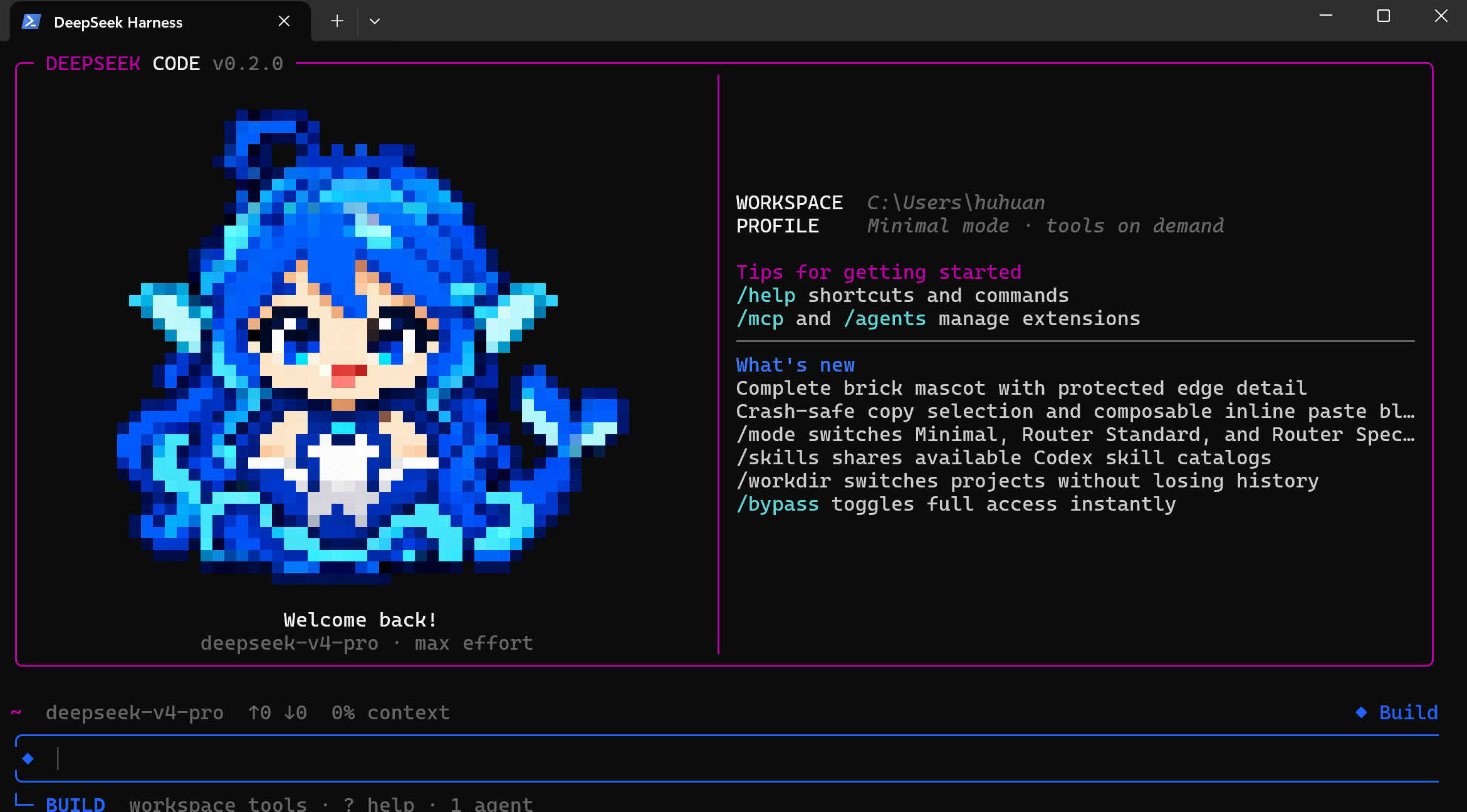
DeepSeek Code TUI is a terminal-native coding agent built on the official DeepSeek Harness. It combines DeepSeek V4 Pro/Flash, a persistent TUI, real coding tools, resumable sessions, permissions, MCP, skills, and continuable subagents in one shell-first workflow.
Run deepseek inside a project. No browser is required.
This is an independent community distribution. It is not an official DeepSeek product and is not affiliated with Anthropic. Claude Code is referenced only as a terminal UX comparison.
Why this build
- DeepSeek-native defaults: V4 Pro, max reasoning effort, and a Minimal first request that reveals the complete coding tool catalog on demand.
- Real Bash semantics on Windows: model-facing shell calls use Git Bash/MSYS instead of pretending PowerShell is Bash; safe Windows operations can still use PowerShell.
- A complete terminal loop: inspect, search, edit, run commands, review diffs, create checkpoints, rewind, resume, export, and manage long-running work without leaving the TUI.
- Explicit safety states: permission and planning modes have distinct colors, prompt rails, glyphs, and footer labels; unrestricted access is always an explicit choice.
- Extensible by design: MCP servers, skills, durable subagents, and the
allinmulti-agent tool use the underlying Cordis plugin architecture rather than a separate wrapper runtime. - Windows-friendly interaction: CJK-aware layout, mouse scrolling, jump-to-bottom, selection copy, multiline paste blocks, clipboard images, and width-safe rendering.
Quick start
Requirements
- Node.js
22.19+or24+(Node 24 recommended) - pnpm
11.7+ - Git and a DeepSeek API key
- Windows Terminal, WezTerm, Kitty, iTerm2, or another modern terminal
- Git for Windows when using the Bash-backed profiles on Windows
Install from source
The current source line is v0.2.0. Packaged installers and npm releases are not available yet.
git clone https://github.com/BenHuHuan/dhs-tuicode.git
cd dhs-tuicode
corepack enable
pnpm install
pnpm run build:lib:host
pnpm --filter @deepseek-ai/dsh link --global
Open a new terminal, enter a project, and run:
cd your-project
deepseek
To run directly from a checkout without the global link:
pnpm --dir /path/to/dhs-tuicode dsh
On Windows, the built repository-local entry is:
node .\apps\cli\lib\bin.js
First session
- Run
deepseekin the directory you want the agent to edit. - Enter
/loginand paste the DeepSeek API key. The credential provider saves it for later sessions. - Use
/modelto confirm or change the model. - Enter a coding request and press Enter.
- Press Shift+Tab to change the active permission/planning state.
For a one-off unrestricted launch:
deepseek --dangerously-skip-permissions
Only use bypass in a trusted workspace. It removes approval prompts for shell commands and file changes.
Two independent mode systems
DeepSeek Code deliberately separates model/tool routing from workspace permissions. Changing one does not silently change the other.
Routing profiles: /mode
| Profile | Intended model | First-request behavior |
|---|---|---|
minimal | V4 Pro (default) | Starts with the anchored Minimal prompt and a small shell + read surface, then promotes the full catalog after the first durable action or assistant result |
router | Primarily V4 Flash | Restores the routing suite's compact RL interface with a one-sentence persona and shell/editor surface, then opens the full catalog after the first tool call |
spec | Primarily V4 Flash | Uses task classification, deep-think-first guidance, and the spec/react/weak first-turn tool surface for more deliberate planning |
The Router profiles port reproducible behavior from dsh-routing-suite, including chat stand-down, fresh classification for later tasks, complexity-aware guidance, and a non-Flash-only closure suffix. Minimal follows the anchored approach from dsh-anchored-standard.
The default reasoning effort is max. Prompt and shell anchoring can improve behavioral consistency, but they do not guarantee a fixed hidden reasoning prefix.
Switch at any time:
/mode minimal
/mode router
/mode spec
Permission and planning states
Shift+Tab cycles the configured safe states and Plan. The bundled theme presents states such as Build, Flow, Inspect, and Plan with different color systems and authority. Use /permission, /plan, and /bypass for direct control.
Dangerous full access is never added to the normal cycle until it has been selected explicitly.
What is included
| Area | Capabilities |
|---|---|
| Coding | File read/search/edit, shell execution, background jobs, task lists, tool cards, external editor, and direct ! command execution |
| Sessions | Persistent logs, resume/continue, rename, clear/new, prompt history, context compaction, copy, and export |
| Review and recovery | Interactive diff, named workspace/conversation checkpoints, rewind, and conversation branching |
| Models | Provider/model selection, reasoning effort, thinking visibility, token usage, and context pressure |
| Extensions | MCP status/reload, skill discovery and invocation, durable subagent management, and Cordis plugins |
| Multi-agent | allin orchestration with a V4 Pro coordinator and parallel V4 Flash execution lanes |
| Terminal UX | Mouse scrolling, jump-to-bottom, OSC 52 selection copy, inline paste blocks, clipboard-image input, terminal images, ANSI pixel fallback, and CJK-aware width handling |
Main commands
| Command | Purpose |
|---|---|
/login | Save or replace the DeepSeek API token |
/model, /effort | Select the model and reasoning effort |
/mode | Switch Minimal, Router, or Spec model/tool routing |
/permission, /plan, /bypass | Control workspace authority and planning state |
/workdir [path] | Open another project in a fresh session |
/diff | Review uncommitted workspace changes |
/checkpoint [label], /rewind | Create and restore reversible workspace/conversation points |
/resume, /continue | Resume a persisted session |
/new, /clear, /rename | Manage conversation identity and lifecycle |
/compact, /context | Manage and inspect context pressure |
/agents, /tasks | Manage continuable subagents and background work |
/mcp | Show MCP connection state and public tools |
/skills, /skill:<name> | Discover and load skills |
/copy [N], /export [file] | Copy assistant output or export the conversation |
/config, /status, /help | Edit settings, inspect diagnostics, and open help |
Type / to open the scrollable command palette. Skill commands are populated asynchronously from active catalogs.
Keyboard essentials
- Enter sends; Shift+Enter or Alt+Enter inserts a newline.
- Shift+Tab changes the permission/planning state; Alt+P chooses a model; Alt+T toggles thinking.
- Up/Down browses prompt history; Ctrl+R searches it.
- Ctrl+V or Alt+V pastes a clipboard image when one is available.
- Long or multiline text becomes a compact
[Paste #N ...]block that can be combined with ordinary text and additional blocks. - The mouse wheel scrolls the transcript; Ctrl+End jumps to the latest output.
- Ctrl+O cycles tool-card detail; Ctrl+T toggles the task checklist.
- Ctrl+S stashes or restores the current draft; Ctrl+G opens an external editor.
- Ctrl+C cancels or clears; press it twice on empty input to exit.
- Type
?on empty input for the complete shortcut reference.
Windows Git Bash integration
On Windows, Minimal and Router model-facing shell tools launch fresh Git Bash processes with real Bash/MSYS command semantics. DeepSeek Code checks DSH_BASH_PATH, GIT_BASH, standard Git for Windows locations, and finally PATH. PowerShell remains available for Windows-confined operations.
Because MSYS signal pipes do not work inside the restricted-token sandbox used by safe Windows execution, a Git Bash tool call may require one full-access approval or /bypass on. This is a Windows runtime constraint, not an API-key requirement.
Override Bash discovery when needed:
$env:DSH_BASH_PATH = 'C:\Program Files\Git\bin\bash.exe'
deepseek
For mixed Chinese and English, select Sarasa Mono SC or another verified CJK monospace font in the terminal profile. Proportional CJK fallback fonts can appear misaligned even when the TUI's column calculations are correct.
Linux, servers, and SSH
Run the same deepseek command in a Bash-compatible terminal. The coding loop, sessions, permissions, MCP, skills, and subagents do not require a desktop. Bitmap image protocols depend on the terminal; ANSI pixels and text metadata remain available as fallbacks.
Local data and security
- Sessions, configuration, and managed credentials are stored under the configured DSH home directory.
/statusand normal logs do not print the saved API key.- Workspace Write is the normal editing authority; Inspect and Plan reduce mutation authority; bypass removes approval prompts.
- Use
/checkpointbefore broad refactors, but keep using Git and backups: rewind is not transactional storage. - Do not grant unrestricted access to an untrusted repository.
Architecture and extension points
DeepSeek Code remains a DeepSeek Harness distribution rather than a monolithic wrapper. Cordis plugins provide model routes, tools, sessions, permissions, credentials, MCP, skills, agents, and the TUI. Optional capabilities can be added or removed without replacing the core agent loop.
Current limitations
- Installation is source-based; there is no npm, MSI, Homebrew, or standalone binary release yet.
- Mouse reporting, OSC 52 clipboard support, color, fonts, and image protocols vary by terminal.
- MCP, skills, and agents have functional terminal management surfaces rather than graphical marketplaces.
- Checkpoints support local coding recovery but do not replace commits, worktrees, or backups.
- Configuration and compatibility may change before v1.0.
Development
pnpm install
pnpm run build:lib:host
pnpm run test
pnpm run test:e2e
Keyless e2e fixtures do not require an API key; real model requests do. Report bugs through GitHub Issues with the OS, terminal, Node version, launch command, and smallest reproduction.
Project status
The repository and source tag are currently v0.2.0. This is a pre-1.0 community distribution intended for early adopters and contributors.
DeepSeek Harness and the imported routing/minimal projects retain their own history, authorship, and notices. GitHub's contributor list is derived automatically from commit history; it is not an ownership declaration by this README.
License
MIT. See THIRD_PARTY_NOTICES.md for bundled third-party notices.
프로젝트 파일 및 신호
표시된 항목은 디렉터리 스냅샷에서 감지된 공개 저장소 신호입니다.
저장소 정보
- 언어
- TypeScript
- 라이선스
- MIT
- 최신 릴리스
- v0.2.0
- 마지막 업데이트
- 2026. 8. 17. AM 5:13
신중하게 설치하기
소스 코드, 권한, 수명 주기 스크립트, 의존성 및 네트워크 접근을 검토하고 신뢰하지 않는 플러그인은 격리 환경에서 테스트하세요.