설치
npx -y @deepseek-ai/dsh plugin --profile web add github:lecutu/dsh-slide-reflex이 설치 명령은 GitHub 저장소 주소에서 생성된 확인되지 않은 시작점입니다.
README
유지 관리자가 작성한 문서 스냅샷입니다.
ppt-reflex · Correct PowerPoint without a vision model






ppt-reflex is a vision-free engine that lets LLMs produce correct PowerPoint decks — plus a DeepSeek Harness (DSH) plugin with a live PNG preview panel and a click/box-select feedback loop.
Blind LLMs — DeepSeek first, but any text-only model — cannot see the .pptx they generate. ppt-reflex inverts that pipeline: the AI never writes a coordinate and never guesses how anything looks. It declares layout intent — an archetype, parameters, a recipe, a skin — and a deterministic constraint-solving engine computes every coordinate, measures every glyph, and returns structured text diagnostics.
Three things replace vision:
- Real font measurement — PIL glyph-level FreeType metrics (CJK-aware) compute how much space text actually needs before render.
- Structured diagnostics — every build returns machine-readable issues the AI can act on directly.
- Three-tier ASCII feedback — an L0 structure map, L1 element map, and L2 numeric text table give the model a "picture" it can read.
The AI reads diagnostics, edits its declaration, and re-runs. CircuitBreaker watches for mechanical micro-adjustments and forces a design-level rethink before the loop burns itself out.
Screenshots
PNG Preview Panel (v3)
The preview panel shows real engine-rendered PNGs — the same output the .pptx will contain. Click an element or drag-box-select an area to give feedback; the feedback loop is fully wired.
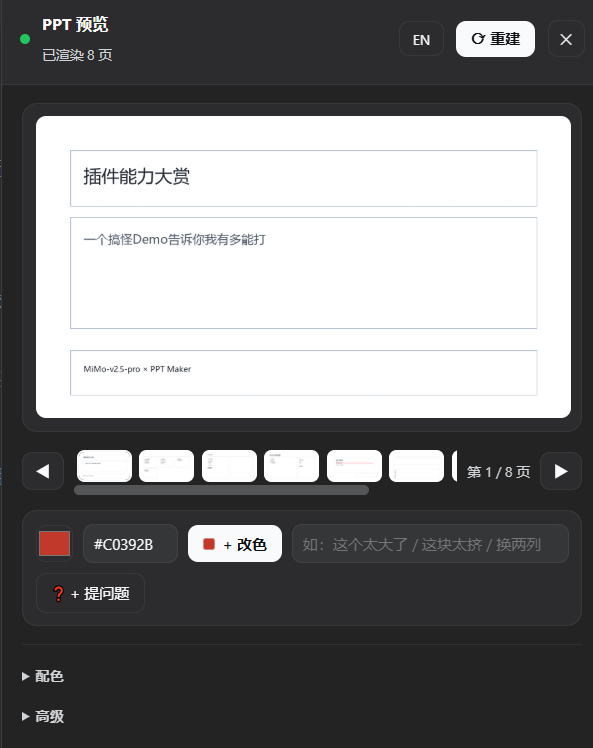 Live preview panel (slide 4/8) with recolor palette and area-feedback visible
PPT Maker Agent Session
A ppt-maker preset agent session in DeepSeek Harness. The input bar left side shows the PPT Preview button; the agent declares deck intent, the watcher auto-builds + renders, and the panel updates in real time.
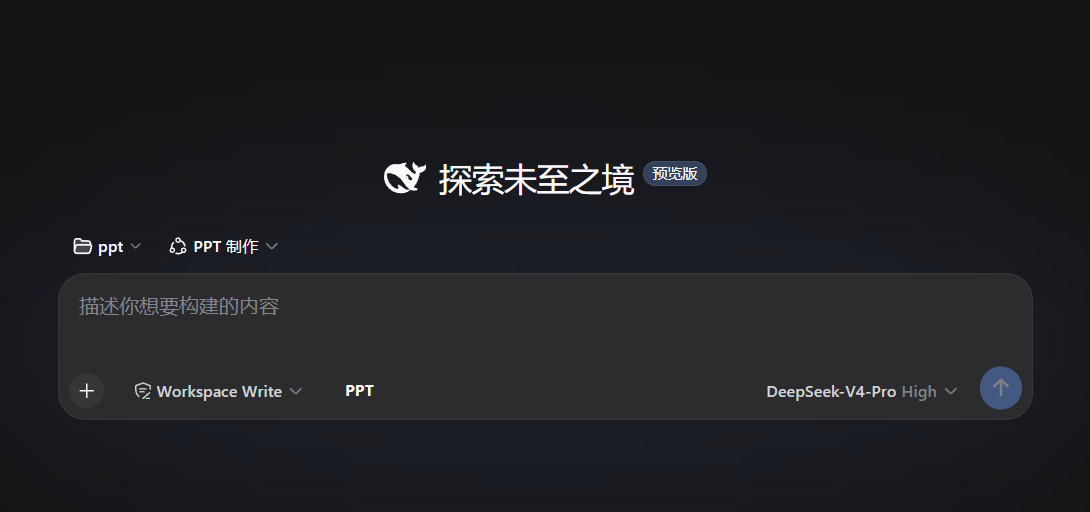 Agent session: "PPT 制作" preset selected, PPT Preview entry button visible in the input bar
The Agent-Engine Loop
            ┌─────────────────────────────────────────────┐
            │                LLM AGENT                    │
            │      (no vision — reads JSON, not pixels)   │
            │                                             │
            │   ① declare intent                          │
            │      archetype + params + recipe + skin     │
            │   ② read diagnostics + L0/L1/L2 ASCII       │
            │   ③ decide fix → declare_direction()        │
            └───────────────┬─────────────────▲───────────┘
                            │                 │
              declaration   ▼                 │  diagnostics (JSON)
                            │                 │  + three-tier ASCII
            ┌───────────────▼─────────────────┴───────────┐
            │            ENGINE (deterministic)           │
            │  resolve archetype → phase1 layout →        │
            │  collision → composition → WCAG contrast →  │
            │  PIL text metrics → freeze → roundtrip      │
            │  + auto-render PNG (_render_vision/)        │
            │  CircuitBreaker guards the fix loop         │
            └───────────────┬─────────────────▲───────────┘
                            │                 │
                  build()   ▼                 │  fix_slide() / rebuild()
                            │                 │
             .pptx written — ok:true = visually correct
             .png written  — panel shows the real result
Not "AI generates, human fixes." It is "AI declares, engine computes + renders, AI reads, AI decides, loop." Every LLM can read JSON. That is the whole trick.
Design philosophy — the engine speaks the AI's own language. The declaration layer is deliberately HTML/CSS-isomorphic: the model's deepest muscle memory. grid_cards reads like CSS Grid, fit_mode accepts contain/cover like object-fit, density accepts comfortable/spacious, recipe works like a component class. This is not HTML→PPTX conversion; the engine only borrows the vocabulary so a blind LLM can drive layout with knowledge it already has. The mapping lives in one place: ppt_reflex/grid/agent_vocabulary.py.
Features
- Blind-LLM friendly by design. The AI writes no coordinates and no raw
python-pptxcalls. It declares what it wants —archetype,params,recipe,frame/rail/corner_mark— and the engine solves where. - Deterministic constraint solver. Same declaration → same layout, every time. Coordinates come from a reproducible pipeline, not a sampled model.
- Real font measurement.
text_metrics.pymeasures glyph advances with PIL/FreeType against Microsoft YaHei (CJK-capable), falling back gracefully. Overflow is caught before the file is written. - Structured diagnostics.
{slide, phase, kind, severity, message, options}per issue, deduplicated and batch-collapsed. - Three-tier ASCII feedback.
L0structure map ·L1element map (#overlap,!overflow) ·L2numeric text table. - PNG preview panel (DSH plugin). Watcher auto-builds AND renders PNGs on every deck change; the panel shows real rendered pages with click/box-select feedback. No frame-stream redraw — the panel sees the engine's own output.
- Two-level correctness floor.
geometry_okandharmony_ok— both verifiable floors, never taste. - Harmony rules, OKLCH-measured. 60-30-10 colour ratio, focal-point uniqueness, hue harmony — all OKLCH.
- Guaranteed-fix loop.
CircuitBreakerescalates: same direction → WARN, three times → BLOCK; mechanical tweaks → BLOCK. - Design tokens + recipes.
tokens.json/recipes.jsonhold tiered values; recipes pre-resolve token values. - Aesthetic judgment stays human. The engine enforces the objective floor (WCAG AA contrast) and never pretends to have taste.
What's new in v2 (PNG preview)
| Change | What it means |
|---|---|
| PNG-based panel preview | Panel shows real engine-rendered PNGs (_render_vision/slide_XX.png), not a canvas re-draw of frame-stream data. What you see is what the .pptx will contain. |
| Watcher auto-render | Every watcher build now renders PNGs automatically — render_png: true is injected into the build request. No manual renderSlides call needed for preview. |
| New RPCs | previewState (PNG list + per-slide element geometry) and slideImage (single page as base64 PNG). The panel polls previewState and loads images via slideImage. |
| Frames demoted | _frames_auto.jsonl is no longer the panel's rendering source — it serves as the element-geometry source for click/box-select hit-testing only. |
| Direct-fetch communication | Panel talks to the host gateway directly (no typert remotes mount chain). ctx.interval replaced with native setInterval. Errors show in the status bar instead of being swallowed. |
What's new in harmony v1 (supersedes v0.6.0)
| Change | What it means |
|---|---|
| OKLCH colour core | grid/oklch.py — sRGB↔OKLCH, hue distance, chroma/lightness helpers |
| Two-channel diagnostics | violations → error/warning (block ok); signals → advisory (never trimmed) |
| Area-based colour ratio | 60-30-10 bands measured by filled area |
| Focal-point uniqueness | exactly one focal element per page |
| Hue harmony | mono / analogous / complementary / triadic, all OKLCH; ≤2 high-chroma families |
| Entry discipline | strict_tokens=True by default |
| CSS-isomorphic vocabulary | contain/cover, comfortable/spacious |
| Region diagnostics | inspect_slide(idx, elem_ids) + runner --inspect |
| Dual gate | geometry_ok and harmony_ok must both pass |
| Persistent circuit breaker | build_count in _breaker_state.json across processes |
| Watcher auto-build | deck file change → auto-build (no manual runner invocation) |
ppt_build tool | host-registered: build / renderSlides / inspect |
Quick Start
Install
git clone https://github.com/lecutu/dsh-slide-reflex.git && cd dsh-slide-reflex
pip install -e .
Python 3.10+. Two runtime dependencies: python-pptx and Pillow.
Minimal deck
from ppt_reflex.builder import PPTBuilder

b = PPTBuilder(template="business", style="corporate_minimal")
b.add_slide("Why This Exists",
    archetype="content",
    elements=[
        b.title("python-pptx Is Blind"),
        b.bullet("Text overflow and invisible text are silent failures"),
        b.box("Every LLM can read JSON.\nNo vision required.", recipe="card"),
    ],
)
result = b.build("output.pptx")
print(result["summary"])
Runner command (DSH bridge)
python _dsh_ppt_runner.py < deck_request.json
DSH Plugin Workflow
user says what they need
        │
        ▼
agent questionnaire → generate deck (archetypes + params + recipes + skins)
        │
        ▼
write D:\ppt\_deck_auto.json  ──►  host watcher auto-builds + renders PNGs
        │
        ▼
panel polls previewState → shows real rendered PNGs
        │
        ▼
feedback loop:  click element · drag-box select · recolor · ask question
        │
        ▼
agent edits deck  ──►  watcher rebuilds + re-renders  ──►  panel updates
Build trigger = writing the deck file. The host watcher watches _deck_auto.json; on change it runs the engine AND renders PNGs — the panel shows the result without any manual renderSlides call.
Workflow file bridge:
| File | Purpose |
|---|---|
_deck_auto.json | Deck plan — the only file the agent touches |
_render_vision/slide_XX.png | Rendered PNGs (panel's live data source) |
_frames_auto.jsonl | Element geometry for box-select hit-testing (not the visual source) |
_feedback_auto.json | User problem feedback from the panel |
_selection_auto.json | Element selection (click / drag-box) |
_palette_auto.json | Panel palette (merged by runner, never by the agent) |
_breaker_state.json | CircuitBreaker persistence across processes |
For full plugin documentation, maintenance notes, and troubleshooting: see plugins/dsh-slide-reflex/README.md and docs/.
API Overview
| API | Signature | Purpose |
|---|---|---|
PPTBuilder | PPTBuilder(template, style, overrides, page_w=960, page_h=540) | AI entry point |
add_slide | add_slide(title, *, archetype, params, regions, elements, arrows, frame, rail, corner_mark) | Declare one slide |
title / subtitle / text / bullet / footer | (text, *, style, region) | Text primitives |
box | (text, *, recipe, ...) | Card component |
shape | (shape_id, *, ...) | 20 shapes |
image | (path, *, fit_mode, ...) | Contain-fit image |
table | (headers, rows, *, region) | Auto-sized table |
build | (path) | Full build |
fix_slide / rebuild | (idx, ...) / (changed_slides, path) | Incremental rebuild |
inspect_slide | (idx, elem_ids) | Region inspection |
set_render_frame_hook | (fn) | Streaming preview callback |
declare_direction | (direction) | Fix strategy for CircuitBreaker |
list_templates / list_style_presets / list_archetypes | () | Catalogs for the agent |
12 archetypes: title_cover · content · two_column · comparison · data_showcase · grid_cards · image_hero · conclusion · section · quote · timeline · blank.
6 templates: academic · business · minimal · data_report · teaching · product. 6 style presets: academic_rigorous · corporate_minimal · tech_dark · editorial_magazine · creative_vibrant · government_solemn.
Escape Hatches
The engine is a floor, not a ceiling. Three layers let the agent take back control:
- Hand-written regions. Skip the archetype, pass explicit
regions=[...]. - Element parameters. Every primitive accepts overrides —
pw/ph,fill_color,corner_radius,align_h,font_size. - Agent takeover code. Drop to raw
python-pptxor theofficecliskill for one slide.
Roadmap
- ✅ Golden-set regression (T6) — baseline + runner + 110 passing tests landed in harmony v1
- ✅ PNG preview panel — watcher auto-renders, panel shows real PNGs, box-select feedback wired
- Harvest golden cases from real feedback (
tools/golden_harvest.py) - More recipes and tokens — grow the human-curated asset layer
- More parameterized primitives —
columns/gap/density-style parameters for more archetypes - Reference-PPTX layout extraction — wire
layout_extractor.pyintoregister_archetype() - Full ASCII → diagnostic cross-linking — every
#/!clickable to its JSON diagnostic
ppt-reflex is MIT licensed. Built for AI agents. Blind-proof by design — ok: true means the file is correct, and no one had to see it.
Docs
docs/slide-reflex-engineering.md— full engineering maintenance documentdocs/preview-panel-deepdive.md— preview panel root-cause analysisplugins/dsh-slide-reflex/README.md— plugin developer docs.claude/skills/ppt-maker/SKILL.md— agent operating manual
프로젝트 파일 및 신호
표시된 항목은 디렉터리 스냅샷에서 감지된 공개 저장소 신호입니다.
저장소 정보
- 언어
- Python
- 라이선스
- MIT
- 마지막 업데이트
- 2026. 8. 17. AM 9:01
신중하게 설치하기
소스 코드, 권한, 수명 주기 스크립트, 의존성 및 네트워크 접근을 검토하고 신뢰하지 않는 플러그인은 격리 환경에서 테스트하세요.