설치
npx @deepseek-ai/dsh plugin --profile web add dsh-mcp-mgr@latest dsh-mcp-mgr-ui@latest이 명령은 GitHub 저장소 주소에서 생성됩니다. 실행 전에 업스트림 README와 소스를 검토하고 재현성이 필요하면 release 또는 commit을 고정하세요.
README
유지 관리자가 작성한 문서 스냅샷입니다.
dsh-mcp-mgr
English | 中文
A workspace-level MCP manager for DeepSeek Harness: declare MCP servers in each workspace's .dsh/dshmm/mcp.json (Claude/Codex-style mcpServers format), auto-discovered and dynamically registered as dsh plugin instances, with a management UI in the settings page.
Features
- Workspace MCP: auto-discovers
mcp.jsonunder every registered workspace, hot-syncs on file changes, and unloads on workspace removal - Profile MCP display: unified display and management of non-workspace mcp-client registrations (profile patch / bundle /
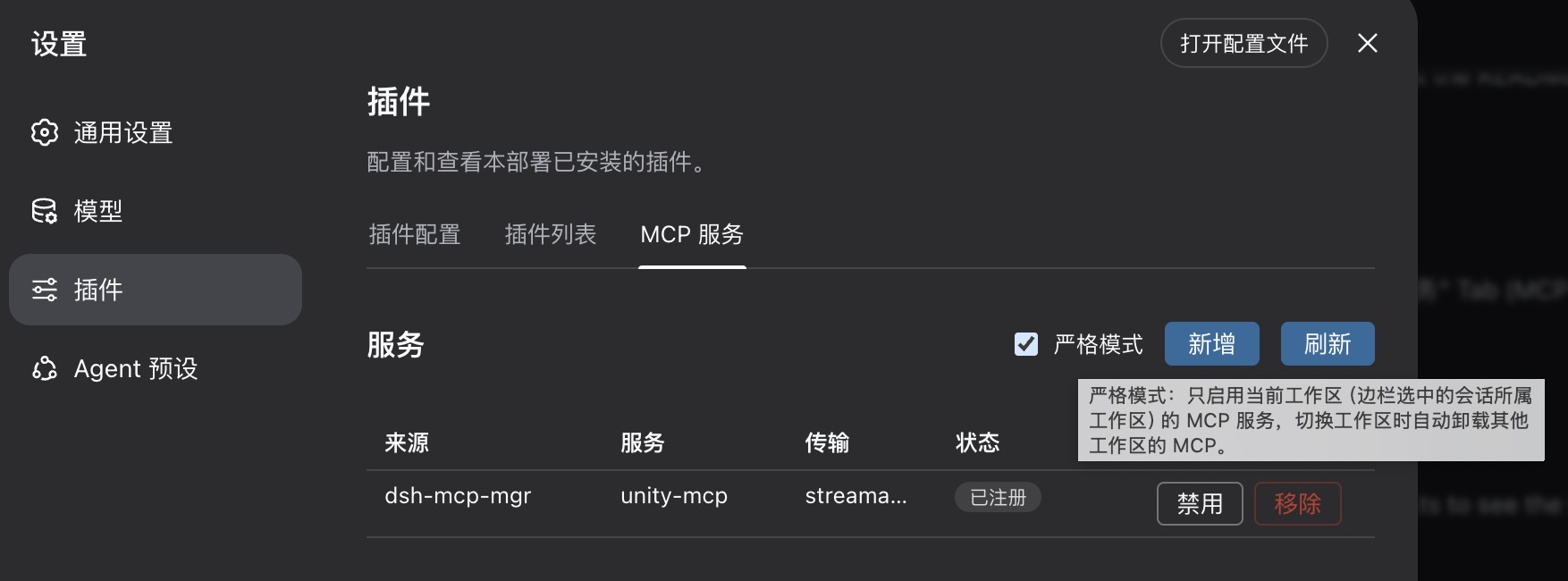
--patch) - Settings tab: MCP server list — source, status, inspect and remove
- Strict mode: when checked, only the current workspace's (the sidebar-selected session's workspace) MCP servers are enabled; switching workspaces unloads the others. Off by default (all workspaces coexist)
- Workspace MCP servers are registered under dsh's standard
mcp__<serverName>__<tool>naming, so multiple servers and sources are naturally isolated
Install, update & uninstall
Install/Update:
npx @deepseek-ai/dsh plugin --profile web add dsh-mcp-mgr@latest dsh-mcp-mgr-ui@latest
Start:
npx @deepseek-ai/dsh web
Uninstall:
npx @deepseek-ai/dsh plugin --profile web remove dsh-mcp-mgr dsh-mcp-mgr-ui
Workspace configuration
The plugin auto-detects .dsh/dshmm/mcp.json at the workspace root, for example:
{
  "mcpServers": {
    "unity-mcp": { "type": "http", "url": "http://localhost:8090/" },
    "filesystem": { "type": "stdio", "command": "npx", "args": ["-y", "@modelcontextprotocol/server-filesystem", "/data"] }
  }
}
- A missing
typeis treated as remote Streamable HTTP;${VAR}environment expansion is supported - The stdio server's cwd defaults to the workspace root
serverNamemust be globally unique; a later duplicate fails loudly (flagged as a conflict in the UI)- Set
"enabled": falseon an entry to disable it without removing it (absent means enabled); the settings tab's toggle writes this field
Development
Build:
# host plugin
tsc -p packages/dsh-mcp-mgr && node gen.mjs

# UI plugin (from the ui package directory)
tsc -p packages/dsh-mcp-mgr-ui && tsdown --config-loader tsx --env.DSH_BUILD_FACE client

# regression
node verify.mjs
Note: after changing src/types.ts (wire fields) you MUST re-run gen.mjs and rebuild the UI bundle — a stale typert client codec silently strips unknown fields (e.g. a lost connected keeps the status wrong forever).
Local (source) install verification and uninstall:
# install
node scripts/install.mjs

# uninstall
node scripts/uninstall.mjs
Design docs live in Doc/requirements.md.
프로젝트 파일 및 신호
표시된 항목은 디렉터리 스냅샷에서 감지된 공개 저장소 신호입니다.
저장소 정보
- 언어
- TypeScript
- 라이선스
- 보고되지 않음
- 마지막 업데이트
- 2026. 8. 17. AM 5:51
신중하게 설치하기
소스 코드, 권한, 수명 주기 스크립트, 의존성 및 네트워크 접근을 검토하고 신뢰하지 않는 플러그인은 격리 환경에서 테스트하세요.