Installation
npx -y @deepseek-ai/dsh plugin --profile web add github:5102a/dsh-plugin-hot-toggleThis installation command is an unverified starting point generated from the GitHub repository address.
README
Maintainer-authored documentation snapshot.
dsh-plugin-hot-toggle
Hot-toggle any installed plugin from the DeepSeek Harness Web settings page (Plugins → 启停管理): stop or start a Cordis Loader entry in-process with instant effect and no DSH restart — the state persists across restarts.
中文文档 | English



Features
The 启停管理 (Plugin Toggle) tab in the Web settings:
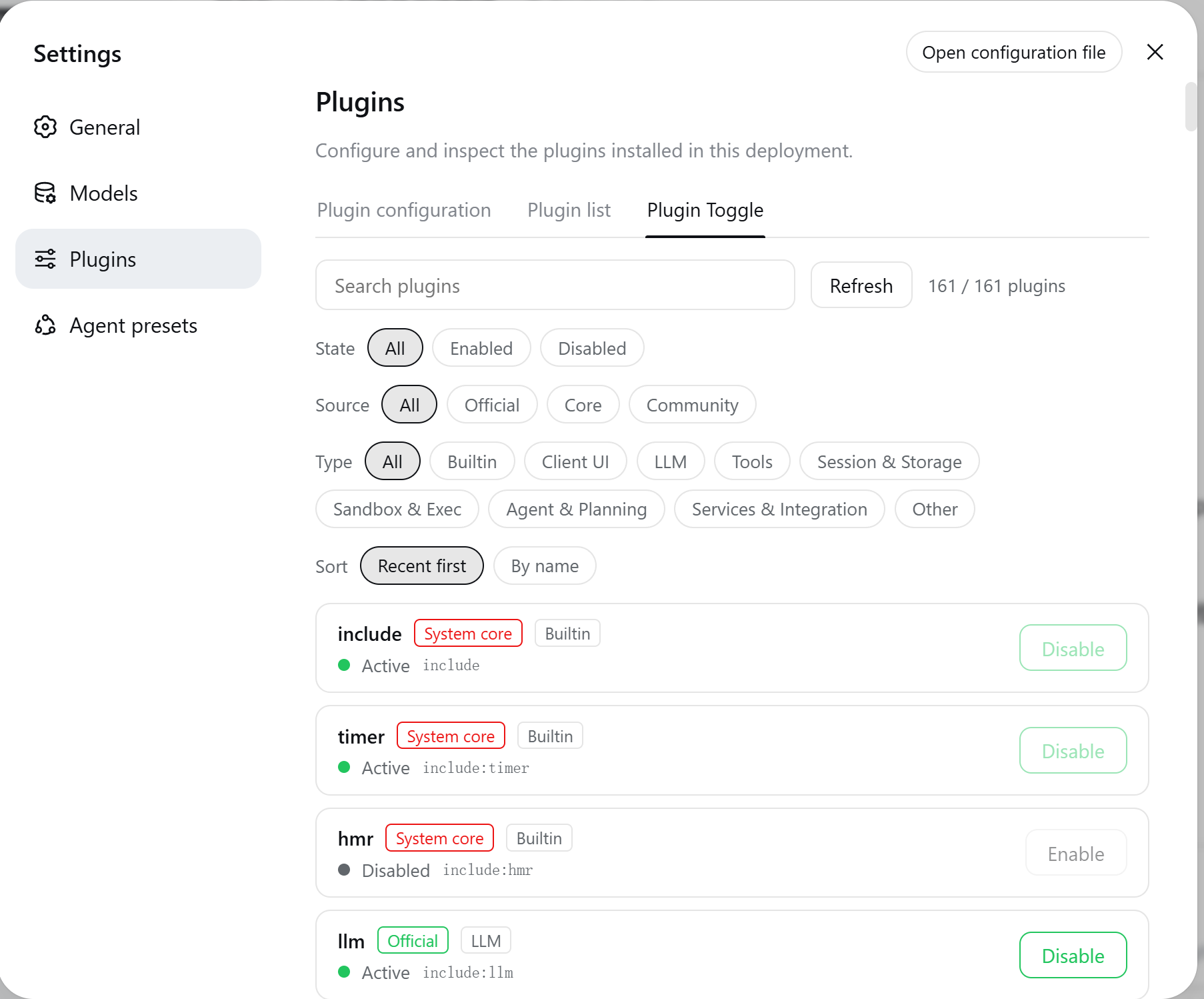
- Hot toggle: calls the official Cordis Loader
Entry.update({ disabled })— disabling disposes the plugin fiber, enabling re-imports and starts it, all in-process with instant effect. No DSH restart needed. - Persistent: the toggle state is written to the profile patch layer (
$DSH_HOME/profiles/<profile>/cordis.patch.yml) and hot-applied by the official HMR watcher on save — survives restarts. - Safety guard: system-core entries (
include,cordis:*, loader/hmr/timer, the dynamic-plugin host) cannot be toggled and are marked 「系统核心」. - Multi-dimensional filters (combinable):
- State: all / enabled / disabled
- Source: all / official / core / community (community = a matching directory under
$DSH_HOME/plugins) - Type: builtin framework / client UI / LLM / tools / session & storage / sandbox & exec / agent & planning / services & integration / other
- Search + live count (filtered / total)
- Sorting: recent-first (community plugins ahead) or by name.
- i18n: the UI follows the DSH language preference (中文/English) via the official locale service (namespace
pluginHotToggle, 39 balanced keys).
Installation
From a local checkout (development)
dsh plugin --profile web add ./dsh-plugin-hot-toggle
From npm (after publish)
dsh plugin --profile web add dsh-plugin-hot-toggle
From git (after publish)
dsh plugin --profile web add github:5102a/dsh-plugin-hot-toggle
After installation, start DSH (or let HMR apply it) and open Settings → Plugins → 启停管理.
Platform support
The plugin runs on Windows, macOS, and Linux — the three platforms DeepSeek Harness itself supports.
| Concern | Guarantee |
|---|---|
| Host half | All filesystem paths go through node:path (join/dirname) and fileURLToPath; no hardcoded separators |
| Persistence | Patch-layer writes use readFileSync/writeFileSync(…, 'utf8') with paths derived from the Loader include |
| HTTP API | /plugin-hot-toggle/api/* is a URL route — platform-independent |
| Client half | Pure browser fetch + React; no process.platform/navigator.platform branches |
| Build | scripts/build.mjs resolves paths from import.meta.url via fileURLToPath + join |
| Dev tooling | Chrome/Edge discovery honors CHROME_PATH/CHROME_BIN or a cross-platform candidate list; DSH_URL overrides the target origin |
| CI | GitHub Actions matrix: ubuntu + windows + macos × Node 18/20/22 |
How it works
┌─────────────────────────────┐         ┌──────────────────────────────┐
│  Web (client half)          │  fetch  │  Node (host half)             │
│  settings.plugins.tab       │ ──────► │  /plugin-hot-toggle/api/*     │
│  「启停管理」tab             │  JSON   │  ┌──────────────────────────┐ │
│  - list + filters + sort    │ ◄────── │  │ ctx.loader.entries()     │ │
│  - toggle buttons           │         │  │ entry.update({disabled}) │ │
└─────────────────────────────┘         │  │ → fiber dispose / start  │ │
                                        │  └──────────────────────────┘ │
                                        │  ┌──────────────────────────┐ │
                                        │  │ persistence: write       │ │
                                        │  │ cordis.patch.yml → HMR   │ │
                                        │  └──────────────────────────┘ │
                                        └──────────────────────────────┘
- Node half uses only public seams (
loader,webServer,dshHomePath) — zero DSH core changes.webServeris injected dynamically, so TUI/headless surfaces never pend. - Web half talks to the Node half over a same-origin HTTP API; mutating requests carry a same-origin check (missing Origin / cross-origin → 403).
- Client bundle is generated from
src/client.jsby a zero-dependency build script (node scripts/build.mjs) and committed to the repo, so git/npm installs need no build step.
Project layout
dsh-plugin-hot-toggle/
├── package.json         # dsh.bundle declaration + peerDependencies + exports
├── index.d.ts           # Host half type declarations
├── index.js             # Node half: loader list/toggle + webServer HTTP API
├── cordis.patch.yml     # bundle layer: inserts the plugin row
├── src/client.js        # Web half source (React)
├── lib/client.js        # Web half build artifact (generated, do not edit)
├── scripts/build.mjs    # zero-dep client bundle build
├── scripts/screenshot.mjs   # headless-Chrome UI screenshot (CDP, zero deps)
├── scripts/verify-render.mjs # verify the 启停管理 tab rendered
├── scripts/debug-dom.mjs    # DOM/slot debugging helper
├── tests/patch.test.js  # unit tests (node:test)
├── docs/DSH-PLUGIN-DEVELOPMENT-SOP.md  # end-to-end DSH plugin development SOP (bilingual)
├── .dsh/skills/dsh-plugin-hot-toggle/SKILL.md  # project skill: dev/build/publish SOP
└── .github/workflows/ci.yml  # CI: build + artifact freshness + tests
API
| Method | Path | Body | Returns |
|---|---|---|---|
| GET | /plugin-hot-toggle/api/list | — | { entries: PluginEntry[] } |
| POST | /plugin-hot-toggle/api/setEnabled | { entryId, enabled } | SetEnabledResponse |
See index.d.ts for PluginEntry / SetEnabledResponse.
Development
npm run build   # generate lib/client.js from src/client.js
npm test        # node:test unit tests
npm run check   # build + test in one step
Publishing
Releases are fully automated via OIDC trusted publishing — pushing a version tag triggers the Release workflow, which builds, tests, packs, publishes to npm (with provenance), and creates a GitHub Release. No npm token or manual 2FA is needed.
npm version 0.1.5 --no-git-tag-version   # bump version
git commit -am "chore: release v0.1.5"
git tag v0.1.5
git push origin master --tags            # CI + Release workflow + npm publish (OIDC)
The name
dsh-plugin-hot-togglewas verified available withnpm viewbefore release.
Note on peer-dependency warnings: the package declares
@deepseek-ai/cordisandreactas peer dependencies (the same pattern as the official@deepseek-ai/*plugins). DSH resolves them from its own installation via the profile's flat fallback, so an "unmet peer" warning duringdsh plugin addis expected and harmless.
License
MIT — see LICENSE.
Project files and signals
Shown items are public repository signals detected in the directory snapshot.
Repository information
- Language
- JavaScript
- License
- MIT
- Latest release
- v0.1.4
- Last updated
- Aug 16, 2026, 7:48 AM
Install deliberately
Review source code, permissions, lifecycle hooks, dependencies and network access. Test untrusted plugins in an isolated environment.