Installation
npx -y @deepseek-ai/dsh plugin --profile web add github:a792883583/dsh-git-panelThis installation command is an unverified starting point generated from the GitHub repository address.
README
Maintainer-authored documentation snapshot.
dsh-git-panel
DSH Web GUI 的 Git 面板插件:分支管理(切换 / 拉取 / 抓取 / 重命名 / 删除 / 合并)+ GitLens 风格的提交图谱。
功能
- 分支面板(聊天区右侧):
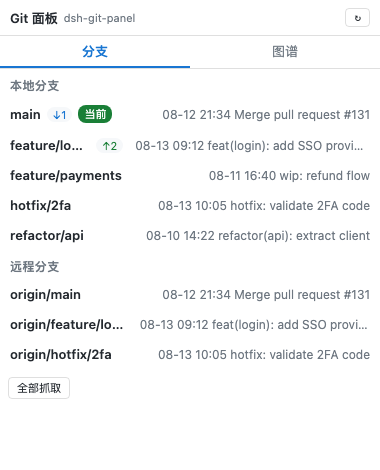
- 本地分支:当前分支高亮,显示相对上游的
↑ahead / ↓behind,双击切换分支(当前分支双击为拉取) - 远程分支:双击检出(自动创建本地跟踪分支)
- 右键菜单:重命名 / 删除 / 合并至当前分支(远程分支为删除远程分支)
- 一键拉取当前分支、全部抓取(
git fetch --all --prune)
- 本地分支:当前分支高亮,显示相对上游的
- 分支胶囊(输入框上方):显示当前分支,点击展开本地分支列表快速切换
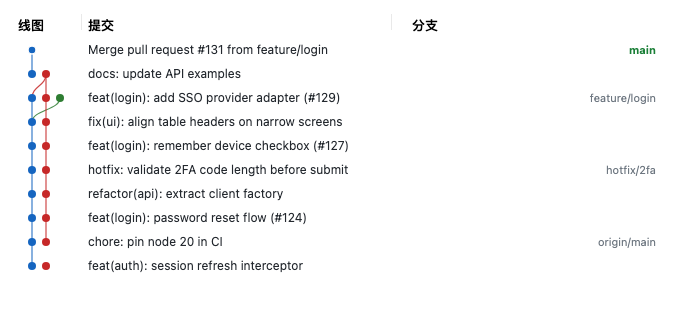
- Git 图谱:提交 DAG 泳道图(lane 算法),三栏标题(线图 / 提交 / 分支),提交列左右两侧可拖拽调宽(宽度持久化),点击节点查看提交详情;虚拟化渲染——只绘制可视区域,大仓库滚动流畅
- 多语言:自动跟随 DSH Web 界面语言(中文 / 英文),西班牙语浏览器自动切换西班牙语,默认简体中文
- 跟随当前会话工作目录:切换项目会话自动重新绑定
- 明暗主题跟随 DSH Web GUI
界面预览
分支面板(本地/远程分支、ahead/behind、双击切换、右键菜单):
分支胶囊(输入框上方快速切换分支):

提交图谱(三栏可拖拽列宽、虚拟化滚动):
安装
dsh plugin --profile web add dsh-git-panel
重启 dsh web,打开绑定 git 仓库的项目会话,聊天区右侧出现「Git 面板」。
本地开发时可用
dsh plugin --profile web add link:/path/to/dsh-git-panel以链接方式安装,修改源码后npm run build并刷新页面即可生效。
License
MIT
Project files and signals
Shown items are public repository signals detected in the directory snapshot.
DocumentationDetected
Repository information
- Language
- TypeScript
- License
- MIT
- Latest release
- v0.1.0
- Last updated
- Aug 15, 2026, 12:21 AM
Install deliberately
Review source code, permissions, lifecycle hooks, dependencies and network access. Test untrusted plugins in an isolated environment.