Installation
npx -y @deepseek-ai/dsh plugin --profile web add github:alextamhk/dsh-harness-titleThis installation command is an unverified starting point generated from the GitHub repository address.
README
Maintainer-authored documentation snapshot.
Harness Title(DSH 插件)
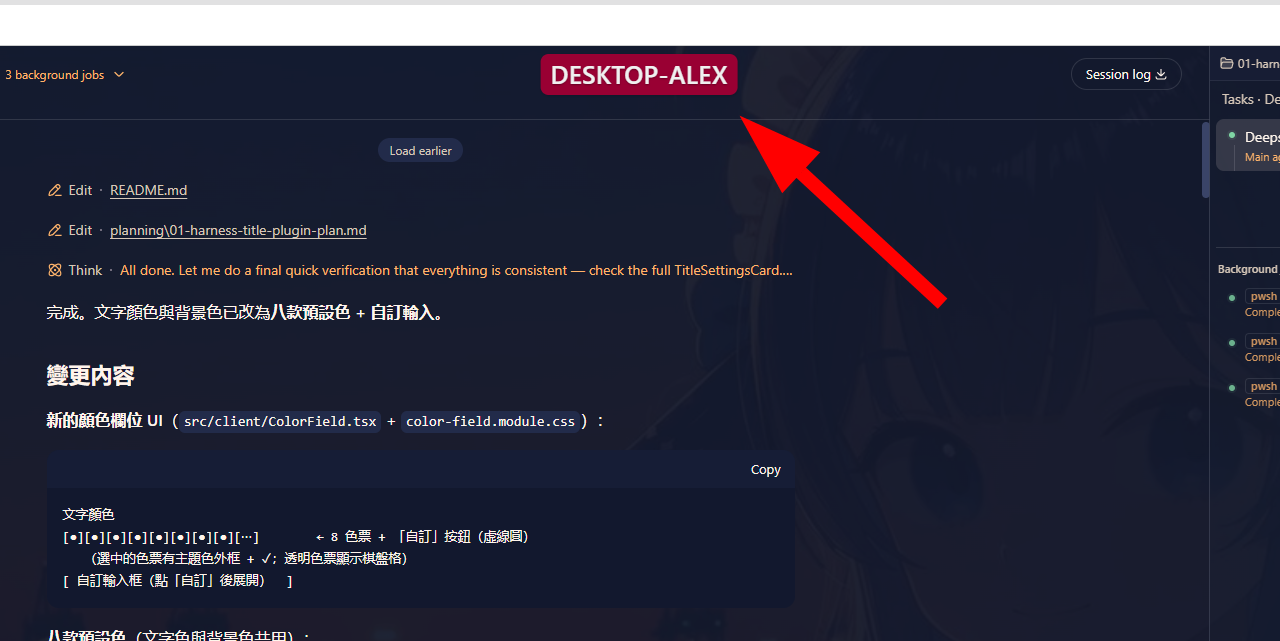
在 DeepSeek Harness(DSH)Web GUI 顯示大字、可設色、可設背景色的自訂 Name Title, 用來一眼識別「目前正在使用哪一台機器的 Harness」。
預設顯示在 New Session 按鈕正上方(左側 sidebar 頂部),開箱即顯示本機 hostname
(由 Host 端注入 base value),可在 Settings 設定頁 修改文字、文字顏色、背景色、
字體大小(10–72px)、顯示位置,並持久化到 ~/.dsh/settings.yaml(每台機器各自一份)。
除了標題文字,還可附加顯示工作區名稱(例如 DESKTOP-ALEX [harness-title]):
獨立開關、獨立字體大小,並可放在標題文字的左側/右側/下方。
工作區名稱預設為「自動」模式:跟隨目前 workspace 的名稱,切換 session/workspace 時即時更新;
也可切換為「手動」輸入固定文字。
效果預覽
功能
- 四種顯示位置:New Session 按鈕上方(預設)/右上角/左上角/頂部居中
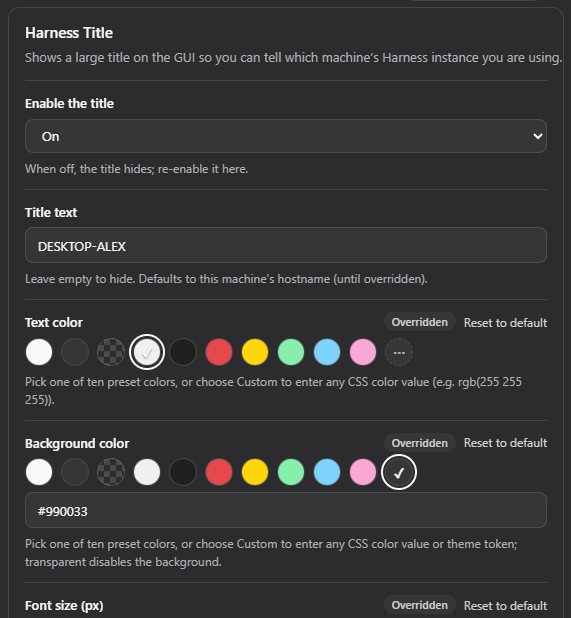
- 文字顏色、背景色支援任意 CSS 色值(含
var(--dsw-*)主題變數) - 字體大小 10–72px
- 總開關(關閉即隱藏)
- 工作區名稱(方括號顯示,如
DESKTOP-ALEX [harness-title]):- 獨立開關(不影響標題)
- 獨立字體大小(10–72px,預設 20)
- 三種位置:標題左側/標題右側(預設)/標題下方
- 名稱來源二選一:
- 自動(預設):跟隨目前 workspace 的名稱(目前 session 所屬 workspace 的 title; 未分組 session 退回其 cwd 目錄名;無目前 session 時用最近啟用的 workspace), 切換 session/workspace 時即時更新
- 手動:固定顯示設定頁輸入的文字(預設為 Host 工作目錄名稱)
- 設定即時生效(儲存後 badge 立即更新,無需重新整理)
- 不阻擋任何 UI 操作(badge
pointer-events: none) - 側欄收起成 rail 時,「New Session 按鈕上方」位置自動隱藏
- 中英雙語(zh / en)
- 多機器各自設定:settings.yaml 為每 profile/每機器一份
安裝
# 在 profile 目錄(~/.dsh/profiles/web)執行
# 方式一:從 GitHub 安裝(推薦)
dsh plugin --profile web add github:alextamhk/dsh-harness-title
# 方式二:本機開發連結
dsh plugin --profile web add link:C:/Users/AlexTam/Projects/ai/deepseek-harness/Plugin/harness-title
安裝後需重啟 dsh web 進程(Host 端 cordis 載入)並在瀏覽器硬刷新。 若 pnpm 報
ERR_PNPM_UNEXPECTED_STORE,請先設定完整環境變數 (USERPROFILE/LOCALAPPDATA/APPDATA/HOME)再執行。
驗證:
dsh plugin --profile web list          # 應出現 harness-title
# ~/.dsh/profiles/web/node_modules/harness-title 應存在
# 瀏覽器載入 http://127.0.0.1:3080/plugins/harness-title/client.js 應回傳 bundle
設定
Settings 側欄 → Harness 標題 頁:
| 欄位 | 說明 | 預設 |
|---|---|---|
| 啟用標題 | 總開關 | 開 |
| 標題文字 | 留空隱藏;未覆寫時為 hostname | 本機 hostname |
| 文字顏色 | 十款預設色 + 「自訂」輸入任意 CSS 色值 | #f0f0f0 |
| 背景色 | 十款預設色 + 「自訂」輸入任意 CSS 色值或主題變數 | var(--dsw-alias-bg-layer-3) |
| 字體大小(px) | 10–72 | 22 |
| 顯示位置 | 四選一 | New Session 按鈕上方 |
| 啟用工作區名稱 | 獨立開關 | 開 |
| 工作區名稱來源 | 自動(目前 workspace)/手動輸入 | 自動 |
| 工作區名稱(手動) | 方括號內文字;僅「手動輸入」來源使用;留空隱藏 | 工作目錄名稱 |
| 工作區字體大小(px) | 10–72,獨立於標題字體 | 20 |
| 工作區名稱位置 | 標題左側/標題右側/標題下方 | 標題右側 |
十款預設色:主題文字色、主題底色、透明、近白、近黑、紅、黃、淺綠、淺藍、粉紅。
也可直接編輯 ~/.dsh/settings.yaml:
harness-title:
  enabled: true
  text: '我的機器'
  color: '#f0f0f0'
  backgroundColor: 'rgba(0, 0, 0, 0.45)'
  fontSize: 28
  position: top-right   # above-new-session | top-right | top-left | top-center
  workspaceEnabled: true
  workspaceMode: auto   # auto(目前 workspace,預設)| manual(使用 workspaceText)
  workspaceText: '我的專案'   # 僅 manual 模式使用;留空隱藏
  workspaceFontSize: 20
  workspacePosition: right   # left | right | below
開發
pnpm install          # 安裝建置依賴
pnpm build            # tsc -b && tsdown → lib/index.js + lib/client.js
pnpm watch            # tsdown --watch(Client 端變更)
- Client 端變更:重建後瀏覽器硬刷新即可
- Host 端變更(cordis / settings namespace):需重啟 dsh web 進程
移除:
dsh plugin --profile web remove harness-title
架構
- Host 端(
src/index.ts):僅註冊harness-titlesettings namespace, base entry 帶os.hostname()。 - Client 端(
src/client/):TitleBadge.tsx註冊進shell.overlayslot(root list slot, 覆蓋整個 frame 的浮動層),position: fixed依設定座標顯示;TitleSettingsCard.tsx註冊進settings.sectionslot(一級設定頁), 採用 family 共用CardFormstaged form 模式(Save 才寫入、revision-fenced)。
- 設定解析層級:schema 預設值 → Host composition base → user 文件(settings.yaml)。
已知限制
shell.overlayslot 屬 DSH rc.7 實作,未來版本可能變動;slot 名稱集中為常數, 升級時易於定位(備案:仿 dsh-pet 直接掛document.body)。- 「New Session 按鈕上方」位置會覆蓋在 sidebar 字標(wordmark)區域之上; 若與字標重疊,建議在設定頁指定一個不透明的背景色。
Repository information
- Language
- TypeScript
- License
- Not reported
- Last updated
- Aug 18, 2026, 11:41 AM
Install deliberately
Review source code, permissions, lifecycle hooks, dependencies and network access. Test untrusted plugins in an isolated environment.