Installation
npx -y @deepseek-ai/dsh plugin --profile web add github:azhe411/dsh-download-progressThis installation command is an unverified starting point generated from the GitHub repository address.
README
Maintainer-authored documentation snapshot.
⬇️ dsh-download-progress
DeepSeek Harness (DSH) 常驻下载管理器 —— 右下角常驻面板,实时显示所有下载任务的进度(文件名 / 百分比 / 速度 / 剩余时间),支持多任务、历史记录、拖动和缩放。
Always-on download manager for DeepSeek Harness: floating panel showing every download's realtime progress (file name / percent / speed / ETA), with multi-task support, history, drag & resize.
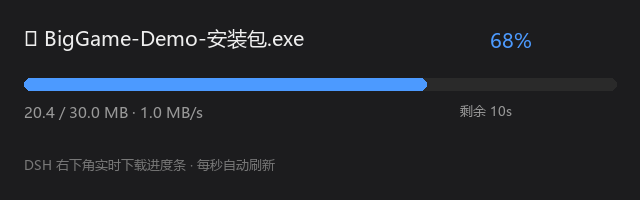
功能
- 🖥️ 常驻面板:右下角一直显示(无任务时显示「待命」),不消失
- 📄 每个下载任务一行:文件名、百分比、速度、剩余时间
- ✅ 多任务并发:同时下载多个文件,每个任务独立进度条
- 🕐 历史记录:已完成/失败的任务保留在列表(显示完成时间),最多 20 条
- 📁 打开文件位置:点已完成/失败任务的「📁 打开」按钮,在文件资源管理器中定位该文件
- 🔽 可展开:标题栏 ▾/▸ 按钮收起/展开任务列表(收起时只留标题栏一行)
- 🖱️ 可拖动:标题栏拖动移动面板位置
- 📐 可缩放:右下角手柄调整面板大小
- 🔄 下载工具支持断点续传、HTTP 重定向跟随、GitHub 镜像加速
组成
| 文件 | 说明 |
|---|---|
download.cjs | 下载工具(Node.js,每个任务写状态到 ~/.dsh/downloads/tasks/<任务>.json,完成后保留=历史) |
plugin-definition.json | DSH 动态 Cordis 插件定义(常驻下载管理面板 UI) |
@local/dl-manager/ | 固化版插件包(v2):装进 ~/.dsh/profiles/web/node_modules/@local/,重启自动加载,无需每次 cordis_define |
安装
1. 下载工具
# 放到 DSH 脚本目录
cp download.cjs ~/.dsh/scripts/download.cjs
2. 进度条插件(两种方式任选其一)
方式 A:动态插件(临时,重启即失)
在 DSH 会话中通过动态插件加载(cordis_define / cordis_run),定义内容见 plugin-definition.json:
- Host 端:注册
dl-tasksRPC,读取~/.dsh/downloads/tasks/目录(v2 改为按任务文件读,支持多任务) - Client 端:注册
shell.overlay悬浮层,每秒host.call('dl-tasks')轮询刷新
⚠️ 如果进度条一直显示「待命」,可能是
fs.resolve('~/.dsh/...')未展开~,把 Host 代码里的路径改为绝对路径(如C:/Users/<你>/.dsh/downloads/tasks)。
方式 B:固化插件(推荐,重启自动加载)
# 1. 复制包到 profile 的 @local 目录
cp -r @local/dl-manager ~/.dsh/profiles/web/node_modules/@local/dl-manager

# 2. 在 profiles/web/cordis.patch.yml 末尾加(照 voice-core 的 insert 模式):
# - insert:
#     - id: dl-manager
#       name: '@local/dl-manager'

# 3. 重启 dsh web,刷新浏览器,右下角出现「⬇ 下载」面板
固化版 host 半用 ctx.webServer.register 注册 /api/dl-manager/tasks 和 /api/dl-manager/open 两个 HTTP 端点,client 半用 fetch 轮询——不使用动态插件专属的 harness.handle(见踩坑记录)。
3. 多线程下载(可选,大文件加速)
# aria2c 16 连接并发,进度同样写入 tasks/ 目录驱动面板
node ~/.dsh/scripts/aria2-dl.cjs <URL> <输出路径> [--mirror=前缀]
使用
# 基础下载(自动显示进度条)
node ~/.dsh/scripts/download.cjs <URL> <输出路径>

# GitHub 大文件国内加速(镜像)
node ~/.dsh/scripts/download.cjs <URL> <输出路径> --mirror=https://gh-proxy.com/

# 大文件多线程下载(>50MB 推荐)
node ~/.dsh/scripts/aria2-dl.cjs <URL> <输出路径> --mirror=https://gh-proxy.com/
下载开始后,右下角自动弹出进度条;完成后回到「待命」状态。
国内下载加速
GitHub 大文件国内直连常超时,推荐镜像(响应快但偶发不稳定):
https://gh-proxy.com/https://ghfast.top/https://ghproxy.net/
踩坑记录
- drain 恢复作用域:下载工具的
res.on('drain')恢复必须在res回调作用域内注册,否则报ReferenceError: res is not defined - 动态 client 无 setInterval:DSH 动态客户端没有浏览器定时器全局,必须用
timer服务的ctx.interval,且插件需inject: ['timer'] - 限速无效:
pause/resume节流对 Node 大缓冲无效,已移除限速功能 - ⚠️ 固化版不能用
harness.handle(v1 崩溃教训):动态插件跑在 vm 沙箱里,harness是沙箱注入的全局;但固化包(@local/常规 cordis 插件)作用域没有harness全局——把动态插件的 host 代码直接抄进固化包会抛ReferenceError: harness is not defined,启动即崩 web。固化版 host 必须改用ctx.webServer.register注册 HTTP 端点(与 dsh-usage-stats 同模式),client 端用fetch替代host.call - ⚠️ aria2 RPC 必须带
Content-Length:http.request不设该头会走 chunked 传输,aria2 的 RPC 服务器拒绝 →Parse error500 → 进度永远 0%。加'Content-Length': Buffer.byteLength(body)解决 - aria2 RPC 模式不自动退出:下载完成后进程不退出,需轮询
tellStopped收尾写done状态,再aria2.shutdown
License
MIT
Project files and signals
Shown items are public repository signals detected in the directory snapshot.
Repository information
- Language
- JavaScript
- License
- MIT
- Last updated
- Aug 18, 2026, 3:01 PM
Install deliberately
Review source code, permissions, lifecycle hooks, dependencies and network access. Test untrusted plugins in an isolated environment.