Installation
npx -y @deepseek-ai/dsh plugin --profile web add github:FenyxHuang/dsh-desktop-petThis installation command is an unverified starting point generated from the GitHub repository address.
README
Maintainer-authored documentation snapshot.
dsh-desktop-pet
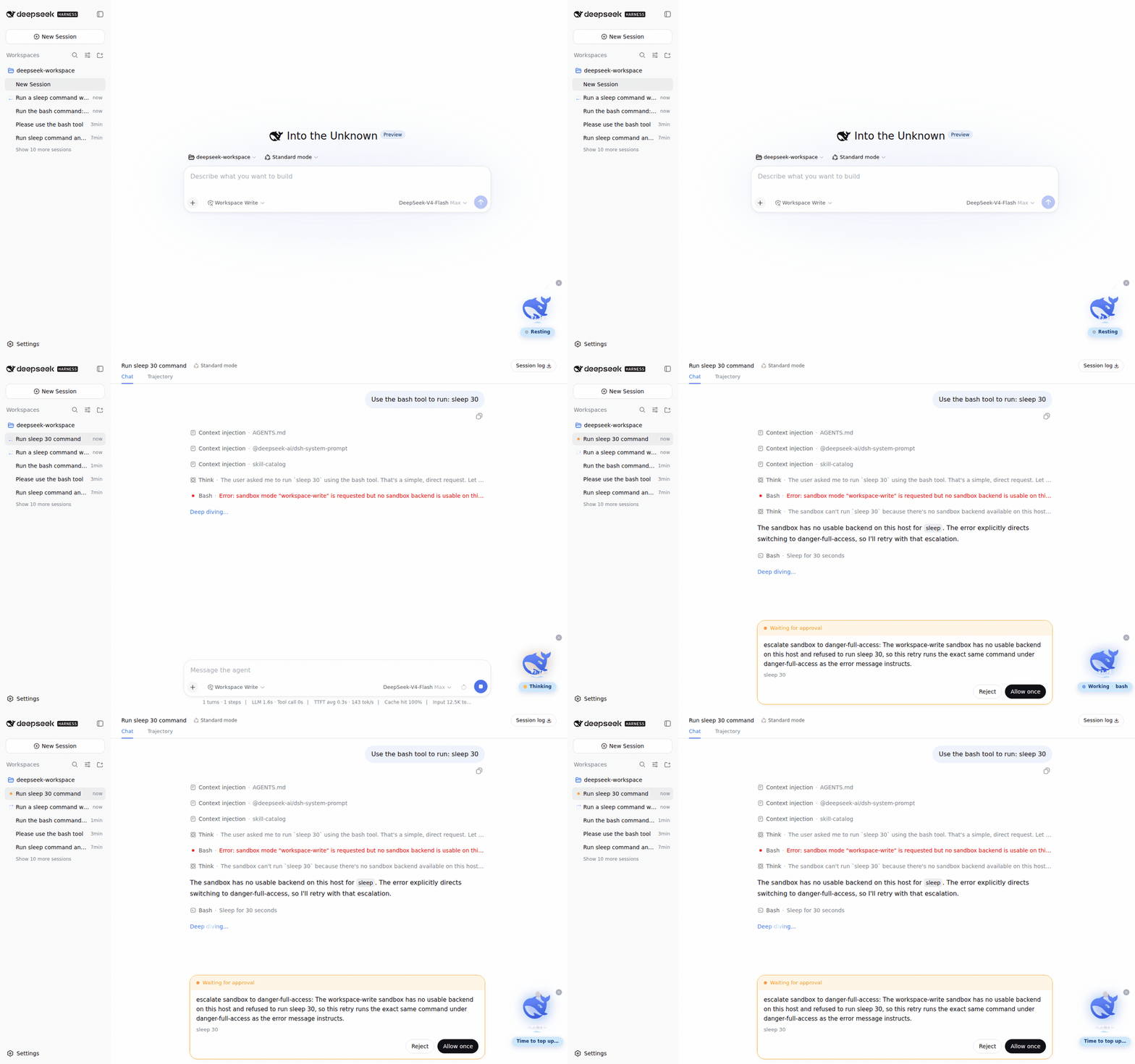
A desktop pet for DeepSeek Harness: the official whale mark lives in the shell overlay, floats in a circular sea whose level mirrors your DeepSeek API balance, and reacts to your agent's every move.
Features
- Live agent status — the whale rests, thinks, works, or cries (
❗) exactly as your agent does, with a status pill that shows the phase, the current tool, and elapsed time. - Balance as sea level — the circular sea around the whale fills to
balance / balanceScale(¥100 = full by default), the surface is a scrolling wave with a slow tide, and the amount is printed on the water. Low balance also makes the whale droop and complain. - Interactive — click to pet it: a springy jump most of the time, or a rare (40%) charged dive with a 360° spin that lands with a big splash, a high rebound, a little hop, and a final tiny splash. Random chatter lines (zh/en) per state, floating hearts, rising bubbles while thinking, drag it anywhere, minimize to a dot.
- Zero runtime dependencies — the bundle ships prebuilt; all
@deepseek-ai/*services come from the harness itself, so installing needs no build step and no build authorization.
Install
Prerequisite: a DeepSeek Harness install (web profile recommended).
# GitHub direct install (prebuilt artifacts, no build authorization needed)
dsh plugin --profile web add github:FenyxHuang/dsh-desktop-pet

# or from a local checkout
dsh plugin --profile web add link:/path/to/dsh-desktop-pet

# or as a tarball
pnpm pack
dsh plugin --profile web add ./dsh-desktop-pet-0.1.0.tgz
Restart dsh after installing (bundle layers compose at startup). The whale appears in the bottom-right corner of the web UI.
Configuration
The bundle applies the cordis.patch.yml layer, which mounts two rows:
| id | package | config |
|---|---|---|
pet-status | dsh-desktop-pet | balanceScale: 100 (the CNY amount at which the sea reads full; the sea level is balance / balanceScale, capped at 1) |
ui-pet | dsh-desktop-pet | — |
The host row reads your DeepSeek API key through the harness's normal credentials (DEEPSEEK_API_KEY) and refetches https://api.deepseek.com/user/balance at most every 15 seconds. Override any key in your own profile's cordis.patch.yml:
- update:
    - id: pet-status
      config:
        balanceScale: 500
        balanceRefetchMs: 60000
How it works
One npm package carries both halves, mirroring the official split packages:
- Host half (
lib/index.js) — a Cordis service (PetStatusService) that foldsagent/status,tools/pre-execute,tools/result, andagent/errorevents into a per-session snapshot and serves it over a generated Typert Remote (petStatus.snapshot). Thelib/typert.*artifacts are generated by@deepseek-ai/dsh-typert-generatorand committed, so consumers install prebuilt code. - Browser half (
lib/client.js) — a module-loader bundle that mounts its own Remote contribution, polls it once per second for the current session, and registers the shell-overlay widget. React, Cordis, and the platform modules stay external (the app provides them); everything else is inlined.
The package declares no runtime dependencies: the loader resolves @deepseek-ai/* names from the dsh install itself, which is the official plugin contract.
Development
The repo is a self-contained single package (TypeScript + tsdown). Building and testing require an enclosing DeepSeek Harness checkout (the tests alias @deepseek-ai/* to its source tree):
# from inside a harness checkout (e.g. <harness>/.dsh-build/dsh-desktop-pet)
pnpm install
pnpm run build          # tsc both faces + tsdown host bundle + browser bundle
pnpm run test           # 34 pass; the 7 jsdom widget tests need a supported Node (^22.19 || >=24)
Regenerate the Typert artifacts only when the Remote surface changes, by copying the output of the harness's own build for the equivalent package and re-patching the package name, or by running the official generator in a <workspace>/packages/* layout (its discovery requires that shape).
License
MIT — derived from the DeepSeek Harness codebase (MIT, © 2026 DeepSeek). The whale mark is DeepSeek's official brand artwork and is used for the widget's own display.
Project files and signals
Shown items are public repository signals detected in the directory snapshot.
Repository information
- Language
- JavaScript
- License
- MIT
- Last updated
- Aug 16, 2026, 1:45 AM
Install deliberately
Review source code, permissions, lifecycle hooks, dependencies and network access. Test untrusted plugins in an isolated environment.