Installation
pnpm build:rust # cargo build --release → prebuilt/<triple>/dsh_powerdesk_pty.nodeThis command is generated from the GitHub repository address. Inspect the upstream README and source before running it; pin a release or commit when reproducibility matters.
README
Maintainer-authored documentation snapshot.
dsh-powerdesk
English | 简体中文
A DSH web plugin that adds a small IDE workbench to the DSH web UI: a GPU-accelerated terminal, a file explorer, a notes app, a code editor, a sandboxed browser, and a calendar — all self-contained, in a dockable right panel and a dockable bottom panel (VSCode-style dual workbench, with drag-to-split and drag-between-panels).
- Terminal — rendered with restty
(WebGPU/WebGL2 + WASM VT, Ghostty-lineage) and backed by a Rust PTY
(napi-rs + portable-pty)
instead of the C++
node-ptythe stock terminal uses. - Explorer — a directory tree over any local folder you bookmark (picked via a built-in folder-browser modal, not a text field). Click a file to open it in the editor; each file row has quick "copy relative path" (for @-mentioning in chat) and "copy absolute path" actions.
- Notes — bind one local folder and browse/edit only its
.mdfiles as a recursive tree, with inline create / rename / delete for both notes and folders. The editor is embedded in the same tab (tree left, editor right). - Editor — CodeMirror 6 with syntax highlighting for TS/JS/Python/JSON/CSS/HTML/Markdown/Rust/YAML, a selectable CodeMirror theme (Dracula by default), soft line-wrapping, and Cmd/Ctrl+S save. Opens automatically when you click a file in Explorer or Notes.
- Browser — a sandboxed iframe behind an address bar, with an
embeddability probe that explains
X-Frame-Options/frame-ancestorsrefusals instead of showing a blank "refused to connect" frame. - Calendar — a schedule-x calendar (Month / Week
/ Day) over a local SQLite database (a new Rust napi module with bundled
SQLite, sibling to the PTY crate), lazy-loaded so it never weighs down
startup. Events persist at
<profile-dir>/powerdesk-calendar.db.
All six surface as tabs in the plugin's own sidebar — a right panel (width freely draggable, no cap) and a bottom panel (height draggable, spans the full window width including under the right panel).
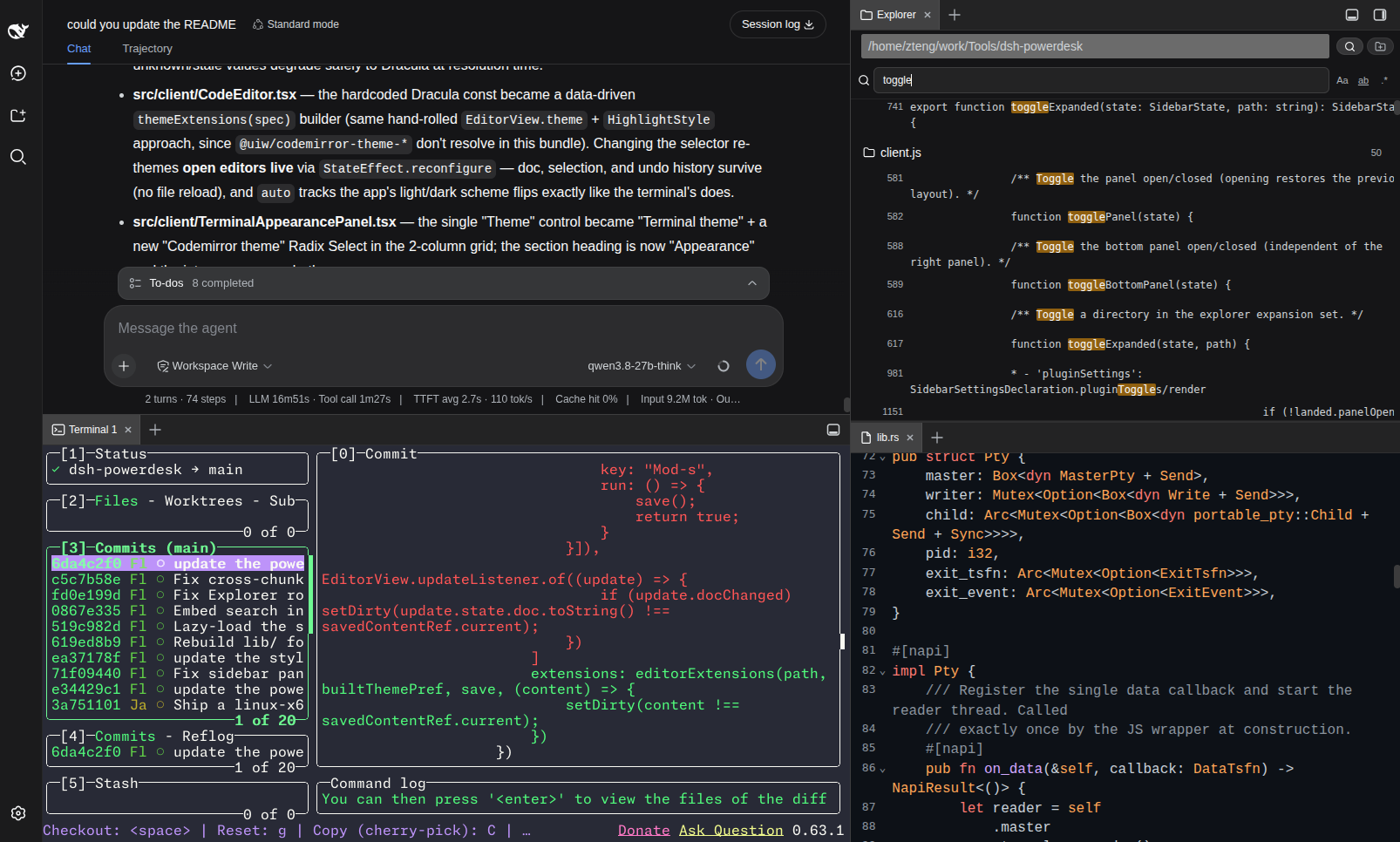
Why Powerdesk
- A genuinely fast terminal — restty (WebGPU/WebGL2 + a WASM VT, Ghostty-lineage) over a Rust PTY (napi-rs + portable-pty), not the C++
node-ptythe stock terminal uses — so terminal I/O is substantially faster and lighter. - A full IDE without leaving the chat — ripgrep content search, a CodeMirror 6 editor, a file explorer, notes, and a sandboxed browser, all as tabs in dockable right + bottom panels. Never context-switch out of the DSH page.
- Two-panel VSCode-style workbench — drag any tab to a pane edge to split it, or between the right and bottom panels to move it entirely; two split trees sharing one drag-and-drop system.
- Zero-build install —
lib/and the macOS / Linux-x64 Rust PTY binaries are committed, sodsh plugin addjust copies files: no build step, no Rust toolchain, noallowBuildsentry. - Build your own tabs — ship a React component + a
powerdesk.jsonas a.tgzand it mounts as a sidebar tab; a template (templates/extension/) gets you topnpm packin minutes. - Sandboxed by default — the browser tab runs without
allow-same-origin, refuses loopback addresses, and probesX-Frame-Options/frame-ancestorsto explain refusals instead of showing a blank frame.
Quick install
dsh plugin --profile web add https://github.com/FleetingEcho/dsh-powerdesk.git
Requires DSH >=0.0.1 with the dsh CLI on your PATH. Hard-refresh the browser (Cmd/Ctrl+Shift+R) after installing. The terminal works out of the box on macOS (both architectures) and Linux x86_64; other platforms build the Rust PTY once on first use (see Install).
Requirements
- DSH
>=0.0.1with thedshCLI on yourPATH(dsh --version). Loads into a DSH profile (defaultweb). - Node.js 20+ and pnpm 9+ if you install from source.
- A Rust toolchain (
rustup) — only if your platform has no committed prebuilt binary yet; macOS users never need Rust.
The PTY addon is looked up by platform triple (src/rust-pty-deps.ts). Three triples have a binary committed to the repo and shipped with every install; the rest build from source on first use:
| OS | Arch | Triple | Prebuilt? |
|---|---|---|---|
| macOS | Apple Silicon | darwin-arm64 | ✅ committed |
| macOS | Intel | darwin-x64 | ✅ committed |
| Linux | x86_64 (glibc) | linux-x64-gnu | ✅ committed |
| Linux | aarch64 (glibc) | linux-arm64-gnu | build from source |
| Windows | x86_64 | win32-x64-msvc | build from source |
| Windows | ARM64 | win32-arm64-msvc | build from source |
Install
Pick one channel — do not enable both (they would double-mount the host half and render two sidebars). No npm package is published yet, so both install straight from the GitHub repo.
Option A — from GitHub (recommended)
dsh plugin --profile web add https://github.com/FleetingEcho/dsh-powerdesk.git
The repo is public, so the plain HTTPS URL works anonymously. pnpm reads the package name out of the repo, so no dsh-powerdesk@ prefix is needed — though dsh-powerdesk@<url> lets you pin a branch or tag (...git#my-branch). Prefer SSH? git+ssh://git@github.com/FleetingEcho/dsh-powerdesk.git works too (needs an SSH key on GitHub).
lib/ (the built client/host JS) and the macOS / Linux-x64 Rust PTY binaries are committed, so there's no build step and no allowBuilds entry — the terminal works immediately on those platforms.
Windows or Linux ARM64: build the Rust PTY once
cd ~/.dsh/profiles/web/node_modules/dsh-powerdesk
pnpm build:rust       # needs the Rust toolchain (rustup); cargo build --release
Option B — from source (for development)
git clone https://github.com/FleetingEcho/dsh-powerdesk.git
cd dsh-powerdesk
pnpm install
pnpm build            # tsc (lib/types) + tsdown (lib/*.js + the lazy chunks)
pnpm build:rust       # cargo build --release → prebuilt/<triple>/dsh_powerdesk_pty.node
pnpm test             # vitest (optional sanity check)

# Register the local checkout with your DSH profile.
# Use an ABSOLUTE path (link:. resolves relative to the profile dir and breaks):
dsh plugin --profile web add "dsh-powerdesk@link:$PWD"
After either option: hard-refresh the browser (Cmd/Ctrl+Shift+R). Client-half changes hot-reload without a DSH restart; host-half changes (src/*.ts, including the Rust PTY layer) need a DSH restart (pm2 restart dsh-web, or dsh web).
Use
Click the toggle cluster at the top-right corner of the window — one button opens/collapses the right panel, the other the bottom panel. Drag a tab to a pane's edge to split it, to its center to merge/reorder, or from one panel to the other to move it entirely. Every open tab stays mounted while inactive, so switching tabs never drops a terminal's connection or an editor's undo history.
Terminal
Opens in the active conversation's working directory; open multiple per session up to the configured quota (tab title shows the index: Terminal 1, Terminal 2, …). The toolbar has a copy action. Font family / weight / size and the terminal theme are stored prefs — edit them from Settings → Powerdesk. If the native PTY binary is missing or fails to load, the terminal shows a repair banner with the exact command to run (see Repair).
Explorer
Click the folder-name button in the header to open a folder-browser modal (click through subdirectories, "Select this folder"). Add multiple folder bookmarks and switch between them from the same button. Click a directory row to expand it, a file row to open it in the editor (opening a file auto-splits Explorer into its own pane once, so the editor doesn't stack on top). Hovering a file row reveals: @ copies the path relative to the bookmark root (for @-mentioning in chat), and a copy icon copies the absolute path.
Notes
First use prompts you to bind a folder (rebindable any time by clicking the folder name). Notes recursively lists every .md / .markdown file under it — directories with no markdown anywhere under them are pruned — and renders the tree (left) next to an inline editor (right, resizable via the divider), both in the one tab. Header actions: new note, new folder; per-file actions (hover): rename, delete (deleting a folder is recursive).
Editor
Not opened directly — it's what Explorer and Notes open files into. CodeMirror 6 with syntax highlighting for TypeScript/JavaScript, Python, JSON, CSS, HTML, Markdown, Rust, and YAML; a selectable CodeMirror theme (Dracula by default), picked in Settings → Powerdesk and re-applied live to any open editor (auto follows the app's light/dark scheme). Soft line-wrapping; Cmd/Ctrl+S to write back. The tab shows a dirty dot while there are unsaved edits.
Browser
Type a URL in the address bar and press Enter. Back / forward / refresh / open-in-browser buttons line the bar.
- Sandbox — the iframe runs without
allow-same-origin(the visited page cannot read the GUI's storage or reach its API) and withoutallow-top-navigation. A temporary unlock button drops the sandbox for trusted sites; a red status bar warns while it's off. - Address bar — only
http/httpsare accepted;javascript:,data:,file:are refused. Loopback addresses (localhost,127.0.0.0/8,::1,0.0.0.0) are refused so a browsed page cannot probe your local services. - Embed refusals — when a site sets
X-Frame-Options/ aframe-ancestorsCSP that blocks embedding, the plugin probes the headers first and shows a reason panel with "Open in browser" and "Load anyway" instead of a blank frame. This is a browser-enforced, per-site restriction; "Open in browser" is the only way to view such a site from here. - External links — the browser tab claims
http://external-link clicks (so an http link in chat opens in the sidebar);https://is left to the system browser.
Calendar
A schedule-x calendar (Month / Week / Day views) over a local SQLite database. Click New event to create (title via prompt), drag to move/resize, click an event to confirm-delete. The DB lives at <profile-dir>/powerdesk-calendar.db, so events survive restarts and plugin updates. The tab is lazy-loaded — schedule-x + its preact runtime only download on first open, never at startup — and degrades to a repair banner when the platform's SQLite native binary is missing.
Settings
Settings → Powerdesk shows a card per tab type with an enable toggle — switching a tab type off hides it from every pane's + menu and makes openTab a no-op for it (persisted in localStorage). Clicking a card's body opens that surface.
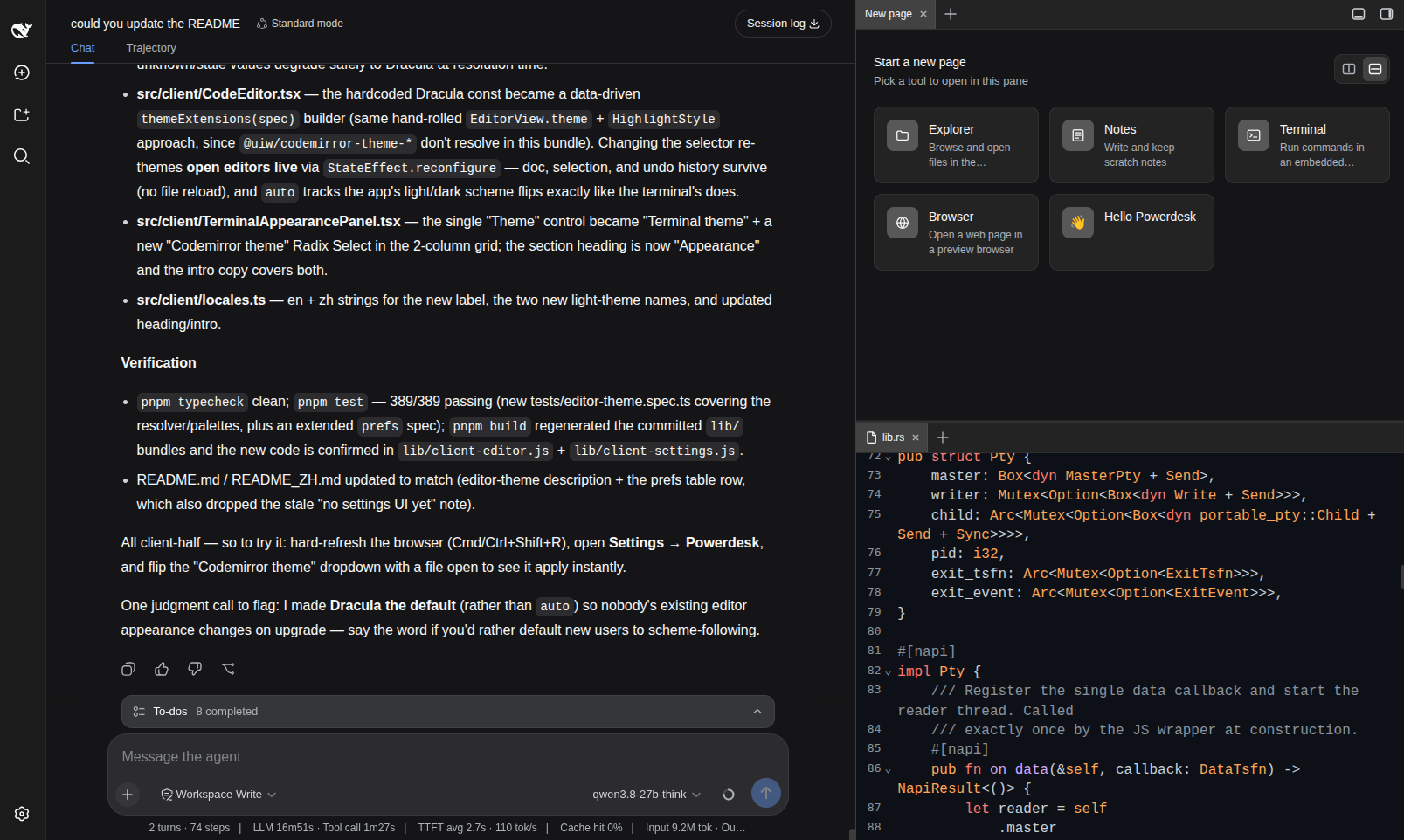
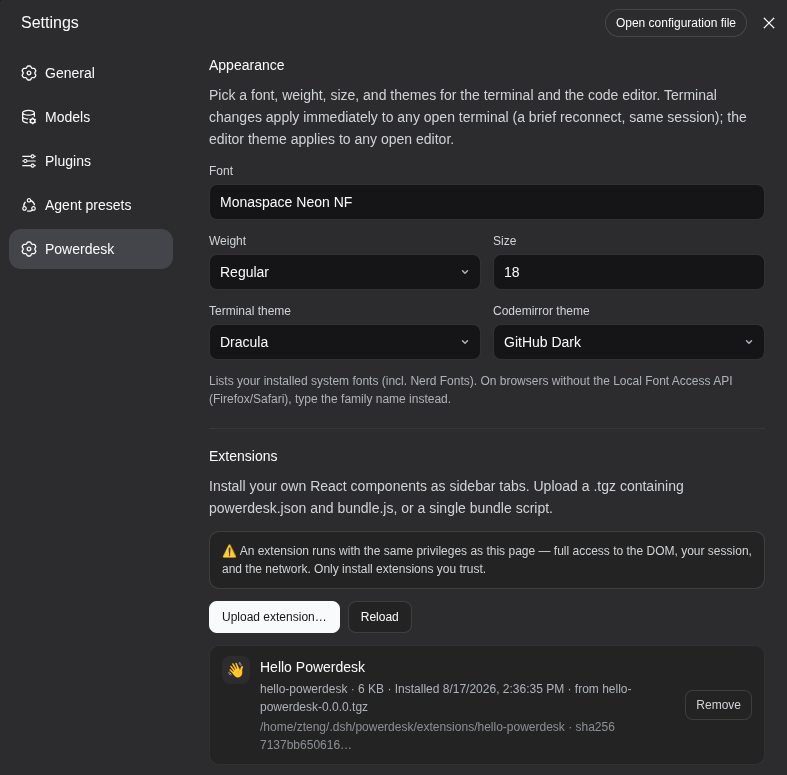
Below the cards, an Appearance block holds the terminal font family / weight / size and the two theme selectors — the Terminal theme and the Codemirror theme — each with a "System default" option that follows the app's light/dark scheme. Changing either re-applies live to any open terminal / editor.
Update
# Option A (GitHub channel) — pnpm pins the resolved commit, so remove + re-add to upgrade:
dsh plugin --profile web remove dsh-powerdesk
dsh plugin --profile web add https://github.com/FleetingEcho/dsh-powerdesk.git

# Option B (source) — pull, rebuild, restart only if you touched the host half:
git pull && pnpm install && pnpm build && pnpm build:rust
Then hard-refresh the browser. Host-half changes need a DSH restart; the client half only needs a hard-refresh.
Uninstall
dsh plugin --profile web remove dsh-powerdesk
# Source channel: also revert any `link:` dependency you added to the profile, then `pnpm install`.
Hard-refresh (or restart DSH) for the mount row to drop.
Repair
If the terminal shows "Rust PTY loading failed" — the native PTY binary is missing, corrupt, or built for the wrong platform — rebuild it in place (no reinstall):
cd ~/.dsh/profiles/web/node_modules/dsh-powerdesk   # GitHub channel
#   — or your local dsh-powerdesk checkout            # source channel
pnpm build:rust                                      # needs the Rust toolchain (rustup)
Then hard-refresh and restart DSH (the host half re-reads the binary on startup).
Install troubleshooting
The plugin installs but does not load — check that the bundle row was added; dsh.profile.bundles must list dsh-powerdesk alongside the dependency:
cat ~/.dsh/profiles/web/package.json
If the dependency is present but the bundle row is not, the plugin mounts as a plain dependency and never loads — that's the symptom of a broken link: install (see Option B's note); re-add with an absolute path or the git URL. Host-half changes only take effect after a DSH restart.
Configuration
Plugin config (in dsh.profile.bundles)
dsh-powerdesk:
  terminalsPerSession: 3      # max live terminals per conversation session
  reconnectGraceMs: 30000     # keep a dropped pty alive this long for reconnect
  shell: ''                   # override the interactive shell (auto-detected if '')
  extensionsEnabled: false   # allow user-installed extensions (see Extensions)
  extensionsDir: ''           # where they live ('' = ~/.dsh/powerdesk/extensions)
User prefs (localStorage, no host round-trip)
| Pref | Storage key | Notes |
|---|---|---|
| Terminal font family / weight / size / theme; CodeMirror (editor) theme | dsh-powerdesk:prefs | Editable from Settings → Powerdesk (Appearance). |
| Explorer folder bookmarks | dsh-powerdesk:explorer-bookmarks | Multiple bookmarks + which is active. |
| Notes bound folder | dsh-powerdesk:notes-folder | One folder, rebindable. |
| Notes tree column width | dsh-powerdesk:notes-tree-width | Dragged via the divider. |
| Per-tab-type enable switches | dsh-powerdesk:tabs-enabled | Set from the Settings card. |
Environment variables
| Var | Purpose |
|---|---|
DSH_POWERDESK_PTY_PATH | Absolute path to a .node addon; beats every other resolution. |
DSH_POWERDESK_PTY_TRIPLE | Override the detected platform triple (e.g. linux-x64-musl). |
DSH_RESTTY_SHELL | Override the Windows shell probe (default: first pwsh.exe on PATH or in a known install dir, else powershell.exe). |
PREBUILT_BASE | Override the prebuilt-binary download base URL (default: GitHub releases). |
DSH_HOME | Override the DSH home (default ~/.dsh). |
DSH_CMD | Override the dsh CLI used by install.sh (default: dsh, then npx). |
Extensions
Powerdesk can mount your own React components as sidebar tabs. An extension is a single bundled script plus a powerdesk.json manifest, uploaded as a .tgz from the Settings card.
Security — read this first
An extension runs in the DSH page's own origin, with full access to the DOM, your session, and the network — the same privileges as Powerdesk itself. There is no sandbox (and cannot be one while extensions share the host's React instance). This is a trusted local extensions feature, not a marketplace: install only code you have read or whose author you trust. The feature is off by default — turn it on deliberately:
dsh-powerdesk:
  extensionsEnabled: true
Install / remove
Settings → Powerdesk → Extensions → Upload extension… Accepted uploads (decided by bytes, not filename): .tgz / .tar.gz / .tar (must contain powerdesk.json at the root), or a bare .js / .js.gz (the card asks for an id and display name). Each extension installs to <extensionsDir>/<id>/ atomically; the card shows the on-disk path and the source archive's sha256. Remove deletes the directory; to disable without uninstalling, use the enable switch on the extension's card.
Authoring
cp -r templates/extension ~/my-extension
cd ~/my-extension && pnpm install
$EDITOR powerdesk.json          # pick an id and a title
pnpm build && pnpm pack         # -> my-extension-0.0.0.tgz
See templates/extension/README.md for the component contract, manifest reference, and how extensions are loaded. Do not bundle React — it's external, and the host passes you its own instance; a second copy of React has its own hook dispatcher and every hook you call will throw.
Limits: upload 16 MiB, inflated archive 32 MiB, 64 files/archive, 8 MiB/file. Archives with symlinks, hardlinks, device nodes, absolute paths, or .. segments are rejected at parse time.
Development
pnpm install
pnpm build            # tsc (lib/types) + tsdown (lib/*.js + the lazy chunks)
pnpm build:rust       # cargo build --release → prebuilt/<triple>/dsh_powerdesk_pty.node
pnpm typecheck        # tsc --noEmit
pnpm test             # vitest run
pnpm watch            # tsdown --watch (rebuild bundles on save)
The Rust crate (rust/) uses napi-rs + portable-pty. restty and CodeMirror live in lazy chunks (lib/client-terminal.js, lib/client-editor.js) fetched on first use, keeping the initial bundle small (~196 KB).
lib/ and prebuilt/ are committed, not gitignored — the GitHub-install channel is a plain file copy with no build step, so whatever is in git is what installs. After any source change, run pnpm build (and pnpm build:rust if the Rust layer changed) and commit the result before pushing, or GitHub installs will silently ship stale code. Sourcemaps (lib/**/*.map) stay gitignored.
Acknowledgements
Inspired by DSH-better-sidebar — sincere thanks to its authors for the panel / dock layout and the sidebar shell foundation Powerdesk built on. Powerdesk grew its own plugin architecture on top of that base, with a performance-first terminal (restty renderer + Rust PTY) and the split-tree / file / notes / editor / browser / extension surfaces redesigned from scratch.
License
MIT.
Project files and signals
Shown items are public repository signals detected in the directory snapshot.
Repository information
- Language
- JavaScript
- License
- MIT
- Last updated
- Aug 18, 2026, 5:10 AM
Install deliberately
Review source code, permissions, lifecycle hooks, dependencies and network access. Test untrusted plugins in an isolated environment.