Installation
npx -y @deepseek-ai/dsh plugin --profile web add github:FxRayHughes/dsh-coding-companionThis installation command is an unverified starting point generated from the GitHub repository address.
README
Maintainer-authored documentation snapshot.
dsh-coding-companion · 编程陪伴
一个 deepseek-harness 的 Node-host 插件:AI 工作时弹出一个独立窗口陪你「摸鱼」,AI 停下等你输入时把窗口最小化并挂起整个进程树(视频与声音冻结、不占 CPU),你继续对话时再从冻结帧恢复播放。
仅 Windows。媒体不限抖音——任意视频 / 直播 URL 皆可,每个站点各自保存登录,互不干扰。
演示
▶ 点此观看演示视频 demo.mp4(作为 v0.4.0 Release 附件发布)
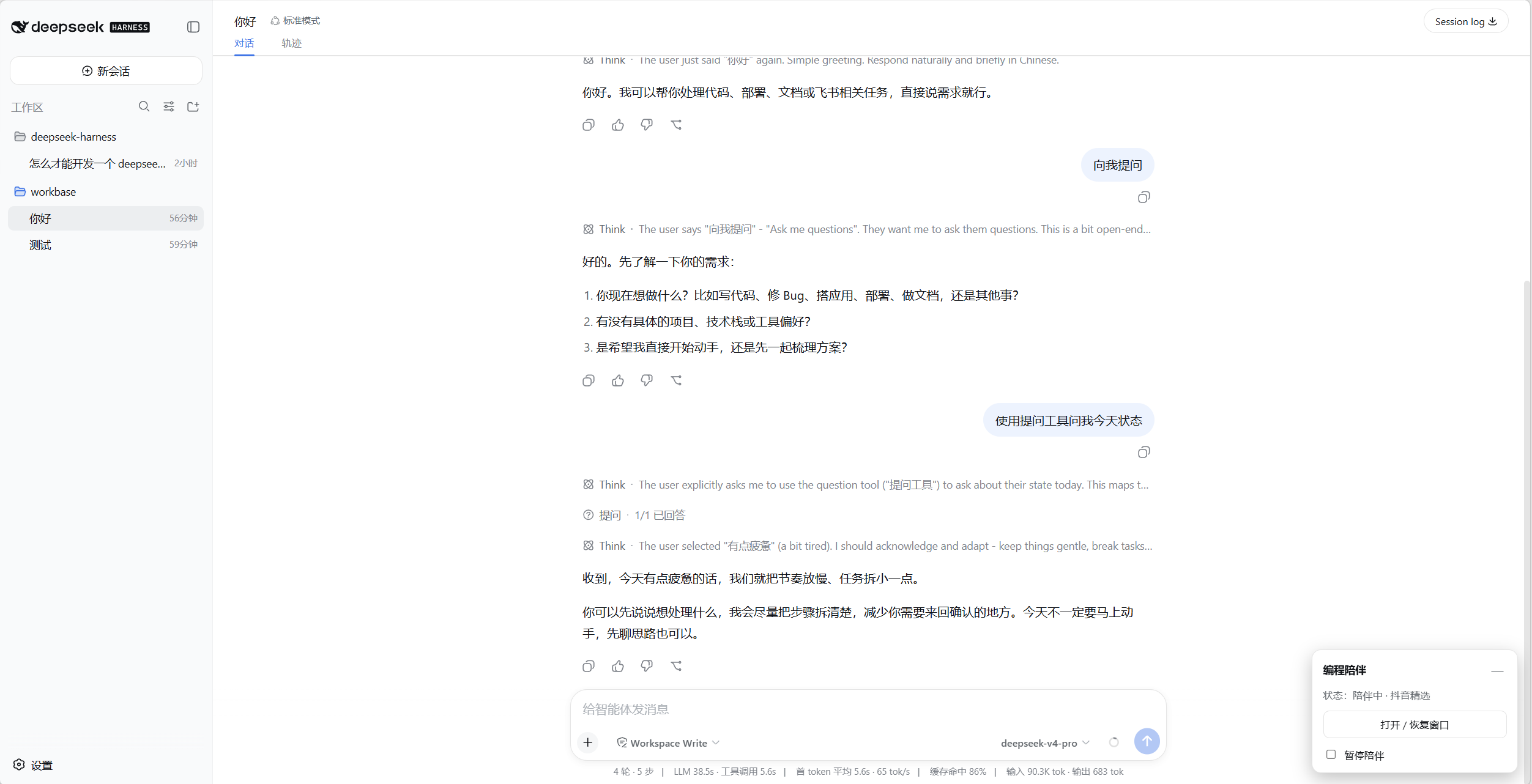
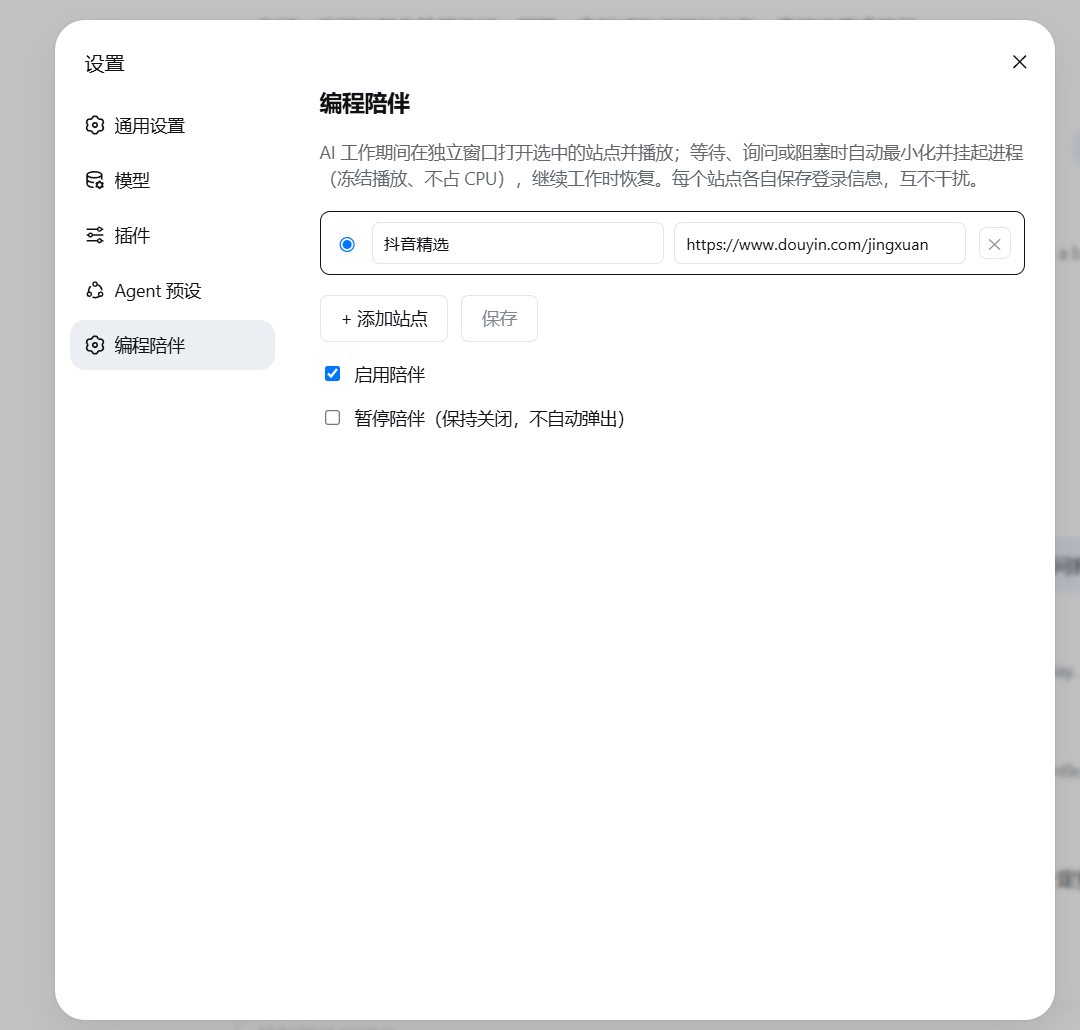
| 主界面悬浮控件 | 设置页(多站点管理) |
|---|---|
 |  |
特性
- 跟随 AI 状态:有 AI 在后台工作且无人需要你输入时,窗口最大化置顶播放;一旦有任务需要你(提问 / 审批)或全部空闲,自动最小化 +
NtSuspendProcess挂起整棵进程树(Chromium--app是多进程,只挂根进程停不住视频 / 声音)。恢复时从冻结帧续播,页面不重载。 - 多任务不抢焦点:多个会话并行时,需要你操作就让出对话,纯后台跑才置顶。
- 登录持久化:每个站点一个固定的
--user-data-dir(~/.dsh-coding-companion/<站点id>/),cookie / 登录跨重启保留,站点之间隔离。 - 多站点:设置页维护站点列表(名称 + URL),单选切换当前站点。
- 窗口内「回到对话」:随窗加载一个轻量扩展,在页面注入悬浮按钮;点击即挂起陪伴窗、露出对话。
- 跟随父进程关闭:harness 退出(含
Ctrl+C)时先 resume 再 taskkill 整棵进程树,绝不留下「挂起」状态的僵尸进程。 - 主界面悬浮控件:右下角右边缘手柄,展开后可见状态、「打开 / 恢复窗口」、「暂停陪伴」。
安装
本插件是纯 JS 组合包(bundle),无需构建,可直接从 GitHub 安装进 web profile:
dsh plugin --profile web add github:FxRayHughes/dsh-coding-companion
从源码仓库运行时用
pnpm dsh plugin --profile web add github:FxRayHughes/dsh-coding-companion。 因为无prepare构建脚本,pnpm ≥10的安装期构建授权不需要;add完直接重启 profile 即可。
也可锁定 commit 更稳妥:
dsh plugin --profile web add github:FxRayHughes/dsh-coding-companion#<sha>
卸载:
dsh plugin --profile web remove dsh-coding-companion
配置
插件从 coding-companion 设置命名空间读取配置,全部在设置侧栏 → 编程陪伴里操作:
| 字段 | 说明 |
|---|---|
sites | 站点列表 { id, name, url },每个站点独立持久化目录 |
activeSiteId | 当前显示的站点 id |
enabled | 是否启用陪伴 |
paused | 暂停陪伴(保持关闭、不自动弹出) |
设置页由配套的仓库客户端包 @deepseek-ai/dsh-client-ui-coding-companion 提供(注册 coding-companion 命名空间与「编程陪伴」设置页)。若你的部署单独启用该设置页,记得把 coding-companion 加入 api-proxy 的 web 设置白名单。
cordis.patch.yml 里的默认配置:
- insert:
    - id: coding-companion
      name: dsh-coding-companion
      config:
        activeSiteId: douyin
        sites:
          - id: douyin
            name: 抖音精选
            url: https://www.douyin.com/jingxuan
        enabled: true
实现要点
- 窗口是 Chromium
--app独立窗口,用唯一的--user-data-dir路径同时作为进程标记,控制器据此定位根进程及其整棵进程树。 - 窗口显隐用 Win32
ShowWindowAsync/SetForegroundWindow,冻结用 ntdllNtSuspendProcess/NtResumeProcess,进程句柄用 kernel32OpenProcess,全部通过一段内联 PowerShell(P/Invoke)执行。 - 「回到对话」按钮由
return-extension/(MV3 扩展)注入,点击经后台 service worker 调用 host 的/coding-companion/return路由触发挂起;host 在启动时把带端口的回调地址写入扩展的config.js。
限制
- 仅 Windows(窗口控制与进程挂起依赖 Win32 / ntdll)。
- 部分 Edge / Chrome 稳定版可能对
--load-extension有策略限制,若「回到对话」悬浮按钮不出现,属该限制所致。
许可
MIT
Project files and signals
Shown items are public repository signals detected in the directory snapshot.
Repository information
- Language
- JavaScript
- License
- Not reported
- Latest release
- v0.4.0
- Last updated
- Aug 16, 2026, 6:39 AM
Install deliberately
Review source code, permissions, lifecycle hooks, dependencies and network access. Test untrusted plugins in an isolated environment.