Installation
npx -y @deepseek-ai/dsh plugin --profile web add github:guo6x/dsh-pilotThis installation command is an unverified starting point generated from the GitHub repository address.
README
Maintainer-authored documentation snapshot.
🛩️ dsh-pilot — give your DSH agent hands



 中文说明 · DeepSeek Harness plugin
Drive a real browser from the DeepSeek Harness chat: the agent opens pages, reads them as structured text with a numbered element list, clicks and types by ref (no CSS guessing), presses keys, navigates back/reload, waits, evaluates JS, and takes screenshots — while you watch a live draggable cockpit panel in the Web GUI and can take over at any time.
- 🚀 One command install —
dsh plugin --profile web add github:guo6x/dsh-pilot - ⚡ Zero runtime dependencies — talks CDP over the native Node ≥ 22 WebSocket, uses the Edge/Chrome already on your machine
- 🔑 No API key — nothing leaves your machine; no vision model required
- 📖 Text-first by design — the agent reads DOM snapshots (title/URL/text/links + numbered elements), so text-only models browse without burning vision tokens
- 🎯 Ref-driven interaction — every click/type targets a snapshot ref, not a guessed selector; stale refs fail loudly with a hint
- 🧭 Full navigation set — back, reload, and wait tools for real browsing flows, with page-settling waits built in
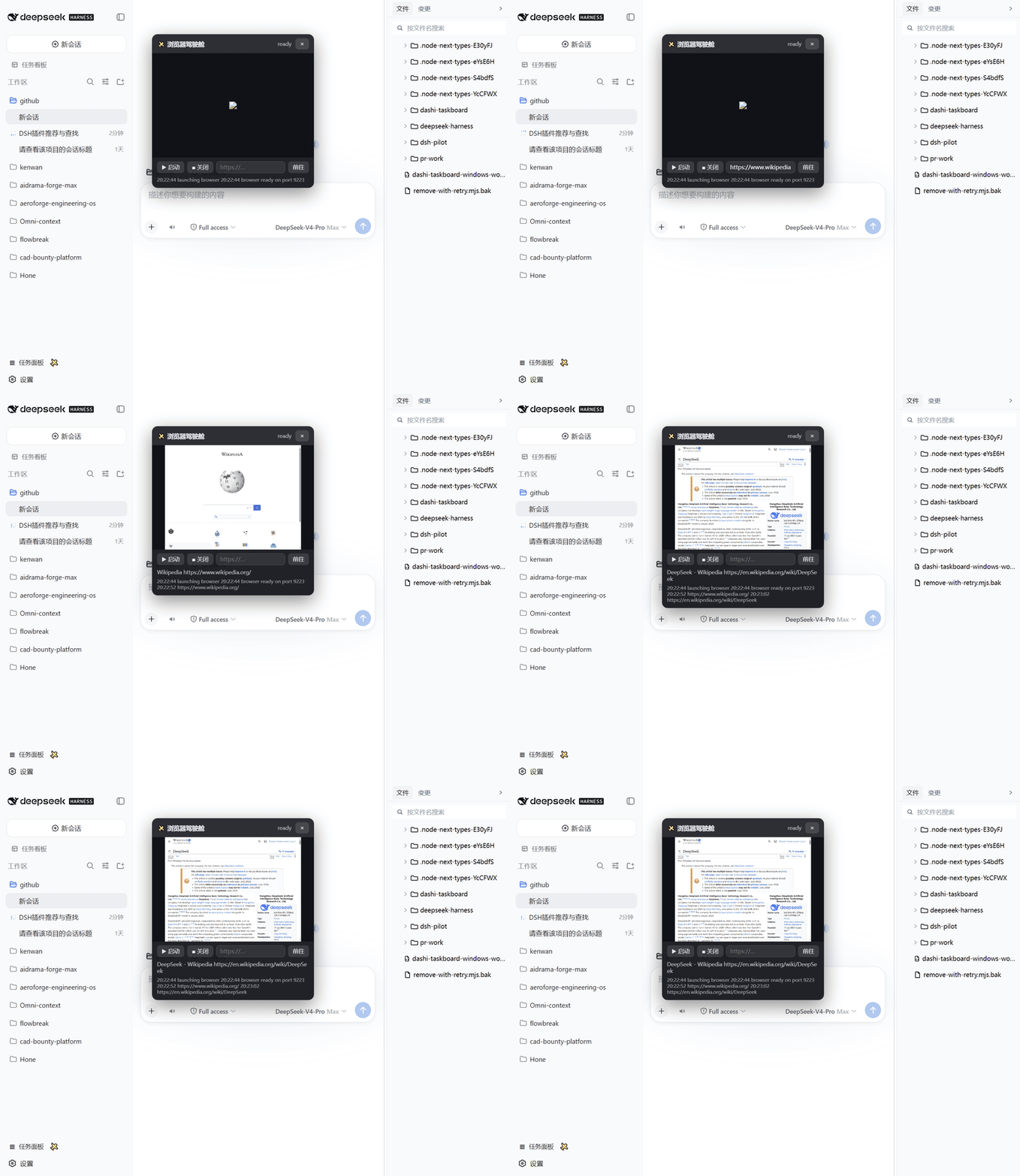
- 👀 Human in the loop — live screenshot, URL bar, action log, and a session indicator in the cockpit; you see everything the agent does
- 🧩 Per-session isolation — every agent session gets its own browser instance; parallel sessions never fight over one page
Install
dsh plugin --profile web add dsh-pilot
# or straight from GitHub (same code, pinned to a commit):
# dsh plugin --profile web add github:guo6x/dsh-pilot
Restart dsh web, refresh the page. A ✈️ button appears at the sidebar foot — that opens the cockpit.
Requirements: DeepSeek Harness web profile, Node ≥ 22, and Edge or Chrome installed.
What the agent gets
| Tool | What it does |
|---|---|
pilot_open | Open a URL (launches the browser on first use), return title/URL/text snapshot |
pilot_snapshot | Read the current page as text: title, URL, visible text (8k chars), links, a numbered element list (refs), and a change summary vs the previous snapshot |
pilot_diff | Report ONLY what changed since the last snapshot (URL/title/text delta, elements added/removed) — judge whether an action worked without re-reading the page |
pilot_click | Click an element by its snapshot ref (or CSS selector); scrolls into view first |
pilot_type | Type into an input by its snapshot ref (or selector) via the native value setter — React/Vue forms observe it |
pilot_press | Press a key (Enter/Tab/Escape/arrows/single chars) |
pilot_back | Go back in history, waits for the page to settle, returns URL/title |
pilot_reload | Reload the current page, waits for it to settle |
pilot_wait | Wait N ms (1–30000) for async content before the next action |
pilot_screenshot | Save a PNG and return its path (for vision-capable models or the human) |
pilot_download | Download a resource (default: current page) through the page's own fetch — inherits session cookies; cap 20 MB |
pilot_eval | Evaluate JS in the page, get JSON back |
pilot_close | Stop the browser; the next call relaunches it |
The agent just says what it needs: "open the login page, fill the form, click submit, and read the result" — the tools are the same verbs.
What the human gets
A draggable cockpit overlay: live screenshot (2 s refresh), current URL + title, 启动/关闭 buttons, an address bar, the recent action log, and a session indicator when several sessions are browsing. Everything the agent does is visible; close the browser or take over whenever you like.
Known limitations
- One tab per session. Refs are pinned to the current page, so a tab switcher would invalidate them. Need a second context? Spawn a subagent — each agent session gets its own browser.
- Headless only. The cockpit shows the headless view; there is no headed mode (a human driving the same browser is a different product).
- The panel shows the most recently used session's browser. Each session still owns its own instance — the panel just follows the last one that acted.
How it works
DSH chat ──pilot_* tools──▶ host plugin ──CDP (native WebSocket)──▶ headless Edge/Chrome
    ▲                              │
    └── structured text snapshots ◀┘
GUI cockpit ◀──/dsh-pilot/state + /dsh-pilot/shot.png (loopback)──┘
- Launches
msedge/chromeheadless with an isolated--user-data-dirunder the OS temp dir and a dynamically picked debugging port (9222+); the whole tree is killed and the profile removed on stop. - The host registers 8 tools plus a loopback-only HTTP API (
/dsh-pilot/*, 403 for non-loopback clients). - The client is a small overlay panel registered in
sidebar.footer.action+shell.overlay.
Security
- Browser runs headless with an isolated profile; it never touches your real browser session.
- The HTTP API binds to the DSH server (loopback by default) and rejects non-loopback clients explicitly.
pilot_openaccepts http(s) URLs only;pilot_evalruns page-context JS (same trust as opening DevTools yourself — do not point the agent at pages you don't trust).- No telemetry, no network calls to third parties, no API keys.
Develop
pnpm install
node build.mjs        # esbuild → lib/index.js (host ESM) + lib/client.js (ModuleLoader bundle)
node tests/smoke.mjs  # real-headless-Edge end-to-end smoke test
MIT licensed. Found a bug or an idea? Open an issue.
Related
- Chinese dev log (掘金): 我给我的 agent 装了双手:零依赖浏览器操控插件开发记
Project files and signals
Shown items are public repository signals detected in the directory snapshot.
Repository information
- Language
- JavaScript
- License
- MIT
- Last updated
- Aug 18, 2026, 7:33 AM
Install deliberately
Review source code, permissions, lifecycle hooks, dependencies and network access. Test untrusted plugins in an isolated environment.