Installation
npx -y @deepseek-ai/dsh plugin --profile web add github:hacxy/dsh-live2dThis installation command is an unverified starting point generated from the GitHub repository address.
README
Maintainer-authored documentation snapshot.
This README snapshot could not be refreshed during the latest directory sync.
dsh-live2d


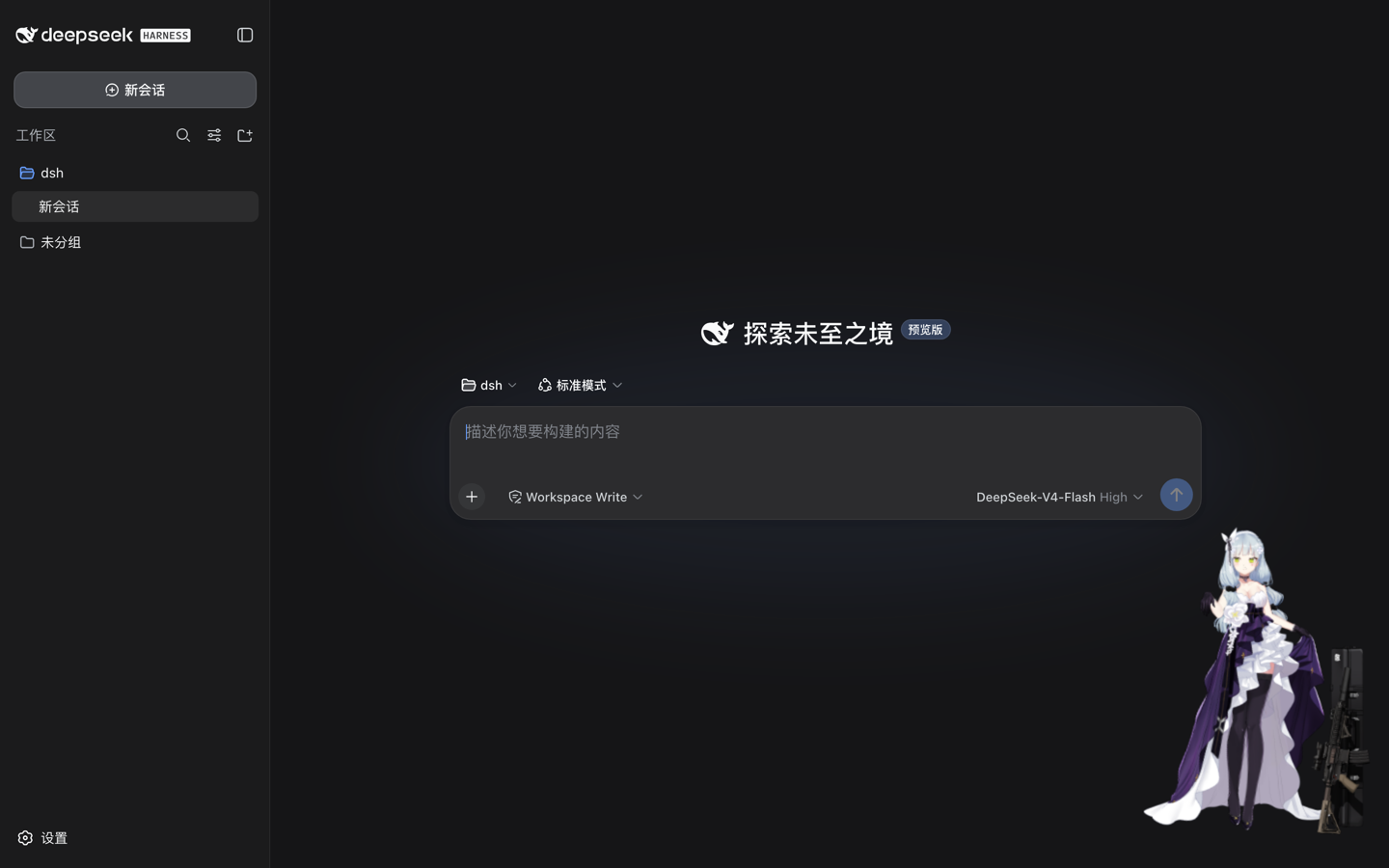
让 DeepSeek Harness 的 Web 界面右下角多一只 Live2D 看板娘——带加载进度条的模型、可以随手拖到任意位置,尺寸、位置、透明度、音量……全部行为都在 Web 可视化设置界面进行调整。
特性
- 右下角 Live2D 角色:默认内置模型(Cubism 6),支持任意
.model.json(Cubism 2)与.model3.json(Cubism 6) - 加载进度条:模型资源下载时显示进度,加载完成自动隐藏
- 可拖拽:拖到屏幕任意位置;不想要拖拽也能关
- 全量配置 Web 化:模型地址、尺寸、位置、锚定边、缩放、透明度、层级、音量、日志级别、总开关——13 个字段全部在「设置 → Live2D」里完成,保存即生效,无需重启、无需改文件
- 跟随主题:面板配色与 DSH 界面(浅色/深色)自动一致
- 零依赖安装:l2d 运行时已打进插件包,用户装完即用
- 配置安全:多开页面/外部修改冲突时自动刷新为最新值,不会静默互相覆盖
安装
dsh plugin --profile web add dsh-live2d
dsh web
想先本地体验?
git clone后在包目录pnpm install && pnpm run build,再dsh plugin --profile web add /path/to/dsh-live2d,最后dsh web。
使用
打开 DSH Web → 左下角侧边栏 → 设置 → Live2D。
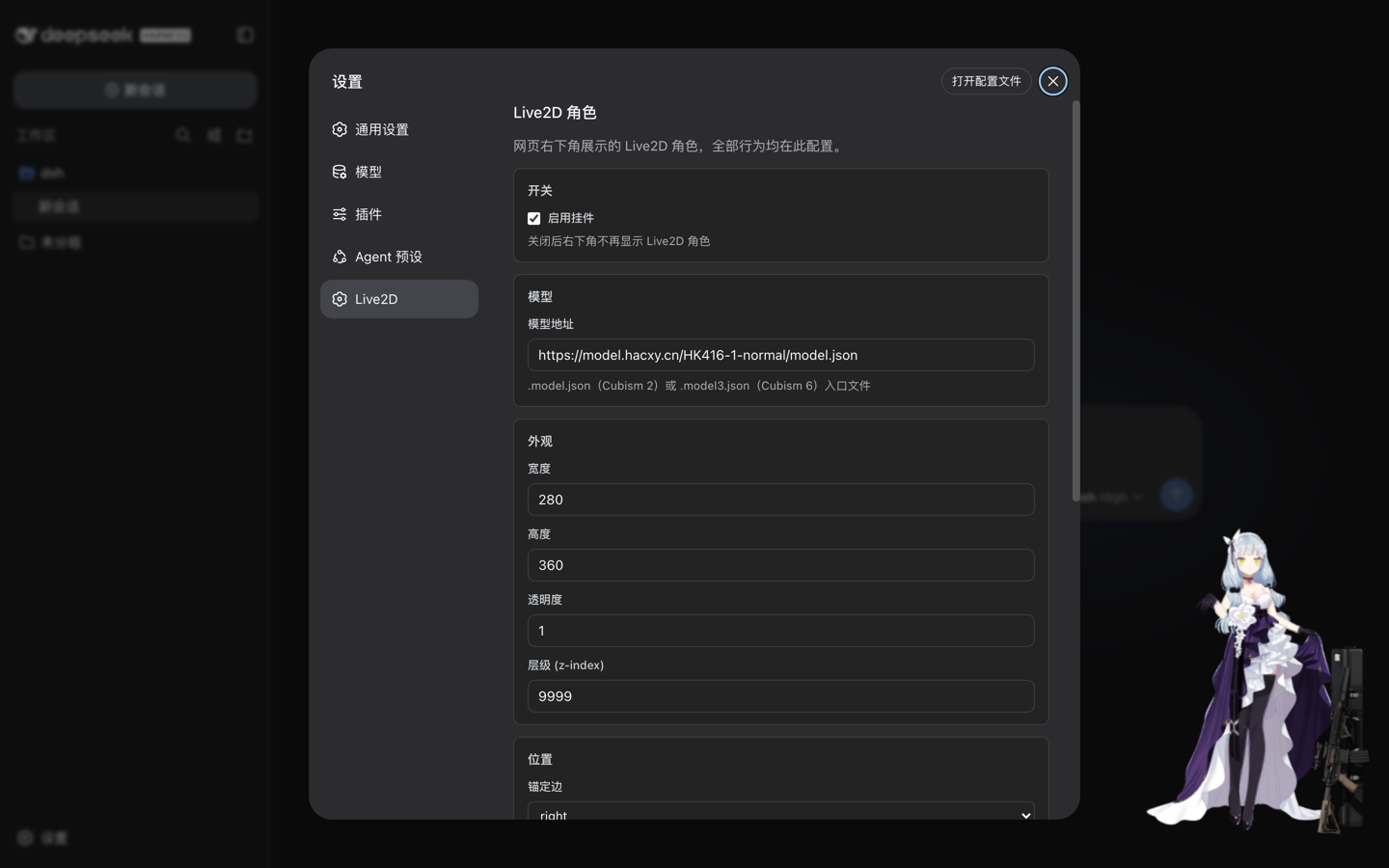
| 分组 | 支持配置 |
|---|---|
| 开关 | 总开关 enabled(关闭后不显示角色) |
| 模型 | 模型地址 modelUrl |
| 外观 | 宽度、高度、透明度、层级 |
| 位置 | 锚定边(右下/左下)、水平/底部间距 |
| 渲染 | 模型缩放、动作音量、日志级别 |
| 交互 | 可拖拽 |
几点说明:
- 保存即生效:改完点「保存」,尺寸/位置类改动原地应用,模型地址等改动会自动重载模型,无需重启。
- 恢复默认:一键清除你的自定义,回到部署默认值。
- 实时同步:其他标签页或外部对配置文件的修改,会自动热更到所有已打开页面。
卸载
dsh plugin --profile web remove dsh-live2d
配置(进阶)
插件采用 DSH 官方 settings 通道,「三层解析,后层优先」:
- schema 默认(内置)
- base 层:部署者的组合配置(
cordis.patch.yml的live2d行) - user 层:
~/.dsh/settings.yaml的dsh-live2d段——由设置面板写入,优先级最高
# ~/.dsh/settings.yaml(正常不需要手改,设置面板会代管)
dsh-live2d:
  modelUrl: "https://example.com/model.model3.json"
  width: 320
开发
pnpm install
pnpm run typecheck   # tsc --noEmit
pnpm run build       # tsdown → lib/index.mjs(Node 半)+ lib/client.js(浏览器半,l2d 内联)
浏览器端到端验证(需先安装进 web profile 并 dsh web --port 3090 运行,本机装有 Chrome;headless 软件渲染下请先换成 Cubism 2 模型如 shizuku 再验证画面):
"/Applications/Google Chrome.app/Contents/MacOS/Google Chrome" --headless=new \
  --no-sandbox --disable-gpu --enable-unsafe-swiftshader --use-angle=swiftshader-webgl \
  --disable-dev-shm-usage --no-first-run --user-data-dir=/tmp/dsh-chrome \
  --remote-debugging-port=9224 about:blank &

DEBUG_PORT=9224 node scripts/e2e-verify-v2.mjs
scripts/e2e-verify-v2.mjs 覆盖:默认挂载定位、加载进度条、改模型地址 → 挂件重载、改尺寸/锚定/总开关 → 原地生效,结束后自动恢复默认配置。
架构速览
- Node half(
src/index.ts):Cordis entry,用installSettingsSection(@deepseek-ai/dsh-settings)注册dsh-live2dsettings namespace,组合配置作 base 层;schema 同时承担持久层校验。 - Browser half(
src/client/):__ModuleLoader__CJS bundle。挂件订阅ctx.settingsScope快照——布局字段原地更新 DOM(不重载模型),渲染字段重建 l2d;设置面板向官方settings.section注入全字段表单(逐字段set,恢复默认unset)。
免责声明
本插件不包含、不分发任何 Live2D 模型资源。默认模型 URL 指向模型 CDN,请确认你有权使用所配置的模型(商用需遵循模型许可与 Live2D Proprietary Software License)。
License
Repository information
- Language
- TypeScript
- License
- MIT
- Last updated
- Aug 18, 2026, 8:07 AM
Install deliberately
Review source code, permissions, lifecycle hooks, dependencies and network access. Test untrusted plugins in an isolated environment.