Installation
pnpm --dir "$DSH_HOME/profiles/web" exec dsh-lifeboat serveThis command is generated from the GitHub repository address. Inspect the upstream README and source before running it; pin a release or commit when reproducibility matters.
README
Maintainer-authored documentation snapshot.
This README snapshot could not be refreshed during the latest directory sync.
DSH Lifeboat
English | 简体中文
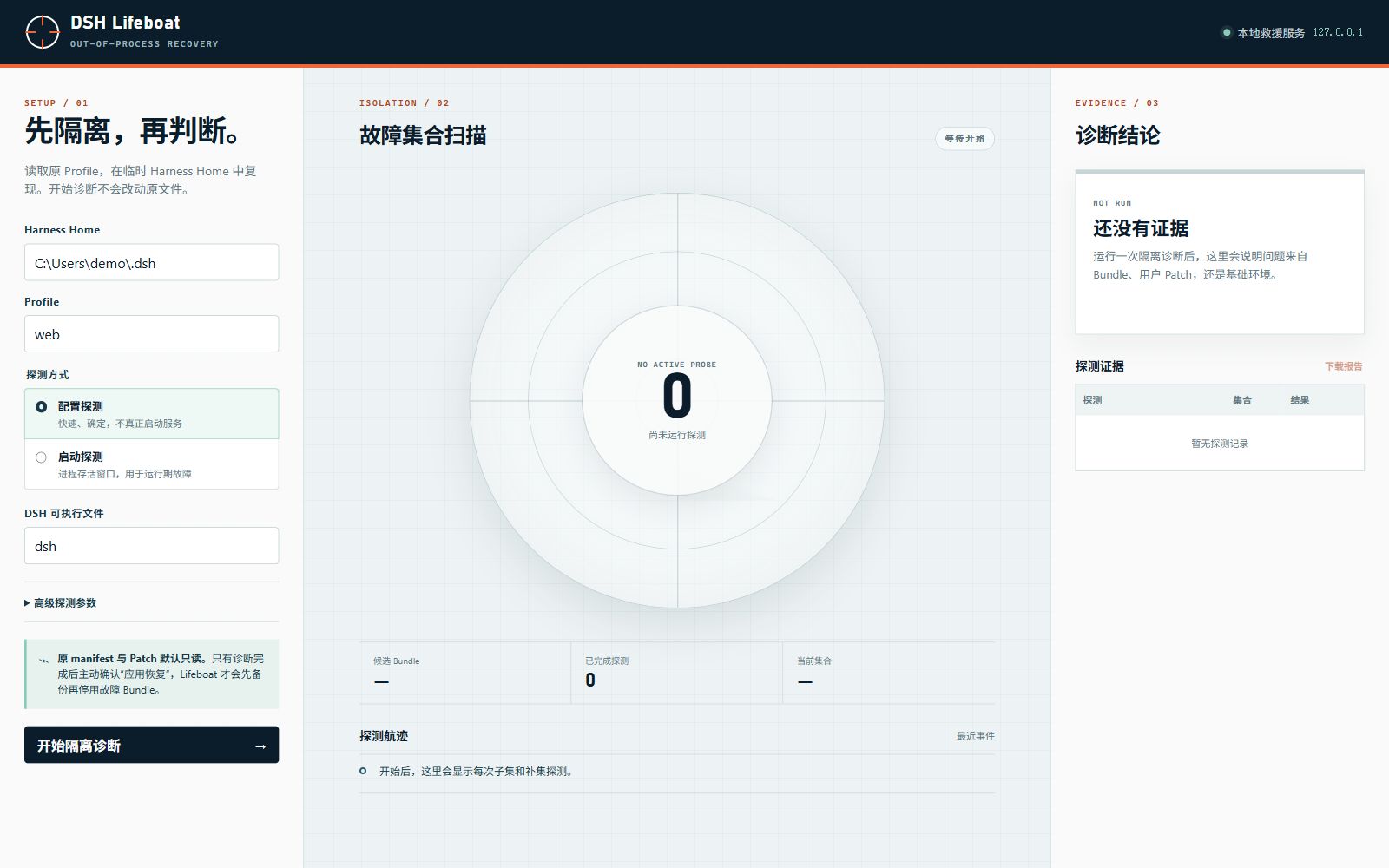
DSH Lifeboat is an out-of-process recovery console for DeepSeek Harness profiles. It can still start when a profile cannot: every probe runs against a temporary DSH_HOME, and the original profile manifest and patch files stay read-only until the user explicitly applies a recovery.
What is included
- A loopback-only Web UI at
127.0.0.1with live probe progress, evidence, report download, recovery confirmation, and one-step undo. - A CLI mode that emits the same
dsh-lifeboat/v1JSON report without the UI. - Config probes using
dsh --profile <name> --dump-config. - Optional runtime probes that treat a clean exit or survival through a configurable startup window as a successful boot.
- Fresh temporary homes for every probe attempt; runtime results are confirmed twice by default and mixed evidence never enables recovery.
- Delta debugging over out-of-tree bundles, including minimal multi-plugin conflict sets.
- Separate checks for profile-level and Harness-home
cordis.patch.ymlfailures. - Optimistic manifest hashing, timestamped backups, and atomic recovery writes.
- A bounded diagnosis queue, graceful process shutdown,
GET /api/health, browser-session reconnect, and atomically persisted reports. - A small Harness plugin that writes
~/.dsh/lifeboat/last-healthy.jsononly after the Loader settles. The rescue server itself never runs inside the failing Harness process.
Run from this checkout
Node.js ^22.19.0 || >=24.0.0 is required. There are no runtime dependencies.
node ./src/cli.js serve
Open the printed http://127.0.0.1:<port>/ address. The default port is 4317; use --port 0 for a random free port.
Terminal reports are stored under $DSH_HOME/lifeboat/reports. See service operation for systemd and Windows Task Scheduler guidance.
Run without the UI:
node ./src/cli.js diagnose --profile web
node ./src/cli.js diagnose --profile web --json
node ./src/cli.js diagnose --profile web --mode boot --allow-runtime-code-execution
node ./src/cli.js diagnose --profile web --mode boot --boot-confirmations 3 --allow-runtime-code-execution
When dsh is run from a Harness source checkout, use safe executable-plus-argument fields instead of a shell command string:
node ./src/cli.js diagnose \
  --command pnpm \
  --command-arg --dir \
  --command-arg /path/to/deepseek-harness \
  --command-arg dsh \
  --profile web
On PowerShell, quote any argument beginning with -- when necessary.
Install as a Harness bundle
Install the pinned v0.1.0 release directly through Harness:
dsh plugin --profile web add https://github.com/IoveCelestina/dsh-lifeboat/releases/download/v0.1.0/dsh-lifeboat-0.1.0.tgz
For a local checkout, run this from its parent directory instead:
dsh plugin --profile web add ./dsh-lifeboat
The package declares dsh.bundle through cordis.patch.yml. Installation adds the health marker to the selected profile. The rescue UI remains a standalone binary so a broken Loader cannot take it down:
pnpm --dir "$DSH_HOME/profiles/web" exec dsh-lifeboat serve
The v0.1.0 package is published as a GitHub Release asset, not on the npm registry. The release-tarball command above was exercised end to end against the current Harness CLI.
How isolation works
- Lifeboat reads
$DSH_HOME/profiles/<name>/package.jsonand records its SHA-256 hash. - Installation-owned bundles stay fixed. Bundles also present in the profile's
dependenciesbecome candidates. - Every probe attempt receives a new direct child named
dsh-lifeboat-*under the operating-system temp directory. - Bounded regular profile assets are copied. Credential-bearing files and symlinked assets are skipped. Installed packages are exposed through absolute package-resolution links so pnpm's relative links remain valid in the temporary profile.
- The full composition is probed. If it fails, Lifeboat distinguishes clean bundle failures from user-patch failures.
- For a community-bundle failure, delta debugging tests subsets and complements until it finds a 1-minimal failing set.
- In runtime mode, inconsistent repeated attempts stop the diagnosis as
unstable-probewithout offering recovery. - Each temporary directory is removed after all owned links are unlinked, unless
--keep-artifactswas selected.
Lifeboat reports a minimal reproduced set, not moral blame. A two-bundle result means the combination failed under the selected probe; it does not prove either package is independently defective.
Recovery behavior
“Apply recovery” is deliberately unavailable until the report contains a bundle finding. When confirmed, Lifeboat:
- re-reads the original manifest and rejects the write if its hash changed;
- saves the exact original file under
.lifeboat-backups/; - atomically replaces
package.json, removing only the diagnosed bundles fromdsh.profile.bundles; - keeps package dependencies installed;
- exposes “Undo this recovery” for the same local server session.
Running a later dsh plugin package-manager command may reconcile an installed bundle back into the active list. Remove or update the actual faulty dependency after recovery.
Safety and current limitations
- The server binds only to
127.0.0.1, rejects non-loopback Host headers, sends a restrictive CSP, and requires a random per-process token for writes. - Config mode does not mount plugin rows. Runtime mode does execute installed plugin code with the current operating-system user permissions and therefore requires an explicit acknowledgement. The temporary Home isolates configuration and runtime data; it is not an operating-system sandbox for plugin source code.
- Probe processes receive a credential-scrubbed environment. A plugin that requires an API key may therefore fail for an environmental reason; the report preserves this distinction as far as the process result allows.
- Runtime survival is a health heuristic, not proof of full application correctness. Prefer config mode for deterministic loader/configuration failures.
- Relative profile assets are copied up to 32 MiB. Links are skipped and reported, so a profile built around linked local sources may require
--keep-artifactsand manual inspection. - The current candidate classifier follows the Harness profile contract: out-of-tree bundle names are active bundles also listed in
dependencies. Installation-owned bundles are never automatically disabled. - The current release targets the
dsh.profile.bundlesformat used by current pre-release Harness builds. It has not been validated against every historical release.
Relationship to dsh-guard
Lifeboat was implemented independently. The closest listed community project, dsh-guard, focuses on rolling snapshots and in-process rollback; its README explicitly notes that an in-process plugin cannot rescue a startup crash without an external launcher. Lifeboat focuses on an independent diagnostic service, fresh-home reproduction, minimal conflict isolation, and evidence-gated recovery. See the non-ranking comparison.
Development
npm test
npm run check
npm pack --dry-run --ignore-scripts
The project intentionally uses only Node.js built-ins so the rescue path does not acquire another dependency graph that can fail during an incident.
Project files and signals
Shown items are public repository signals detected in the directory snapshot.
Repository information
- Language
- JavaScript
- License
- MIT
- Latest release
- v0.1.0
- Last updated
- Aug 18, 2026, 8:14 AM
Install deliberately
Review source code, permissions, lifecycle hooks, dependencies and network access. Test untrusted plugins in an isolated environment.