Installation
npx @deepseek-ai/dsh plugin --profile web add @javenlu233/dsh-cost-monitor@0.1.3 # 此处的版本号随每次正式发布更新This command is generated from the GitHub repository address. Inspect the upstream README and source before running it; pin a release or commit when reproducibility matters.
README
Maintainer-authored documentation snapshot.
dsh-cost-plugin





DeepSeek Harness (DSH) 费用展示插件: 底部累计 + 每轮费用 + 会话统计图。
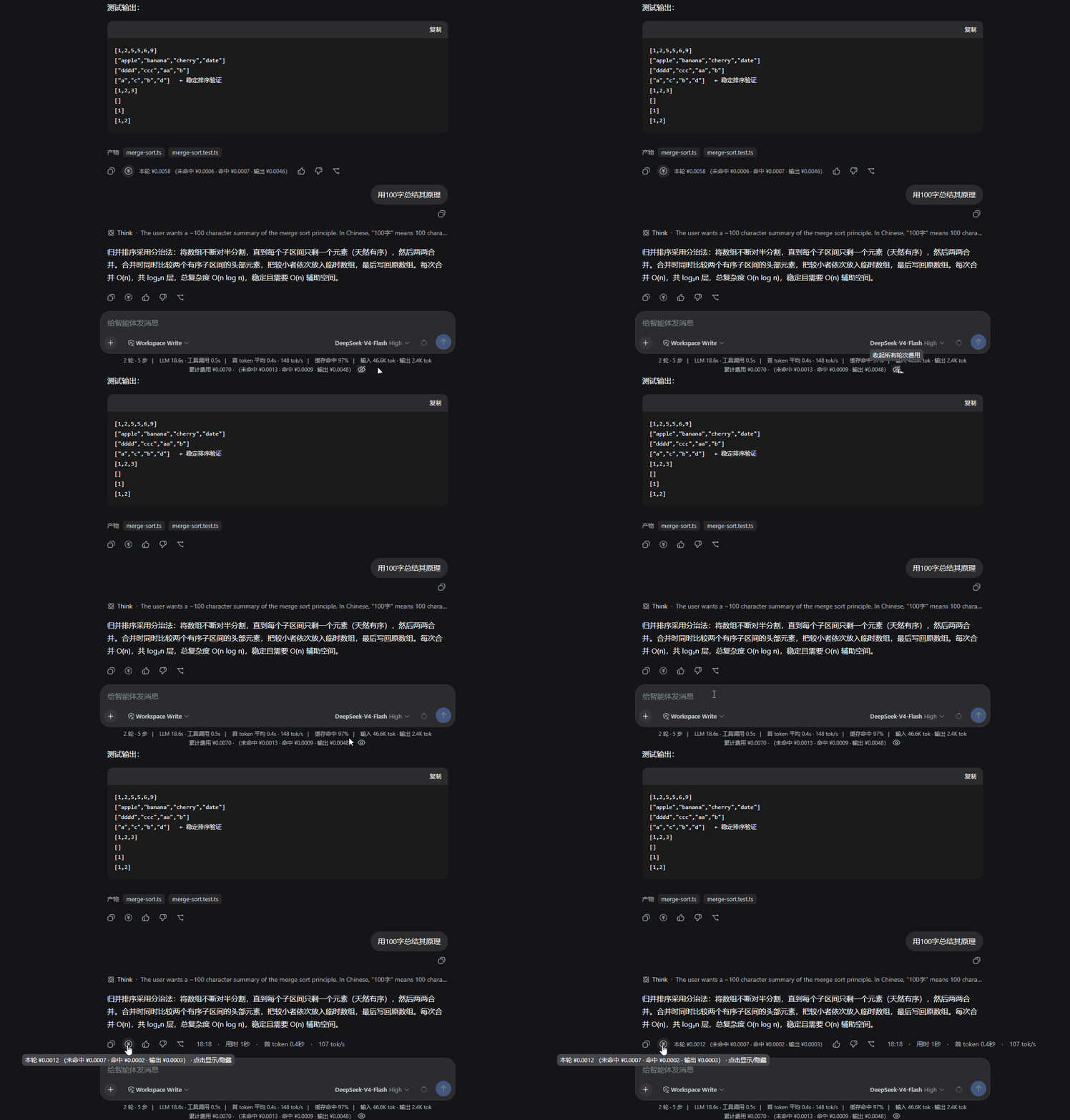
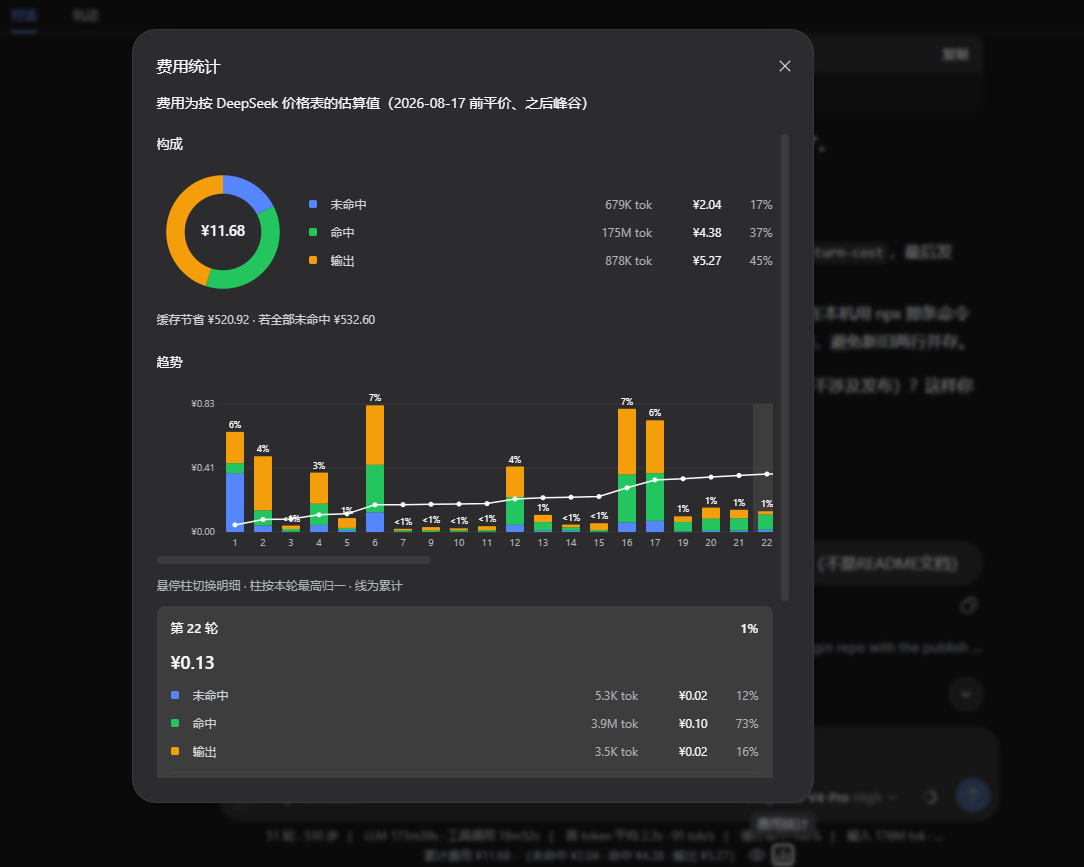
@javenlu233/dsh-session-cost— host 侧投影(sessionCost),按每次请求的模型/时间计价。@javenlu233/dsh-client-ui-turn-cost— client 侧展示(底部累计 + 每消息「本轮」)。@javenlu233/dsh-cost-monitor— 聚合包,一键装齐上面两个。
安装(使用者)
装好 Node.js 后执行:
npx @deepseek-ai/dsh plugin --profile web add @javenlu233/dsh-cost-monitor@0.1.3 # 此处的版本号随每次正式发布更新
npx @deepseek-ai/dsh web
这里写死版本,是因为 DSH web profile 对 npm 新包有 24 小时冷却:不写版本或写
@latest时,刚发布的0.1.3会被跳过,实际装上的可能是更早的版本。钉死后装的就是这一版。
浏览器打开后,插件有时不会立刻出现:等几秒再强制刷新(Windows / Linux:Ctrl+Shift+R,macOS:Cmd+Shift+R)。底部应出现「累计费用」,每条助手消息有「费用」按钮。若刷新后仍没有,关掉 dsh web 再启动一次,然后再强制刷新。
本机已有 dsh 命令时,把 npx @deepseek-ai/dsh 换成 dsh 即可。需要 DSH 0.1.0-rc.6 及以上。
卸载:
npx @deepseek-ai/dsh plugin --profile web remove @javenlu233/dsh-cost-monitor
更新到最新版
必须先卸掉旧版,再钉死安装段里的正式号;不要用裸包名或 @latest(冷却原因同上):
npx @deepseek-ai/dsh plugin --profile web remove @javenlu233/dsh-cost-monitor
npx @deepseek-ai/dsh plugin --profile web add @javenlu233/dsh-cost-monitor@0.1.3
然后重启 dsh web,再强制刷新。
查当前装了哪一版、npm 上最新正式号:
npx @deepseek-ai/dsh plugin --profile web list
npm view @javenlu233/dsh-cost-monitor version
历史会话
费用从会话的完整用量日志折算,不要求当时已经装着本插件。装好并重启后,打开装插件之前的旧会话,底部同样会给出整段累计费用;每条仍加载在窗口里的助手消息也可以看「本轮」。
分页、压缩不会改累计总额。已被压缩、不在当前窗口里的回合没有单独的「本轮」行,它们的费用仍计入底部累计。每条用量按它自己的事件时间套价格表(2026-08-17 前走平价,之后走峰谷),所以跨涨价日的旧会话也会按当时时段计价。
计价
费用是按配置表的估算,不是官方账单:峰谷取各用量样本的事件时间(组装 message 的时间,不是请求开始时间),中途换模型只按 request/context 的粒度计价,结果可能和 provider 账单有出入。单位为 人民币 / 百万 token。缓存写入按未命中价计。未记录模型或表中没有该模型时,回退到 deepseek-v4-flash。
内置 DeepSeek 价格(2026-08-17 00:00 北京时间起从平价切到峰谷;峰时为北京时间 9:00–12:00、14:00–18:00):
| 模型 | 时段 | 命中 | 未命中 | 缓存写 | 输出 |
|---|---|---|---|---|---|
deepseek-v4-flash | 平价(涨价前) | 0.02 | 1 | 1 | 2 |
| 峰时 | 0.10 | 3 | 3 | 9 | |
| 谷时 | 0.05 | 1.5 | 1.5 | 4.5 | |
deepseek-v4-pro | 平价(涨价前) | 0.025 | 3 | 3 | 6 |
| 峰时 | 0.30 | 9 | 9 | 27 | |
| 谷时 | 0.15 | 4.5 | 4.5 | 13.5 |
自定义价格
编辑 profile 的 cordis.patch.yml(默认 ~/.dsh/profiles/web/cordis.patch.yml),按 id 覆盖 session-cost 的 config。patch 整段替换 config,不会和默认表做字段级合并;prices 也是整表替换,要改价请把用到的模型都写全。未写的配置项仍走插件 schema 默认值。
- id: session-cost
  config:
    currency: CNY
    defaultRoute: deepseek-v4-flash
    # 2026-08-17 00:00 北京时间;更早的用量走 flat
    effectiveAt: 1786896000000
    peakWindows: [[9, 12], [14, 18]]
    timezoneOffsetMinutes: 480
    prices:
      deepseek-v4-flash:
        flat: { cacheRead: 0.02, uncachedInput: 1, cacheWrite: 1, output: 2 }
        peak: { cacheRead: 0.10, uncachedInput: 3, cacheWrite: 3, output: 9 }
        offPeak: { cacheRead: 0.05, uncachedInput: 1.5, cacheWrite: 1.5, output: 4.5 }
      deepseek-v4-pro:
        flat: { cacheRead: 0.025, uncachedInput: 3, cacheWrite: 3, output: 6 }
        peak: { cacheRead: 0.30, uncachedInput: 9, cacheWrite: 9, output: 27 }
        offPeak: { cacheRead: 0.15, uncachedInput: 4.5, cacheWrite: 4.5, output: 13.5 }
给其他模型加价:在 prices 里用 provider 侧模型 id 再加一项。改完后重启 dsh web。
开发
结构
cost-plugin/
├─ packages/
│  ├─ session/session-cost/    # host 投影
│  ├─ client/ui-turn-cost/     # client 展示(dsh.client 浏览器半)
│  └─ cost-monitor/                # 聚合包:汇总的 cordis.patch.yml
├─ scripts/link-profile.mjs    # 把子包 junction 进 ~/.dsh/profiles/node_modules/@javenlu233
├─ package.json / pnpm-workspace.yaml / .npmrc
构建
pnpm install
pnpm build   # 或 pnpm -r build
产物:packages/*/*/lib/{index,invariant}.js + packages/client/ui-turn-cost/lib/client.js。
改代码后:pnpm build(或只 build 改过的包)→ 重启 dsh web → Ctrl+Shift+R。link-profile 只需包路径变了才重跑。
发布流程
按这条链路走,不要跳过 beta 直接发 latest:
- 本地 link 调通
- 发 beta 包,用 npm 的
@beta再验一遍 - PR 合进
main - 发正式包(
latest)
发包细节(顺序、OTP、workspace:^)见 PUBLISHING.md。三个包的 version 必须一起改。
1. 本地 link
不改 DSH 源码。Windows 上请在 harness 仓库里用 pnpm dsh ...,不要 npx @deepseek-ai/dsh(bin 可能指到不存在的 lib/bin.js)。
# 1. 构建
pnpm install && pnpm build

# 2. 把子包链接进 profile(聚合包的 children 依赖靠这个解析)
node scripts/link-profile.mjs

# 3. 用本地 link 装聚合包(把 <repo> 换成仓库根目录的绝对路径)
dsh plugin --profile web remove @javenlu233/dsh-cost-monitor
dsh plugin --profile web add "link:<repo>/packages/cost-monitor"

# 4. 重启 dsh web;打开页面后等几秒再强制刷新
dsh web
验证:dsh --profile web --dump-config 应出现 # == @javenlu233/dsh-cost-monitor 及 session-cost / ui-turn-cost 两行。
2. 发 beta
三个包改成预发布号(例如上次正式版是 0.1.1,这次用 0.1.2-beta.0),构建后带 --tag beta 发布,不会覆盖 latest:
pnpm build

cd packages/session/session-cost && pnpm publish --tag beta --no-git-checks && cd ../../..
cd packages/client/ui-turn-cost && pnpm publish --tag beta --no-git-checks && cd ../../..
cd packages/cost-monitor && pnpm publish --tag beta --no-git-checks && cd ../..
卸掉 link,改装 beta:
dsh plugin --profile web remove @javenlu233/dsh-cost-monitor
dsh plugin --profile web add @javenlu233/dsh-cost-monitor@beta
必须写 @beta 或完整预发布号。不要用裸包名或 @latest(冷却原因见上文「安装」)。重启 dsh web 并强制刷新。
3. PR 合进 main
beta 验证通过后开 PR,合进 main。不要在合入前发正式包。
4. 发正式包
在 main 上把三个包的 version 改成正式号(例如 0.1.3,去掉 -beta.0),构建后不要加 --tag(默认 latest)。发完后把上文「安装(使用者)」里的 @0.1.3 改成新号。
pnpm build

cd packages/session/session-cost && pnpm publish --no-git-checks && cd ../../..
cd packages/client/ui-turn-cost && pnpm publish --no-git-checks && cd ../../..
cd packages/cost-monitor && pnpm publish --no-git-checks && cd ../..
验证安装用同一钉死版本(先卸再装):
dsh plugin --profile web remove @javenlu233/dsh-cost-monitor
dsh plugin --profile web add @javenlu233/dsh-cost-monitor@0.1.3
重启并强制刷新。
已知限制
显示值是估算:峰谷用 message 组装时间而非请求开始时间,换模型只按 request/context 的粒度,可能和 provider 账单不一致。web_search 触发的 flash 总结用量会计入本轮和统计图的「搜索调用」栏;装插件之前的旧会话补不上这一笔。
dsh-session-cost 依赖 host 的 sessionProjections 投影服务、ui-turn-cost 依赖
composer.dock / assistant-actions 两个 slot。这些 API 来自 DSH 的 @deepseek-ai/dsh-*
官方包;独立构建时它们作为 external 不打包、也不作为 devDependencies 安装(否则会拉取
npm 上尚未发布的传递依赖),改为在 peerDependencies 中声明、由真实 dsh web 宿主提供。
因此在「本地 link + 真实 dsh web」下可跑;需确认DSH 版本
已包含上述 API。
License
MIT,见 LICENSE。
Project files and signals
Shown items are public repository signals detected in the directory snapshot.
Repository information
- Language
- TypeScript
- License
- MIT
- Latest release
- v0.1.3
- Last updated
- Aug 18, 2026, 4:14 PM
Install deliberately
Review source code, permissions, lifecycle hooks, dependencies and network access. Test untrusted plugins in an isolated environment.