Installation
npx -y @deepseek-ai/dsh plugin --profile web add @jinsong-zhou/dsh-html-canvas@latestThis command is generated from the GitHub repository address. Inspect the upstream README and source before running it; pin a release or commit when reproducibility matters.
README
Maintainer-authored documentation snapshot.
dsh-html-canvas
English | 简体中文
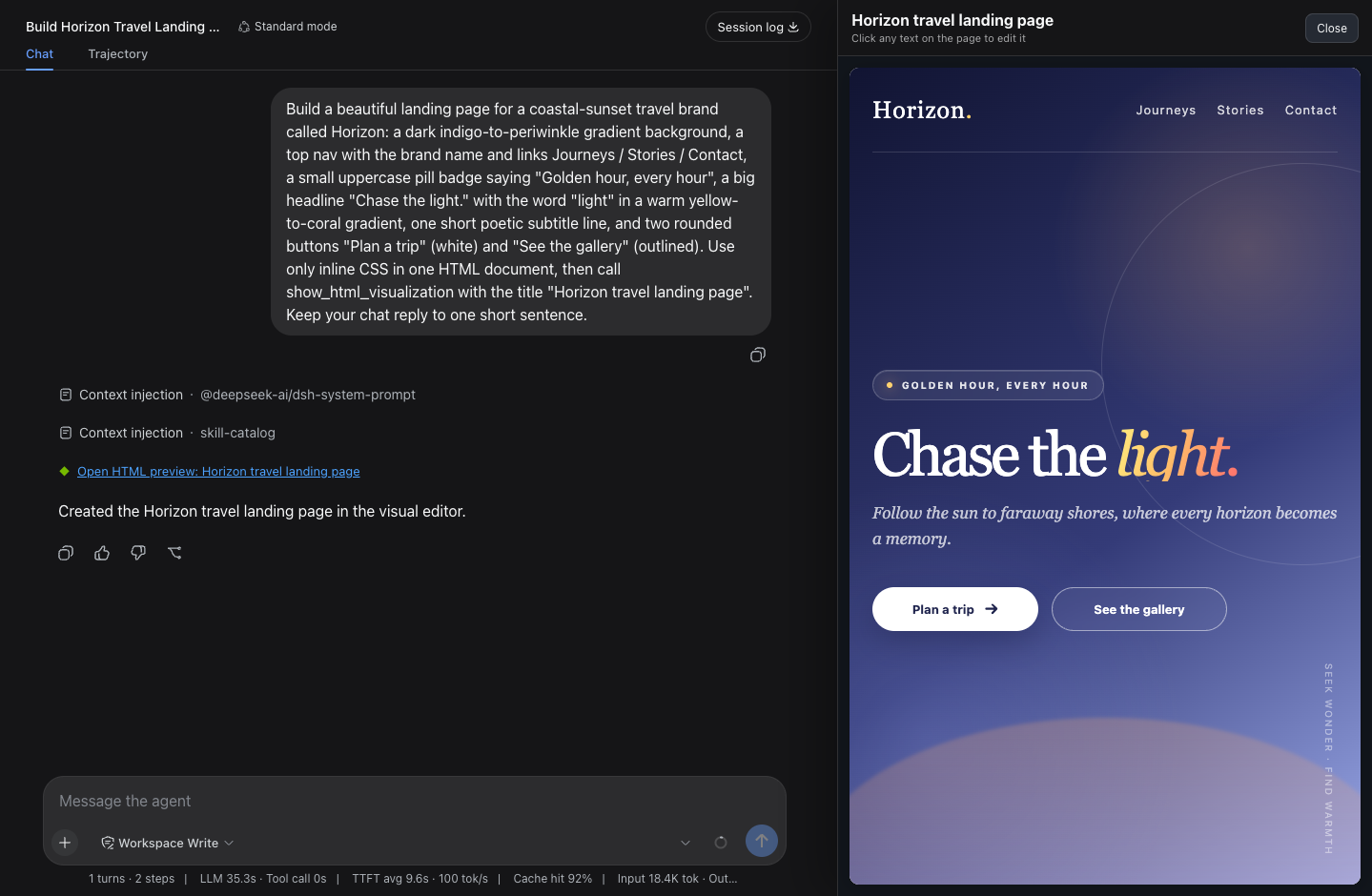
A DeepSeek Harness plugin that turns AI-generated HTML into a click-to-edit canvas beside the chat.
A DSH agent can build a complete HTML page, but the Web UI only shows it as a code block that most people can't read, let alone edit — this plugin closes that gap: the agent hands the finished page to one tool, it renders in a canvas beside the chat, and anyone can change it by clicking the text on the page, no source code ever.
Features
- Click-to-edit — any text on the rendered page is editable: headings, buttons, nav links, bare
<div>text, even text inserted later by page scripts. - Side-by-side, not overlapping — the canvas squeezes the chat column instead of covering it, and resizes with a drag handle.
- Lives in the chat — the tool call renders as a link; close the canvas anytime and click the link to reopen it with edits and width intact.
- Safe and localized — sandboxed iframe, no editor artifacts in the output, UI text follows the DSH locale (English / 中文).
Install
npx -y @deepseek-ai/dsh plugin --profile web add @jinsong-zhou/dsh-html-canvas@latest
Then restart the DSH web process and refresh the browser. For a local checkout, declare a file: dependency in the profile's package.json and insert it in cordis.patch.yml:
- insert:
    - id: html-canvas
      name: '@jinsong-zhou/dsh-html-canvas'
Usage
Ask the agent for any page — "make me an Apple-style personal homepage" — the canvas opens with the result, and you click the text to change it.
Development
node tests/host.test.mjs      # host contract (plugin must stay dependency-free)
node tests/client.test.mjs    # client behavior
DSH_WEB_URL=http://127.0.0.1:<port> node tests/verify-deployment.mjs
Note: the host half imports nothing by design — a bundled @deepseek-ai/* dependency gets hoisted into the profile and shadows the host's copy, which breaks every tool call. The tests guard this.
License
Project files and signals
Shown items are public repository signals detected in the directory snapshot.
Repository information
- Language
- JavaScript
- License
- MIT
- Last updated
- Aug 14, 2026, 2:27 AM
Install deliberately
Review source code, permissions, lifecycle hooks, dependencies and network access. Test untrusted plugins in an isolated environment.