Installation
npx -y @deepseek-ai/dsh plugin --profile web add github:julescules/dsh-windows-workspace-guardThis installation command is an unverified starting point generated from the GitHub repository address.
README
Maintainer-authored documentation snapshot.
dsh-windows-workspace-guard
中文 | English
[!IMPORTANT] Unofficial community plugin. Independently developed and maintained; not reviewed or endorsed by DeepSeek.
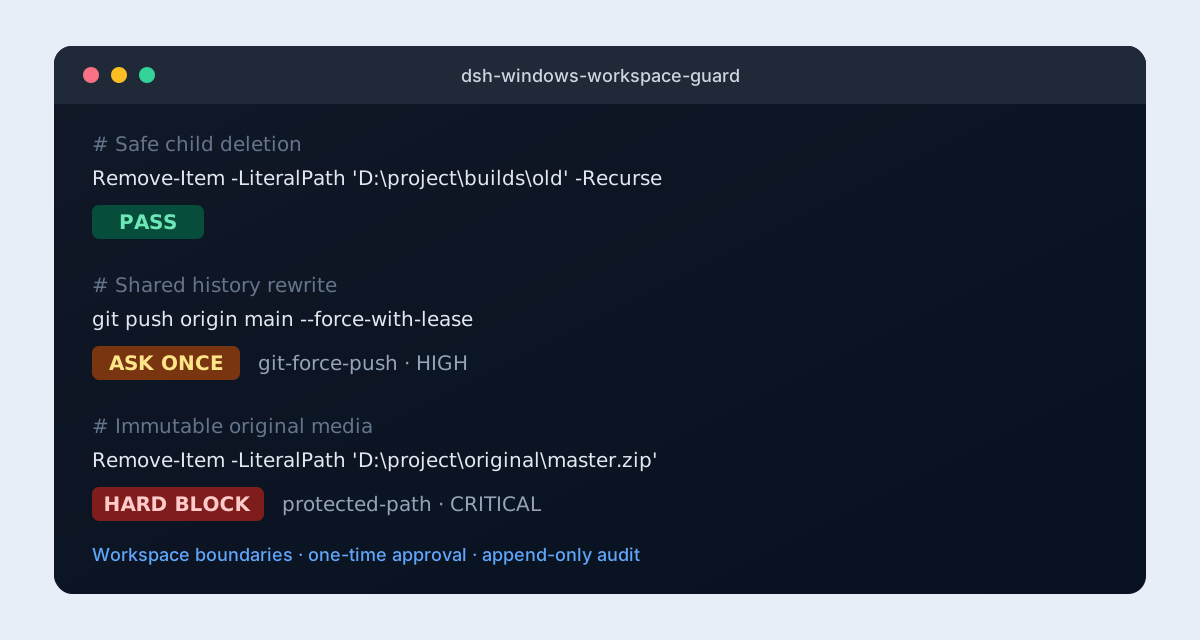
Safety policy for DeepSeek Harness on Windows. It checks model-issued PowerShell calls before execution and protects workspaces, original files, Windows system state, processes, and Git recovery paths.
What it does
- keeps destructive PowerShell targets inside trusted workspace roots;
- makes
original/, signing files, or any configured path immutable; - reviews risky Git commands such as
reset --hard,clean -fdx, worktree restore, stash deletion, and force push; - hard-blocks registry, service, scheduled-task, ACL/ownership, junction/symlink, and nested-shell mutations;
- reviews process termination and supports configurable guarded tool names;
- supports
block, one-timeask, and audit-onlyreportmodes; - adds a live settings card to the official DSH plugin settings page (DSH
v0.1.0-rc.7or newer); - writes optional append-only JSONL audit records with redacted previews and command hashes;
- permanently blocks disk operations, broad roots, encoded execution,
System.IObypasses, and protected paths.
Install
dsh plugin --profile web add github:julescules/dsh-windows-workspace-guard#v0.3.0
dsh --profile web --dump-config
Restart DSH after installation.
Recommended config
- id: windows-workspace-guard
  name: dsh-windows-workspace-guard
  config:
    mode: ask
    workspaceRoots:
      - 'D:\projects\current-project'
    protectedPaths:
      - 'D:\projects\current-project\original'
    guardGit: true
    guardSystem: true
    guardProcesses: true
    auditPath: 'D:\projects\current-project\operation_logs\dsh-guard.audit.jsonl'
On DSH v0.1.0-rc.7 or newer, the same fields can be changed from Settings → Plugins → Windows Workspace Guard and apply immediately without restarting the plugin.
| Result | block | ask | report |
|---|---|---|---|
| Safe | allow | allow | allow |
| Needs review | deny | ask once | allow + audit |
| Hard block | deny | deny | deny |
Hard blocks cannot be bypassed by allowExact or report mode.
Check without running
The plugin registers windows_workspace_guard_check. The agent can inspect a command and receive stable PASS, REVIEW, or FAIL JSON without executing it.
Verified
- 28/28 unit, browser-contract, and adversarial tests pass;
- official
dsh.bundle.patchpackage shape; - official keyed
settings.plugin.itemcard andsettingsScopelive-config contract; - official
tools/pre-executeallow/deny/ask contract; - package contains no install-time build step;
- UTF-8 append-only audit with common secret redaction.
npm run check
npm pack --dry-run
Limits
- Static inspection is not a complete PowerShell parser or OS sandbox.
pwshis intercepted by default; add other PowerShell tool names intoolNames.- Existing junction/symlink targets are not resolved against the live filesystem; creation is hard-blocked.
- DeepSeek Harness is in developer preview; pin a reviewed release or commit.
License
Project files and signals
Shown items are public repository signals detected in the directory snapshot.
Repository information
- Language
- JavaScript
- License
- MIT
- Latest release
- v0.3.0
- Last updated
- Aug 18, 2026, 3:38 AM
Install deliberately
Review source code, permissions, lifecycle hooks, dependencies and network access. Test untrusted plugins in an isolated environment.