Installation
npx -y @deepseek-ai/dsh plugin --profile web add github:KaichenCurry/TabNexus-DSHThis installation command is an unverified starting point generated from the GitHub repository address.
README
Maintainer-authored documentation snapshot.
TabNexus for DSH
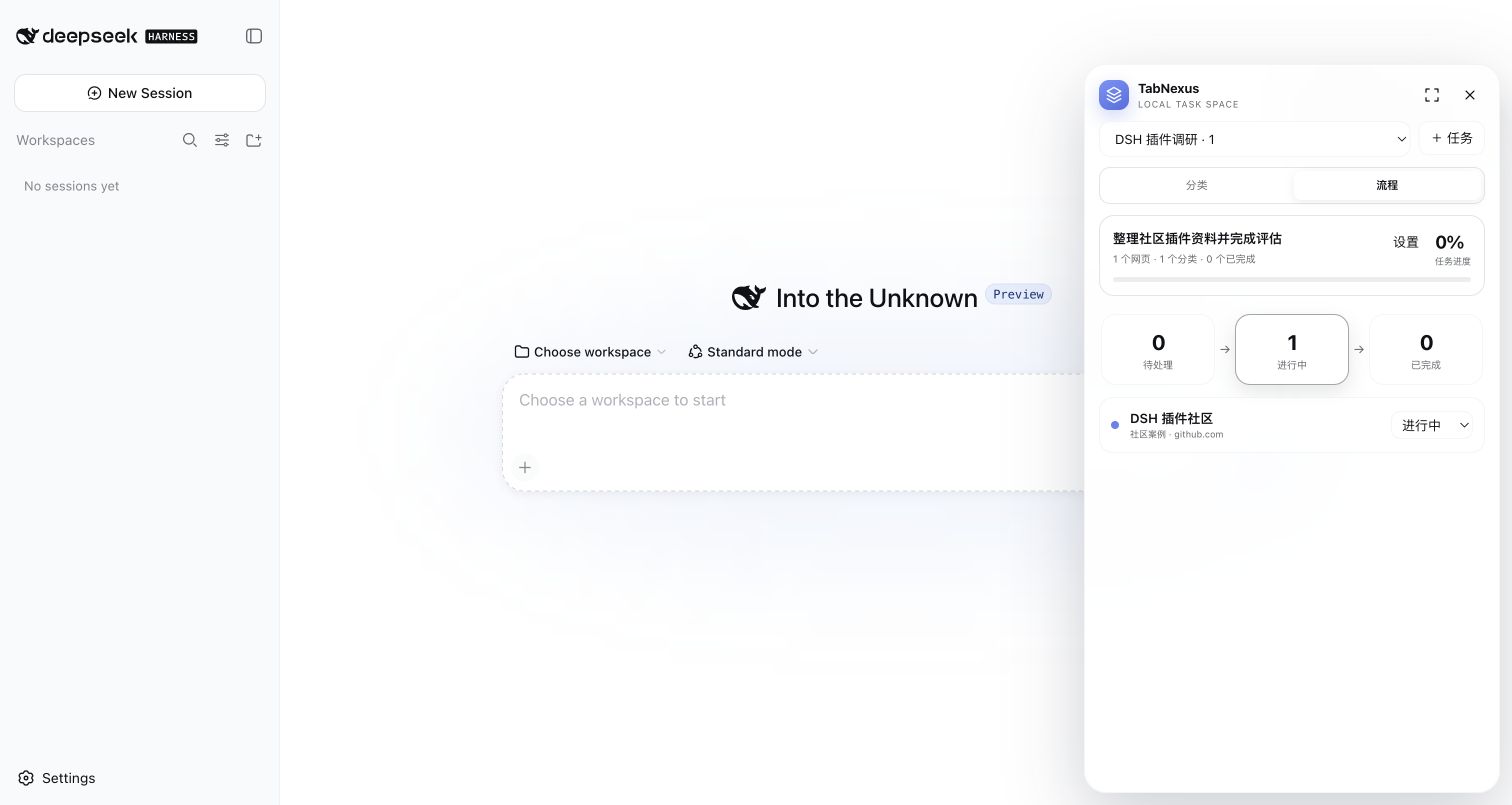
在 DeepSeek Harness 里,用最简单的方式管理任务和网页资料。
TabNexus-DSH 是一个轻量、纯界面、本地优先的 DSH 插件。它只做四件事:
任务管理 → 分类整理 → 网页状态 → 简单流程
DSH 本身就是 AI Agent,因此这个版本不注册 Agent 工具、不提供 MCP、不开放 Host API,也不要求任何模型或 API Key。安装后点击右上角 TabNexus 即可使用。
v0.3.0
- 创建、切换、重命名和删除任务;为任务记录一个清晰目标。
- 通过分类整理网页,支持分类重命名、删除和网页移动。
- 网页支持标题、URL、备注与“待处理 / 进行中 / 已完成”三种状态。
- “分类”与“流程”两个视图;流程视图只展示三段式进度,不引入复杂工作流。
- 使用 DSH 官方
shell.overlaySlot:右上角胶囊、玻璃感 Dock、展开工作区和窄屏抽屉。 - 数据保存在当前 DSH Web Client 的浏览器本地存储中;不上传云端。
- 只接受
http://和https://网页,自动去除常见追踪参数并避免重复添加。
安装
curl -LO https://github.com/KaichenCurry/TabNexus-DSH/releases/download/v0.3.0/dsh-plugin-tabnexus-0.3.0.tgz
dsh plugin --profile web add ./dsh-plugin-tabnexus-0.3.0.tgz
重启 DSH Web 服务并刷新 http://127.0.0.1:3080/。桌面端使用同一套 Web Client,无需额外安装。
使用
- 点击右上角
TabNexus。 - 新建任务并写下目标。
- 新建分类,粘贴网页地址。
- 随进展把网页从“待处理”切到“进行中”或“已完成”。
- 切换到“流程”查看整体推进情况。
当前边界
- 不接入 Agent,不注册
mcp__tabnexus__*工具。 - 不提供
/plugins/tabnexus/*API 或 SSE。 - 不读取真实 Chrome 标签,也不批量关闭标签。
- 不支持
file://、本地文件、云同步或 Chrome 双向同步。
开发
npm install --legacy-peer-deps
npm run typecheck
npm test
npm run pack:check
License
Project files and signals
Shown items are public repository signals detected in the directory snapshot.
DocumentationDetected
Repository information
- Language
- JavaScript
- License
- MIT
- Latest release
- v0.3.0
- Last updated
- Aug 15, 2026, 8:51 AM
Install deliberately
Review source code, permissions, lifecycle hooks, dependencies and network access. Test untrusted plugins in an isolated environment.