Installation
npx -y @deepseek-ai/dsh plugin --profile web add github:liuxinlongwa-hue/dsh-stitch-designerThis installation command is an unverified starting point generated from the GitHub repository address.
README
Maintainer-authored documentation snapshot.
dsh-stitch-designer
DeepSeek Harness(DSH)AI 设计插件 · Google Stitch 文字生成 UI · 会话内实时预览 · 1:1 HTML 导出
在 DeepSeek Harness(DSH)里用 Google Stitch 做 AI 界面设计:输入需求 → 自动生成高保真 UI 设计稿 → 会话内面板实时预览 → 对话迭代改稿 → 导出 1:1 成品页面(可打包 EXE)。




✨ 功能特性
| 能力 | 说明 |
|---|---|
| 🎨 文字生成设计 | 输入需求 → Google Stitch 生成高清 UI 设计稿(免费额度:每日 400) |
| 📱 多形态支持 | MOBILE(APP / 小程序)· DESKTOP(Web / 桌面软件界面)· TABLET · AGNOSTIC |
| 🖥 会话内预览 | 会话标题栏「AI 设计」按钮 → 弹出面板实时显示设计预览图(高清原图) |
| 💬 对话迭代 | 直接说"哪里要改" → AI 调用 Stitch 编辑 → 预览图自动更新 |
| 📦 1:1 导出 | 确定版后导出完整 HTML 成品(Tailwind,可运行 / 部署 / Electron·Tauri 打包 EXE) |
| 🔗 网页同步 | 同账号打开 stitch.withgoogle.com 可实时查看 / 手动微调(可选) |
📸 演示
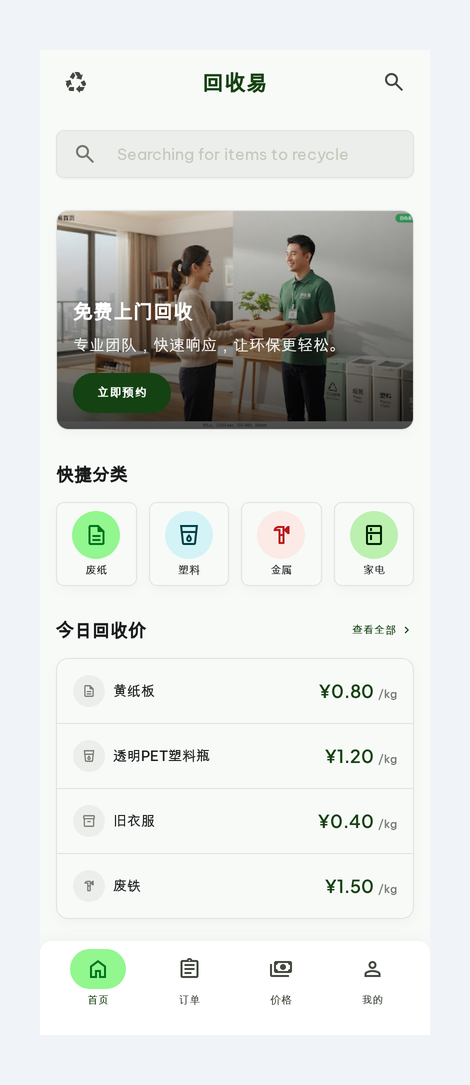
Stitch 生成的移动端设计稿(示例),会话内面板会实时展示类似效果。
📦 安装(人类)
# 1. 克隆
git clone https://github.com/liuxinlongwa-hue/dsh-stitch-designer.git
cd dsh-stitch-designer

# 2. 一键安装(自动复制插件 + 写入 DSH 组合配置)
bash install.sh

# 3. 准备 Stitch API key(免费,每日 400 额度)
#    a. 打开 https://stitch.withgoogle.com 并登录
#    b. 头像 → Stitch Settings → API key → Create key
#    c. 保存完整 key(AQ. 开头):
#       echo 'AQ.你的key' > ~/.stitch/key && chmod 600 ~/.stitch/key

# 4. 重启 DSH(dsh web),会话标题栏出现「AI 设计」按钮即成功
🤖 安装(AI / Agent)
把本仓库链接发给你的 AI(如 Claude / DeepSeek / Codex),AI 阅读本文件后即可自动配置:
- 安装插件:将
plugin.js/client.js/package.json放入 DSH profile 的 node_modules:${DSH_HOME:-$HOME/.dsh}/profiles/web/node_modules/stitch-designer/ - 建符号链接:在 npx 缓存 node_modules(DSH 实际安装位置,如
~/.npm/_npx/<hash>/node_modules/)执行:ln -sfn <上述目录> <npx缓存>/stitch-designer(DSH loader 用import('stitch-designer')从自身位置解析;client-modules 用createRequire(profile目录)解析——两端都要命中。) - 写组合配置:在
cordis.patch.yml追加:- insert: - id: stitch-designer name: 'stitch-designer' - 配置 API key:指导用户到 https://stitch.withgoogle.com → Stitch Settings → API key → Create key 获取免费 key(
AQ.开头),保存到~/.stitch/key(权限 600)。 - 重启 DSH,验证会话标题栏出现「AI 设计」按钮。
- 使用:用户提设计需求 → 调
POST /stitch/api/generate({prompt, deviceType})→ 生成约 1-2 分钟(异步,用list_screens轮询)→ 面板显示/stitch/screens/{id}.png高清预览 → 用户提意见 →POST /stitch/api/edit({screenName, prompt})→ 满意后POST /stitch/api/html/{screenId}导出 1:1 HTML。
🔌 插件 API(Host 路由)
| 方法 | 路径 | 说明 |
|---|---|---|
| GET | /stitch/api/state | 项目 + 屏幕列表(含高清预览 URL,缺失自动下载) |
| POST | /stitch/api/generate | {prompt, deviceType} 生成设计 |
| POST | /stitch/api/edit | {screenName, prompt} 编辑改稿 |
| GET | /stitch/api/html/{screenId} | 导出 1:1 HTML 成品 |
| GET | /stitch/screens/{id}.png | 高清预览图(本地缓存) |
| GET | /stitch/html/{id}.html | HTML 成品页面 |
高清截图:Stitch 返回的
screenshot.downloadUrl是缩略图,插件自动加=s0参数取原始分辨率。 默认项目:5188527734101747624(可在plugin.js的DEFAULT_PROJECT修改)。
🛠 工作原理
- Host 端(
plugin.js,Node):直接调用 Stitch 官方 MCP HTTP API(stitch.googleapis.com/mcp+X-Goog-Api-Key),负责生成 / 编辑 / 列表 / 截图缓存 / HTML 导出。不依赖 DSH 的 mcp-client,独立可用。 - Client 端(
client.js,浏览器 bundle):__ModuleLoader__.load格式,在会话头部 Slot 注册「AI 设计」面板,实时拉取预览图。 - 无构建链,纯手写 bundle;改动后重启 DSH 生效。
🗺 路线图 / 其他
- 更多设备形态、多屏幕流程、
generate_variants变体对比 - 中文 / 英文 README 双语维护
🔒 安全
- API key 存于
~/.stitch/key(600 权限),不硬编码、不进入仓库。 - 请勿把 key 提交到任何公开仓库。
📄 License
MIT © 2026 liuxinlongwa-hue
Project files and signals
Shown items are public repository signals detected in the directory snapshot.
Repository information
- Language
- JavaScript
- License
- MIT
- Latest release
- v1.0.0
- Last updated
- Aug 15, 2026, 8:12 PM
Install deliberately
Review source code, permissions, lifecycle hooks, dependencies and network access. Test untrusted plugins in an isolated environment.