Installation
npx -y @deepseek-ai/dsh plugin --profile web add github:nanami-0713/dsh-notifierThis installation command is an unverified starting point generated from the GitHub repository address.
README
Maintainer-authored documentation snapshot.
@dsh-external/dsh-notifier
DSH 的任务提醒插件:任务运行结束、运行中需要你做决策(权限审批 / 用户提问)时,弹出跨窗口可见的提醒——类似 Codex / Claude Code 的 Hook 通知体验:你切到任何应用、任何桌面空间(甚至全屏应用)都能看到。
- 跨窗口悬浮面板(默认,v0.2):macOS 用内置 Swift notifier(NSPanel
.floating+canJoinAllSpaces+fullScreenAuxiliary),浮在所有应用窗口之上、所有 Space / 全屏应用之上;样式与网页 toast 同款,「去处理 / 查看会话」按钮直接唤起浏览器打开 DSH - web 内 toast 弹窗:DSH 网页里的右下角深色通知卡片 + 提示音(React portal 挂在
document.body,保证浮在面板之上) - 系统通知中心横幅:macOS
osascript/ Linuxnotify-send/ Windows 气泡,可配置关闭 - 决策型弹窗钉住不放:审批 / 提问在 web 端被回答、被拒绝后,悬浮面板自动消失;任务结束/出错面板 10 秒自动消失
- 手机同步提醒(v0.4):配合 dsh-remote bridge,把「任务完成」「需要你回答」两类 PC 弹窗再推一份给已连接的手机 App(手机端跨窗口系统通知,点通知直达会话)
- 手机推送开关(v0.5):设置页新增总开关「转发到已连接的手机」+ 按类型开关(任务完成 / 需要你回答);手机 App 侧也有独立的接收开关与类型开关,两端互不干扰
- 设置页可视化配置(v0.3):左下角「设置」新增「提醒通知」页,内置 4 套预设(默认 / 顶部浅色 / 专注 / 仅系统弹窗),可调 toast 位置、主题、宽度、圆角、停留时长、提示音、同屏数量与系统级开关;修改实时生效并保存到
~/.dsh/plugins/dsh-notifier/config.json
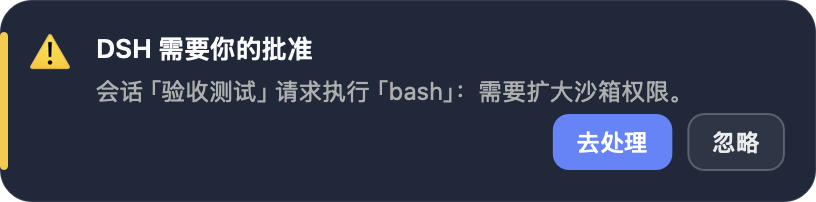
效果截图
跨窗口悬浮面板与网页内 toast 使用同一套卡片设计,下面即实际样式:
| 任务完成 | 需要批准 | 需要回答 |
|---|---|---|
 |  |  |
工作原理
事件 → Hook(host 插件)→ 系统提醒,与 Claude Code 的 Notification Hook 同构:
| 提醒 | 触发事件(host Hook) | web 弹窗信号(client) |
|---|---|---|
| 任务结束 | agent/status:running → idle 边沿 | events.host 流 host/session-status:running: true → false 边沿 |
| 权限审批 | session/event:approval/asked(waterfall approval/request 辅助观察);approval/decided 关闭面板 | events.mux 流 approval/requested / approval/resolved |
| 用户提问 | session/event:tool/call(ask_user_question);对应 tool/result 关闭面板 | events.mux 流 question/requested / question/resolved |
| 任务出错 | agent/error | events.host 流 host/agent-error |
- client 用
ctx.connection消费两条实时事件流,断线自动重连;host 与 client 相互独立,任一失效不影响另一半 - 跨窗口提醒的机制随操作系统不同,见下一节「平台差异与要求」
平台差异与要求
网页内 toast 在三个平台完全一致(任何浏览器)。跨窗口系统弹窗按平台选择不同实现,行为对比如下:
| 能力 | macOS | Windows | Linux |
|---|---|---|---|
| 弹窗机制 | 内置 Swift notifier 悬浮卡片(NSPanel .floating,跨桌面 Space / 全屏应用可见) | Windows 自带 PowerShell + WScript.Shell.Popup 系统弹窗 | zenity 系统对话框 |
| 首次使用依赖 | 需要 Xcode Command Line Tools(swiftc),首次触发自动编译并缓存到 ~/.dsh/plugins/dsh-notifier/DSHNotifier;无 swiftc 自动回退 osascript display dialog / notification | 无额外依赖(powershell.exe 系统自带) | 需要 zenity(多数发行版:sudo apt install zenity / dnf install zenity);无 zenity 时退化为 notify-send 横幅 |
| 任务结束 / 出错 | 10 秒自动消失 | 10 秒自动消失 | 10 秒自动消失 |
| 审批 / 提问 | 钉住,网页端处理完自动关闭 | 钉住,网页端处理完自动关闭 | 钉住,网页端处理完自动关闭 |
| 「去处理」按钮 | 点击直接打开 DSH(webUrl) | 弹窗点 Yes 打开 DSH | 弹窗点 OK 后 xdg-open 打开 DSH |
| 外观 | 与网页 toast 同款深色卡片 | 系统对话框样式(不可自定义) | 系统对话框样式(不可自定义) |
| 虚拟桌面 / 全屏 | 支持(canJoinAllSpaces + fullScreenAuxiliary) | 弹窗会置顶,跨虚拟桌面行为以系统为准 | 随桌面环境(GNOME/KDE)行为 |
| 实测状态 | ✅ 本仓库真机验收(窗口枚举确认 .floating 层上屏) | ⚠️ 未在 Windows 真机验证,欢迎 issue 反馈 | ⚠️ 未在 Linux 真机验证,欢迎 issue 反馈 |
如果不想弹系统级弹窗,可在「设置 → 提醒通知」里关闭,或把插件配置里的 floating 设为 false(只保留通知中心横幅 + 网页 toast)。
安装
方式一:GitHub Release 安装(推荐)
- 到 Releases 下载最新
dsh-external-dsh-notifier-<版本>.tgz - 解压,然后把插件装进 web profile:
dsh plugin --profile web add <解压目录>
# 或:编辑 ~/.dsh/profiles/web/package.json:
#   "dependencies": { "@dsh-external/dsh-notifier": "link:<解压目录>" },
#   "dsh": { "profile": { "bundles": [..., "@dsh-external/dsh-notifier"] } }
dsh web   # 重启后自动装配
方式二:源码构建安装
git clone https://github.com/nanami-0713/dsh-notifier.git
cd dsh-notifier
npm install
npm run build:all          # 产物:lib/index.js(host)+ lib/client.js(web 弹窗)
dsh plugin --profile web add .
注入器环境(dev_* 工具)
# 构建并运行时注入(免重启)
dev_build_plugin {"dir": "<本目录>"}
dev_inject_plugin {"dir": "<本目录>"}
# 持久化安装(写 profile package.json + bundles,重启仍生效)
dev_install_package {"dir": "<本目录>"}
配置
推荐:设置页可视化配置。打开左下角「设置 → 提醒通知」,切换预设或修改任意字段都会实时生效,并自动保存到:
~/.dsh/plugins/dsh-notifier/config.json
配置通过同源 API 读写:GET/PUT /api/dsh-notifier/config。
兼容:loader 配置。插件仍接受 config / patch 里的部署默认配置,全部有默认值:
| 字段 | 默认 | 说明 |
|---|---|---|
preset | default | 内置预设:default / top-light / focus / native-only |
toast.enabled | true | 是否在 DSH 网页内显示 toast |
toast.position | bottom-right | bottom-right / bottom-left / top-right / top-left |
toast.theme | dark | 深色 / 浅色卡片 |
toast.width | 380 | 弹窗宽度 px(320–560) |
toast.radius | 14 | 卡片圆角 px(6–20) |
toast.sound | true | 提示音 |
toast.durationSeconds | 6 | 普通提示停留秒数(4–30) |
toast.errorDurationSeconds | 10 | 错误提示停留秒数(4–30) |
toast.maxCount | 6 | 同屏最多卡片数(1–10) |
floating | true | 跨窗口系统弹窗(macOS Swift notifier / Windows PowerShell WScript.Shell.Popup / Linux zenity) |
desktop | true | 系统通知中心横幅 |
webUrl | $DSH_WEB_URL 或 http://127.0.0.1:3080 | 悬浮面板「去处理 / 查看会话」按钮打开的地址 |
bridgeUrl | 空(关闭) | dsh-remote bridge 地址(如 http://127.0.0.1:8787),配置后把「任务完成 / 需要你回答」弹窗推给手机 |
bridgeToken | 空(关闭) | dsh-remote bridge 主 token(与 bridge config.json 的 token 一致);也可用环境变量 DSH_BRIDGE_TOKEN |
bridgePush | true | 手机推送总开关(关闭后完全不转发) |
bridgePushKinds.done | true | 任务完成是否转发到手机 |
bridgePushKinds.question | true | 需要你回答是否转发到手机 |
quietSeconds | 8 | 同一事件的最短重复提醒间隔(秒) |
手机推送(DSH-Remote bridge)
当电脑同时运行 dsh-remote bridge、且手机 App 已连接时,把 PC 弹窗原样发一份到手机:
- 在「设置 → 提醒通知」最下方填写 bridge 地址与主 token(或在
config.json/ loader 配置里写bridgeUrl、bridgeToken),并确认「转发到已连接的手机」总开关打开; - 每次「任务完成」或「需要你回答」弹窗触发时,插件会 best-effort
POST /api/notify.push到 bridge(3 秒超时,失败只记日志、不影响 PC 弹窗); - bridge 校验主 token 后把
bridge/notify帧广播给所有已连接的手机;手机 App 默认以跨窗口系统通知(Android heads-up / iOS 横幅)显示,点通知直达对应会话。
开关:PC 侧有总开关 bridgePush + 按类型开关 bridgePushKinds.done/question(设置页可视化);手机 App 侧还有独立的接收开关与类型开关(首页右上角铃铛),两端互不干扰,可以各自自由开关。
说明:只转发 done(任务完成)与 question(需要你回答)两类;审批/错误类暂不转发。手机 App 需要保持前台(事件流已连接),后台或未打开时无法送达。
验收测试
仓库自带真实事件级 E2E 脚本(用 DSH host API 建会话、派任务、监听事件流):
node scripts/e2e-done.mjs       # 任务结束:host/session-status idle 帧 → 悬浮面板上屏
node scripts/e2e-approval.mjs   # 权限审批:approval/requested 帧 → 悬浮面板钉住,拒绝后自动关闭
node scripts/e2e-question.mjs   # 用户提问:question/requested 帧
node scripts/ui-test.mjs        # Headless Chrome 全链路:真实事件 → 网页 toast → 截图
macOS 上可用 CoreGraphics 窗口枚举验证面板确实浮在屏幕上(kCGWindowLayer == 3 即 .floating 层):
swiftc scripts/winlist.swift -o /tmp/winlist && /tmp/winlist
UI 测试只截取弹窗局部(Page.captureScreenshot clip,不含页面其他区域),输出到不入库的 .artifacts/ui/,并在结束后把测试会话归档清理。仓库中正式截图只保留 docs/screenshots/native/ 一套。
License
MIT
Project files and signals
Shown items are public repository signals detected in the directory snapshot.
Repository information
- Language
- TypeScript
- License
- MIT
- Latest release
- v0.3.0
- Last updated
- Aug 17, 2026, 12:52 AM
Install deliberately
Review source code, permissions, lifecycle hooks, dependencies and network access. Test untrusted plugins in an isolated environment.