Installation
npx -y @deepseek-ai/dsh plugin --profile web add github:ryubyte/dsh-a2aThis installation command is an unverified starting point generated from the GitHub repository address.
README
Maintainer-authored documentation snapshot.
dsh-a2a
中文文档 | English
A DeepSeek Harness (DSH) plugin that implements the Agent2Agent (A2A) Protocol v1.0 (Linux Foundation, a2aproject/A2A, Apache-2.0).
It turns a DSH instance into a full A2A peer in both directions:
- Client mode (outbound) — discover a remote agent via its AgentCard, map each skill to a DSH model tool (
a2a__<name>__<skill>), and execute remote tasks through A2A JSON-RPC. - Server mode (inbound) — expose this DSH to other agents:
/.well-known/agent-card.jsonplus a JSON-RPC endpoint (SendMessage,GetTask,ListTasks,CancelTask,SendStreamingMessageover SSE) on the DSH webserver.
Features
Protocol surface (A2A v1.0)
- Discovery:
GET /.well-known/agent-card.json(well-known first, configured URL fallback) - Unary:
SendMessage,GetTask,ListTasks,CancelTask,GetExtendedAgentCard - Streaming:
SendStreamingMessage(SSE) /SubscribeToTask, withTaskStatusUpdateEvent+TaskArtifactUpdateEvent - Task lifecycle:
SUBMITTED → WORKING → COMPLETED / FAILED / CANCELED / REJECTED / INPUT_REQUIRED / AUTH_REQUIRED - Types:
Task,Message,Part(text/raw/url/data),Artifact,AgentCard, security schemes, extensions
Connection dashboard (设置 → A2A 连接)
- Outbound agents — remote agents this DSH connects to (name, connection state, AgentCard URL, skill/tool counts, last activity), each with Reconnect / Enable / Disable / Delete controls.
- Inbound peers — who is calling this DSH (label, source address, first/last seen, task count, streaming flag), with a close control.
- A2A server — inbound server status with an online/offline toggle, endpoint and skill overview.
- The panel refreshes every 3 s;
/a2a/apiserves a JSON snapshot and control endpoints, fenced to loopback/same-origin.
Runtime configuration (a2a.json)
Configuration is driven by a2a.json (per profile, UI-editable) — manage
agents without touching the composition. The file is resolved from the active
profile, not the launch directory: the plugin parses --profile <name> from
the process command line and reads/writes ~/.dsh/profiles/<name>/a2a.json.
Screenshots
| Outbound agents (who this DSH connects to) | Inbound peers (who calls this DSH) |
|---|---|
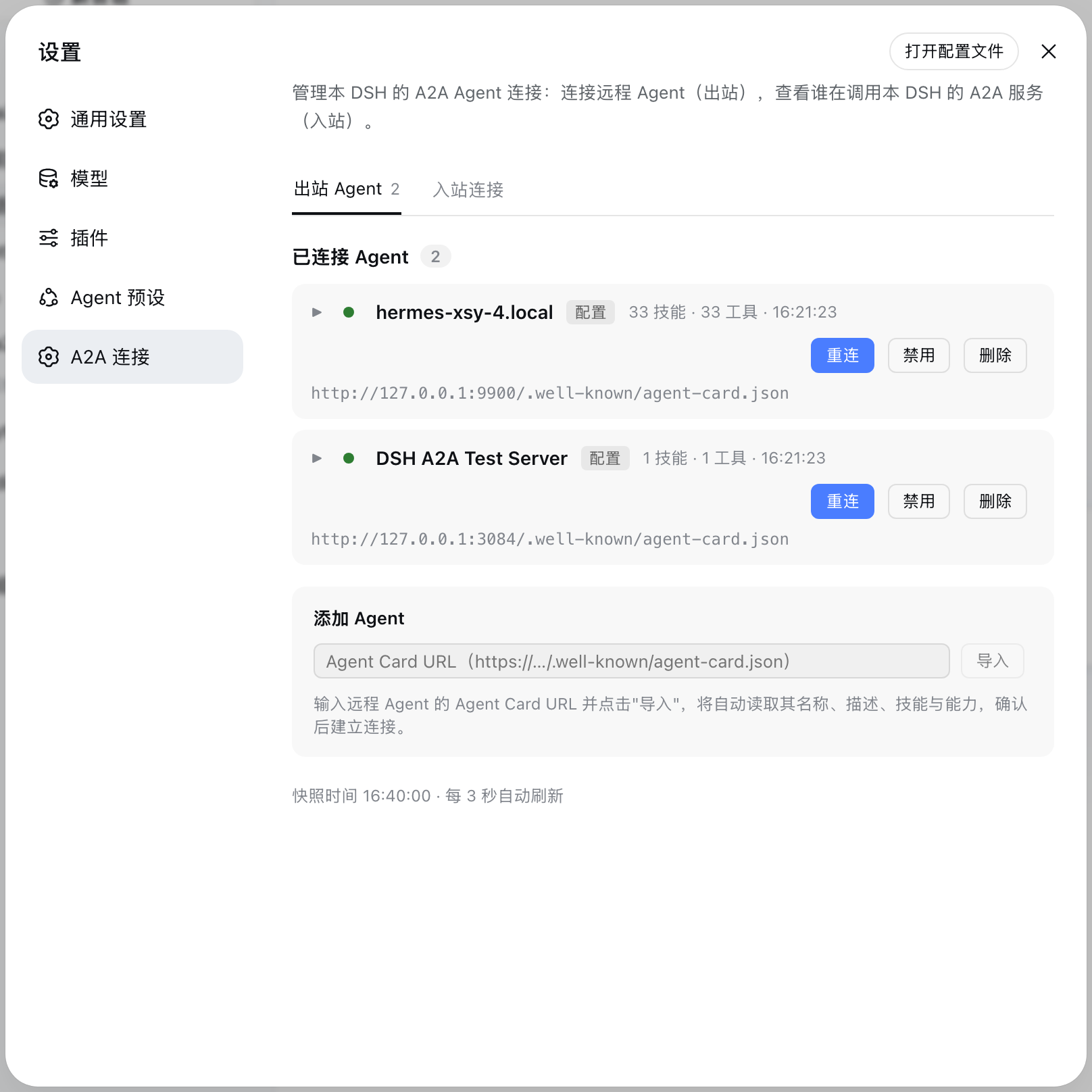 | 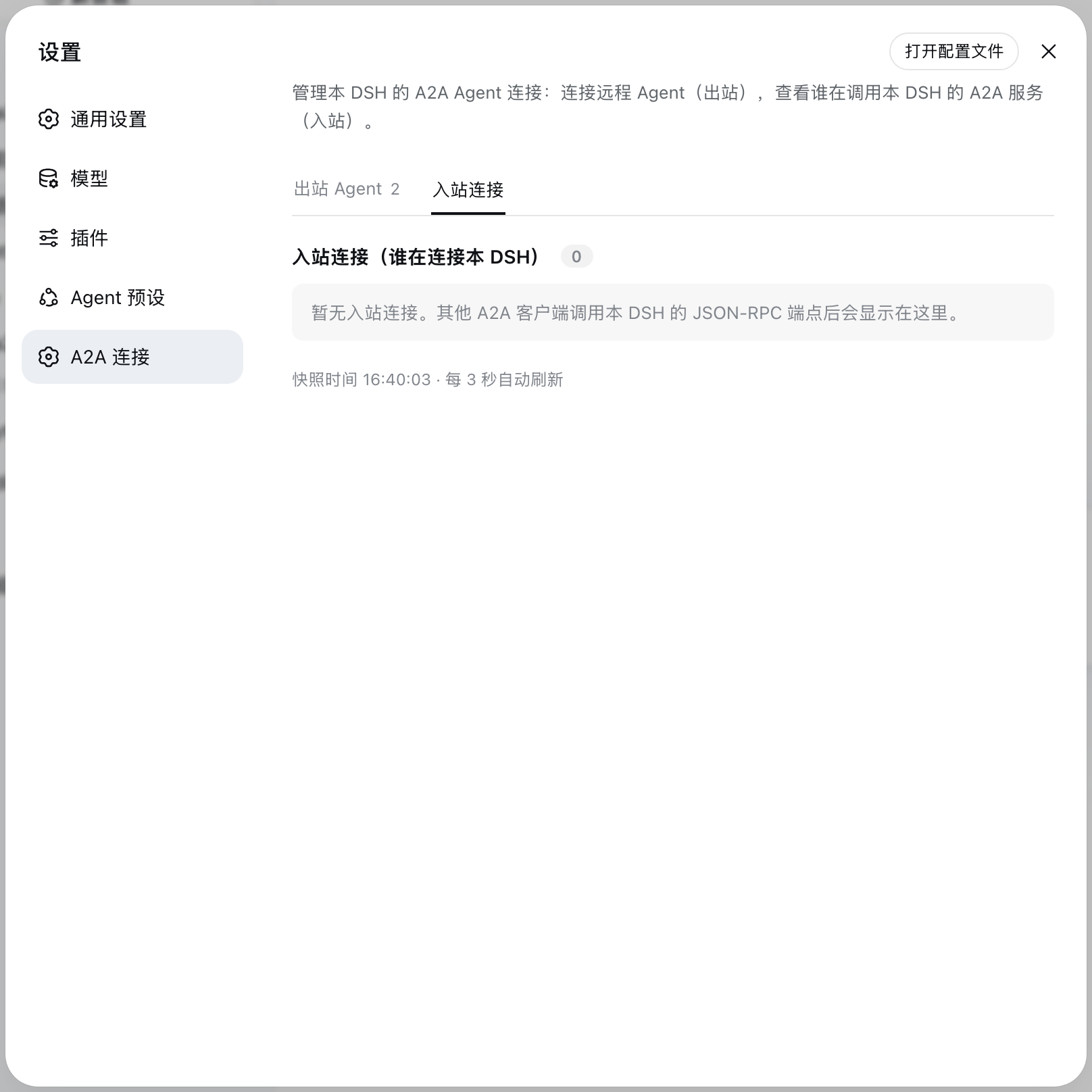 |
| Inbound with a live record | A2A server status panel |
|---|---|
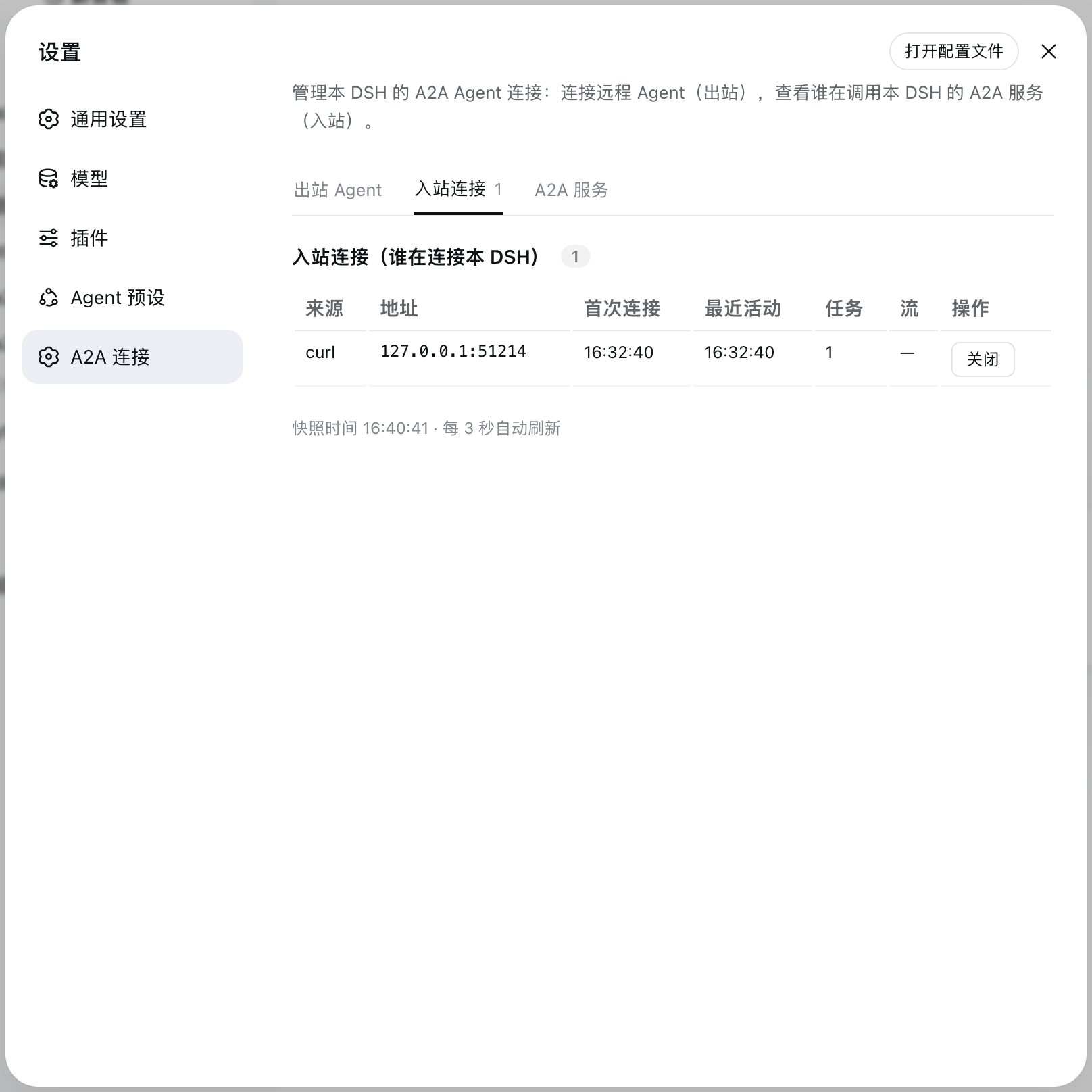 | 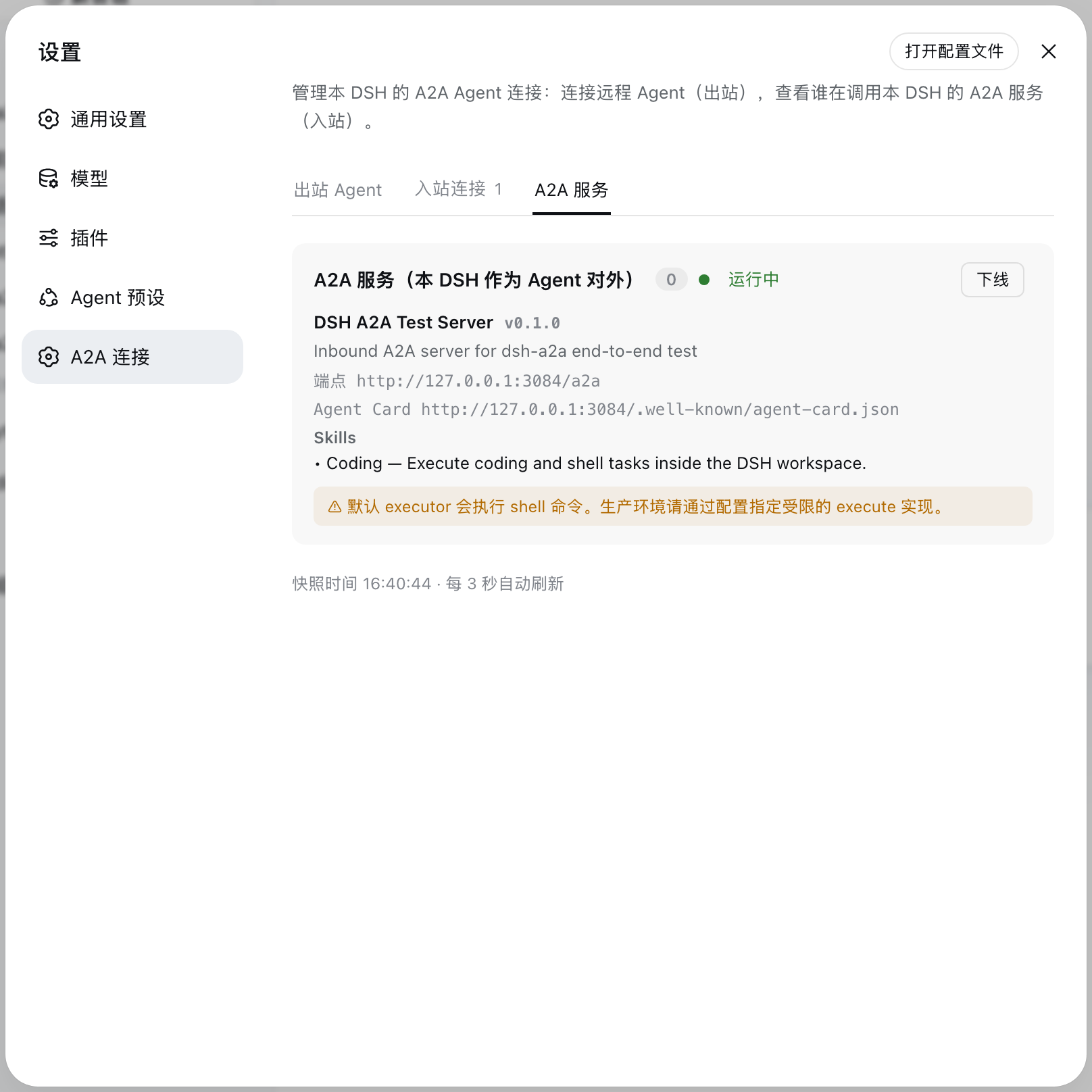 |
Installation
Option 1: from npm (recommended)
Once published to npm, install into the target profile with one command and restart:
dsh plugin --profile <profile> add @ryubyte/dsh-a2a
dsh --profile <profile>
dsh plugin installs the package into the profile and auto-registers the
plugin layer (this package declares dsh.bundle.patch in package.json) — no
manual configuration is needed.
Option 2: from the repository (development)
For hacking on the code, requires Node.js >= 22:
# 1. Clone the repo
git clone https://github.com/ryubyte/dsh-a2a.git
cd dsh-a2a

# 2. Install deps and build
npm install
npm run build

# 3. Link into the target profile
dsh plugin --profile <profile> add link:$(pwd)

# 4. Restart
dsh --profile <profile>
After changing source, re-run npm run build and restart.
Usage
1. Configure a remote agent (outbound)
Declare agents to connect to in the profile's a2a.json:
{
  "agents": [
    {
      "name": "research",
      "agentCardUrl": "https://research.example.com/.well-known/agent-card.json",
      // "bearerToken": "...",
      // "timeoutMs": 8000,
      // "mapSkills": true,
      // "enabled": false        // keep the entry, but don't auto-connect
    }
  ]
}
Alternatively, in the Web GUI go to 设置 → A2A 连接 → 添加 Agent, paste an
AgentCard URL to import and connect — the config is written back to
a2a.json.
Once connected, the remote agent's skills appear as model tools:
a2a__<name>__<skill>.
2. Expose this DSH as an A2A agent (inbound)
Enable server mode in a2a.json:
{
  "mode": "server",
  "server": {
    "enabled": true,             // explicitly turn the inbound server on
    // "baseUrl": "http://127.0.0.1:3080",   // optional; default: derive from webServer
    "agentName": "My DSH Agent",
    "agentDescription": "A DSH agent over A2A v1.0",
    "agentVersion": "0.1.0",
    "skills": [
      { "id": "coding", "name": "Coding", "description": "Execute coding and shell tasks.", "tags": ["coding", "shell"] }
    ]
  }
}
Other A2A clients discover this DSH via
http://<host>:<port>/.well-known/agent-card.json and call the /a2a endpoint.
Note: the default inbound executor runs shell commands — fine for local testing only; for production, inject a constrained executor programmatically (see below) and put a TLS reverse proxy in front.
3. Programmatic use
import { A2AClient, A2AServer, TaskStore } from '@ryubyte/dsh-a2a';

// outbound: connect to a remote agent
const client = await A2AClient.connect('https://agent.example.com');
const { task } = await client.sendMessage({
  messageId: crypto.randomUUID(),
  role: 'ROLE_USER',
  parts: [{ text: 'Draft a report' }],
});
for await (const ev of client.streamMessage({ messageId: crypto.randomUUID(), role: 'ROLE_USER', parts: [{ text: 'hi' }] })) {
  // ev.statusUpdate | ev.artifactUpdate | ev.task | ev.message
}

// inbound: wire a custom executor to your own agent loop
const store = new TaskStore();
const server = new A2AServer({
  baseUrl: 'http://127.0.0.1:3080',
  agentName: 'My DSH',
  agentDescription: '...',
  agentVersion: '1.0.0',
  execute: async ({ message }) => ({
    messageId: crypto.randomUUID(),
    role: 'ROLE_AGENT',
    parts: [{ text: await myAgentRun(message.parts) }],
  }),
}, store);
Directory structure
src/
  protocol.ts        # A2A v1.0 types & constants
  card.ts            # AgentCard discovery / validation
  jsonrpc.ts         # JSON-RPC 2.0 + SSE transport
  client.ts          # outbound client (A2AClient)
  server.ts          # inbound server + TaskStore (A2AServer)
  outbound.ts        # skill → model-tool bridge (registerAgentTools)
  dashboard.ts       # connection registry + control
  a2a-config.ts      # runtime a2a.json parsing / persistence
  index.ts           # Cordis plugin entry (client / server modes)
  client/
    index.ts         # browser half: settings "A2A 连接" panel
lib/                 # build output (index.js + client.js + types/)
scripts/
  build-client.mjs   # wrap client bundle (__ModuleLoader__)
  capture-shots.mjs  # README screenshot capture (headless Chrome + CDP)
cordis.patch.yml     # plugin registration row (self-mounted bundle)
package.json         # dsh.bundle.patch + dsh.client manifest
How it works
- The plugin reads
ctx.webServerandctx.toolsas context properties insidectx.inject(...)/ctx.effect(...)— the native Cordis pattern used by DSH bundles (dsh-client-hmr, …). A composition missing either half simply idles that half; nothing crashes. baseUrlis optional in server mode: when omitted the AgentCard advertises the webserver's real listen address, so ephemeral ports never publish a stale URL. Set it explicitly only when a reverse proxy fronts the instance.- Client-mode connection lifecycle hooks (
onReady/onDispose) feed a process-wide shared registry; multiple instances (client + server) share it, and/a2a/apiis registered once per process. - All registrations are fiber-scoped: Cordis disposes them on plugin stop/update.
- Disabled agents (
enabled: false) show as grayed-out placeholder cards and are not reconnected on restart until re-enabled.
Known limitations
- The dashboard API (
/a2a/api) listens on loopback / same-origin only; it carries no secrets and exists for operator visibility. - The default inbound executor runs shell commands directly (
/bin/sh -c), not an LLM agent; replace it with a constrained executor (e.g. DSH's sandbox/approval pipeline) in production. - The A2A spec requires HTTPS for production
AgentInterface.url; DSH's webserver binds loopback by default, so put a TLS reverse proxy in front before exposing beyond localhost. - Outbound bearer tokens are stored in plaintext in
a2a.json; secure the file yourself.
Development
npm install
npm run build    # tsc(types) + tsdown(lib) + wrap client → lib/client.js
npm test         # node:test + tsx (unit/integration) + client-bundle smoke
Project files and signals
Shown items are public repository signals detected in the directory snapshot.
Repository information
- Language
- TypeScript
- License
- MIT
- Latest release
- v0.1.2
- Last updated
- Aug 18, 2026, 10:55 AM
Install deliberately
Review source code, permissions, lifecycle hooks, dependencies and network access. Test untrusted plugins in an isolated environment.