Installation
npx -y @deepseek-ai/dsh plugin --profile web add github:shanliuling/dsh-image-genThis installation command is an unverified starting point generated from the GitHub repository address.
README
Maintainer-authored documentation snapshot.
🎨 dsh-image-gen
DeepSeek Harness (DSH) 原生生图插件
让 DeepSeek Harness 像 ChatGPT 一样,在对话里直接生成图片。
支持 Google Gemini、OpenAI Images、OpenAI Compatible API、字节 Seedream / 火山方舟。




English | 简体中文
💬 直接对你的 DeepSeek Harness Agent 发送以下提示词:
帮我安装生图插件,执行命令:pnpm dsh plugin --profile web add dsh-image-gen
(也可以手动在终端执行:pnpm dsh plugin --profile web add dsh-image-gen)
安装完成后,在 DSH 设置中填入自己的 API Key,就可以直接对 Agent 说:
帮我画一张雨夜霓虹街头的赛博朋克猫咪。
Agent 会自动调用 generate_image,生成图片并直接显示在当前对话中。
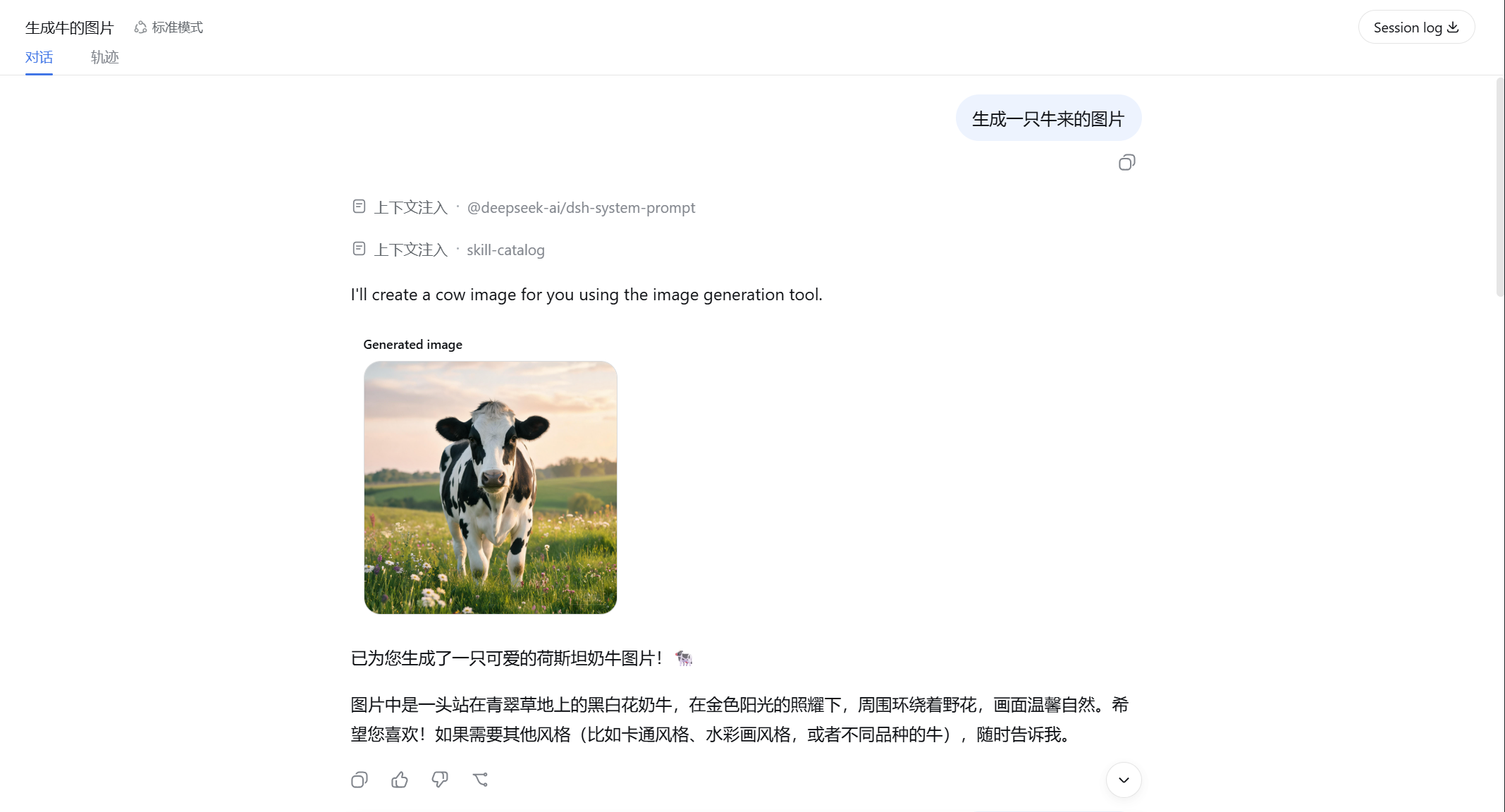
💡 它解决什么问题?
dsh-image-gen 是专为 DeepSeek Harness (DSH) 打造的开源图像生成插件。
DeepSeek Harness 已经可以让 Agent 调用不同工具完成任务,本项目为它补上了原生的多模态生图能力:
graph LR
    A[用户 Prompt] --> B[DeepSeek Harness Agent]
    B --> C[generate_image 工具]
    C --> D[Gemini / OpenAI / Seedream]
    D --> E[图片数据]
    E --> F[当前 Conversation 对话流]
🚀 快速安装与使用
1. 安装插件
在你的 DeepSeek Harness 项目根目录下运行:
# 推荐方式:通过 pnpm 一键安装并注册插件
pnpm dsh plugin --profile web add dsh-image-gen

# 若已将 dsh 安装为系统全局命令:
dsh plugin --profile web add dsh-image-gen
🛠️ 其他安装方式(Git 仓库直装 / 本地调试)
# 方式 B:从 GitHub 仓库直接安装最新代码
pnpm dsh plugin --profile web add git+https://github.com/shanliuling/dsh-image-gen.git

# 方式 C:本地克隆源码开发安装
git clone https://github.com/shanliuling/dsh-image-gen.git
pnpm dsh plugin --profile web add ./dsh-image-gen
2. 配置 API Key
打开 DSH Web 页面(默认 http://localhost:3080):
- 进入 Settings → Plugins → Image generation。
- 选择 Provider,填写 API Key,点击 保存 即可。
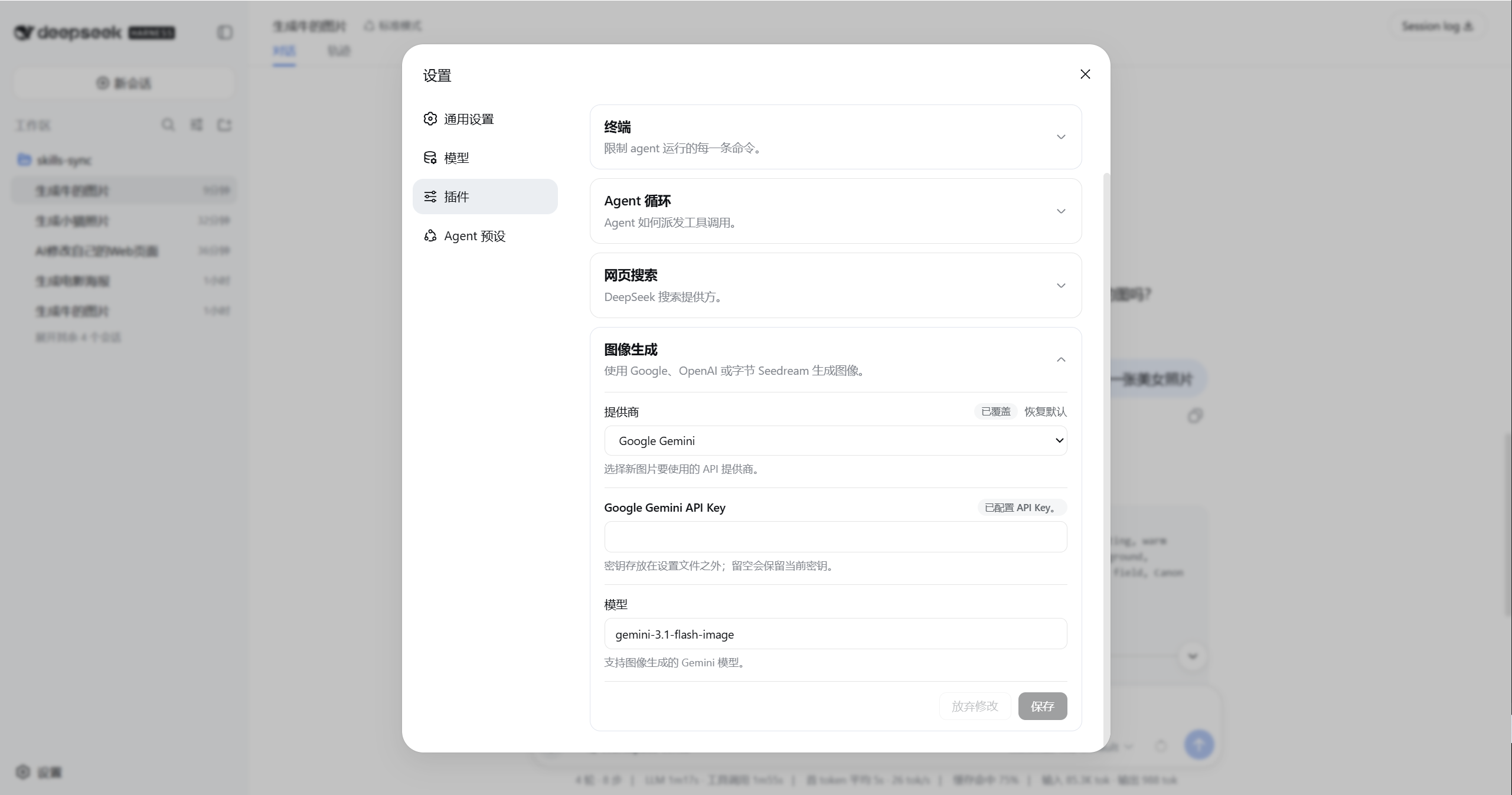
3. 开始对话生图
现在直接在聊天框输入:
生成一张极简主义的现代建筑客厅插画。
当前 Agent 就会自动调用 generate_image 工具并在对话流中返回图片。
✨ 主要能力
- 💬 对话中直接生图:不需要切换到其他网站,也不需要手动复制 Prompt,直接告诉 Agent 你想画什么即可。
- 🎨 多 Provider 支持:目前支持 Google Gemini、OpenAI Images、OpenAI Compatible API 以及 ByteDance Seedream / Volcengine Ark。Provider、模型和 Endpoint 都可以在设置界面中自由修改。
- 🔑 BYOK (自带 Key):插件使用你自己的 API Key。API Key 通过 DeepSeek Harness 的
credentials服务管理,采用写保护隔离,不需要写进项目源码或配置文件,前端不存明文。 - 🖼️ 图片跟随会话保存:生成结果会接入 DeepSeek Harness 的 Attachment / Conversation 体系,重新打开历史会话后,仍然可以看到之前生成的图片。
- ⚙️ 原生设置界面:Provider、API Key、模型和 Endpoint 都可以直接在 DSH Web 设置中修改,不需要手动编辑配置文件。
📦 支持的 Provider
| Provider | 默认模型 | 默认 Endpoint / Base URL |
|---|---|---|
| Google Gemini | gemini-3.1-flash-image | https://generativelanguage.googleapis.com/v1beta/interactions |
| OpenAI Images | gpt-image-2 | https://api.openai.com/v1 |
| OpenAI Compatible | 自定义 | 自定义 Base URL |
| ByteDance Seedream / 火山方舟 | doubao-seedream-5-0-260128 | https://ark.cn-beijing.volces.com/api/v3 |
🛠️ 本地开发 (Development)
# 克隆仓库
git clone https://github.com/shanliuling/dsh-image-gen.git
cd dsh-image-gen

# 安装依赖与构建
pnpm install
pnpm run typecheck
pnpm run test
pnpm run build

# 检查 npm 打包内容
pnpm run pack:check
📄 开源协议 (License)
本项目基于 MIT License 开源。
如果这个插件对你有用,欢迎点一个 ⭐️ Star 支持!
Project files and signals
Shown items are public repository signals detected in the directory snapshot.
Repository information
- Language
- TypeScript
- License
- MIT
- Latest release
- v0.1.1
- Last updated
- Aug 18, 2026, 1:12 AM
Install deliberately
Review source code, permissions, lifecycle hooks, dependencies and network access. Test untrusted plugins in an isolated environment.