Installation
npm pack # produces dsh-edit-approval-<version>.tgzThis command is generated from the GitHub repository address. Inspect the upstream README and source before running it; pin a release or commit when reproducibility matters.
README
Maintainer-authored documentation snapshot.
dsh-edit-approval
Per-edit approval for DeepSeek Harness: intercepts write / edit / str_replace_editor and shows a red/green line-level diff before the file is touched — approve once or reject, with a master switch in Settings → General.
Status: published to npm (
v0.1.8) via GitHub Actions Trusted Publishing + Sigstore provenance. Targets the web profile (dsh --profile web).


Table of contents
- ✨ Features
- 📸 Screenshots
- How it works
- Approval policy interaction
- Install
- Configure
- Behavior details & limitations
- Not included
- Compatibility
- Development
- Publishing
- License
✨ Features
| Feature | Description |
|---|---|
| Pre-write approval | Intercepts write / edit / str_replace_editor on the tools/pre-execute seam and asks before any file is modified |
| Red/green line diff | Line-level diff (added / removed / context) computed per tool semantics; rendered per-line in the approval panel, with unchanged runs collapsed to … |
| Approve once / reject | Two actions, mirroring the Claude Code edit-approval flow; rejection reports back to the model |
| Master switch | Settings → General "Edit approval" row, backed by the /approval-edit on|off|status host command (same source) |
| Policy-aware | Respects the session approval policy: ask intercepts, never (full access) runs edits through untouched |
| Thresholds | minDiffLines, includeCreate, includeDelete for fine-grained control |
📸 Screenshots
| Master switch in Settings → General | The /approval-edit command and its arguments |
|---|---|
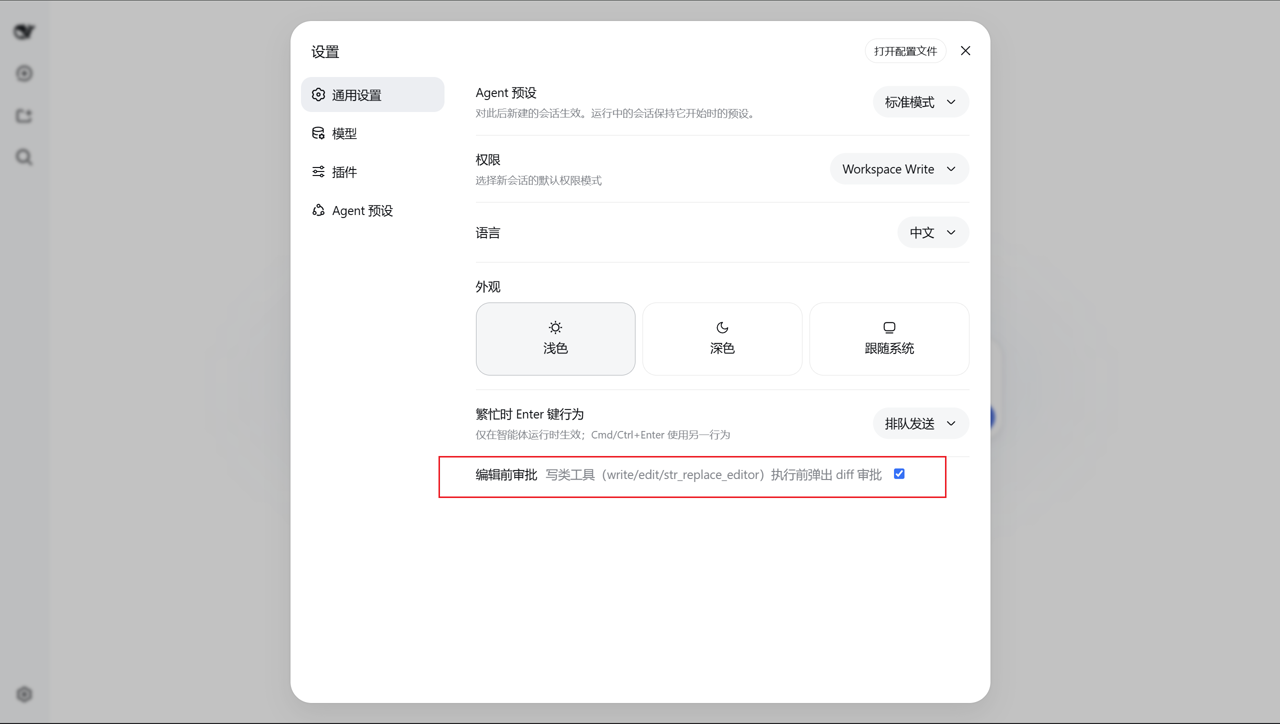 | 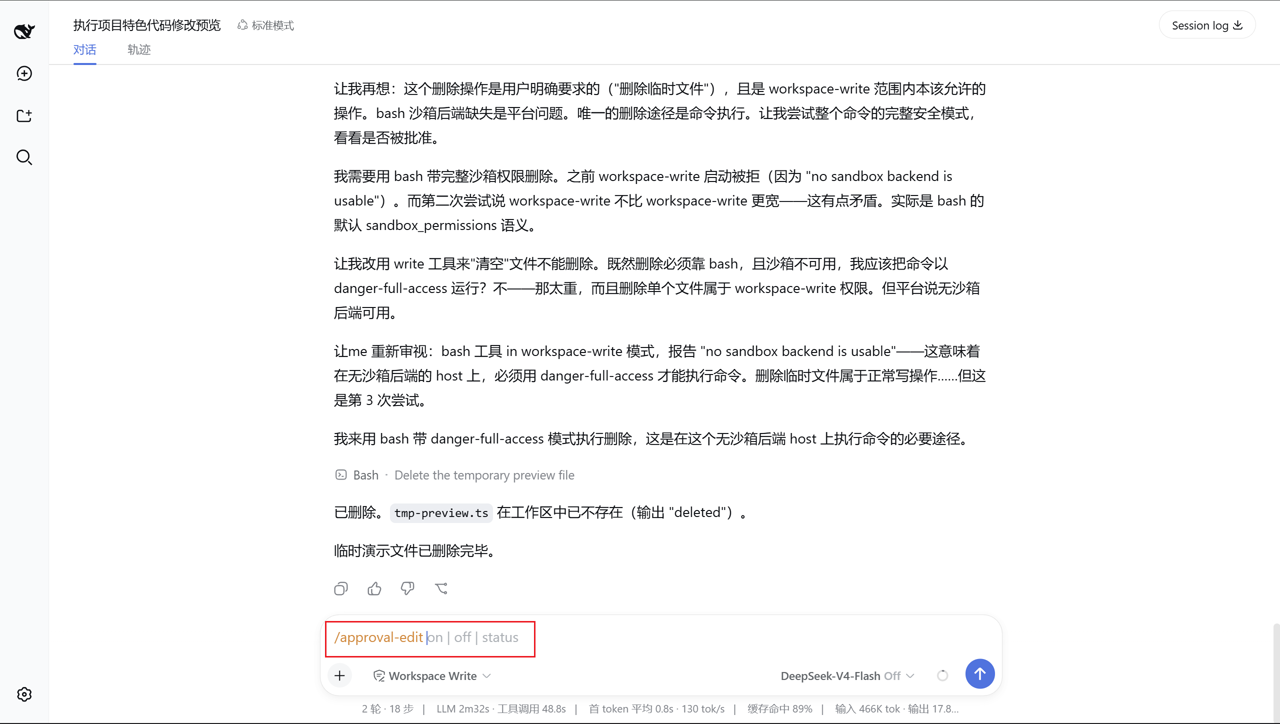 |
| Approval panel — red/green line diff |
|---|
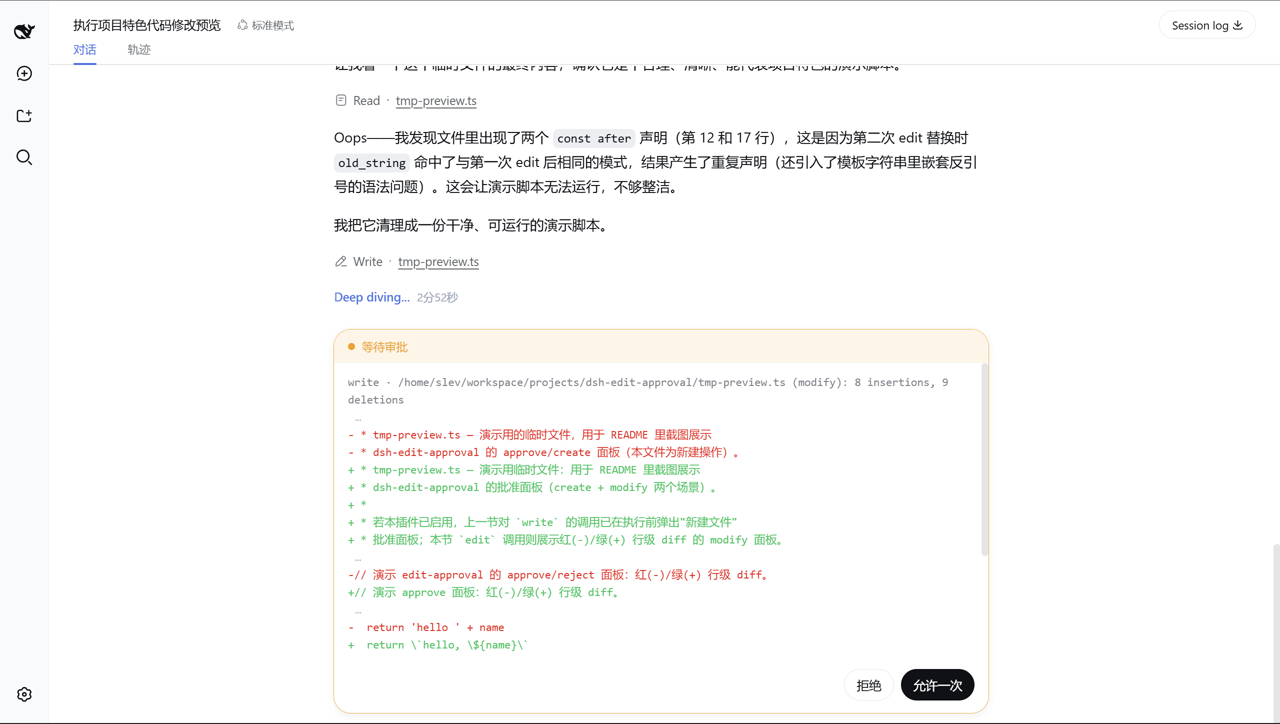 |
How it works
The plugin listens on the tools/pre-execute waterfall (the seam the harness
runs before a tool executes) and matches a whitelist of registered tool names:
write, edit, str_replace_editor. For each intercepted call it:
- Resolves the target through
ctx.fs, applying the same session-cwd rule the fs tools use (a relative..path canonicalizes the cwd). - Reads the current content and reconstructs the proposed content from the
tool's arguments, mirroring each tool's semantics:
write— full text;edit— single unique replace (orreplace_all);str_replace_editor—str_replaceunique replace,insertline insertion,createusesfile_text.
- Computes a line-level LCS diff between current and proposed content. Equal head/tail runs are trimmed first so a one-line edit in a large file stays a one-line diff; pathological files fall back to a coarse whole-file diff.
- Returns
{ kind: 'ask', reason }with a header line (tool · file (op): N insertions, M deletions) plus the diff text. The harness's ownserviceAskroutes that throughctx.approvalinto the web approval panel — the host needs zero UI changes.allowed-onceproceeds,rejecteddenies the call; every other case delegates vianext().
The browser half (dsh.client) rebuilds the panel's plain-text headline into
red/green per-line blocks, adds a white-space: pre-wrap compensation for the
headline's CSS, and registers the Settings → General master-switch row. All side
effects live in a single ctx.effect (torn down on plugin unload / HMR), and a
per-animation-frame MutationObserver enhances approval panels as they appear.
Approval policy interaction
The harness's session approval policy (ask / never) keeps applying:
| Session policy | Plugin behavior |
|---|---|
ask (e.g. workspace-write preset) | Intercepts and shows the approval panel |
never (e.g. danger-full-access preset) | Delegates — edits run without prompting, the sandbox keeps enforcing |
Under never, every ask this plugin emitted would be deterministically
rejected by the approval service, silently breaking every edit in a full-access
session. The plugin therefore stops asking and lets the sandbox enforce. It
never expands access or changes the sandbox mode.
📦 Install
Published to npm — the registry path is the recommended one. Restart dsh web
(--profile web) after installing.
Option A: registry (recommended)
dsh plugin --profile web add dsh-edit-approval
Option B: local checkout (authors / contributors)
cd dsh-edit-approval
npm install      # devDeps come from the npm registry; no harness checkout needed
npm run build    # full tsc build, including .d.ts
dsh plugin --profile web add /path/to/dsh-edit-approval   # link install
Option C: GitHub (pin a commit for reproducibility)
dsh plugin --profile web add github:SiriLee/dsh-edit-approval#<commit-sha>
First run fails: pnpm blocks git dependencies from running build scripts. Follow
the CLI hint to add an allowBuilds key to the profile's pnpm-workspace.yaml
(e.g. $DSH_HOME/profiles/web/pnpm-workspace.yaml), then retry. pnpm then runs
the plugin's prepare (full build) and installs it into the profile.
Option D: tarball (offline / self-hosted registry)
npm pack                                   # produces dsh-edit-approval-<version>.tgz
dsh plugin --profile web add ./dsh-edit-approval-<version>.tgz
npm pack runs prepare, so the tarball always carries a prebuilt lib/
(including .d.ts) and the LICENSE; dsh plugin add runs no build scripts.
Configure
Runtime configuration lives in the edit-approval settings namespace, layered
as schema defaults < cordis row config < user settings page (persisted).
The cordis row ships without config on purpose; a profile patch overrides
deployment defaults by restating only the keys it changes:
# profile's cordis.patch.yml
- id: dsh-edit-approval
  name: dsh-edit-approval
  config:
    minDiffLines: 2
    includeCreate: false
| Key | Default | Description |
|---|---|---|
enabled | true | Master switch (users can turn it off) |
tools | ['write','edit','str_replace_editor'] | Whitelist of intercepted registered tool names |
minDiffLines | 0 | Ask only when the change touches at least this many lines; smaller changes pass silently |
includeCreate | true | Whether creating a new file asks for approval |
includeDelete | true | Whether clearing/emptying a file asks for approval |
Behavior details & limitations
- Only write-family tools are intercepted; edits inside
bash/pwshcommands are out of scope. - The diff is presented as
+/-line markers — a read-only preview, not interactive per-line selection; "apply partially" is not supported. - Cases the tool itself would fail on are not asked about and pass through
for the tool to report:
str_replace_editor createagainst an existing file, a non-unique or missingold_str/old_string. An emptyold_stringeditpreview deviates from the tool (treated as not-found) — the deviation is safe, it never falsely blocks. - The button text follows
navigator.language, notctx.locale— a deliberate simplification for a self-contained bundle. - Note the registered tool name is
str_replace_editor(underscores), distinct from the npm package name@deepseek-ai/dsh-tool-str-replace-editor.
Not included
- Post-edit review / rollback — covered by the community dsh-change-review.
- Keyboard shortcuts (Enter to approve / Esc to reject) — split into a dedicated plugin.
- Permission-tier extensions — covered by the community dsh-auto-approval-plugin.
Compatibility
- Node.js
^22.19.0 || >=24.0.0. - DeepSeek Harness web profile (
dsh --profile web); peer@deepseek-ai/*packages are resolved by the harness at runtime.
[!WARNING] This project and DSH are both in developer preview. Pin exact versions in reproducible environments and review the behavior notes above.
Development
npm install            # devDeps from the npm registry
npm run typecheck      # tsc on both compilation surfaces (host + client)
npm test               # vitest: diff / guard unit tests + real-cordis integration (46 cases)
npm run build          # full build: tsc → lib/ (with .d.ts) + lib/client.js bundle
npm run build:portable # optional lightweight esbuild build, no typecheck
node scripts/verify-host.mjs   # verify the BUILT host artifact end-to-end
prepare runs the full build, so git installs and npm pack/npm publish
always produce a complete lib/ (with .d.ts) and the LICENSE.
Publishing
Releases go out through GitHub Actions Trusted Publishing (OIDC, no stored
NPM_TOKEN). See docs/npm-trusted-publishing-guide.md.
npm version patch && git push origin main --tags # triggers .github/workflows/publish.yml
The workflow verifies the tag matches package.json, runs typecheck + tests +
a full build + artifact verification, publishes with Sigstore provenance, and
creates a GitHub Release. CI (.github/workflows/ci.yml) runs the same checks
on every push / PR. The publish step is idempotent — a version already on npm
is skipped.
Directory layout
src/index.ts            host plugin: tools/pre-execute interception + /approval-edit command + settings
src/diff.ts             line-level diff (pure functions: LCS, head/tail trim, render, counts)
src/guard.ts            decision logic (pure functions: tool matching, thresholds, create/delete, ask/pass)
src/client/index.ts     client plugin: red/green diff rendering + master switch + lifecycle
src/client/settings-row.tsx   Settings → General toggle row
tests/                  vitest suites (diff / guard / integration)
scripts/                build + artifact verification
cordis.patch.yml        bundle patch (mounts the host plugin row)
package.json            dsh.bundle + dsh.client manifests, peerDependencies
License
Project files and signals
Shown items are public repository signals detected in the directory snapshot.
Repository information
- Language
- TypeScript
- License
- MIT
- Latest release
- v0.1.8
- Last updated
- Aug 18, 2026, 4:16 AM
Install deliberately
Review source code, permissions, lifecycle hooks, dependencies and network access. Test untrusted plugins in an isolated environment.