Installation
npx -y @deepseek-ai/dsh plugin --profile web add github:smanx/dsh-proxyThis installation command is an unverified starting point generated from the GitHub repository address.
README
Maintainer-authored documentation snapshot.
dsh-proxy
English | 中文
HTTP + WebSocket 反向代理:把局域网端口转发到本地 DSH 服务 127.0.0.1:3080。
支持 Basic Auth、局域网访问、crypto.randomUUID polyfill 注入。
DSH 插件版(推荐 · dsh-proxy)
推荐 DSH(DeepSeek Harness)用户使用:把代理作为插件装进 web profile,随 dsh web 启停,无需单独进程、无需下载可执行文件,带完整设置页面。
- 与独立版相同的原生 Basic Auth(浏览器弹窗)与 HTTP + WebSocket 全协议转发
- 设置页面(DSH 设置 → 局域网代理):状态红绿灯、启动/停止、改代理监听端口与用户名密码(表单回写当前值,留空即设为空)
- 默认空凭据 = 密码登录关闭;同时设置用户名和密码才启用
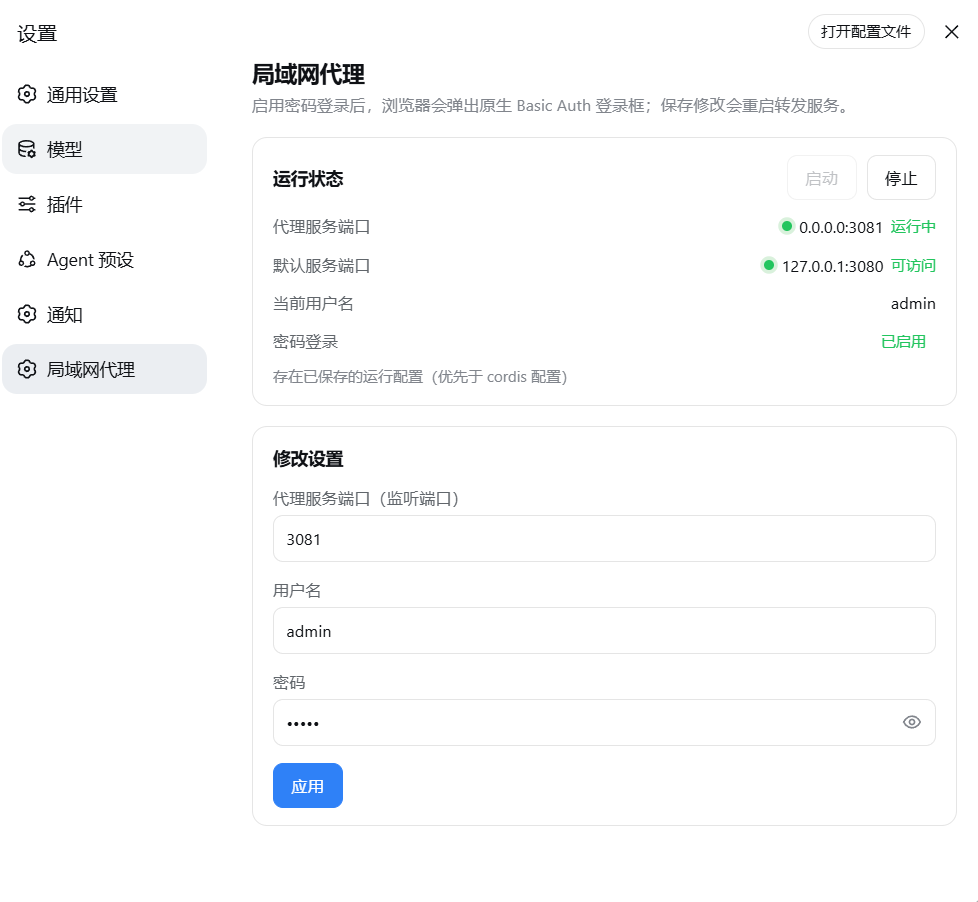
安装
在线安装(推荐)——直接从 GitHub 安装(无需下载仓库):
dsh plugin --profile web add github:smanx/dsh-proxy#master
本地安装(仓库已克隆/下载到本机):
dsh plugin --profile web add file:C:/mydata/codes/dsh-proxy
重启 dsh web 后,访问 http://<局域网IP>:3081 即弹 Basic Auth 登录框。详细说明见 dsh-proxy/README.zh.md。
独立可执行版本(go/ 与 node/)
不使用 DSH、或需要独立进程时的备选方案:两个等价的单文件版本(交互式启动、配置记忆、CLI 免交互参数)。
下载安装:从 GitHub Releases 下载对应平台的单个可执行文件(Go 版约 6-7 MB / Node 版约 80-120 MB),放到任意目录直接运行;macOS/Linux 先 chmod +x。
| 目录 | 语言 | 单文件体积 | 说明 |
|---|---|---|---|
go/ | Go(静态编译) | 6-7 MB | 轻量版;Go 标准库实现,体积小 95%,推荐 |
node/ | Node.js(SEA 打包) | 83-119 MB | 原版;用 Node 官方 SEA 打包,无需安装 Node |
功能
- HTTP + WebSocket 反向代理(Go 版用标准库
httputil.ReverseProxy,原生支持 WS 升级) - Basic Auth(默认
admin/admin,HTTP 与 WS 握手统一校验;公开静态资源如/manifest.webmanifest免认证,避免浏览器抓取 manifest 时报 401) - Origin 对齐 + Host 改写(通过 DSH
/api同源校验,LAN 访问 WS 不 403) - HTML 注入
crypto.randomUUIDpolyfill(LAN 非安全上下文下实时通道可用) - 交互式启动:4 项配置预填可编辑(源端口 3080 / 目标端口 3081 / admin / admin),端口与账号密码均可手动修改
- 配置记忆:
config.json存于可执行文件同目录,下次启动自动预填 - CLI 免交互参数(供计划任务/自动化):
dsh-proxy --source-port 3080 --target-port 3081 --user admin --pass admin
构建
# Node 版(产物在 node/dist/)
cd node
npm install
npm run build          # 全部 5 个平台(首次需下载 Node 二进制,之后缓存于 .sea-cache/)
npm run build:win      # 只构建 Windows

# Go 版(产物在 go/dist/,无需安装 Go 运行时)
cd go
./build.ps1            # 全部 5 个平台
./build.ps1 -Target win-x64
产物清单(两个版本各 5 个平台:win-x64、linux-x64、linux-arm64、macos-x64、macos-arm64):
- Node 版:
dsh-proxy-<平台>(如dsh-proxy-win-x64.exe) - Go 版:
dsh-proxy-go-<平台>(如dsh-proxy-go-win-x64.exe,避免与 Node 版同名)
macOS/Linux 版传到对应系统后先 chmod +x。
启动横幅显示的版本号在打包时注入:CI 自动取标签版本(如 v1.1.0);
本地构建可用 -Version(Go)或 --version(Node)指定,缺省取最近 git 标签。
验证
# 免交互启动(示例端口 3091)
./dsh-proxy-win-x64.exe --source-port 3080 --target-port 3091 --user admin --pass admin

# 无凭据 → 401;带凭据 → 200
curl -i http://127.0.0.1:3091/
curl -u admin:admin http://127.0.0.1:3091/

# WebSocket 握手 → OPEN
node -e "const ws=new WebSocket('ws://127.0.0.1:3091/api/events.mux',{headers:{Authorization:'Basic '+Buffer.from('admin:admin').toString('base64')}});ws.onopen=()=>{console.log('OPEN');ws.close()}"
自动发布
推送 v* 标签(如 v1.1.0)即触发 GitHub Actions,同时构建 Node 版和 Go 版
并发布到 GitHub Release(含 SHA256SUMS.txt 校验和);也可在 Actions 页面手动触发:
git tag v1.1.0
git push origin v1.1.0
工作流见 .github/workflows/release.yml。
Project files and signals
Shown items are public repository signals detected in the directory snapshot.
Repository information
- Language
- JavaScript
- License
- Not reported
- Latest release
- v0.0.9
- Last updated
- Aug 16, 2026, 9:47 AM
Install deliberately
Review source code, permissions, lifecycle hooks, dependencies and network access. Test untrusted plugins in an isolated environment.