Installation
npx -y @deepseek-ai/dsh plugin --profile web add github:tianxia--/dsh-llm-local-tokenThis installation command is an unverified starting point generated from the GitHub repository address.
README
Maintainer-authored documentation snapshot.
dsh-llm-local-token
A DeepSeek Harness plugin that serves LLM calls with the OAuth tokens your local CLIs already hold — no separate API key, no extra login. If you are signed in to the Codex CLI or to Claude Code, those subscriptions become usable model routes inside DSH.
| Provider route | Credential source | Endpoint |
|---|---|---|
openai-codex | ~/.codex/auth.json (ChatGPT OAuth, shared with the codex CLI) | https://chatgpt.com/backend-api |
anthropic | ~/.claude/.credentials.json, else the macOS Keychain item Claude Code-credentials | https://api.anthropic.com |
Both routes appear in the model picker as soon as the plugin loads. A route whose credential is missing is skipped instead of failing the boot.
Both subscriptions as routes in the model picker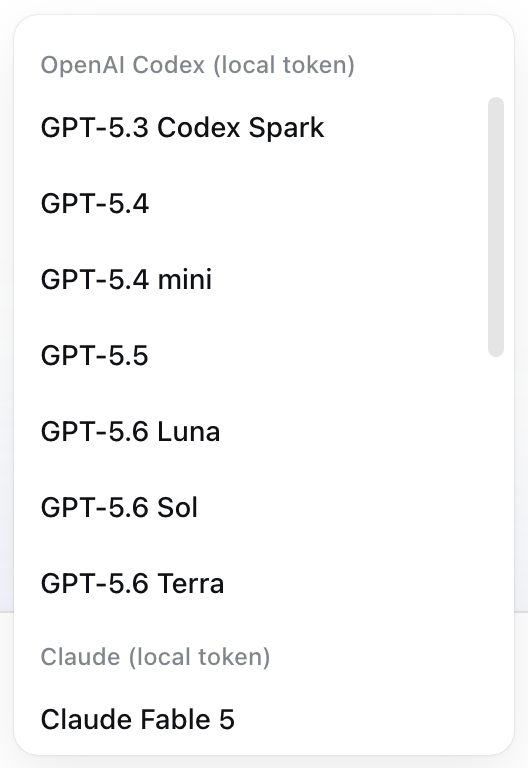 | Subscription usage, read from provider rate-limit headers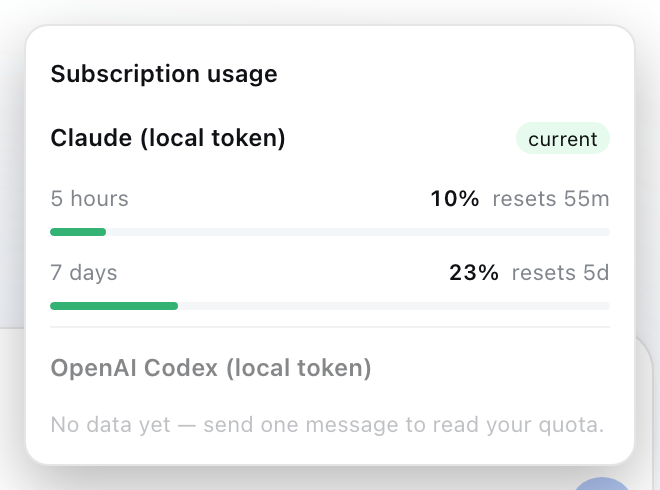 |
Why it exists
DSH resolves a provider's key through its credential seam, which expects an API key. Personal Codex / Claude subscriptions are OAuth-only, so the keys simply do not exist. This plugin resolves the token per request from the file the CLI maintains, refreshes it when it is close to expiry, and hands it to the pi-ai engine that DSH already ships.
Install
dsh plugin --profile web add dsh-llm-local-token

# or straight from git
dsh plugin --profile web add https://github.com/tianxia--/dsh-llm-local-token.git
Then restart dsh — that is the whole install. The package declares a profile
bundle (dsh.bundle.patch → cordis.patch.yml), so DSH
inserts the loader row for you; you do not have to hand-edit the profile's
own cordis.patch.yml.
Enabling it by hand instead
If you vendored the plugin, or you want to pin its config in your own patch
layer, append the row yourself to ~/.dsh/profiles/web/cordis.patch.yml. Your
profile's layer is applied after every bundle layer, so restating the id here
also lets you override the bundle's defaults:
- insert:
    - id: llm-local-token
      name: dsh-llm-local-token
To make it the default model:
# ~/.dsh/settings.yaml
agent-default-model:
  provider: openai-codex
  model: gpt-5.6-terra
  reasoningEffort: medium
Configuration
All keys are optional; the defaults match a stock CLI install.
| Key | Default | Meaning |
|---|---|---|
codexAuthPath | $CODEX_HOME/auth.json, else ~/.codex/auth.json | Codex credential file |
claudeAuthPath | ~/.claude/.credentials.json | Legacy Claude Code credential file |
claudeKeychainService | Claude Code-credentials | macOS Keychain service holding the Claude OAuth payload |
requireClaude | false | Fail activation when no Claude credential is found, instead of skipping the route |
codexTransport | "sse" | Streaming transport for the Codex route: sse / websocket / websocket-cached / auto. The quota badge depends on sse: pi-ai's default auto streams over WebSocket, and the x-codex-* quota headers exist only on the SSE response, so the badge stays empty under WS. Set auto to prefer WebSocket and accept no Codex quota data. |
Subscription usage badge
Both providers return their quota state in response headers, so the plugin reads it for free — no polling, no extra endpoint hits. A badge appears in the composer bar next to the context ring; click it for the breakdown.
| Provider | Headers read | Shown |
|---|---|---|
openai-codex | x-codex-primary-*, x-codex-secondary-*, x-codex-plan-type, x-codex-credits-balance | plan, used % per window, reset countdown, credit balance |
anthropic | anthropic-ratelimit-unified-{5h,7d}-{utilization,reset,status} | used % for the 5-hour and 7-day windows, reset countdown |
The badge is green under 60%, amber under 85%, red above. Usage is whatever the last real
request reported, so a freshly started host shows "no data yet" until you send one message.
The browser half polls GET /llm-local-token/usage every 15s; that route only reads the
in-memory snapshot.
The badge shows only the provider serving the currently selected model: pick Codex and you see
Codex's windows, switch to Claude and it swaps — the two are never mixed into one number. When the
selected model belongs to another adapter (a plain API key, another plugin) the badge hides itself,
because that quota is not this plugin's to report. The popover still lists every route, with the
active one first and marked "current" and the rest dimmed. The selection comes from
ctx.modelDirectories; a composition without that service (non-Web) falls back to the previous
union-of-all-routes view.
Requirements
- Node.js 22.13+ (DSH's own floor;
--use-system-caneeds it too) dsh-basein the profile — it already provides@deepseek-ai/dsh-llm-pi-aiand@earendil-works/pi-ai- A signed-in CLI:
codex loginfor the Codex route; Claude Code for the Anthropic route - The Claude Keychain lookup is macOS-only. On Linux/Windows only the file store is consulted.
Token handling
- Read per request, never cached in memory beyond the call
- Refreshed when less than 5 minutes of life remain, then written back to the same file the CLI reads, so the CLI stays logged in (single-flight: concurrent requests trigger one refresh)
- Written atomically with
0600permissions - Never logged, never sent anywhere except the provider endpoint
Troubleshooting
UNABLE_TO_GET_ISSUER_CERT_LOCALLY
Your traffic goes through a TLS-inspecting proxy (Zscaler, Netskope, corporate MITM). Node does not trust its root CA even when the OS does. Start DSH with either:
node --use-system-ca …                          # trust the OS store (Node 22.13+)
NODE_EXTRA_CA_CERTS=/path/to/root-ca.pem dsh …  # or point at the proxy's root cert
Provider is not configured: openai-codex
Means the pi-ai provider refused an API-key override. This plugin already attaches an api-key
auth method to the OAuth-only Codex provider; seeing this error again implies a pi-ai version
whose resolveProviderAuth changed — open an issue with your @earendil-works/pi-ai version.
The model list shows no Codex/Claude entries
Check the boot log for llm-local-token: registered …. If it names only openai-codex, no
Claude credential was found (expected when Claude Code was never used on this machine).
Caveats
- Uses your personal subscription quota (ChatGPT Plus/Pro, Claude Pro/Max). Respect the provider's terms; this is not a way to share one seat across a team.
chatgpt.com/backend-apiis the Codex client's own endpoint, not a documented public API. It can change without notice; pin the pi-ai version if you need stability.
License
MIT
Project files and signals
Shown items are public repository signals detected in the directory snapshot.
Repository information
- Language
- JavaScript
- License
- MIT
- Latest release
- v1.3.2
- Last updated
- Aug 17, 2026, 7:45 PM
Install deliberately
Review source code, permissions, lifecycle hooks, dependencies and network access. Test untrusted plugins in an isolated environment.