Installation
npm install -g @deepseek-ai/dshThis command is generated from the GitHub repository address. Inspect the upstream README and source before running it; pin a release or commit when reproducibility matters.
README
Maintainer-authored documentation snapshot.
dsh-tui


An open-source terminal front door for DeepSeek Harness (dsh).
@tomowang/dsh-tui is an out-of-tree mode bundle: it stacks on @deepseek-ai/dsh-base exactly like the shipped dsh-web-app and dsh-headless bundles do, but drives the agent from your terminal instead of a browser. The package is both a Cordis plugin (terminal input and presentation) and a dsh bundle (dsh.bundle.patch in package.json points at cordis.patch.yml); everything else — model adapters, tools, session persistence, sandbox and approval policy — stays in dsh-base and remains patchable underneath.
How it works
- The TUI renders only from the durable session log: it replays
agent.session.eventson startup and followssession/eventlive, so--resumeshows the exact history the log carries — the harness's "model-visible ⟺ logged" invariant does the heavy lifting. - Line input maps to the agent inbox:
agent.followup()while idle,agent.steer()while a turn is running,Ctrl+Ccancels the running turn. tui-startupparses this app's flags (everything after the launcher's own) throughdsh-cmdlineand publishes them as an ordinary Cordis service; the runner row reads them via the bundle patch, mirroringdsh-headless.- Both stdin and stdout must be real TTYs; the plugin fails loud instead of degrading, so pipes keep using
dsh --profile headless.
Features
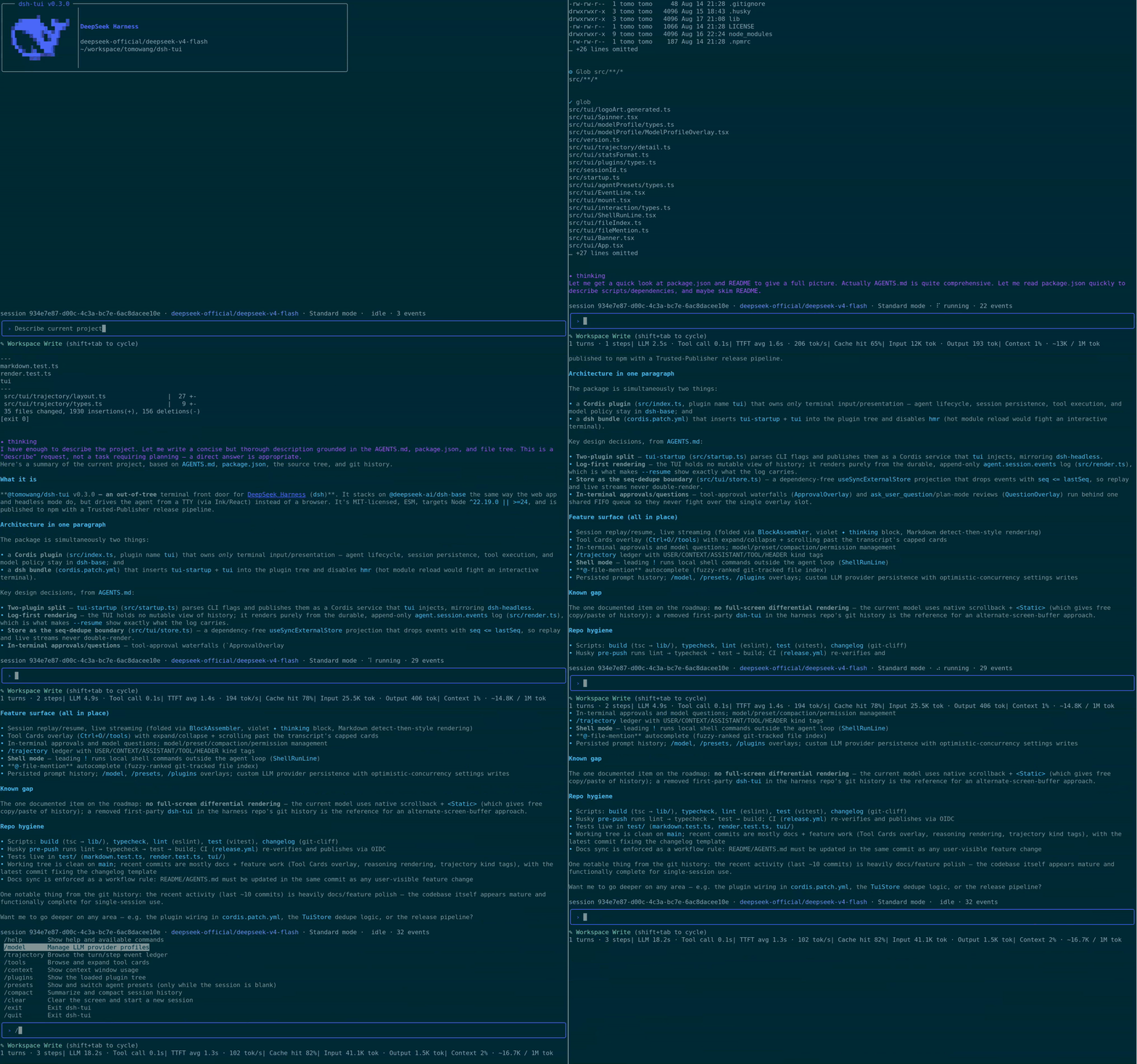
- Status bar — session id, active LLM provider/model, current agent preset, live run state with spinner, queued-message count, and logged event count.
- Stats line — turn/step counts, LLM/tool wall time, TTFT and decode tok/s, cache-hit %, billed tokens, and a compact context-usage summary; sections hide themselves until there's data.
/modelprovider management — switch the active model, and add, edit, or delete custom LLM providers (route, base URL, API key, model discovery) without leaving the terminal.- Agent presets — start a fresh session on a given preset with
--agent-preset, or browse and switch presets from/presets(fixed once the session's first turn has run). - Session inspectors —
/trajectoryfor a turn/step event ledger with a detail view and filtering,/contextfor a context-window usage breakdown,/pluginsfor the loaded Cordis plugin tree and fiber state. - Tool Cards overlay —
/toolsorCtrl+Oopens a scrollable browser over the session's tool calls/results, letting a card expand past the transcript's fixed line cap to its full presentation instead of showing "…omitted". - Reasoning display — a model's reasoning/thinking content renders as a distinct dim
✦ thinkingblock ahead of its visible answer, both while streaming and in settled transcript output. - Markdown rendering — assistant text with an unambiguous Markdown signal (fenced code, headers, lists, blockquotes, rules, tables, links, bold/strikethrough, inline code) is styled for the terminal; plain prose passes through untouched.
- Permission preset cycling —
Shift+Tabcyclesread-only/workspace-write/danger-full-access/custom, shown live in the prompt area. - In-terminal approvals and questions — a tool call parked on an
askpermission decision is answered right in the terminal (allow once / reject), andask_user_question/plan-mode's plan review present as an option list with multi-select and free-text "Other…",escto skip. - Manual compaction —
/compactsummarizes and compacts session history on demand. - Persisted prompt history — submitted lines are saved across processes and
/clear, recalled with↑/↓. - Readline-style input — word/line motion, kill/yank-style deletes, multi-line drafts, and shell-like double-press
Ctrl+C/Ctrl+Dto exit. - Shell mode — a leading
!on an empty prompt (Claude Code's convention) switches Enter to run the line as a local shell command instead of sending it to the agent; the prompt border turns yellow for the duration, and output streams into the transcript without touching the session log. @-file-mention autocomplete — typing@opens a fuzzy-filtered dropdown of repo files (git ls-files, or a bounded walk outside a git repo);Tab/Enterinserts the picked path at the cursor.- Every overlay degrades to a plain notice instead of failing the whole TUI when its backing service isn't mounted in a given profile.
Install
Requires Node ^22.19 || >=24 and a DEEPSEEK_API_KEY.
# 1. Install the dsh launcher
npm install -g @deepseek-ai/dsh

# 2. Create the profile and install this bundle into it
#    (dsh reconciles the profile manifest's "dsh.profile.bundles" list
#    automatically, appending any installed dependency that declares
#    dsh.bundle.patch — no manual package.json edit needed)
dsh plugin --profile tui add @tomowang/dsh-tui

# 3. Run
dsh --profile tui
dsh --profile tui --resume <sessionId>           # reopen a persisted session
dsh --profile tui --agent-preset <presetId>      # start a fresh session on a given preset
dsh --profile tui --dump-config                  # inspect the composed plugin tree
Any row --dump-config prints — the model adapter, tool set, sandbox policy, this TUI's own config — can be overridden from the profile's cordis.patch.yml without touching this package. --agent-preset is a dsh-launcher flag (parsed by tui-startup, not --dump-config above) that only applies to a fresh session; it's ignored together with --resume, and is a no-op with a startup notice on profiles that don't mount dsh-agent-presets.
Terminal commands
| Input | Effect |
|---|---|
| any text | follow-up while idle, steering while a turn runs |
/help | show available commands and keyboard shortcuts |
/model | manage LLM provider profiles: switch model, add/edit/delete a custom provider |
/presets | view and switch agent presets (fixed once the session's first turn has run) |
/trajectory | browse the turn/step event ledger with a detail inspector and filter |
/tools | browse and expand tool cards past the transcript's line cap |
/context | show context-window usage as a bar-chart breakdown |
/plugins | show the loaded Cordis plugin tree and fiber state |
/compact | summarize and compact session history |
/clear | flush the current session and start a new one |
/exit, /quit | cancel, wait for idle, flush the session, exit |
Keyboard shortcuts
| Key | Effect |
|---|---|
Ctrl+C | cancel a running turn; on an idle empty line, press twice within 2s to exit |
Ctrl+D | forward-delete; on an idle empty line, press twice within 2s to exit |
Shift+Tab | cycle the permission preset (read-only / workspace-write / danger-full-access / custom) |
Ctrl+O | open the Tool Cards overlay; ↑/↓ select a card, Enter/Space expand or collapse, PgUp/PgDn/Home/End scroll an expanded card, Esc/q/Ctrl+O close |
! (on an empty prompt) | enter shell mode: Enter runs the line as a local shell command; Esc/backspace-on-empty exits back to normal mode |
@ | open the file-mention dropdown; ↑/↓ to move, Tab/Enter to insert the path, Esc to dismiss |
Tab | in /command mode, autocomplete the highlighted command |
↑ / ↓, Ctrl+P / Ctrl+N | recall prompt history, or move within a multi-line draft |
Shift+Enter, Alt+Enter, trailing \ + Enter | insert a newline instead of submitting |
Home/Ctrl+A, End/Ctrl+E, Ctrl+B/Ctrl+F/arrows | readline-style character and line motion |
Alt+Left/Alt+Right, Ctrl+Left/Ctrl+Right | move by word |
Ctrl+K/Ctrl+U, Ctrl+W/Alt+Backspace, Alt+D | kill to line end/start, kill word back/forward |
Develop
pnpm install
pnpm run build        # tsc → lib/
pnpm run typecheck
pnpm run lint
pnpm run test
To try a local checkout inside a profile, point the profile's dependency at this directory (dsh plugin --profile tui add /path/to/dsh-tui) and rebuild before each run — profiles load the built lib/ under plain Node.
Releasing
CHANGELOG.md and GitHub Release notes are generated from Conventional Commits via git-cliff. To cut a release: bump version in package.json, run pnpm run changelog, commit as chore(release): vX.Y.Z, then git tag vX.Y.Z && git push && git push --tags. The tag push triggers CI to build, create the GitHub Release, and publish to npm. See AGENTS.md for the full flow.
License
Project files and signals
Shown items are public repository signals detected in the directory snapshot.
Repository information
- Language
- TypeScript
- License
- MIT
- Latest release
- v0.4.0
- Last updated
- Aug 17, 2026, 1:24 PM
Install deliberately
Review source code, permissions, lifecycle hooks, dependencies and network access. Test untrusted plugins in an isolated environment.