Installation
npx -y @deepseek-ai/dsh plugin --profile web add github:vlln/dsh-task-statusThis installation command is an unverified starting point generated from the GitHub repository address.
README
Maintainer-authored documentation snapshot.
task-status
后台任务状态条:对话页输入区上方的任务进度 UI——运行中计数 + 展开详情 + 实时输出 tail
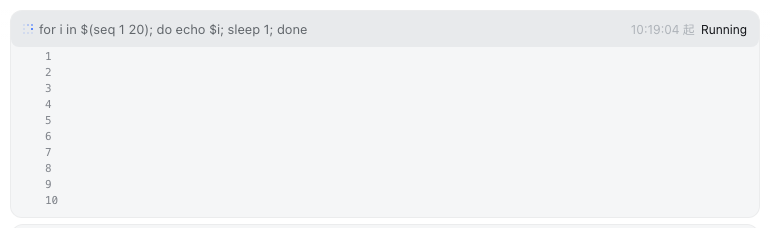
对话页输入框上方的后台任务状态条:运行中任务计数 + 点击展开逐条详情 + 实时输出 tail(自动轮询,10 行滚动区)。经官方 conversation.input.dock 槽注册(与 queue/todo/goal 同族)。形态:官方 bundle 插件(dsh.bundle + dshClient 通道),0 patch。
效果
能力
UI(对话页 dock 槽):
| 功能 | 说明 |
|---|---|
| 状态条 | 对话页输入框上方 dock 卡片:⚙ N 个后台任务运行中 |
| 展开详情 | 点击任务行展开:状态/耗时/详情 + 输出 tail |
| 实时 tail | 展开时每 1s 轮询输出路由,整段替换渲染(镜像补丁保证与官方 task_output 工具零竞争、视图一致) |
| 滚动区 | 输出区 max 10 行(160px),超出变滚动条(tail 保尾可回看) |
| 仅对话页 | 非 Chat 视图(trajectory/taskboard 等)自动隐藏 |
路由(Node half):
| 路由 | 说明 |
|---|---|
/plugins/dsh-task-status/tasks | 任务列表(只读,按 session 过滤;owned + unowned 并集) |
/plugins/dsh-task-status/output | 任务输出 tail(full:true 累积全文;未知 id 404) |
输出 tail 的竞争语义(0809 官方 API 约束):tasks.read 是消耗式增量(每任务唯一共享游标)。本插件给 ctx.tasks.read 打镜像补丁——官方 read = 缓冲镜像(他人已读增量,不重复消耗)+ 直读补最新(正常消耗);插件自读直接走底层 rawRead。官方工具与插件看到同一增量序列(无重复无丢失),仅主动自读部分官方不再能单独重放(官方语义本就是增量读取,模型感知无影响)。
安装
推荐:git 源一行安装(构建产物已入库,git 源不触发构建):
dsh plugin --profile web add "github:vlln/dsh-task-status#main"
或本地目录(有源码时):git clone 后 cd dsh-task-status && dsh plugin --profile web add .。
装完 重启 web 生效;设置页「插件」面板可停用/启用。
使用
跑一个后台任务即可看到状态条(如模型侧 bash 工具 run_in_background: true):
⚙ 1 个后台任务运行中
  ● bash-1  for i in $(seq 1 20)…   21:30:15 起   运行中
点击任务行展开 → 输出 tail 实时滚动(超过 10 行滚动条)。任务结束后状态条自动消失。
开发
pnpm install
pnpm run build      # tsdown:Node half (lib/index.mjs) + client bundle (lib/client.js)
- Node half:
src/index.mjs(镜像补丁 +/tasks/output路由) - client:
src/client/task-status.tsx(dock 槽状态条)
许可
MIT License(DSH 生态示例插件)。
Project files and signals
Shown items are public repository signals detected in the directory snapshot.
Repository information
- Language
- JavaScript
- License
- MIT
- Last updated
- Aug 18, 2026, 1:07 PM
Install deliberately
Review source code, permissions, lifecycle hooks, dependencies and network access. Test untrusted plugins in an isolated environment.