Installation
npx -y @deepseek-ai/dsh plugin --profile web add github:xiajiajun516/dsh-config-managerThis installation command is an unverified starting point generated from the GitHub repository address.
README
Maintainer-authored documentation snapshot.
🎒 DSH Config Manager
Pack up your DSH configuration and take it anywhere — restore your whole environment on a new machine with one click.
What is this? 🤔
DSH is your AI assistant workbench — it holds your settings: model configs, plugins, skills, workspaces…
DSH Config Manager is its "moving service":
┌──────────────┐   ① one-click    ┌─────────────────┐   ② one-click    ┌──────────────┐
│  Machine A    │ ──── export ───► │ dsh-config.zip   │ ──── import ───► │  Machine B    │
│  my config    │                  │   (one file)     │                  │  all restored │
└──────────────┘                  └─────────────────┘                  └──────────────┘
⚠️ Security first: no secrets (API Key / Token / Password) are exported by default. See Security.
✨ Highlights
| Icon | Feature | In one line |
|---|---|---|
| 🚀 | One-click Export | Package your recommended config into a ZIP |
| 📦 | One-click Import | Restore your environment on another machine |
| 👀 | Preview before import | Full preview first — never touches your config silently |
| ⚔️ | Conflict handling | Keep Current / Use Imported — you decide |
| 🗺️ | Path auto-mapping | Detects dead absolute paths and lets you remap them |
| 🔒 | Secret safety | API Keys are not exported by default — non-encrypted imports ask you to re-enter; encrypted backups restore them with the password |
| ↩️ | Automatic rollback | Failed import restores everything automatically |
| 📸 | Snapshot restore | Undo an import: whole-file restore + uninstall added plugins (CLI & GUI) |
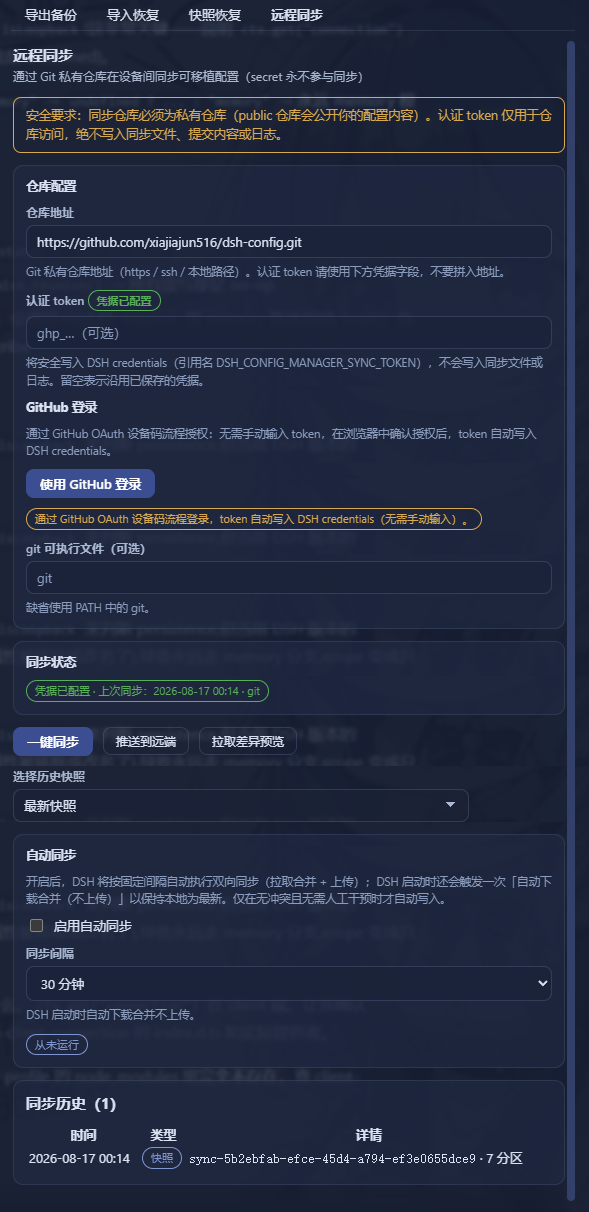
| 🔄 | Remote Sync | Push/pull portable config via a private Git repo (secrets never sync) |
| 🗂️ | Profiles | Save multiple setups (Work / Personal) and switch anytime |
| 🌐 | Bilingual UI | Interface, reports and error details follow the DSH app language (中文 / English) |
📸 Screenshots
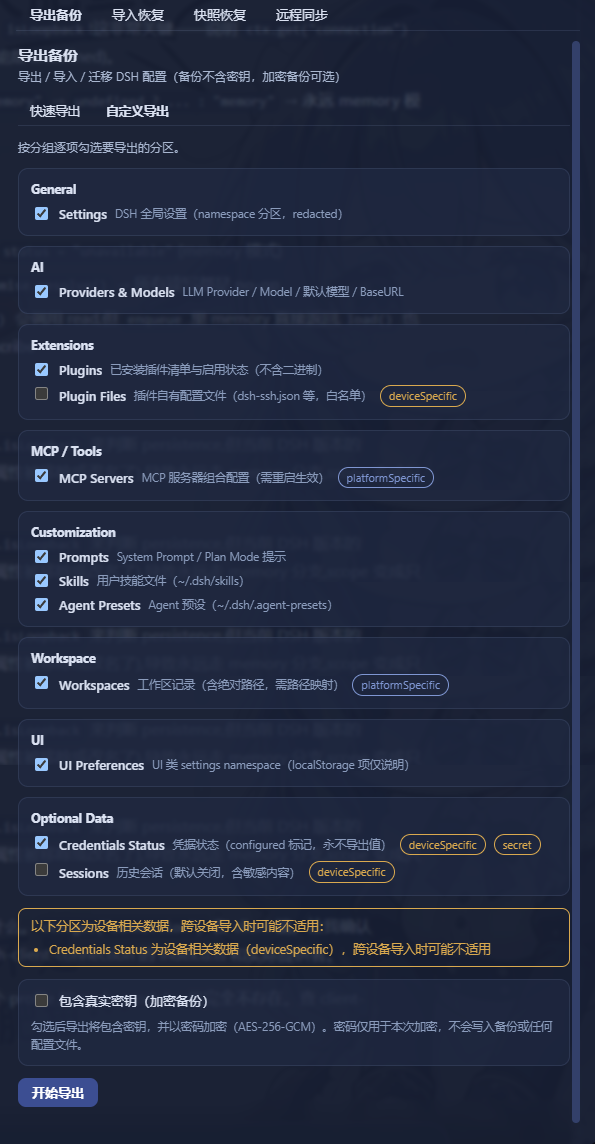
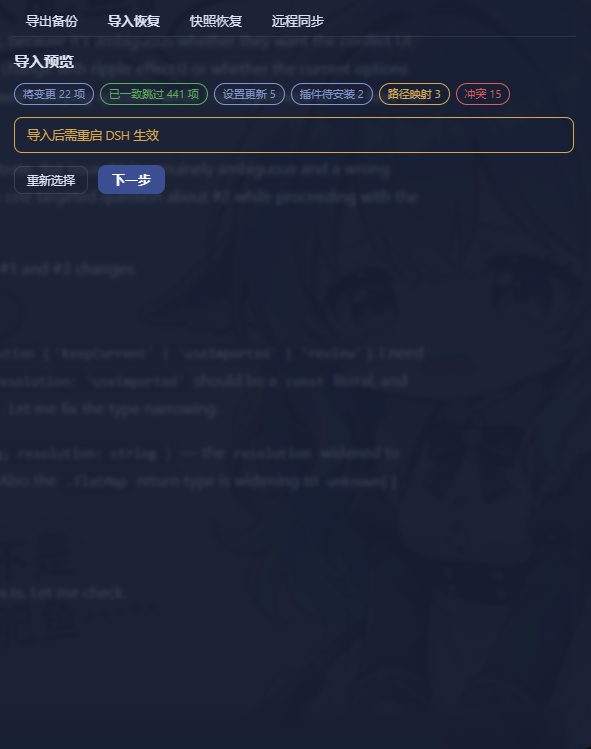
| Export | Import Preview |
|---|---|
 |  |
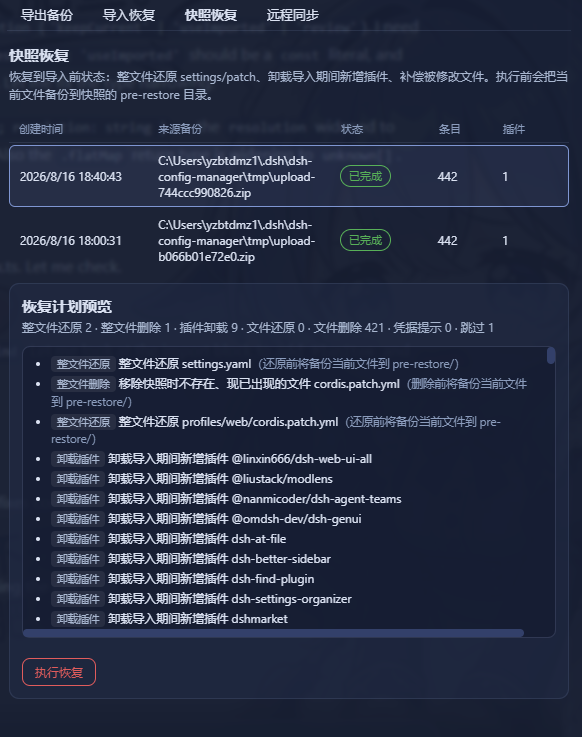
| Snapshot Restore | Remote Sync |
|---|---|
 |  |
🔄 How it works?
Export (pack it up)
Read your config → strip secrets (safe) → build manifest → compute checksums → pack into ZIP
Import (restore the environment)
Every step confirms and backs up first — it never modifies your config directly:
Select ZIP → validate file → check integrity → check schema → compatibility check
    → scan contents → build import plan → preview & confirm
    → auto-backup current config → apply → validate → done
                      │
                      └─ failed midway? → automatically restored (rollback)
📥 Installation
It's a standard DSH plugin — two steps:
# ① Install the plugin
dsh plugin --profile web add dsh-config-manager@latest --config.auto-install-peers=false

# ② Restart DSH (a "Backup & Migration" entry appears in Settings)
💡 Just copy-paste the command:
--config.auto-install-peers=falseskips a few DSH core packages that aren't on the public registry yet (the DSH runtime provides them), and@latestensures you get the newest build.🐛
@latestinstalled an old version? That's pnpm 11'sminimumReleaseAgesupply-chain policy, not a cache issue: versions published less than ~30 days ago are excluded from resolution until whitelisted. Two fixes:
- Install an exact version once (it auto-whitelists, then
@latestworks):dsh plugin --profile web add dsh-config-manager@0.1.8 --config.auto-install-peers=false- Or disable the age gate with a one-liner (adds
minimumReleaseAge: 0at the top of the profile'spnpm-workspace.yaml):$f = "$env:USERPROFILE\.dsh\profiles\web\pnpm-workspace.yaml" $c = Get-Content $f -Raw if ($c -notmatch '(?m)^minimumReleaseAge:') { Set-Content -LiteralPath $f -Value ("minimumReleaseAge: 0`n" + $c) -Encoding utf8 Write-Output "Added minimumReleaseAge: 0" } else { Write-Output "Already present, nothing to do" }
🚀 Quick start (3-minute tour)
Machine A (export)
  1. Open DSH → Settings → "Backup & Migration"
  2. Click "Export Configuration" → choose "Quick Export"
  3. You get dsh-config-2026-08-14.zip (the report confirms no secrets inside)

Copy the ZIP to Machine B (import)
  1. Open DSH → "Backup & Migration" → "Import Configuration"
  2. Select the ZIP → wait for analysis → review the "Import Preview"
  3. Path issues? → choose new paths (batch mapping supported)
  4. Conflicts? → choose Keep Current / Use Imported
  5. Confirm import → wait
  6. Re-enter any missing API Keys as prompted
  7. ✅ Settings / plugins / MCP / skills / workspaces are back
🧩 Features
📤 Export (two modes)
| Mode | Description |
|---|---|
| Quick Export (recommended) | One-click: settings / UI / models / plugins / MCP / skills / workspaces… |
| Custom Export | Tick the categories you want |
Output:
dsh-config-<date>.zipwith manifest + per-category data + SHA-256 checksums.
📥 Import (safe flow)
- Nothing is written before confirmation — analyze & preview are zero-write
- Backup before applying — the target config is snapshotted automatically
- Automatic rollback on failure — full rollback or skip-and-continue, your choice
👀 Import Preview (dry run)
Shown fully before importing:
✓ 18 settings will be updated    ✓ 6 plugins already installed
⚠ 2 plugins need installation    ⚠ 3 secrets need re-entry
⚠ 1 path needs mapping           ⚠ 2 conflicts need attention
⚔️ Conflict handling
When the target already has a same-named item, you choose:
| Option | Meaning |
|---|---|
| Keep Current | Leave the target's config untouched |
| Use Imported | Overwrite with the backup's value |
Note: a "decide later / review" option is intentionally not offered — an undecided conflict would block the import from proceeding. Every conflict must be resolved before continuing.
🗺️ Path mapping
C:\Users\alice\projects doesn't exist on the new machine? The plugin:
- Detects the dead absolute paths automatically
- Lets you pick new paths
- Supports batch prefix mapping (
C:\Users\alice\→/Users/bob/in one shot)
🔒 Secrets
| Scenario | Behavior |
|---|---|
| Default backup | No secret values at all — only records which keys are needed |
| Encrypted backup (explicit opt-in) | scrypt + AES-256-GCM, random salt & IV per export; secrets never leave as plaintext, and the password is never written to the file |
| Encrypted backup import | The export-time password is required: enter → verify → credentials are restored; no password, no import |
| After non-encrypted import | "3 secrets need re-entry" — values stay in memory only |
🗂️ Profiles
Save multiple configurations (Work / Personal) and switch anytime; switching includes preview + auto-backup + rollback.
📸 Snapshot restore (undo an import)
Every import creates a safety snapshot first. If something feels off afterwards, restore the target back to its pre-import state:
| Action | What it does |
|---|---|
| Whole-file restore | settings.yaml / settings.json / cordis.patch.yml blobs are written back to $DSH_HOME; files that didn't exist at snapshot time but appeared after import are removed |
| Plugin uninstall | Plugins added during import are removed via the official dsh plugin remove (baseline comparison; old snapshots without a baseline only get a hint) |
| File compensation | skills / agentPresets / pluginFiles / sessions blobs are written back to their original paths |
| Credentials | DSH never reads credential values back — you get a manual re-entry hint instead |
GUI: Settings → "Backup & Migration" → Snapshots & Restore tab → pick a snapshot → preview the plan (dry-run, zero writes) → confirm.
CLI (offline, no DSH runtime needed) — it is a standalone npm tool, installed separately from the plugin:
# install the CLI once on the machine where you want to restore snapshots
# (--omit=peer: the offline CLI only needs js-yaml, not the DSH peer packages)
npm install -g dsh-config-manager@latest --omit=peer
⚠️ Installing/updating the plugin (
dsh plugin --profile web add ...) only enables the GUI — it does not create thedsh-config-managercommand. Run the install command above, then:
# list snapshots (newest first)
dsh-config-manager snapshots

# preview the restore plan for the latest usable snapshot (zero writes)
dsh-config-manager restore --dry-run

# execute the restore (current files are backed up to <snapshot>/pre-restore/ first)
dsh-config-manager restore --id <snapshot-id>
Every overwrite/delete is first copied to <snapshotDir>/pre-restore/ so you can manually change your mind. Exit code is 1 if any action failed; the report honestly lists restored / removedPlugins / manualHints / failed / skipped.
🛡️ Security
- The default backup contains no secret values — a hard invariant, enforced at export
- Not exported by default: API Keys / passwords / tokens / cookies / sessions / device unique ID / logs & cache / plugin binaries
- A ZIP is untrusted input: defends against Zip Slip, malicious paths, zip bombs, corrupt archives — any trigger rejects the whole file
- Logs are fully redacted — secret values never reach logs
- Encrypted backup (explicit opt-in): secrets are exported only as scrypt + AES-256-GCM ciphertext — random salt & IV per export, never plaintext; the password lives in memory only
🤝 Compatibility
| Status | Meaning |
|---|---|
| ✅ Excellent | Same platform, complete sections, supported schema |
| 👍 Good | Backup from an older DSH |
| ⚠️ Partial | Cross-platform / missing sections / backup newer than target |
| ❌ Unsupported | Schema beyond the supported range (cannot import) |
❓ FAQ
Q: Will my API Key be in the backup? Not by default. The default backup never contains any secret value — only records which keys you'll need to re-enter. If you explicitly choose an encrypted backup, secrets are included, but only as scrypt + AES-256-GCM ciphertext (random salt & IV per export) — never plaintext.
Q: Will importing overwrite my existing config? Not silently. Conflicts ask you to choose (Keep Current / Use Imported); the target is auto-backed-up and can roll back.
Q: Does it work across platforms (Windows → macOS)? Yes. Dead absolute paths are detected and remapped (batch replacement supported).
Q: Can a corrupted ZIP still be imported? No. A checksum mismatch rejects the import outright (protects against corruption or tampering).
Q: Will re-importing duplicate things? No. Items are deduplicated by stable IDs (plugin ID / MCP name / skill name…); existing items are skipped.
Q: Does importing an encrypted backup require the password? Yes. The import wizard asks for the export-time encryption password and verifies it before the import can proceed; the password is never saved — memory only. A wrong or missing password blocks the import (credentials are restored from the backup instead of being re-entered when the password is correct).
📋 Known limitations (user-facing)
- Installing / updating plugins or MCP takes effect after restarting DSH
- Some UI state is not migrated (e.g. task board data, panel widths — they live in the browser, not in DSH's config files)
- keybindings / workflow configs / commands / rules — DSH has no such concepts, so nothing is exported for them
- History/session migration is off by default (v1 copies files only)
- Encrypted backups: a lost password means the
secrets.enccan't be decrypted (by design — keep your password safe) - Snapshot restore is offline and honest: entries the offline engine can't restore (settings namespaces / patch lines when the snapshot has no whole-file backup, workspace records stored in DSH storages) are reported as skipped with a pointer to online rollback; credential values are never auto-written (manual re-entry hint only); old snapshots without a plugin baseline only get a hint to remove added plugins manually
Maintainers & developers: see DEVELOPERS.md for build, testing, auto-publishing and full technical notes.
Product principles: better to migrate one config less than to break your existing config. Every import follows Analyze → Preview → Backup → Apply → Validate → Rollback(if needed); every secret follows never export by default / never log / never expose / never silently transfer.
Project files and signals
Shown items are public repository signals detected in the directory snapshot.
Repository information
- Language
- TypeScript
- License
- Not reported
- Latest release
- v0.1.28
- Last updated
- Aug 18, 2026, 7:41 AM
Install deliberately
Review source code, permissions, lifecycle hooks, dependencies and network access. Test untrusted plugins in an isolated environment.